
In this second part of the blog post, we will explore how the PXC Replication Manager script handles source and replica failover in a multi-source replication topology.
Multi-source replication is commonly used when data from multiple independent sources needs to be gathered into a single instance which is often required for reporting, analytics, or specific ad-hoc business cases. In this post, we’ll walk through how failover is managed in such a setup when integrated in PXC/Galera based environment.
For an initial understanding of the basic PXC replication manager setup, you can refer to the linked blog post
Let’s dive into the practical use.
Topology:
|
1 2 3 4 5 6 7 8 9 10 11 12 |
DC1 172.31.78.120 DC1-1 172.31.70.222 DC1-2 DC2 172.31.75.60 DC2-1 172.31.71.144 DC2-2 DC3 172.31.74.136 DC3-1 172.31.73.157 DC3-2 |
Async Replication syncing flow:
- DC1 [DC1-1] will have a multi-source replication channel and syncing from DC2[DC2-1] and DC3 [DC3-1] nodes.
- DC2 [DC2-1] will be syncing from DC1 [DC-1].
- DC3 [DC3-1] will be syncing from DC1[DC-1].
|
1 |
DC2 <=> DC1[multi-source] <=> DC3 |
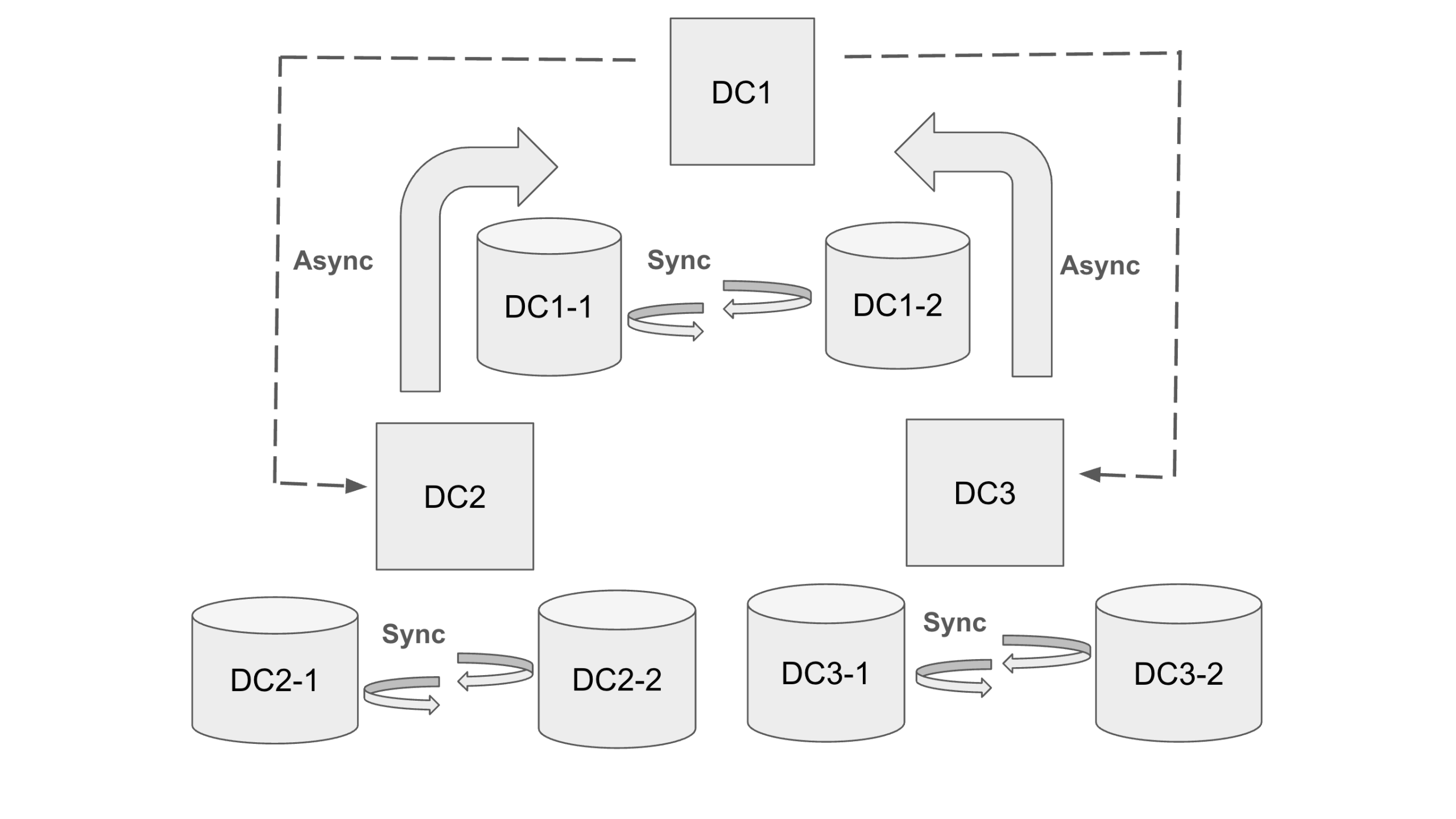
Async Multi-Source topology
PXC/Async configurations
The configuration details as per each DC node is mentioned in the Github file at location – https://gist.github.com/aniljoshi2022/7714c97a9c755e3d12c60e3ead21a55f .
At this stage, all 3 clusters should be bootstrapped and in running state.
- First Node:
|
1 |
shell> systemctl start mysql@bootstrap.service |
- Second and rest other Nodes:
|
1 |
shell> systemctl start mysql |
We should also make sure the replication user created on the DC1[mysql-DC1-1] node.
|
1 2 |
mysql> CREATE USER 'repl'@'%'; mysql> GRANT REPLICATION CLIENT, REPLICATION SLAVE ON *.* TO 'repl'@'%'; |
Replication Manager configuration
Now we will add configuration entries in the replication manager related tables on DC-1 [DC1-1]. I am not covering what each table does here, as we already mentioned in the first part of the blogpost.
|
1 2 3 |
mysql> INSERT INTO `cluster` VALUES ('DC1','172.31.78.120 172.31.70.222 ','source_user='repl', source_password='replpass''); mysql> INSERT INTO `cluster` VALUES ('DC2','172.31.75.60 172.31.71.144','source_user='repl', source_password='replpass''); mysql> INSERT INTO `cluster` VALUES ('DC3','172.31.74.136 172.31.73.157','source_user='repl', source_password='replpass''); |
|
1 2 3 4 5 6 7 8 |
mysql> select * from cluster; +---------+------------------------------+------------------------------------------------+ | cluster | masterCandidates | replCreds | +---------+------------------------------+------------------------------------------------+ | DC1 | 172.31.78.120 172.31.70.222 | source_user='repl', source_password='replpass' | | DC2 | 172.31.75.60 172.31.71.144 | source_user='repl', source_password='replpass' | | DC3 | 172.31.74.136 172.31.73.157 | source_user='repl', source_password='replpass' | +---------+------------------------------+------------------------------------------------+ |
|
1 2 3 4 |
mysql> INSERT INTO `link` VALUES ('DC1','DC2'); mysql> INSERT INTO `link` VALUES ('DC1','DC3'); mysql> INSERT INTO `link` VALUES ('DC2','DC1'); mysql> INSERT INTO `link` VALUES ('DC3','DC1'); |
|
1 2 3 4 5 6 7 8 9 |
mysql> select * from link; +--------------+---------------+ | clusterSlave | clusterMaster | +--------------+---------------+ | DC1 | DC2 | | DC1 | DC3 | | DC2 | DC1 | | DC3 | DC1 | +--------------+---------------+ |
|
1 2 3 4 5 6 |
mysql> INSERT INTO `weight` VALUES('DC1','DC1-1',10); mysql> INSERT INTO `weight` VALUES('DC1','DC1-2',11); mysql> INSERT INTO `weight` VALUES('DC2','DC2-1',10); mysql> INSERT INTO `weight` VALUES('DC2','DC2-2',11); mysql> INSERT INTO `weight` VALUES('DC3','DC3-1',10); mysql> INSERT INTO `weight` VALUES('DC3','DC3-2',11); |
|
1 2 3 4 5 6 7 8 9 10 11 |
mysql> select * from weight; +---------+----------+--------+ | cluster | nodename | weight | +---------+----------+--------+ | DC1 | DC1-1 | 10 | | DC1 | DC1-2 | 11 | | DC2 | DC2-1 | 10 | | DC2 | DC2-2 | 11 | | DC3 | DC3-1 | 10 | | DC3 | DC3-2 | 11 | +---------+----------+--------+ |
Asynchronous Replication Setup
- Taking mysqldump from DC1 [DC1-1] node.
|
1 |
mysql-DC1-1> mysqldump -u root -pRoot@1234 --source-data=2 --single-transaction -R -A -E > dump.sql |
- Transferring dump to DC2[DC2-1] and DC3[DC3-1].
|
1 2 |
mysql-DC1-1> sudo scp -i /root/.ssh/mykey dump.sql root@172.31.75.60:/root/ mysql-DC1-1> sudo scp -i /root/.ssh/mykey dump.sql root@172.31.74.136:/root/ |
- Restoring dump on DC2[DC2-1] and DC3[DC3-1].
|
1 2 |
mysql-DC2-1> mysql -u root -p < dump.sql mysql-DC3-1> mysql -u root -p < dump.sql |
- Replication channel setup and starting.
DC2-1
|
1 2 |
mysql-DC2-1> change replication source to GET_SOURCE_PUBLIC_KEY=1, source_host='172.31.78.120', source_user='repl', source_password='replpass', SOURCE_AUTO_POSITION = 1 FOR CHANNEL 'DC2-DC1'; mysql-DC2-1> start replica FOR CHANNEL 'DC2-DC1'; |
|
1 2 3 4 5 6 7 8 9 10 11 12 13 14 |
mysql-DC2-1> show replica statusG; *************************** 1. row *************************** Replica_IO_State: Waiting for source to send event Source_Host: 172.31.78.120 Source_User: repl Source_Port: 3306 Connect_Retry: 60 Source_Log_File: binlog.000002 Read_Source_Log_Pos: 742076 Relay_Log_File: ip-172-31-75-60-relay-bin-dc2@002ddc1.000002 Relay_Log_Pos: 3480 Relay_Source_Log_File: binlog.000002 Replica_IO_Running: Yes Replica_SQL_Running: Yes |
DC3-1
|
1 2 |
mysql-DC3-1> change replication source to GET_SOURCE_PUBLIC_KEY=1, source_host='172.31.78.120', source_user='repl', source_password='replpass', SOURCE_AUTO_POSITION = 1 FOR CHANNEL 'DC3-DC1'; mysql-DC3-1> start replica FOR CHANNEL 'DC3-DC1'; |
|
1 2 3 4 5 6 7 8 9 10 11 12 13 14 |
mysql-DC3-1> show replica statusG; *************************** 1. row *************************** Replica_IO_State: Waiting for source to send event Source_Host: 172.31.78.120 Source_User: repl Source_Port: 3306 Connect_Retry: 60 Source_Log_File: binlog.000002 Read_Source_Log_Pos: 797204 Relay_Log_File: ip-172-31-74-136-relay-bin-dc3@002ddc1.000002 Relay_Log_Pos: 70850 Relay_Source_Log_File: binlog.000002 Replica_IO_Running: Yes Replica_SQL_Running: Yes |
- Multo-Source async replication setup on DC1[DC1-1]
|
1 2 |
mysql-DC1-1> change replication source to GET_SOURCE_PUBLIC_KEY=1, source_host='172.31.75.60', source_user='repl', source_password='replpass', SOURCE_AUTO_POSITION = 1 FOR CHANNEL 'DC1-DC2'; mysql-DC1-1> start replica FOR CHANNEL 'DC1-DC2'; |
|
1 2 3 4 5 6 7 8 9 10 11 12 13 14 |
mysql-DC1-1> SHOW REPLICA STATUS FOR CHANNEL "dc1-dc2"G *************************** 1. row *************************** Replica_IO_State: Waiting for source to send event Source_Host: 172.31.75.60 Source_User: repl Source_Port: 3306 Connect_Retry: 60 Source_Log_File: binlog.000001 Read_Source_Log_Pos: 153605 Relay_Log_File: ip-172-31-78-120-relay-bin-dc1@002ddc2.000002 Relay_Log_Pos: 4898 Relay_Source_Log_File: binlog.000001 Replica_IO_Running: Yes Replica_SQL_Running: Yes |
|
1 2 |
mysql-DC1-1> change replication source to GET_SOURCE_PUBLIC_KEY=1, source_host='172.31.74.136', source_user='repl', source_password='replpass', SOURCE_AUTO_POSITION = 1 FOR CHANNEL 'DC1-DC3'; mysql-DC1-1> start replica FOR CHANNEL 'DC1-DC3'; |
|
1 2 3 4 5 6 7 8 9 10 11 12 13 14 |
mysql-DC1-1> SHOW REPLICA STATUS FOR CHANNEL "dc1-dc3"G *************************** 1. row *************************** Replica_IO_State: Waiting for source to send event Source_Host: 172.31.74.136 Source_User: repl Source_Port: 3306 Connect_Retry: 60 Source_Log_File: binlog.000001 Read_Source_Log_Pos: 144468 Relay_Log_File: ip-172-31-78-120-relay-bin-dc1@002ddc3.000002 Relay_Log_Pos: 413 Relay_Source_Log_File: binlog.000001 Replica_IO_Running: Yes Replica_SQL_Running: Yes |
Now, all the clusters are linked as a source to source.
Replication Manager Cron Setup
We need to enable replication manager cron across all PXC/Async nodes.
|
1 2 |
crontab -l * * * * * /usr/local/bin/replication_manager.sh |
For any error or issues we can check insight the – /tmp/replication_manager.log log file.
Testing Source Failover For Multi-Source Channel
DC1-1:
|
1 2 3 4 5 6 7 8 9 10 11 |
mysql-DC1-1> select * from percona.replication; +-------+--------+------------+-----------+---------------------+---------------------+----------------+---------------+ | host | weight | localIndex | isReplica | lastUpdate | lastHeartbeat | connectionName | currentSource | +-------+--------+------------+-----------+---------------------+---------------------+----------------+---------------+ | DC1-1 | 10 | 0 | Yes | 2025-12-20 16:03:02 | 2025-12-20 16:03:02 | DC1-DC2 | 172.31.75.60 | | DC1-2 | 11 | 1 | No | 2025-12-20 16:03:02 | 2025-12-20 16:03:02 | DC1-DC2 | | | DC1-1 | 10 | 0 | Yes | 2025-12-20 16:03:02 | 2025-12-20 16:03:02 | DC1-DC3 | 172.31.74.136 | | DC1-2 | 11 | 1 | No | 2025-12-20 16:03:02 | 2025-12-20 16:03:02 | DC1-DC3 | NULL | | DC2-1 | 10 | 0 | Yes | 2025-12-20 16:03:02 | 2025-12-20 16:03:02 | DC2-DC1 | 172.31.78.120 | | DC3-1 | 10 | 1 | Yes | 2025-12-20 16:03:02 | 2025-12-20 16:03:02 | DC3-DC1 | 172.31.78.120 | +-------+--------+------------+-----------+---------------------+---------------------+----------------+---------------+ |
|
1 2 3 4 5 6 7 8 9 10 11 12 13 14 |
mysql-DC1-1> show replica status for Channel 'dc1-dc2'G; *************************** 1. row *************************** Replica_IO_State: Waiting for source to send event Source_Host: 172.31.75.60 Source_User: repl Source_Port: 3306 Connect_Retry: 60 Source_Log_File: binlog.000001 Read_Source_Log_Pos: 165024 Relay_Log_File: ip-172-31-78-120-relay-bin-dc1@002ddc2.000002 Relay_Log_Pos: 11267 Relay_Source_Log_File: binlog.000001 Replica_IO_Running: Yes Replica_SQL_Running: Yes |
Now we will stop source DC2 [DC2-1] .
|
1 |
mysql-DC2-1> systemctl stop mysql |
Below, we can see that connectionName with “DC1-DC2” is in a “Failed” state.
|
1 2 3 4 5 6 7 8 9 |
mysql-DC2-1> select * from percona.replication; +-------+--------+------------+-----------+---------------------+---------------------+----------------+---------------+ | host | weight | localIndex | isReplica | lastUpdate | lastHeartbeat | connectionName | currentSource | +-------+--------+------------+-----------+---------------------+---------------------+----------------+---------------+ | DC1-1 | 10 | 0 | Failed | 2025-12-20 16:10:22 | 2025-12-20 16:10:22 | DC1-DC2 | 172.31.75.60 | ... | DC1-1 | 10 | 0 | Yes | 2025-12-20 18:49:02 | 2025-12-20 18:49:02 | DC1-DC3 | 172.31.74.136 | |
After a couple of mins when the script again starts monitoring, DC1 [DC1-1] is now connected with another source node of DC2 which is [DC2-2] .
|
1 2 3 4 5 6 |
mysql-DC2-1> select * from percona.replication; +-------+--------+------------+-----------+---------------------+---------------------+----------------+---------------+ | host | weight | localIndex | isReplica | lastUpdate | lastHeartbeat | connectionName | currentSource | +-------+--------+------------+-----------+---------------------+---------------------+----------------+---------------+ | DC1-1 | 10 | 0 | Yes | 2025-12-20 19:06:01 | 2025-12-20 19:06:01 | DC1-DC2 | 172.31.71.144 | ... |
|
1 2 3 4 5 6 7 8 9 10 11 12 13 14 |
mysql-DC2-1> show replica status for Channel 'dc1-dc2'G; *************************** 1. row *************************** Replica_IO_State: Waiting for source to send event Source_Host: 172.31.71.144 Source_User: repl Source_Port: 3306 Connect_Retry: 60 Source_Log_File: binlog.000004 Read_Source_Log_Pos: 421885 Relay_Log_File: ip-172-31-78-120-relay-bin-dc1@002ddc2.000005 Relay_Log_Pos: 5137 Relay_Source_Log_File: binlog.000004 Replica_IO_Running: Yes Replica_SQL_Running: Yes |
Testing Replica Failover For Multi-Source channel
We will stop DC1 (DC1-1) which is the current multi source replica connected via both DC2 and DC3 nodes.
|
1 2 3 4 5 6 7 8 9 10 11 12 |
mysql-DC1-1> select * from percona.replication; +-------+--------+------------+-----------+---------------------+---------------------+----------------+---------------+ | host | weight | localIndex | isReplica | lastUpdate | lastHeartbeat | connectionName | currentSource | +-------+--------+------------+-----------+---------------------+---------------------+----------------+---------------+ | DC1-1 | 10 | 0 | Yes | 2025-12-21 04:15:02 | 2025-12-21 04:15:02 | DC1-DC2 | 172.31.71.144 | | DC1-2 | 11 | 1 | Failed | 2025-12-20 18:48:22 | 2025-12-20 18:48:22 | DC1-DC2 | | | DC1-1 | 10 | 0 | Yes | 2025-12-21 04:15:02 | 2025-12-21 04:15:02 | DC1-DC3 | 172.31.74.136 | | DC1-2 | 11 | 1 | No | 2025-12-20 18:48:22 | 2025-12-20 18:48:22 | DC1-DC3 | NULL | | DC2-1 | 10 | 0 | No | 2025-12-20 15:31:02 | 2025-12-20 15:31:02 | DC2-DC1 | 172.31.78.120 | | DC2-2 | 11 | 0 | Yes | 2025-12-21 04:15:02 | 2025-12-21 04:15:02 | DC2-DC1 | 172.31.78.120 | | DC3-1 | 10 | 1 | Yes | 2025-12-20 19:05:01 | 2025-12-20 19:05:01 | DC3-DC1 | 172.31.78.120 | +-------+--------+------------+-----------+---------------------+---------------------+----------------+---------------+ |
Once we stop the database service on DC1[DC1-1] and after waiting for a while we can check the status again and it will show as DC1[DC1-2] as a new multi-source replica.
|
1 2 3 4 5 6 7 8 9 10 11 12 |
mysql-DC1-2> select * from percona.replication; +-------+--------+------------+-----------+---------------------+---------------------+----------------+---------------+ | host | weight | localIndex | isReplica | lastUpdate | lastHeartbeat | connectionName | currentSource | +-------+--------+------------+-----------+---------------------+---------------------+----------------+---------------+ | DC1-1 | 10 | 0 | No | 2025-12-21 04:48:02 | 2025-12-21 04:45:02 | DC1-DC2 | 172.31.71.144 | | DC1-2 | 11 | 0 | Yes | 2025-12-21 04:50:02 | 2025-12-21 04:50:02 | DC1-DC2 | 172.31.71.144 | | DC1-1 | 10 | 0 | No | 2025-12-21 04:48:02 | 2025-12-21 04:45:02 | DC1-DC3 | 172.31.74.136 | | DC1-2 | 11 | 0 | Yes | 2025-12-21 04:50:02 | 2025-12-21 04:50:02 | DC1-DC3 | 172.31.74.136 | | DC2-1 | 10 | 0 | No | 2025-12-20 15:31:02 | 2025-12-20 15:31:02 | DC2-DC1 | 172.31.78.120 | | DC2-2 | 11 | 0 | Yes | 2025-12-21 04:50:02 | 2025-12-21 04:50:02 | DC2-DC1 | 172.31.70.222 | | DC3-1 | 10 | 1 | Yes | 2025-12-21 04:50:01 | 2025-12-21 04:50:01 | DC3-DC1 | 172.31.70.222 | +-------+--------+------------+-----------+---------------------+---------------------+----------------+---------------+ |
|
1 2 3 4 5 6 7 8 9 10 11 12 13 14 15 16 17 |
mysql-DC1-2> show replica statusG; *************************** 1. row *************************** Replica_IO_State: Waiting for source to send event Source_Host: 172.31.71.144 Source_User: repl Source_Port: 3306 Connect_Retry: 60 Source_Log_File: binlog.000004 Read_Source_Log_Pos: 1286708 Relay_Log_File: ip-172-31-70-222-relay-bin-dc1@002ddc2.000002 Relay_Log_Pos: 240223 Relay_Source_Log_File: binlog.000004 Replica_IO_Running: Yes Replica_SQL_Running: Yes ... Channel_Name: dc1-dc2 |
|
1 2 3 4 5 6 7 8 9 10 11 12 13 14 15 16 17 18 |
Replica_IO_State: Waiting for source to send event Source_Host: 172.31.74.136 Source_User: repl Source_Port: 3306 Connect_Retry: 60 Source_Log_File: binlog.000001 Read_Source_Log_Pos: 2325764 Relay_Log_File: ip-172-31-70-222-relay-bin-dc1@002ddc3.000002 Relay_Log_Pos: 285267 Relay_Source_Log_File: binlog.000001 Replica_IO_Running: Yes Replica_SQL_Running: Yes ... Channel_Name: dc1-dc3 |
Important consideration:
The topology or scenario discussed above is intended solely for demonstration purposes and to observe how the PXC Replication Manager handles failover in complex topologies. In a production environment, such architectures should be avoided, as performing writes across both clusters (multiple nodes simultaneously) can lead to inconsistencies. For any similar use cases, thorough and in-depth testing is strongly recommended beforehand.
Summary
The replication manager script can be particularly useful in complex PXC/Galera topologies that require multi-source replication. This will ease the auto source and replica failover to ensure all replication channels are healthy and in sync. If certain nodes shouldn’t be part of a async/multi-source replication, we can disable the replication manager script there. Alternatively, node participation can be controlled by adjusting the weights in the percona.weight table, allowing replication behavior to be managed more precisely.
About the Author
 Anil Joshi
I am Anil Joshi, and I work for Percona as a support engineer. I've worked with some well-known Open Source database technologies (MySQL/MariaDB, MongoDB, and Redis) for almost ten years. I am keenly interested in learning new databases and writing database content.