Rate limiting is one of those topics that looks simple until you’re actually doing it in production. Implement a counter with the INCR command and a TTL and away you go. But when you ask questions like “what happens at the boundary?”, “should I use a Valkey/Redis cluster?”, or “why are we getting twice the traffic we expected?”.
In this post we’ll go beyond the basic tutorial and cover the five algorithms you should know, how to implement them atomically in Valkey, and how Shopify, Stripe, and Uber have pushed these patterns to their limits at scale.
The need for rate limiting
Rate limiting solves three core problems.
Traffic spikes: a misconfigured client, a viral moment, or a poorly written loop can saturate your backend with legitimate-looking requests. Rate limiting is your circuit breaker.
Shared infrastructure: in multi-tenant systems, one noisy customer shouldn’t degrade the experience for everyone else. Fair resource allocation is a rate limiting problem.
Abuse and DDoS: credential stuffing, scraping, and flooding all rely on high request volumes. Rate limits make these attacks expensive to deter them.
One aspect is easy to miss: your rate limiter needs to be as reliable as the service it protects. If it goes down, the service behind it could become inaccessible. This has direct implications for how you build it and why “fail open” (fall back to local limits rather than blocking all traffic) is a non-negotiable design principle.
The main algorithms
Not all rate limiting algorithms are equal. Each makes a different trade-off between memory, accuracy, implementation complexity, and burst tolerance.
| Algorithm | Burst behaviour | Memory | Complexity | Best for |
| Fixed window | boundary peak risk | O(1) | simple | internal/admin APIs |
| Sliding log | exact | O(N) | moderate | compliance/audit |
| Sliding counter | smoothed | O(1) | moderate | microservice auth |
| Token bucket | configurable | O(1) | high | general purpose APIs |
| Leaky bucket | none (strict) | O(1) | high | payment/infra protection |
Let’s dig into each one.
Fixed Window
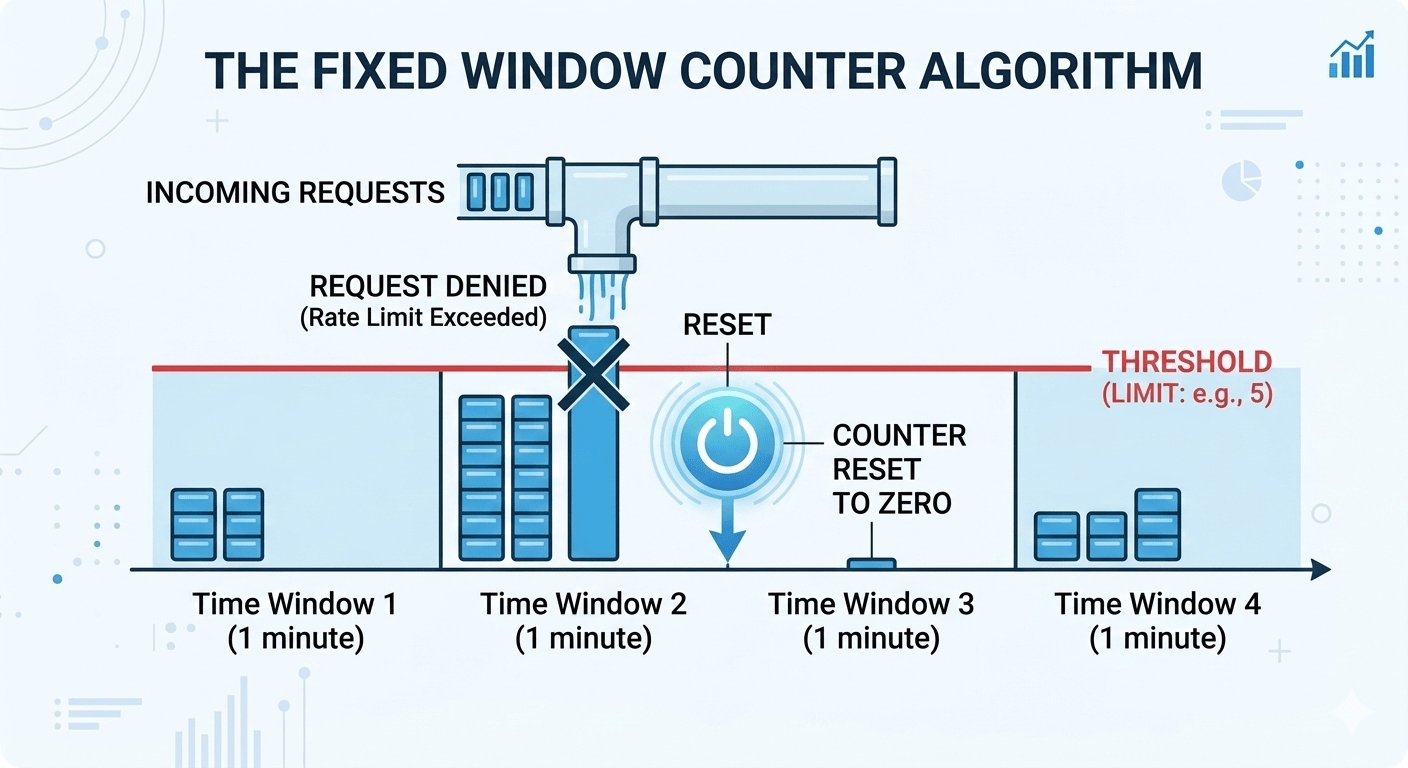
The simplest algorithm. Divide time into discrete windows (e.g. 60 seconds), count requests per window, and reject anything over the limit.
|
1 2 3 4 5 6 7 8 9 10 11 12 13 |
local key = KEYS[1] local limit = tonumber(ARGV[1]) local count = valkey.call("INCR", key) if count == 1 then valkey.call("EXPIRE", key, 60) end if count <= limit then return {1, limit - count} -- allowed else return {0, 0} -- throttled end |
The key is constructed as rl:{client_id}:{math.floor(now/60)} ; dividing the Unix timestamp by 60 and flooring it gives an integer that’s identical for every request within the same 60-second block. When the clock rolls over to the next minute, you get a new key and the counter starts from zero.
The boundary burst problem
The classic issue with the fixed window. Set a limit of 100 requests per minute. A client fires 100 requests at 11:59:59 which all allowed. One second later, the window resets, and they fire another 100. You’ve just served 200 requests in about 2 seconds. For services sized to handle 100 rpm, the limit is actually exceeded.
When to use it
Internal APIs, admin endpoints, situations where simplicity genuinely wins and the boundary burst risk is acceptable with conservative limits (set your limit at 50% of actual capacity).
When not to use it
Public-facing APIs or anything protecting a sensitive downstream service.
SET NX EX
INCR and EXPIRE are two separate commands. If the process crashes between them, the key exists forever without a TTL i.e. that user is rate limited permanently. The fix is to initialise the key atomically
|
1 2 |
<span style="font-weight: 400;">SET rl:user:bucket_14 </span><span style="font-weight: 400;">0 </span><span style="font-weight: 400;">NX EX </span><span style="font-weight: 400;">60</span> <span style="font-weight: 400;">INCR rl:user:bucket_14</span> |
SET NX EX is a single atomic command: create the key with value 0 only if it doesn’t exist, and set the TTL in the same operation. No gap, no orphaned keys.
Sliding Window Log
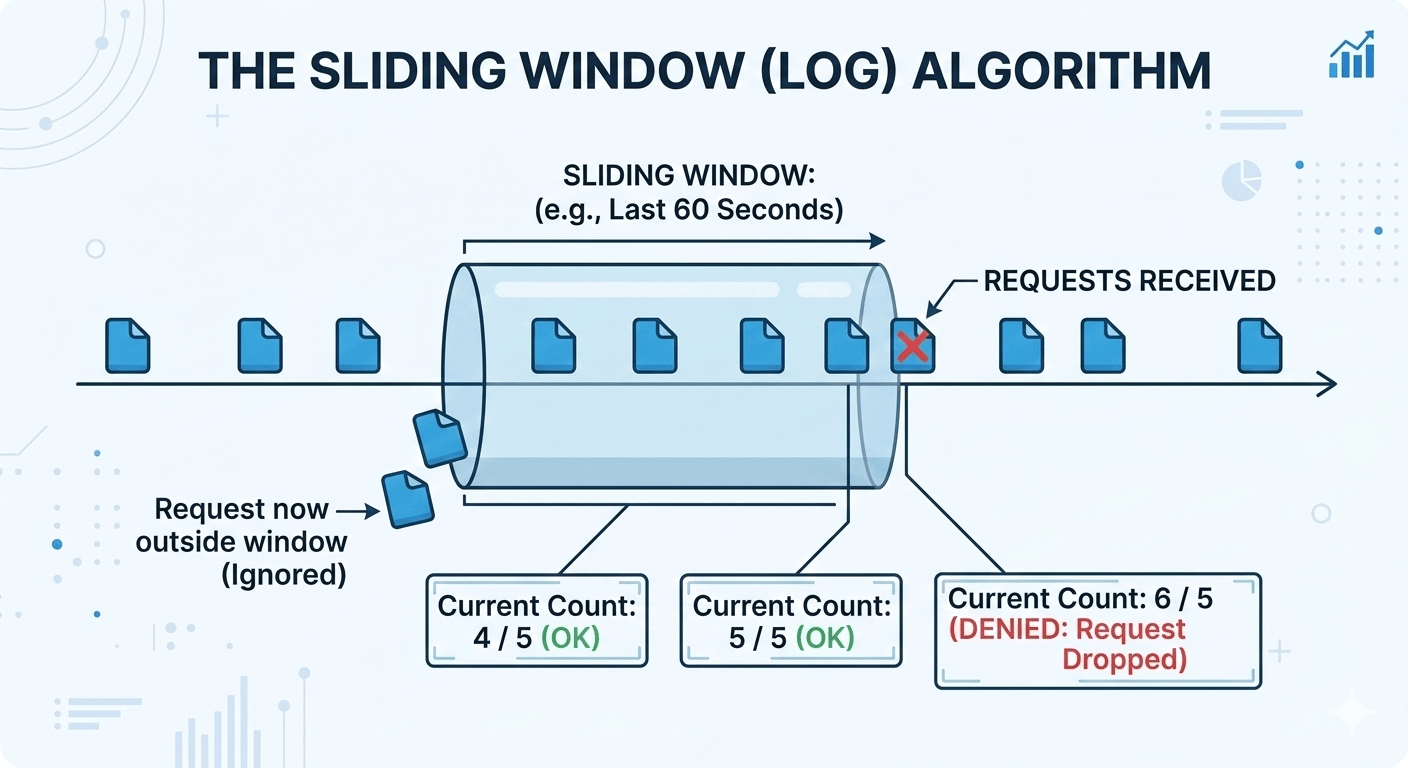
Instead of resetting a counter at a fixed boundary, store a timestamped log of every request in a sorted set. The window slides with every request.
|
1 2 3 4 5 6 7 8 9 10 11 12 13 14 15 16 17 18 19 20 21 22 23 24 25 |
local now = tonumber(ARGV[1]) local window = tonumber(ARGV[2]) local limit = tonumber(ARGV[3]) local key = KEYS[1] -- Remove entries outside the window valkey.call("ZREMRANGEBYSCORE", key, 0, now - window) -- Count what's left local count = valkey.call("ZCARD", key) if count < limit then -- Score = timestamp, member -- = timestamp + random suffix for uniqueness valkey.call("ZADD", key, now, now .. "-" .. math.random()) valkey.call("EXPIRE", key, math.ceil(window / 1000) + 5) return {1, limit - count - 1} else local oldest = valkey.call("ZRANGE", key, 0, 0, WITHSCORES") local retry = (oldest[2] + window - now) / 1000 return {0, retry} end |
The ZADD score is the timestamp and ZREMRANGEBYSCORE is a time-based range deletion.
The memory problem
A limit of 100,000 requests per hour for 10,000 active users means up to 1 billion stored timestamps. Make sure your member names are unique (append a random suffix or request ID) This ensures that if two requests arrive at the same millisecond and share a score, they’ll get their own entry.
When to use it
This is most suitable if you need provable accuracy and are willing to pay the memory cost like compliance use cases and audit trails.
Sliding Counter

This is the algorithm for most microservice auth gateway scenarios. It gives you near-sliding-window accuracy at fixed-window memory cost. Here we keep counters for the current and previous fixed window, and estimate the request count in the last N seconds using a weighted average.
|
1 2 3 4 5 6 7 8 9 10 11 12 13 14 15 16 17 18 19 20 21 |
local now = tonumber(ARGV[1]) local window = tonumber(ARGV[2]) local limit = tonumber(ARGV[3]) local slot = math.floor(now / window) local curr_key = KEYS[1] .. ":" .. slot local prev_key = KEYS[1] .. ":" .. (slot - 1) local curr = tonumber(valkey.call("GET", curr_key) or 0) local prev = tonumber(valkey.call("GET", prev_key) or 0) local t = now % window local est = curr + prev * (1 - t / window) if est < limit then valkey.call("INCR", curr_key) valkey.call("EXPIRE", curr_key, window * 2) return {1, math.floor(limit - est - 1)} else return {0, window - t} end |
The formula est = curr + prev × (1 – t/window) is emulating a sliding window. t is the number of seconds elapsed in the current window. At t=0 (start of a new window), we take 100% of the previous window’s count. At t=30 (halfway through), we take 50% so the boundary is being smoothed. At t=59, we take only ~2% and the previous window is almost irrelevant.
The result is just two integer keys per user in Valkey, regardless of traffic volume. O(1) memory, no boundary bursts, good enough accuracy for the vast majority of rate limiting use cases.
Note
The formula assumes requests were uniformly distributed across the previous window. If someone fired all their requests in the last second of the previous window, the algorithm will underestimate the true rate slightly. For auth gateways and API rate limiting this is fine. But for compliance use cases, still use the sliding log.
Token Bucket
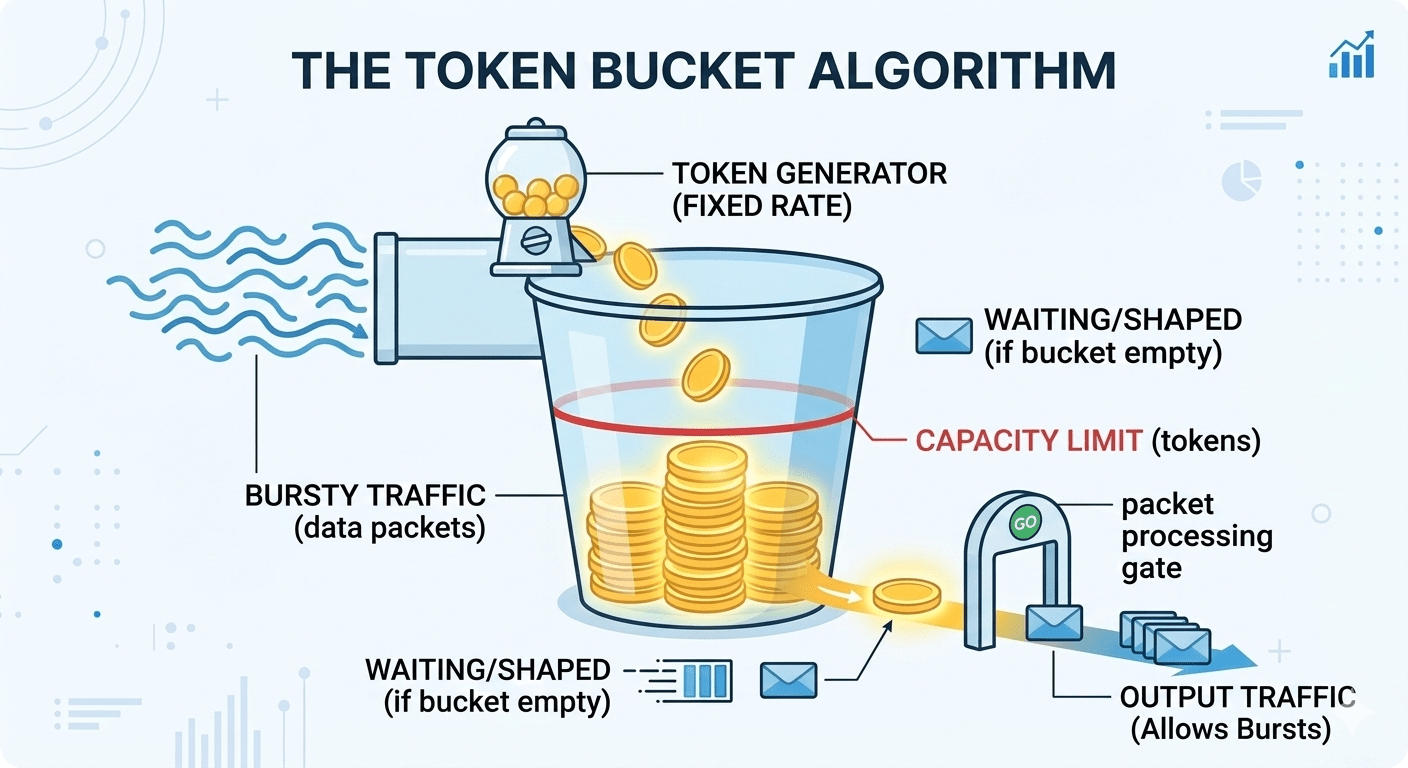
The gold standard for public APIs. A bucket holds tokens up to its capacity. Tokens refill continuously at a fixed rate. Each request consumes one or more tokens. If the bucket is empty, the request is throttled. Rather than counting requests up to a limit, each request uses a token.
|
1 2 3 4 5 6 7 8 9 10 11 12 13 14 15 16 17 18 19 20 21 22 23 24 25 |
local key = KEYS[1] local capacity = tonumber(ARGV[1]) local rate = tonumber(ARGV[2]) -- tokens per second local cost = tonumber(ARGV[3]) -- tokens this request costs local now = tonumber(valkey.call("TIME")[1]) local data = valkey.call("HMGET", key, "tokens", "ts") local tokens = tonumber(data[1]) or capacity local last_ts = tonumber(data[2]) or now local elapsed = math.max(0, now - last_ts) -- Continuous refill — no "tick" rounding artifacts tokens = math.min(capacity, tokens + elapsed * rate) if tokens >= cost then tokens = tokens - cost valkey.call("HMSET", key, "tokens", tokens, "ts", now) valkey.call("EXPIRE", key, math.ceil(capacity / rate) + 10) return {1, math.floor(tokens)} else local retry_after = (cost - tokens) / rate return {0, math.ceil(retry_after)} end |
Using a cost parameter means that single requests can consume more than one token. This way we can appropriately account for simple versus complex requests. Shopify’s GraphQL rate limiter works this way. Query cost is calculated upfront based on query depth and complexity.
The refill uses elapsed * rate rather than stepping through discrete “ticks”. This makes the refill smooth and continuous with no artifacts at the boundaries between seconds.
The HMGET + HMSET pattern loads and saves both tokens and ts (last timestamp) in a single hash. This runs inside a Lua script so the entire check-and-update cycle is atomic.
Return the retry_after value as a Retry-After header. Clients that respect it will back off gracefully rather than blindly hammering requests.
Leaky bucket

Often confused with the token bucket. The difference is that the token bucket limits inbound rate but allows bursts; leaky bucket shapes outbound traffic to a constant rate. Think of it as a queue that drains at a fixed rate. Requests join the queue. If the queue is full, they’re dropped. The downstream service only ever sees a smooth, constant flow.
|
1 2 3 4 5 6 7 8 9 10 11 12 13 14 15 16 17 18 19 20 21 22 23 |
local now = tonumber(valkey.call("TIME")[1]) local state = valkey.call("HMGET", KEYS[1], "ts", "depth") local last_ts = tonumber(state[1]) or now local depth = tonumber(state[2]) or 0 local rate = tonumber(ARGV[1]) -- requests/sec drained local cap = tonumber(ARGV[2]) -- max queue depth -- Virtual drain: calculate how much has leaked since last request local elapsed = now - last_ts local drained = math.floor(elapsed * rate) depth = math.max(0, depth - drained) if depth < cap then depth = depth + 1 valkey.call("HMSET", KEYS[1], "ts", now, "depth", depth) valkey.call("EXPIRE", KEYS[1], math.ceil(cap / rate) + 10) return {1, cap - depth} else return {0, (depth - cap + 1) / rate} end |
There isn’t an actual background process to drain the bucket. The drain is calculated lazily on each incoming request ; “how much would have leaked since I last checked?” This virtual clock approach is what makes the implementation efficient.
When to use it
Anywhere a downstream service needs to be protected from bursts and you want strict constant output regardless of how bursty your clients are. E.g. payment gateways, legacy database adapters or third-party API wrappers.
Implementation in Valkey/Redis
All five algorithms above need atomic read-modify-write cycles. Valkey/Redis give you four ways to achieve this.
INCR and EXPIRE : only works for fixed windows, and you need SET NX EX to avoid orphaned keys (see above). Fast, but limited.
EVAL(lua): flexible, any algorithm, atomic. However, scripts are volatile. If Valkey restarts or you call SCRIPT FLUSH, every client throws NOSCRIPT errors. You need the SCRIPT LOAD + EVALSHA dance plus error handling everywhere.
Functions (Valkey/Redis 7.0+) — persistent, versioned, survives restarts. Load once, call by name with FCALL. This is the best option for production.
|
1 2 3 4 5 |
# Load once (at deploy time) FUNCTION LOAD "#!lua name=ratelimitern..." # Call from any client, any time FCALL token_bucket 1 {user123}:rl 100 10 1 |
redis-cell module : https://github.com/brandur/redis-cell generic cell rate algorithm in a single CL.THROTTLE command, near-native performance. Excellent, but adds some management overhead for the module and check if it’s available on your managed service.
Cluster deployments
Whenever we move from a single-instance to cluster deployment we need to consider the possible crossslot error: multi-key Lua scripts fail with CROSSSLOT Keys in request don’t hash to the same slot.
|
1 2 |
rl:user123:per_second → slot 7823 (node A) rl:user123:per_minute → slot 12039 (node C) |
Use hash tags when moving to a cluster. The substring inside the curly braces determines the destination slot.
|
1 2 |
{user123}:per_second → slot 5461 (node B) {user123}:per_minute → slot 5461 (node B) |
All keys for user123 land on the same shard and multi-key scripts work.
Hot keys
Hot keys are keys that have a much larger amount of requests compared to other keys. A popular API client can saturate a single node’s CPU.
Some strategies for dealing with hot keys :
- Local caching: count requests locally in the application and sync to Valkey every K requests. Reduces Valkey traffic by K*.
- Key sharding: split across N keys per user, aggregate to check global count.
- Read replicas: Functions can run on replicas with a no-writes flag for the check operation.
Real-world implementations
Shopify: Cost-Aware Leaky Bucket
Shopify’s GraphQL API doesn’t count requests — it counts request cost. With GraphQL, one request can be cheap or enormously expensive depending on the query structure. A query fetching one product is simple whereas a query fetching 250 orders each with 250 line items is a completely different one.
Shopify assigns every query a cost score based on its structure before executing it. The bucket holds 1,000 points and restores at 50 points per second. Predicted cost is deducted upfront. If the actual execution cost is lower, the difference is refunded.
This incentivises developers to write efficient queries. Wasteful queries genuinely cost more rate limit budget. The system aligns developer behaviour with server cost.
Stripe: Multi-Dimensional Enforcement
Stripe uses three layers simultaneously:
- Request rate (token bucket per user) : this blocks the obvious cases like runaway scripts, infinite loops, basic abuse.
- Concurrency limiter : caps how many requests from a single client can be in flight simultaneously. This catches what rate limiting misses: a slow endpoint taking 2 seconds means a client making only 5 requests per second can have 10 requests simultaneously consuming worker threads.
- Critical reserve : 20% of total API capacity is ring-fenced exclusively for payment operations. Everything else (list endpoints, metadata) competes for the remaining 80%. Even under heavy load or DDoS on lower-priority endpoints, payments can still be processed.
The reserve pattern is worth keeping in mind. Identify your highest-value operations and explicitly protect capacity for them at the infrastructure level.
Uber: Global Rate Limiter (GRL)
At Uber’s scale, a per-request Valkey call on every API hit is not feasible. Their Global Rate Limiter takes a fundamentally different approach: instead of counting and comparing per request, a control plane continuously calculates optimal drop ratios and distributes them to data plane nodes.
Each node enforces locally using probabilistic dropping based on its target ratio. So the per-request Valkey call is eliminated and there is no need for cross-node coordination. The control plane updates every few seconds. Which means it’s fast enough to react to traffic changes and slow enough to avoid instability.
The trade-off is precision. Enforce approximately the right limit rather than exactly. Due to the scale, operational simplicity is preferable.
Client Communication
Return useful information to clients means they can adjust their requests according to the feedback from the rate limiter. The below headers should be returned on every response, not just on 429s:
| Header | Purpose |
| X-RateLimit-Limit | max requests in window |
| X-RateLimit-Remaining | requests left |
| X-RateLimit-Reset | Unix timestamp of reset |
| Retry-After | seconds until retry (on 429 only) |
Retry-After is the most important header on a 429. Give clients an exact value rather than making them guess with exponential backoff when you know exactly when the limit resets.
When clients do need to back off include jitter.
|
1 2 3 4 5 6 7 8 9 10 11 12 13 14 |
def request_with_backoff(url, retries=5): for attempt in range(retries): resp = requests.get(url) if resp.status_code != 429: return resp retry_after = float( resp.headers.get("Retry-After", 2**attempt)) # Jitter avoids thundering herd at reset time jitter = random.uniform(0, retry_after * 0.1) time.sleep(retry_after + jitter) |
Without jitter, 10,000 throttled clients all retry simultaneously at the reset timestamp, recreating the exact spike that caused the problem. Use a small random adjustment, so that retries are spread across a short window and the load arrives gradually.
Failures
A rate limiter must never be a single point of failure. Consider the failure options.
Fail closed
Blocking all traffic when Valkey is unavailable would mean a service outage. This is worse than not having rate limiter.
Fail open
Fall back to local in-memory limits when Valkey is unavailable at the cost of a short loss of precision. You might let slightly more traffic through than intended for a few seconds. This is almost always acceptable.
When building your rate limiter, add a local fallback from the start.
When to use which algorithm
Internal / admin APIs : fixed window + INCR. Maximum simplicity. Set the limits conservatively (50% of actual capacity) to absorb boundary peaks.
Public APIs at moderate scale : token bucket implemented as Valkey functions. Persistent library, burst tolerance and useful Retry-After headers.
Multi-tenant microservices : sliding counter + hash tags. O(1) memory, cluster-safe, good accuracy without the memory overhead of a log.
Payment gateways or infra protection : leaky bucket + critical reserve. Strict constant output, protect your most important operations explicitly.
Massive scale (>1M rps) : hierarchical + probabilistic (see Uber). No per-request Valkey call, control-plane-driven drop ratios, local enforcement.
Token bucket via Functions is the right default for 80% of cases. Everything else is a specialisation for specific constraints. Start simple, measure, and go the more complex ones only when the data tells you to.
Try it
Ready to experiment with sorted sets? Here’s how to get started:
- Try it out: github.com/valkey-io/valkey
- Join the community: valkey.io/community/
- Join the conversation: Valkey Slack
If you’ve built something interesting with sorted sets or have discovered another creative use case, I’d love to hear about it. The Valkey community is always excited to see what people build with these versatile data structures.
Valkey and Redis at Percona
At Percona, we’re happy to support Open Source Redis and Valkey with enterprise-grade, 24/7 support and consultative expertise. Percona specialises in unbiased architectural guidance and seamless migrations, ensuring users can scale their data environments without being tied to proprietary licenses. More info.
Look out for our upcoming video and blog post on pipelining and transactions.