Database interoperability is a common requirement in enterprise environments. For users seeking to access Oracle data from a PostgreSQL instance, the native PostgreSQL extension oracle_fdw (Foreign Data Wrapper) is an excellent and efficient solution.
However, the question often arises: How do we perform the reverse? How can an Oracle SQL query execute a SELECT statement against a table residing on a remote PostgreSQL server?
The simple answer is: oracle_fdw does not support this reverse direction. The professional solution requires utilizing the PostgreSQL ODBC driver in conjunction with Oracle’s standard integration mechanisms.
We have successfully tested and documented a working configuration. This blog post walks you through the steps to achieve seamless bi-directional connectivity (in the Oracle-to-PostgreSQL direction). Below is a step-by-step guide to setting up this crucial link, allowing you to query PostgreSQL tables directly from your Oracle database using a standard database link.
Why Query PostgreSQL from Oracle?
There are several reasons why we might need to use both Oracle and PostgreSQL databases in a business environment. The coexistence of Oracle and PostgreSQL is not just common—it’s often a purposeful move to maximize operational and financial benefits. Many organizations are still using existing Oracle applications and want to migrate to PostgreSQL for new workloads such as data aggregation and advanced reporting, to familiarize themselves with the PostgreSQL database for OLTP and OLAP tasks. They are also exploring future migration plans to PostgreSQL. This simultaneously creates a safe environment for a comprehensive, practical assessment of PostgreSQL, allowing organizations to fully evaluate its suitability without impacting the production environment. It also facilitates a smoother transition, enabling a gradual and cost-effective move in the future. Furthermore, this demo allows Oracle database administrators to learn PostgreSQL faster, and vice versa, bringing PostgreSQL closer to Oracle and adding practical knowledge for managers.
Real-world use cases include:
- Real-time reporting across legacy Oracle and modern PostgreSQL systems
- Data validation during PostgreSQL migrations
- Cross-database joins for consolidated dashboards
- Legacy application integration without code changes
Example: Run SELECT COUNT(*) FROM postgres_schema.table@PG_LINK directly in Oracle utility tools.
Architecture Overview
Key Components:
-
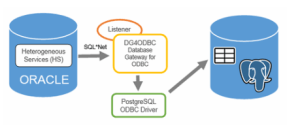
- DG4ODBC: Oracle’s Heterogeneous Services agent
- postgresql-odbc: Official ODBC driver for PostgreSQL
- unixODBC: ODBC driver manager
- PostgreSQL database, Oracle database
When Oracle queries a PostgreSQL table through a database link, the request is routed through Oracle’s Heterogeneous Services agent (DG4ODBC). DG4ODBC hands the query to the system’s ODBC layer, managed by unixODBC, which selects and loads the PostgreSQL ODBC driver. The PostgreSQL ODBC driver then establishes a network connection to the PostgreSQL server, executes the query, and returns the results. These results flow back through the same chain—ODBC driver → unixODBC → DG4ODBC, before Oracle converts them into native Oracle data structures and displays them as if they came from a local table.
Note: The steps below focus on the configuration required for interoperability. While we’ve ensured the PostgreSQL side is correctly configured, support for Oracle-specific components (Gateways, Listener) should be directed toward Oracle support resources.
Step-by-Step Configuration
Prepare PostgreSQL (Create User and Test Data)
Firstly, we need to create a user and grant access to allow query the data:
|
1 2 3 4 5 6 7 8 9 10 11 12 13 14 15 16 17 |
-- Create dedicated user CREATE USER dblinkuser ENCRYPTED PASSWORD 'Password$Secret'; -- Create and populate test table CREATE TABLE test (id INTEGER); INSERT INTO test VALUES (GENERATE_SERIES(1,1000)); -- Verify data SELECT COUNT(*) FROM test; count ------- 1000 (1 row) -- Grant schema and table access GRANT USAGE ON SCHEMA public TO dblinkuser; GRANT SELECT ON ALL TABLES IN SCHEMA public TO dblinkuser; |
Install PostgreSQL ODBC Driver on Oracle Host
|
1 |
[oracle@vagrant01 ~]$ sudo yum install postgresql-odbc -y |
Output expected:
|
1 2 3 4 5 6 7 |
Installing: postgresql-odbc x86_64 10.03.0000-3.el8_6 ol8_appstream 430 k Installing dependencies: unixODBC x86_64 2.3.7-1.el8 ol8_appstream 458 k Total download size: 888 k Installed: postgresql-odbc-10.03.0000-3.el8_6.x86_64 unixODBC-2.3.7-1.el8.x86_64 |
Verify the driver exists:
|
1 2 |
# ls /usr/lib64/psqlodbc.so /usr/lib64/psqlodbc.so |
Configure ODBC Data Source (/etc/odbc.ini)
|
1 2 3 4 5 6 7 8 9 |
# /etc/odbc.ini [PG] Description = PostgreSQL via ODBC Driver = /usr/lib64/psqlodbc.so ServerName = 127.0.1.128 Port = 5432 Database = postgres Username = dblinkuser Password = Password$Secret |
Security Note: In production, avoid plaintext passwords. Use .pgpass, ODBC credential files, or another method. You can consider using a .pgpass file protected by strict OS-level permissions.
For more information, please visit the official link: https://www.postgresql.org/docs/current/libpq-pgpass.html
Configure DG4ODBC Initialization File
|
1 2 3 4 5 6 7 8 |
# vi $ORACLE_HOME/hs/admin/initPG.ora # initPG.ora - DG4ODBC initialization file HS_FDS_CONNECT_INFO = PG HS_FDS_TRACE_LEVEL = 0 HS_FDS_SHAREABLE_NAME = /usr/lib64/psqlodbc.so HS_LANGUAGE = AMERICAN_AMERICA.WE8ISO8859P9 # Environment variables set ODBCINI=/etc/odbc.ini |
Because the listener often runs under Oracle utility startup scripts that do not source user shell profiles. As a result, the ODBC environment might not be available when DG4ODBC starts, leading to confusing connection failures. That’s why it is better to set ODBCINI directly in the initPG.ora file because it ensures that DG4ODBC always loads the correct ODBC configuration regardless of how the Oracle listener is started.
Configure Oracle Network Files
Edit tnsnames.ora
|
1 2 3 4 5 6 7 8 9 10 |
vi $ORACLE_HOME/network/admin/tnsnames.ora Add the following entry: PG = (DESCRIPTION = (ADDRESS = (PROTOCOL = TCP)(HOST = 127.0.1.128)(PORT = 1521)) (CONNECT_DATA = (SID = PG) ) (HS = OK) ) |
Then, edit the listener.ora
|
1 |
vi $ORACLE_HOME/network/admin/listener.ora |
Add the following SID descriptor:
|
1 2 3 4 5 6 7 8 |
SID_LIST_LISTENER = (SID_LIST = (SID_DESC = (SID_NAME = PG) (ORACLE_HOME = /u01/app/oracle/product/19.0.0/dbhome_1) (PROGRAM = dg4odbc) ) ) |
Restart Listener:
|
1 |
lsnrctl restart |
Test TNS Resolution:
|
1 |
tnsping PG |
Expected output:
|
1 2 3 |
Used TNSNAMES adapter to resolve the alias Attempting to contact (DESCRIPTION = (ADDRESS = (PROTOCOL = TCP)(HOST = 127.0.1.128)(PORT = 1521)) (CONNECT_DATA = (SID = PG)) (HS = OK)) OK (0 msec) |
Create Database Link in Oracle to PostgreSQL
|
1 2 3 4 5 |
SQL> CREATE DATABASE LINK PG CONNECT TO "dblinkuser" IDENTIFIED BY "Password$Secret" USING 'PG'; Database link created. |
Note: Double quotes around “dblinkuser” preserve case sensitivity.
Query PostgreSQL from Oracle
|
1 2 3 4 5 6 7 8 9 10 11 12 |
SQL> SELECT * FROM "public"."test"@PG WHERE ROWNUM < 10; id ---------- 1 2 3 4 5 6 7 8 9 |
|
1 2 3 4 |
SQL> SELECT COUNT(*) FROM "public"."test"@PG; COUNT(*) ---------- 1000 |
Great! Oracle is now reading live data from PostgreSQL.
The successful query execution confirms that we can query a PostgreSQL table directly from the Oracle database, providing the necessary reverse interoperability often sought after by users familiar with oracle_fdw.
Conclusion
- This configuration is not officially supported by Oracle for PostgreSQL—use at your own risk.
- Performance may be slower than expected latency for native connections, depending on the network and data volume. Querying PostgreSQL from Oracle via DG4ODBC is inherently slower than native connections. The main factors contributing to this is translation overhead. Because DG4ODBC and the PostgreSQL ODBC driver introduce extra processing to convert Oracle SQL to ODBC calls, and then ODBC results back into Oracle formats. Besides, data must travel over TCP/IP between Oracle and PostgreSQL, which can add delays, especially for large result sets.
In short: The primary performance impact comes from the combination of translation overhead and the network/data volume, rather than the network alone.
- Data types and advanced features may not map perfectly; always test thoroughly.
While oracle_fdw elegantly handles PostgreSQL to Oracle access, the reverse direction requires DG4ODBC + PostgreSQL ODBC. This lab-validated setup proves:
You can run read queries inside Oracle SQL, reliably and with full SQL compatibility between PostgreSQL and Oracle.
The key to enabling Oracle-to-PostgreSQL reporting lies squarely with the highly capable and standards-compliant PostgreSQL ODBC driver. This solution ensures seamless data access, enabling you to utilize PostgreSQL for critical reporting and analytics while planning your comprehensive migration strategy.