

There has been much discussion recently about the stability and performance of the latest MySQL releases. Many database professionals are voicing concerns, especially after encountering several issues in the newer versions.
Let’s start with some important news from Marco Tusa. In one of his blog posts, Marco strongly advised against upgrading to any MySQL version after 8.0.37. You can read more about his warning here: “Do Not Upgrade to Any Version of MySQL After 8.0.37”.
Why the caution? MySQL 8.0.38 contains a critical bug that’s serious enough that the version has been removed from the MySQL download page. According to the MySQL documentation, this bug can prevent the server from restarting if more than 8000 tables are created (bug reported by Jean-François Gagné). This is a significant issue, and users are advised to upgrade directly to MySQL 8.0.39. For more details, check the official release notes here: MySQL 8.0.38 Release Notes.
In addition to stability concerns, there have been reports of performance regressions in the latest MySQL releases. Mark Callaghan has conducted several performance tests and identified regressions. By the time of this write, the last two reports were about DELETE operations versus InnoDB and with UPDATE operations on non-indexed vs indexed columns. These issues are outlined in more detail in his blog posts:
The MySQL 8.0 series has had a somewhat turbulent journey, especially before version 8.0.34. During this period, new features were frequently added with almost every release. While this pace of development was exciting, it also introduced numerous bugs and compatibility issues with previous versions and tools like Xtrabackup.
However, the introduction of Long-Term Support (LTS) and Innovation releases has helped stabilize the 8.0 series. This approach separates stable releases from those that include the latest features, allowing users to choose between stability and cutting-edge functionality.
Given these changes, it’s understandable that some DBAs look back fondly on the perceived stability of MySQL 5.7. But how does that perception hold up against the facts?
To get a clearer picture, I compared the number of bugs fixed in both the MySQL 5.7 and 8.0 series. To make the comparison fair, I aligned the versions based on their release timelines from the first GA release to compare them more accurately, pairing versions like 5.7.33 with 8.0.39 and so forth. Then, I counted the number of bugs listed under the “Bugs Fixed” section in the release notes for each version, applying the same method across both series to maintain consistency.
I excluded earlier releases of MySQL 8.0 due to the frequent addition of new features in those versions, which makes them less directly comparable to later, more stable releases.
Here’s a summary of the versions I analyzed:
And the numbers: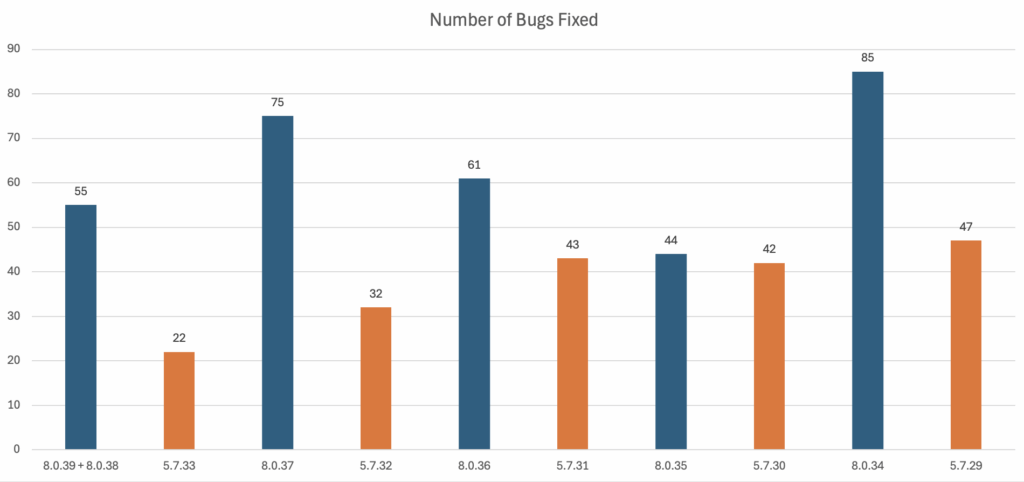
The data shows that MySQL 8.0 has had more bugs fixed than MySQL 5.7 when compared to equivalent releases five years after their initial General Availability release.
You could interpret this in a couple of ways. On the one hand, the higher number of bug fixes in MySQL 8.0 could indicate Oracle’s more proactive approach to address issues and improve the product. On the other hand, some might view the increased bug count as a sign of instability, suggesting that MySQL 8.0 has faced more challenges over time.
As someone who has been working with MySQL for over a decade, I believe in Sakila’s potential. While there are certainly challenges and growing pains, I am optimistic that the MySQL community’s ongoing efforts to report bugs and regressions will contribute to a more robust and reliable future.
Finally, you can reach us through social networks, our forum, or access our material using the links presented below:
MySQL 8.0 introduces several significant changes compared to MySQL 5.7, including improved performance, enhanced security features, and new functionalities. Key differences include the introduction of JSON support, a new default authentication plugin, better indexing capabilities, and improvements in query optimization. However, MySQL 8.0 has also faced stability and performance issues, as highlighted in recent discussions.
MySQL 8.0 introduces a transactional data dictionary, which replaces the older reliance on frm files for storing metadata about database objects like tables and indexes. This change enhances data integrity by making metadata storage transactional, ensuring that all data dictionary tables are consistent. Additionally, MySQL 8.0 improves flexibility with dynamic server variables, allowing you to modify certain system settings without restarting the MySQL server. Another key upgrade is the default authentication plugin moving to caching_sha2_password from the older mysql_native_password in 5.7, which improves security. Lastly, 8.0 adds support for window functions and common table expressions (CTEs), significantly enhancing query performance and capabilities compared to 5.7.
MySQL 8.0.38 has raised concerns due to a critical bug that can prevent the server from restarting if more than 8000 tables are created. This issue has led to the version being removed from the MySQL download page. Users are advised to upgrade directly to MySQL 8.0.39 to avoid this problem.
Performance comparisons between MySQL 8.0 and 5.7 show that while MySQL 8.0 offers several performance enhancements, it has also introduced some regressions. Issues have been reported in operations like DELETE versus InnoDB and UPDATE on non-indexed versus indexed columns. The performance gains and losses can vary depending on the specific use case and workload.
Yes, data indicates that MySQL 8.0 has had more bugs fixed compared to MySQL 5.7 when comparing equivalent releases. This higher number of bug fixes could suggest a proactive approach to addressing issues, but it may also reflect more significant challenges and stability concerns over time.
The decision to upgrade from MySQL 5.7 to 8.0 depends on your specific needs and the potential benefits versus the risks. MySQL 8.0 offers advanced features and improvements, but it has also faced stability and performance issues. Evaluate the new features, potential issues, and your application’s compatibility before making the upgrade. Consulting with database professionals and reviewing the latest release notes can also help make an informed decision.
Resources
RELATED POSTS





Hi Vinicius,
MySQL 8.4 is now the “current” stable version promoted by Oracle so wondering about moving to 8.0 or staying on what is effectively an unsupported version of 5.7 seems rather strange. New users should I guess be looking to install 8.4 versions of MySQL.
However, the performance and bug issues you mention in 8.0 are clearly worth pointing out. I too have been bitten by a few of them.
MySQL 8.0 has various features over MySQL 5.7 and it was one of the reasons I looked to upgrade when it first came out. Right now I depend on many of them so looking back would be a waste of time even if 5.7 were still supported.
It is hard to keep people happy by providing new features yet at the same time keeping things “nice and stable” and thus avoiding surprises and I tend to agree that Oracle may have let a few unexpected bugs through in 8.0 which perhaps could have been caught with more or better testing.
Yet 8.4 LTS is out, this is promised to be stable, but does require an upgrade from 8.0, so moving to it looks to make sense. In the end 8.0 will eventually go away like 5.7 did. There’s time to plan this migration but not to forget about it until the last minute which seems to have happened with 5.7.
I am looking at 9.X which is a moving target like 8.0 was in its DMR phase (but touted to be GA quality in spite of that) and hoping that we will see new features and better performance compared to the current 8.0 or 8.4 LTS releases when it finally goes stable.
Hi Simon,
I agree that anyone new to the MySQL ecosystem should aim for the latest LTS release (currently 8.4 as of this writing).
We’ve all likely encountered the myth that MyISAM is better than InnoDB. Sure, there might be specific cases where this seems true, but it comes at the cost of sacrificing ACID compliance, not to mention the full range of features and benefits that InnoDB offers.
Perhaps Oracle lacks the resources to balance both code optimization and feature development at the same pace. Their focus might now be shifting more toward Oracle Cloud and enhancing their enterprise offerings there.
If MySQL 9.X undertakes a code cleanup and removes deprecated features to prepare for future growth, I believe we could see notable improvements in MySQL’s performance.
It’s great to have people like Mark in the community. They always keep Oracle on its toes and remind them that we, as users, care about performance improvements—or at the very least, avoiding regressions!
Thanks for the compliment.
Some (or many) of the regressions after 8.0.28 are from code cleanup. I have no doubt it was long overdue, but it is still difficult to see more regressions arrive.
Hopefully the community steps on on these because it isn’t clear that upstream is going to fix them.