

 In this blog post, we will compare the performance of performing a backup from a MySQL database using mysqldump, MySQL Shell feature called Instance Dump, mysqlpump, mydumper, and Percona XtraBackup. All these available options are open source and free to use for the entire community.
To start, let’s see the results of the test.
The benchmark was run on an m5dn.8xlarge instance, with 128GB RAM, 32 vCPU, and 2xNVMe disks of 600GB (one for backup and the other one for MySQL data). The MySQL version was 8.0.26 and configured with 89Gb of buffer pool, 20Gb of redo log, and a sample database of 177 GB (more details below).
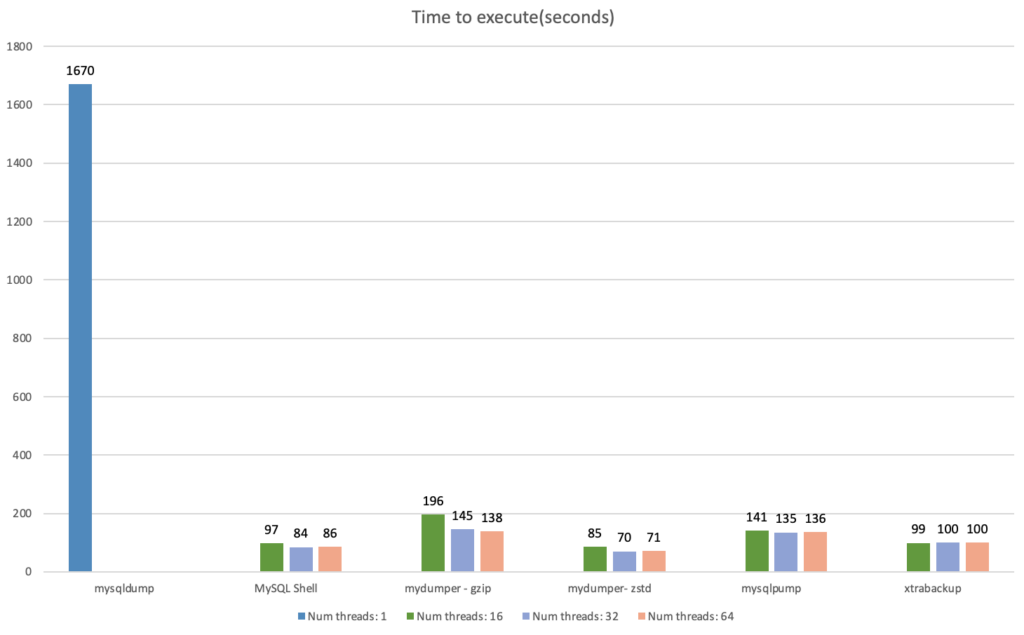
We can observe the results in the chart below:
And if we analyze the chart only for the multi-threaded options:
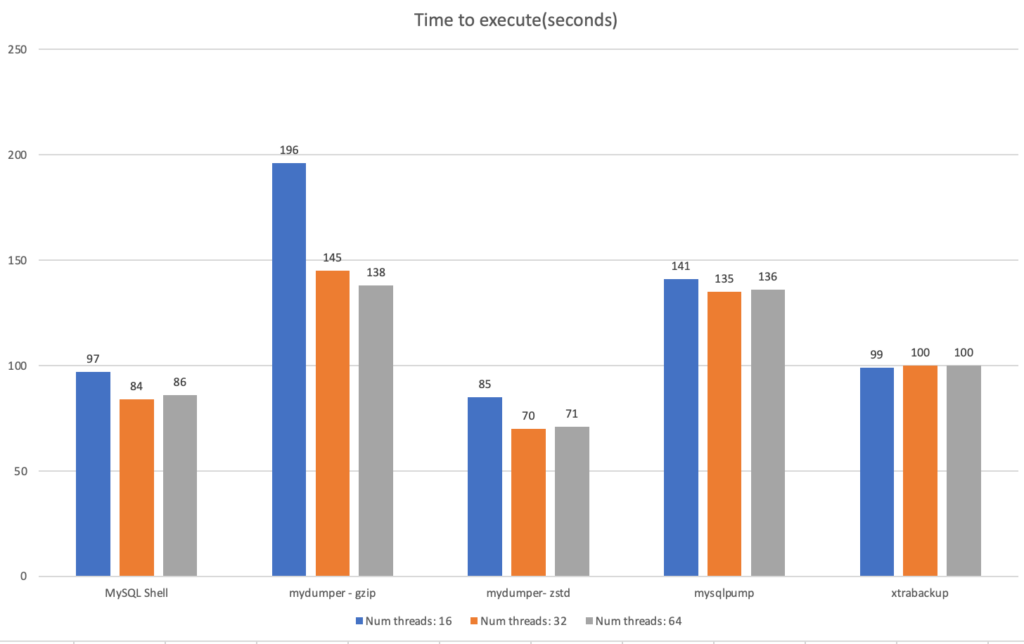
As we can see, for each software, I’ve run each command three times in order to experiment using 16, 32, and 64 threads. The exception for this is mysqldump, which does not have a parallel option and only runs in a single-threaded mode.
We can observe interesting outcomes:
These are the specs of the benchmark:
The my.cnf configuration:
|
1 2 3 |
[mysqld] innodb_buffer_pool_size = 89G innodb_log_file_size = 10G |
For the test, I used sysbench to populate MySQL. To load the data, I choose the tpcc method:
|
1 |
$ ./tpcc.lua --mysql-user=sysbench --mysql-password='sysbench' --mysql-db=percona --time=300 --threads=64 --report-interval=1 --tables=10 --scale=100 --db-driver=mysql prepare |
Before starting the comparison, I ran mysqldump once and discarded the results to warm up the cache, otherwise our test would be biased because the first backup would have to fetch data from the disk and not the cache.
With everything set, I started the mysqldump with the following options:
|
1 |
$ time mysqldump --all-databases --max-allowed-packet=4294967295 --single-transaction -R --master-data=2 --flush-logs | gzip > /backup/dump.dmp.gz |
For the Shell utility:
|
1 2 3 |
$ mysqlsh MySQL JS > shell.connect('root@localhost:3306'); MySQL localhost:3306 ssl test JS > util.dumpInstance("/backup", {ocimds: true, compatibility: ["strip_restricted_grants","ignore_missing_pks"],threads: 16}) |
For mydumper:
|
1 |
$ time mydumper --threads=16 --trx-consistency-only --events --routines --triggers --compress --outputdir /backup/ --logfile /backup/log.out --verbose=2 |
PS: To use zstd, there are no changes in the command line, but you need to download the zstd binaries.
For mysqlpump:
|
1 |
$ time mysqlpump --default-parallelism=16 --all-databases > backup.out |
For xtrabackup:
|
1 |
$ time xtrabackup --backup --parallel=16 --compress --compress-threads=16 --datadir=/mysql_data/ --target-dir=/backup/ |
And what do the results tell us?
Parallel methods have similar performance throughput. The mydumper tool cut the execution time by 50% when using zstd instead of gzip, so the compression method makes a big difference when using mydumper.
For the util.dumpInstance utility, one advantage is that the tool stores data in both binary and text format and uses zstd compression by default. Like mydumper, it uses multiple files to store the data and has a good compression ratio.
XtraBackup got third place with a few seconds of difference from MySQL shell. The main advantage of XtraBackup is its flexibility, providing PITR and encryption for example.
Next, mysqlpump is more efficient than mydumper with gzip, but only by a small margin. Both are logical backup methods and works in the same way. I tested mysqlpump with zstd compression, but the results were the same, hence the reason I didn’t add it to the chart. One possibility is because mysqlpump streams the data to a single file.
Lastly, for mysqldump, we can say that it has the most predictable behavior and has similar execution times with different runs. The lack of parallelism and compression is a disadvantage for mysqldump; however, since it was present in the earliest MySQL versions, based on Percona cases, it is still used as a logical backup method.
Please leave in the comments below what you thought about this blog post, if I missed something, or if it helped you. I will be glad to discuss it!
Finally, you can reach us through the social networks, our forum, or access our material using the links presented below:
Resources
RELATED POSTS





What compression Percona Xtrabackup uses here ? It is interesting it is taking longer as generally it should do a lot less processing (converting data from Innodb data format back to MySQL wire protocol and when to the text format)
One thing I also would be careful about with such benchmarks – it focuses only on time to backup which is important but considering it alone can lead you astray
Also I wonder what was backup size in all those cases was it comparable ? This is also something one may consider especially if long retention is needed
Agreed. It would also need OLTP benchmarks to check if some methods impact performances more than others
Hi Peter and Yoann,
###
One thing I also would be careful about with such benchmarks – it focuses only on time to backup which is important but considering it alone can lead you astray
###
I agree. In general, the ultimate goal of performing a backup is being able to restore it. Im planning to do a second part of this series about restore performance. I will also collect the size of the backups.
Also Xtrabackup uses by default quicklz(and there is a option of lz4):
https://www.percona.com/doc/percona-xtrabackup/LATEST/xtrabackup_bin/xbk_option_reference.html#cmdoption-compress
About Yoann comments:
Indeed this is another perspective. But most use cases that I see is DBA performing backups from a replica or a dedicated backup sever with no workload (apart from replication). Since covering all scenarios is an ungrateful task ( I got questions about using less cores, a less powerful storage, etc…), I decided to use a case where it will cover the majority of uses.
I’d be fine backing up a 2TB database this way for the gross parts, and then do a diff later, this one provides speed, the other part provides consistency before a cutover. Does that makes sense?
Thanks for sharing Vinicius!
Is there any difference substituting mysqldump | gzip with a different compression tool?
Like zstd or even pigz for example.
Fast backups are a good thing of course, but most of times, it’s more important the restore time, so a follow-up article comparing the restore times of the tools would be super nice I think.
Again, thanks a lot!
Hi Ivan,
Thanks for reading! So, I have the plans to release a part 2 with restore time 🙂
About mysqldump, I tested with and without compression and both had similar performance. From what I understood, the fact that only one thread is being used, a lot of hardware horsepower is being lost in the process. Because even the usage of the storage is lower with mysqldump. Even if zstd or pigz allows parallization, the first pipe is still single threaded.
Hi Vinicius,
Could you provide information about the data ? I know you used tpcc, but how many tables and how big are they each ? Are they equivalent in size ? I’m asking as for large tables, MySQL Shell load utility uses a different approach to schedule the parallel ingestion that is optimized (see https://dev.mysql.com/blog-archive/mysql-shell-dump-load-part-3-load-dump/).
Cheers 😉
Hi Lefred!
Here is the information you requested:
mysql> SELECT table_schema AS “Database”, ROUND(SUM(data_length + index_length) / 1024 / 1024, 2) AS “Size (MB)” FROM information_schema.TABLES where table_schema like ‘percona’GROUP BY table_schema;
+———-+———–+
| Database | Size (MB) |
+———-+———–+
| percona | 91626.28 |
+———-+———–+
1 row in set (0.00 sec)
And for each table (there are 90 tables):
+————–+———–+
| Table | Size (MB) |
+————–+———–+
| stock1 | 3560 |
| stock4 | 3560 |
| stock10 | 3559 |
| stock2 | 3559 |
| stock3 | 3559 |
| stock5 | 3559 |
| stock6 | 3559 |
| stock7 | 3559 |
| stock9 | 3559 |
| stock8 | 3559 |
| order_line4 | 3045 |
| order_line1 | 3040 |
| order_line8 | 3040 |
| order_line5 | 3039 |
| order_line10 | 3038 |
| order_line2 | 3035 |
| order_line3 | 3034 |
| order_line9 | 3032 |
| order_line7 | 3029 |
| order_line6 | 3025 |
| customer10 | 2013 |
| customer4 | 2012 |
| customer5 | 2012 |
| customer1 | 2012 |
| customer9 | 2012 |
| customer3 | 2011 |
| customer6 | 2011 |
| customer7 | 2011 |
| customer8 | 2011 |
| customer2 | 2011 |
| history1 | 314 |
| history5 | 313 |
| history6 | 313 |
| history7 | 313 |
| history2 | 313 |
| history9 | 312 |
| history8 | 312 |
| history4 | 312 |
| history10 | 312 |
| history3 | 312 |
| orders1 | 210 |
| orders2 | 210 |
| orders4 | 208 |
| orders10 | 208 |
| orders7 | 208 |
| orders8 | 208 |
| orders9 | 208 |
| orders5 | 208 |
| orders3 | 207 |
| orders6 | 207 |
| new_orders5 | 25 |
| new_orders8 | 25 |
| new_orders7 | 25 |
| new_orders6 | 25 |
| new_orders4 | 25 |
| new_orders3 | 25 |
| new_orders2 | 25 |
| new_orders10 | 25 |
| new_orders1 | 25 |
| new_orders9 | 25 |
| item6 | 11 |
| item1 | 11 |
| item10 | 11 |
| item2 | 11 |
| item3 | 11 |
| item4 | 11 |
| item5 | 11 |
| item7 | 11 |
| item8 | 11 |
| item9 | 11 |
| district9 | 0 |
| district1 | 0 |
| district10 | 0 |
| district2 | 0 |
| district3 | 0 |
| district4 | 0 |
| district5 | 0 |
| district6 | 0 |
| district7 | 0 |
| district8 | 0 |
| warehouse1 | 0 |
| warehouse10 | 0 |
| warehouse2 | 0 |
| warehouse3 | 0 |
| warehouse4 | 0 |
| warehouse5 | 0 |
| warehouse6 | 0 |
| warehouse7 | 0 |
| warehouse8 | 0 |
| warehouse9 | 0 |
+————–+———–+
90 rows in set (0.00 sec)
The bigger ones have 3 million rows, while the smallest one has 100 rows (hence the 0 MB used).
It is very interesting the article that you shared, I will release soon another post about restore performance and all considerations around this topic. Thanks for checking!
I will look forward to restore testing. My experience (which has dictated how 3 large’ish companies run backups) is that xtrabackup restored with zstd beats the snot out of qpress in large part because of skipping reading the compressed data files from the fs. Adding encryption to the backup or restore pipeline has near zero cost.
Hi Rob!
Thanks for reading the post. Let me ask, how are you using zstd with Xtrabackup? This compression algorithm is currently not supported. I opened a feature request for it:
https://jira.percona.com/browse/PXB-2669
And thanks for sharing the information about the encryption. As we know backup and restore times are not the only parameter that influences the decision of opting for a certain tool. I intend to make all these considerations as well.
Yes, we are using zstd with XtraBackup via a pipe.
xtrabackup | pv | zstd | encryption …
Hi Vinicius,
I think the difference you see between MySQL Shell and mydumper can be explained by the use of SSL in one and clear transfer in the other. Encryption has a cost unfortunately.
But of course this is a only a hypothesis that needs to be verified 😉
Cheers and I hope you will you should all that in your FOSDEM MySQL Devroom session 😉
Cheers!
I do believe SSL pays a serious CPU drag of course, but, the issue is more on the usage of parallel execution than anything else IMHO
Could be advice to backup multi threaded only when backing node not in production. 32 threads doing full scan consume 32 cores and most of the network or disk bandwidth. A good overview of various tools, missing maria-backup and for a no time physical backup i would flavor a ZFS snapshot. The bias is that for a backup to be valid it should be store in different location and backup time would mostly be cap to network bandwidth with such good disk