Percona Server for MySQL now ships with a fully open source OpenID Connect (OIDC) authentication plugin, available starting with Percona Server for MySQL 8.4.11-11 and 9.7.2-2 (not yet released as of this writing). It allows a MySQL account to authenticate against any standards-compliant Identity Provider (IdP) instead of relying on a locally stored password, closing the gap with MySQL Enterprise Edition, which has offered OIDC authentication since MySQL 9.1 and, in several respects, going beyond it.
Oracle offers the same category of functionality, but its server-side plugin is part of the paid MySQL Enterprise Edition. Percona’s implementation is open source and adds three capabilities the Enterprise plugin does not provide: automatic signing-key synchronization from a JWKS endpoint, IdP group-to-role mapping, and proxy-user support. This article explains how the plugin works and why those differences matter in practice.
OpenID Connect is an identity layer built on top of the OAuth 2.0 authorization framework [5]. Whereas OAuth 2.0 governs delegated access to resources, OIDC adds a standardized way for a client to establish who a user is. After a user signs in to an Identity Provider, the IdP issues a signed JSON Web Token (JWT), called an ID token, that carries the user’s identity and attributes in a verifiable, tamper-evident form.
Using that model for MySQL authentication brings several practical advantages over password-based accounts:
None of that is unique to Percona; Oracle makes a similar value proposition for the Enterprise plugin. The real difference lies in how much operational burden the plugin removes from the administrator, which becomes clear in the next sections.
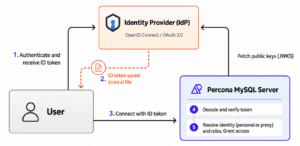
Once the plugin and its configuration are in place, the authentication path is the same regardless of which IdP issued the token:
Identity Providers rotate their signing keys periodically as a basic security measure. If a key is ever compromised, limiting its lifetime reduces the potential impact, and regular rotation also lowers the long-term value of any one key as a target. In practice, rotation is gradual: a new key is published and accepted before it starts signing tokens, and an old key remains valid for a period after it stops signing so that tokens already in flight can still be verified.
Public keys are exposed through the standard JWKS (JSON Web Key Set) endpoint, which applications can use to verify tokens issued by the IdP [6].
The Percona OpenID Connect authentication plugin can download public keys from a configured JWKS endpoint when the plugin is loaded, typically during installation and server startup, and store them in a cache. It also provides a User Defined Function (UDF) that can refresh the cache on demand or periodically through the Event Scheduler.
By contrast, Oracle’s counterpart plugin requires signing keys to be configured statically through the authentication_openid_connect_configuration server variable, supplied either as an inline JSON string or as a path to a JSON file. There is no retrieval or refresh from the JWKS endpoint, so keeping keys current after each rotation remains a manual task for the administrator. In the window just after a rotation, tokens signed with the previous key are still valid but cannot be verified until the configuration is updated. Percona’s plugin supports static key configuration as well, but that mode is better suited to testing or temporary setups than to production.
Using the feature requires two simple steps. First, JWKS endpoint URL must be set in the plugin’s configuration. For example, the below configuration defines IdP named as example-keycloak (pay attention to jwks-url element):
|
1 2 3 4 5 6 7 |
{ "example-keycloak": { "issuer-name": "https://keycloak.example.com/realms/master", "jwks-url": "https://keycloak.example.com/realms/master/protocol/openid-connect/certs", "audiences": [ "mysql-oidc" ] } } |
The second step is ensuring the MySQL event scheduler is running and creating an event updating the keys. For example, to enable updating the keys for example-keycloak every hour run from MySQL client:
|
1 2 3 |
CREATE EVENT update_oidc_keys ON SCHEDULE EVERY 1 HOUR DO SELECT update_jwks("example-keycloak"); |
This is where Percona’s plugin diverges most clearly from the Enterprise implementation.
Groups are managed by the corporate Identity Provider and group membership may be carried by ID tokens. OIDC does not define a standard claim for that, but most IdP implementations allow adding a group claim to the tokens. The Percona’s plugin allows the administrator to configure the group claim name so that it matches the token format used by the chosen IdP.
There are two practical ways to take advantage of this feature: group-to-role mapping and proxy users.
Membership in a group can automatically translate into MySQL roles and therefore privileges across multiple MySQL servers at the same time. On a single server, the flow looks like this:
Please note, that group-to-role mapping still requires an account created for each user, but automates managing user privileges.
To create roles and grant them some privileges one may run:
|
1 2 3 4 |
CREATE ROLE accounting; GRANT ALL PRIVILEGES ON accounting_database.* TO accounting; CREATE ROLE sales; GRANT ALL PRIVILEGES ON sales_database.* TO sales; |
Then, to to define the mapping add to IDP configuration:
|
1 2 3 4 5 |
"group-claim": "groups", "group-role": [ { "/accounting": "accounting" }, { "/marketing": "marketing" } ] |
Any user connecting with an ID token containing claim “groups”:[“/accounting”] will be granted with role accounting and effectively obtain access to accounting_database and so on.
The proxy capability in MySQL allows an authentication plugin to request that the connecting external user be logged in as a different MySQL user. In this model, the external identity is the proxy user and the mapped MySQL account is the proxied user. The purpose is to let multiple users share accounts with the same privilege set, avoiding the need to create a separate personal database account for every individual.
This feature must be supported by the authentication plugin, whose job is to choose the proxied user according to the specifics of the authentication method. In the Percona OIDC plugin, that selection is based on the group claim in the token and works as follows:
Supported signing algorithms include RSASSA-PKCS1-v1_5, RSASSA-PSS, and ECDSA with SHA-256, SHA-384, and SHA-512 hashing functions.
The Percona approach uses the client-side OpenID Connect plugin from upstream MySQL, which ensures compatibility with the standard Oracle client.
Both client-side and server-side OpenID Connect plugins ensure that the token is sent via a secure channel. Accepted protocols are TCP protected by TLS, Unix sockets, and shared memory.
There are some limits worth knowing.
The first comes from MySQL’s authentication design: any authentication plugin is used at connection time only. In the case of OIDC, the token is validated when the user connects, and a session that stays open may outlive the ID token that opened it. There is no out-of-the-box mechanism to force re-authentication after some time (except for idle connection timeout).
A similar situation applies to group-role mapping. The roles tied to the user’s groups in the ID token are granted or revoked at connection time. As a result, if a user is added to or removed from an IdP group, they must reconnect to Percona Server for the change to be reflected in their granted roles.
The proxying mechanism uses group membership claim instead of the token’s subject, so any token signed by a configured IdP that carries the required group is accepted. Group membership is your trust boundary in those modes, so treat it that way.
The current proxying implementation assumes the proxied user’s name matches the group name. This can be a problem when a group name isn’t a valid MySQL username (for example, it’s too long or contains disallowed characters), or when multiple groups need to map to a single account. We plan to add group-to-proxied-account mapping in future releases to address this.
The client-side plugin doesn’t verify the ID token (for example, check whether it has expired) before connecting, and the server doesn’t report the reason for access being denied (for security reasons). A good practice is to obtain a fresh token before connecting.
Functionally, Percona’s OpenID Connect plugin covers the same core ground as the counterpart in MySQL Enterprise Edition: signed ID tokens, claim validation, subject matching, and secure-transport enforcement.
It goes further in several important areas:
Our OIDC implementation is suitable for real-world identity operations at scale. It can automatically map identities and groups managed by an IdP to database users and roles, and synchronize cryptographic keys.
Written by Michal Jankowski. Reviewed by Dennis Kittrell and Oleksiy Lukin.
Percona® is a registered trademark of Percona LLC. MySQL® is a registered trademark of Oracle Corporation.
Resources
RELATED POSTS