

 As a DBA, it is important to monitor a database to help us troubleshoot or to understand the health of an instance. Percona Monitoring and Management (PMM v2) is open-source and does a great job in monitoring the databases like MongoDB, MySQL, PostgreSQL, etc.
In this blog post, we will see how to configure a sharded cluster in PMM2. This is a part two version of the previous one which was done with PMM v1, titled Configuring PMM Monitoring for MongoDB Cluster. I have listed the steps to configure the sharded cluster into PMM2 below:
Before configuring with PMM2, we will need to create a USER for monitoring from the database side. If you need to enable QAN (query analytics), then you will need to enable profiler and some more custom permission like “explainRole” to the user as well. Adding profiler adds up some more little load to the database, so it is better you do prior tests to analyze the load if you want to assess the extra load.
|
1 2 3 4 5 6 7 8 9 10 11 12 13 14 15 16 17 18 19 20 21 22 23 24 25 26 27 28 29 30 31 |
// Change role name / user / password as required db.getSiblingDB("admin").createRole({ role: "explainRole", privileges: [{ resource: { db: "", collection: "" }, actions: [ "listIndexes", "listCollections", "dbStats", "dbHash", "collStats", "find" ] }], roles:[] }) db.getSiblingDB("admin").createUser({ user: "pmm_mongodb", pwd: "password", roles: [ { role: "explainRole", db: "admin" }, { role: "clusterMonitor", db: "admin" }, { role: "read", db: "local" } ] }) |
This is optional. Run the instance with the profiler or add profiling at the database level to monitor queries in QAN (not applicable for mongos).
To start at the instance level (enables profiling for all databases):
|
1 |
mongod <other options> --profile 2 --slowms 200 --rateLimit 100 |
or in mongod.conf:
|
1 2 3 4 5 |
operationProfiling: mode: all slowOpThresholdMs: 200 # (Below variable is available only with Percona Server for MongoDB.) rateLimit: 100 |
To enable p[rofiling at DB level:
|
1 2 |
use dbname db.setProfilingLevel(2) |
Here use the same –cluster option name for all members from the same cluster and provide service-name to identify it:
|
1 2 3 4 5 6 |
sudo pmm-admin add mongodb --username=pmm_mongodb --password=password --query-source=profiler --cluster=mycluster --service-name=myc_mongoc2 --host=127.0.0.1 --port=37061 |
Then check whether the service was added successfully or not:
|
1 2 3 4 5 6 7 8 9 |
$ sudo pmm-admin list Service type Service name Address and port Service ID MongoDB myc_mongoc2 127.0.0.1:37061 /service_id/02e261a1-e8e0-4eb4-8043-8616424500de Agent type Status Metrics Mode Agent ID Service ID pmm_agent Connected /agent_id/281b4046-4f4b-4897-bd2e-b771d3e97922 node_exporter Running push /agent_id/5e9b17a8-ecb9-47c3-8477-ce322047c4d9 mongodb_exporter Running push /agent_id/0067dd85-9a0a-47dd-976e-ae779deb982b /service_id/5c92f132-3005-45ab-84df-7541c286c34a mongodb_profiler_agent Running /agent_id/18d3d87a-9bb9-48c1-8e3e-d8bae3f043bb /service_id/02e261a1-e8e0-4eb4-8043-8616424500de |
I used localhost to deploy the sharded cluster for the testing purpose as below:
Members list:
|
1 2 3 |
1 mongos (37050), 3 shards consist of 3 member replicaSet each (37051-37059), 3 config members(37060-37062) |
Listing one mongod instance from the ps command:
|
1 2 |
balaguru@vinodh-UbuntuPC:~/mongodb/testshard$ ps -ef | grep mongod -w | head -1 balaguru 41883 2846 1 13:01 ? 00:04:04 mongod --replSet configRepl --dbpath /home/balaguru/mongodb/testshard/data/configRepl/rs1/db --logpath /home/balaguru/mongodb/testshard/data/configRepl/rs1/mongod.log --port 37060 --fork --configsvr --wiredTigerCacheSizeGB 1 --profile 2 --slowms 200 --rateLimit 100 --logappend |
Adding mongodb services to pmm-admin:
|
1 2 3 4 5 6 7 8 9 10 11 12 13 14 15 16 17 18 19 20 21 22 23 24 25 26 27 28 29 30 31 32 33 34 35 36 37 38 39 40 41 42 43 44 45 46 47 48 49 50 51 52 53 54 55 56 57 58 59 60 61 62 63 64 65 66 67 68 69 70 71 |
balaguru@vinodh-UbuntuPC:~/mongodb/testshard$ pmm-admin add mongodb --username=pmm_mongodb --password=password --query-source=profiler --cluster=mycluster --service-name=myc_s11 --host=127.0.0.1 --port=37051 MongoDB Service added. Service ID : /service_id/cc6b3fed-ee16-494e-93f0-0d2e8f60a136 Service name: myc_s11--host=127.0.0.1 balaguru@vinodh-UbuntuPC:~/mongodb/testshard$ pmm-admin add mongodb --username=pmm_mongodb --password=password --query-source=profiler --cluster=mycluster --service-name=myc_s12 --host=127.0.0.1 --port=37052 MongoDB Service added. Service ID : /service_id/235494d8-aaee-4ca0-bd3a-bf2259e87ecc Service name: myc_s12 balaguru@vinodh-UbuntuPC:~/mongodb/testshard$ pmm-admin add mongodb --username=pmm_mongodb --password=password --query-source=profiler --cluster=mycluster --service-name=myc_s13 --host=127.0.0.1 --port=37053 MongoDB Service added. Service ID : /service_id/55261675-41e7-40f1-95c9-08cac25c4f64 Service name: myc_s13 balaguru@vinodh-UbuntuPC:~/mongodb/testshard$ pmm-admin add mongodb --username=pmm_mongodb --password=password --query-source=profiler --cluster=mycluster --service-name=myc_s21 --host=127.0.0.1 --port=37054 MongoDB Service added. Service ID : /service_id/5c92f132-3005-45ab-84df-7541c286c34a Service name: myc_s21 balaguru@vinodh-UbuntuPC:~/mongodb/testshard$ pmm-admin add mongodb --username=pmm_mongodb --password=password --query-source=profiler --cluster=mycluster --service-name=myc_s22 --host=127.0.0.1 --port=37055 MongoDB Service added. Service ID : /service_id/4de07a5b-5a47-4126-8824-80570bd72cef Service name: myc_s22--host=127.0.0.1 balaguru@vinodh-UbuntuPC:~/mongodb/testshard$ pmm-admin add mongodb --username=pmm_mongodb --password=password --query-source=profiler --cluster=mycluster --service-name=myc_s23 --host=127.0.0.1 --port=37056 MongoDB Service added. Service ID : /service_id/7bdaaa72-6e00-4f46-a2a9-5205d5f3fff5 Service name: myc_s23 balaguru@vinodh-UbuntuPC:~/mongodb/testshard$ pmm-admin add mongodb --username=pmm_mongodb --password=password --query-source=profiler --cluster=mycluster --service-name=myc_s31 --host=127.0.0.1 --port=37057 MongoDB Service added. Service ID : /service_id/2028e075-bc65-4aae-bcdd-ec616b36e81b Service name: myc_s31 balaguru@vinodh-UbuntuPC:~/mongodb/testshard$ pmm-admin add mongodb --username=pmm_mongodb --password=password --query-source=profiler --cluster=mycluster --service-name=myc_s32 --host=127.0.0.1 --port=37058 MongoDB Service added. Service ID : /service_id/7659231c-f48f-4a65-b651-585ac1f058cd Service name: myc_s32 balaguru@vinodh-UbuntuPC:~/mongodb/testshard$ pmm-admin add mongodb --username=pmm_mongodb --password=password --query-source=profiler --cluster=mycluster --service-name=myc_s33 --host=127.0.0.1 --port=37059 MongoDB Service added. Service ID : /service_id/2c224eaf-c0f1-482b-b23c-8ea4b914c8e5 Service name: myc_s33 balaguru@vinodh-UbuntuPC:~/mongodb/testshard$ pmm-admin add mongodb --username=pmm_mongodb --password=password --query-source=profiler --cluster=mycluster --service-name=myc_mongoc1 --host=127.0.0.1 --port=37060 MongoDB Service added. Service ID : /service_id/09e95cc5-40b7-4a53-9e35-2937ca23395f Service name: myc_mongoc1 balaguru@vinodh-UbuntuPC:~/mongodb/testshard$ pmm-admin add mongodb --username=pmm_mongodb --password=password --query-source=profiler --cluster=mycluster --service-name=myc_mongoc2 --host=127.0.0.1 --port=37061 MongoDB Service added. Service ID : /service_id/02e261a1-e8e0-4eb4-8043-8616424500de Service name: myc_mongoc2 balaguru@vinodh-UbuntuPC:~/mongodb/testshard$ pmm-admin add mongodb --username=pmm_mongodb --password=password --query-source=profiler --cluster=mycluster --service-name=myc_mongoc3 --host=127.0.0.1 --port=37062 MongoDB Service added. Service ID : /service_id/421449d9-8ada-46dd-9c8a-84c0847a8742 Service name: myc_mongoc3 |
Listing the services added:
|
1 2 3 4 5 6 7 8 9 10 11 12 13 14 15 16 17 18 19 20 21 22 23 24 25 26 27 28 29 30 31 32 33 34 35 36 37 38 39 40 41 42 43 44 45 46 |
balaguru@vinodh-UbuntuPC:~/mongodb/testshard$ pmm-admin list Service type Service name Address and port Service ID MongoDB myc_mongoc2 127.0.0.1:37061 /service_id/02e261a1-e8e0-4eb4-8043-8616424500de MongoDB myc_mongoc1 127.0.0.1:37060 /service_id/09e95cc5-40b7-4a53-9e35-2937ca23395f MongoDB myc_s31 127.0.0.1:37057 /service_id/2028e075-bc65-4aae-bcdd-ec616b36e81b MongoDB myc_s12 127.0.0.1:37052 /service_id/235494d8-aaee-4ca0-bd3a-bf2259e87ecc MongoDB myc_s33 127.0.0.1:37059 /service_id/2c224eaf-c0f1-482b-b23c-8ea4b914c8e5 MongoDB myc_mongos 127.0.0.1:37050 /service_id/3f4f56be-6259-4579-88b7-bb4d0c29204b MongoDB myc_mongoc3 127.0.0.1:37062 /service_id/421449d9-8ada-46dd-9c8a-84c0847a8742 MongoDB myc_s22 127.0.0.1:37055 /service_id/4de07a5b-5a47-4126-8824-80570bd72cef MongoDB myc_s13 127.0.0.1:37053 /service_id/55261675-41e7-40f1-95c9-08cac25c4f64 MongoDB myc_s21 127.0.0.1:37054 /service_id/5c92f132-3005-45ab-84df-7541c286c34a MongoDB myc_s32 127.0.0.1:37058 /service_id/7659231c-f48f-4a65-b651-585ac1f058cd MongoDB myc_s23 127.0.0.1:37056 /service_id/7bdaaa72-6e00-4f46-a2a9-5205d5f3fff5 MongoDB myc_s11 127.0.0.1:37051 /service_id/cc6b3fed-ee16-494e-93f0-0d2e8f60a136 Agent type Status Metrics Mode Agent ID Service ID pmm_agent Connected /agent_id/281b4046-4f4b-4897-bd2e-b771d3e97922 node_exporter Running push /agent_id/5e9b17a8-ecb9-47c3-8477-ce322047c4d9 mongodb_exporter Running push /agent_id/0067dd85-9a0a-47dd-976e-ae779deb982b /service_id/5c92f132-3005-45ab-84df-7541c286c34a mongodb_exporter Running push /agent_id/071ec1ae-ff35-4fa1-a4c9-4d5bca705131 /service_id/09e95cc5-40b7-4a53-9e35-2937ca23395f mongodb_exporter Running push /agent_id/5e045290-36c2-410b-86e9-b4945cd7ecfb /service_id/3f4f56be-6259-4579-88b7-bb4d0c29204b mongodb_exporter Running push /agent_id/6331b519-da6e-47c0-be7e-92f2ac142fa5 /service_id/2c224eaf-c0f1-482b-b23c-8ea4b914c8e5 mongodb_exporter Running push /agent_id/6ce78e1c-be6a-4ffd-844b-8afdc0ee5700 /service_id/235494d8-aaee-4ca0-bd3a-bf2259e87ecc mongodb_exporter Running push /agent_id/6ed1bcc2-3561-4c65-95e1-11b3cc051194 /service_id/cc6b3fed-ee16-494e-93f0-0d2e8f60a136 mongodb_exporter Running push /agent_id/7721bd24-7408-431d-abcb-3239459df75a /service_id/7659231c-f48f-4a65-b651-585ac1f058cd mongodb_exporter Running push /agent_id/999c0152-656e-4941-a1fb-003df2dbfbf6 /service_id/2028e075-bc65-4aae-bcdd-ec616b36e81b mongodb_exporter Running push /agent_id/9e63f2d9-7e75-45ee-927d-b1406d4797e0 /service_id/55261675-41e7-40f1-95c9-08cac25c4f64 mongodb_exporter Running push /agent_id/ca3ab511-29eb-4c68-b037-23ab13fa92ff /service_id/4de07a5b-5a47-4126-8824-80570bd72cef mongodb_exporter Running push /agent_id/cd1066eb-f917-4d7e-b284-8d8a8bc7c652 /service_id/7bdaaa72-6e00-4f46-a2a9-5205d5f3fff5 mongodb_exporter Running push /agent_id/e2ef230a-d84b-428c-921b-b6da7c3180f3 /service_id/421449d9-8ada-46dd-9c8a-84c0847a8742 mongodb_exporter Running push /agent_id/e3f7ba25-6592-4cb4-aae6-7431b3b6a6da /service_id/02e261a1-e8e0-4eb4-8043-8616424500de mongodb_profiler_agent Running /agent_id/18d3d87a-9bb9-48c1-8e3e-d8bae3f043bb /service_id/02e261a1-e8e0-4eb4-8043-8616424500de mongodb_profiler_agent Running /agent_id/1cf5ee8a-b5b5-4133-896c-fafccc164f54 /service_id/5c92f132-3005-45ab-84df-7541c286c34a mongodb_profiler_agent Running /agent_id/4b13cc24-fbd2-47cc-955d-c2a65624d2be /service_id/55261675-41e7-40f1-95c9-08cac25c4f64 mongodb_profiler_agent Running /agent_id/4de795cf-f047-49e6-a3bc-dc2ab1b2bc86 /service_id/cc6b3fed-ee16-494e-93f0-0d2e8f60a136 mongodb_profiler_agent Running /agent_id/89ae83c7-e62c-48f6-9e8c-597ce978c8ce /service_id/4de07a5b-5a47-4126-8824-80570bd72cef mongodb_profiler_agent Running /agent_id/98343388-a246-4767-8838-ded8f8de5191 /service_id/235494d8-aaee-4ca0-bd3a-bf2259e87ecc mongodb_profiler_agent Running /agent_id/a5df9e6b-037e-486a-bc95-afe20095cf98 /service_id/7bdaaa72-6e00-4f46-a2a9-5205d5f3fff5 mongodb_profiler_agent Running /agent_id/a6bda9b4-989a-427b-ae64-5deffc2b9ba2 /service_id/7659231c-f48f-4a65-b651-585ac1f058cd mongodb_profiler_agent Running /agent_id/c59c40ca-63ee-4497-b297-403faa9d4ec0 /service_id/2c224eaf-c0f1-482b-b23c-8ea4b914c8e5 mongodb_profiler_agent Running /agent_id/c7f84a08-4823-455b-93a3-168eee19329b /service_id/3f4f56be-6259-4579-88b7-bb4d0c29204b mongodb_profiler_agent Running /agent_id/e85d0757-7542-4b38-bfed-81ded8bf309c /service_id/421449d9-8ada-46dd-9c8a-84c0847a8742 mongodb_profiler_agent Running /agent_id/ed81849a-6fc9-46f3-a5dc-e6c288409009 /service_id/09e95cc5-40b7-4a53-9e35-2937ca23395f mongodb_profiler_agent Running /agent_id/f9d26161-4827-4bed-a85f-cbe3ce9478ab /service_id/2028e075-bc65-4aae-bcdd-ec616b36e81b vmagent Running push /agent_id/a662e1f6-31d3-4514-8f83-ea31e0165d61 |
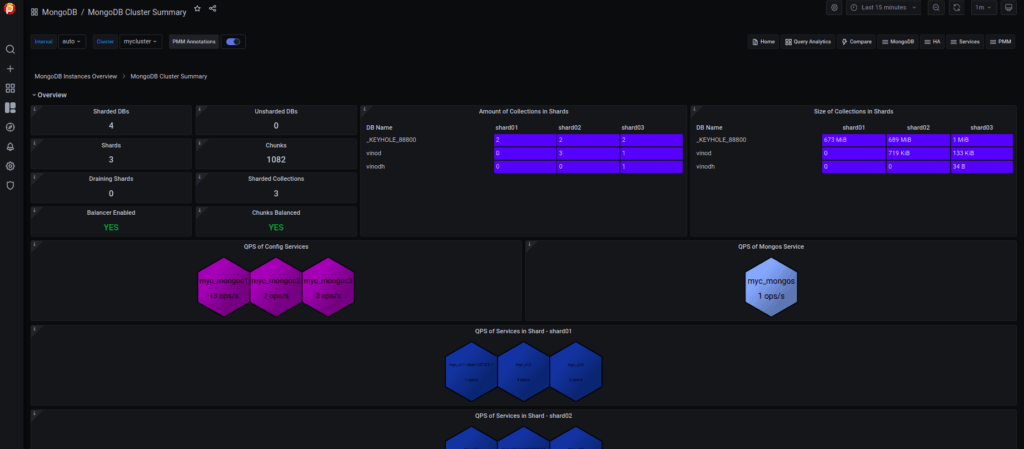
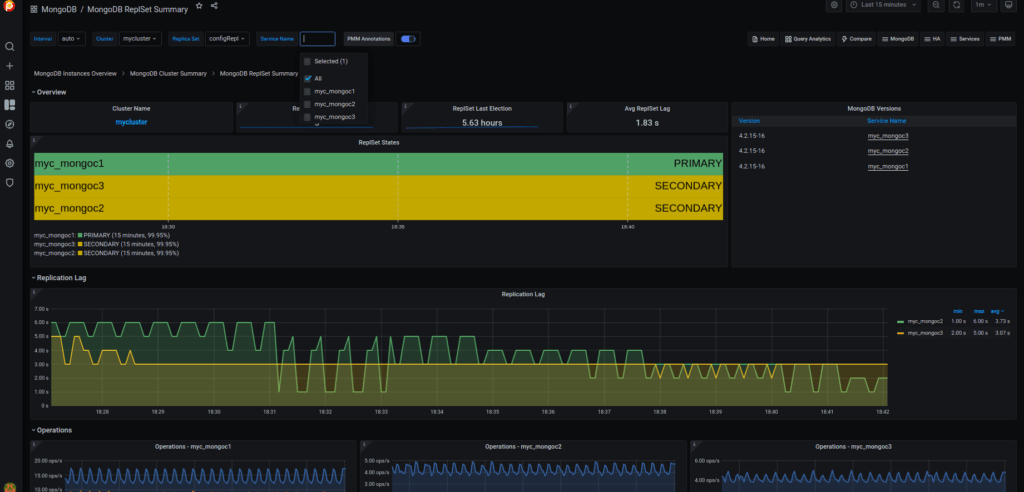
From PMM Dashboards, you can then view the replSet summary as well as the sharded cluster summary.
This dashboard gives information about the sharded/unsharded databases, shards, chunks, cursor details, etc.
This dashboard tells about the replication information like replica lag, operations, heartbeat, ping time, etc.
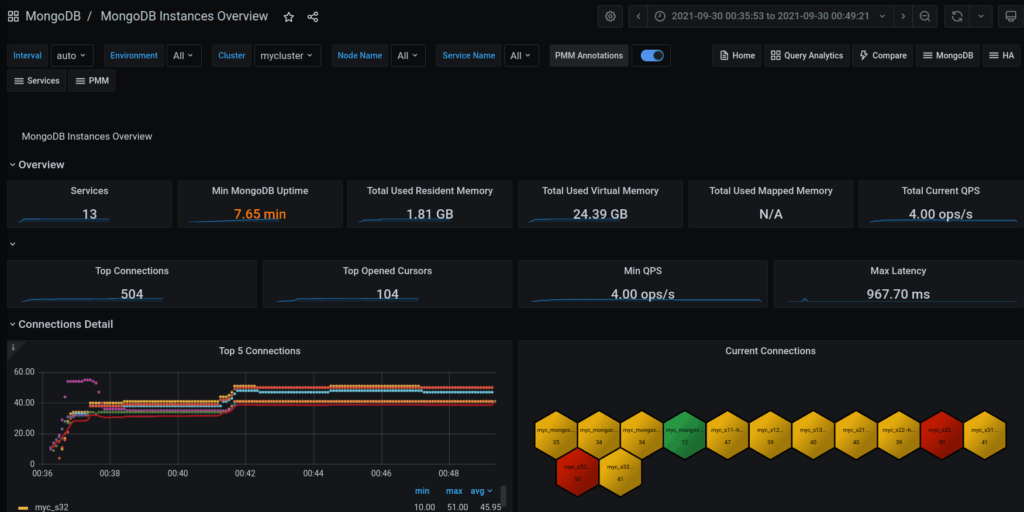
This is the general dashboard for a MongoDB instance which provides generic information about the connections, memory usage, latency, etc
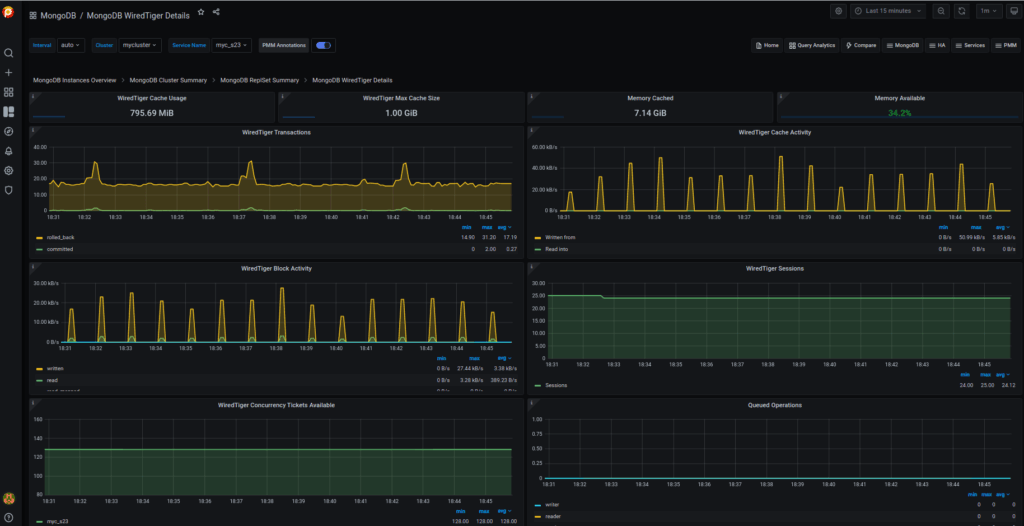
This is the main dashboard that you’ll need most to analyze the problems here as it shows the wiredTiger information. The main metrics that you need to monitor here are the WT cache utilization, evictions of modified or unmodified pages, write/read tickets utilization, index/objects scans, etc.
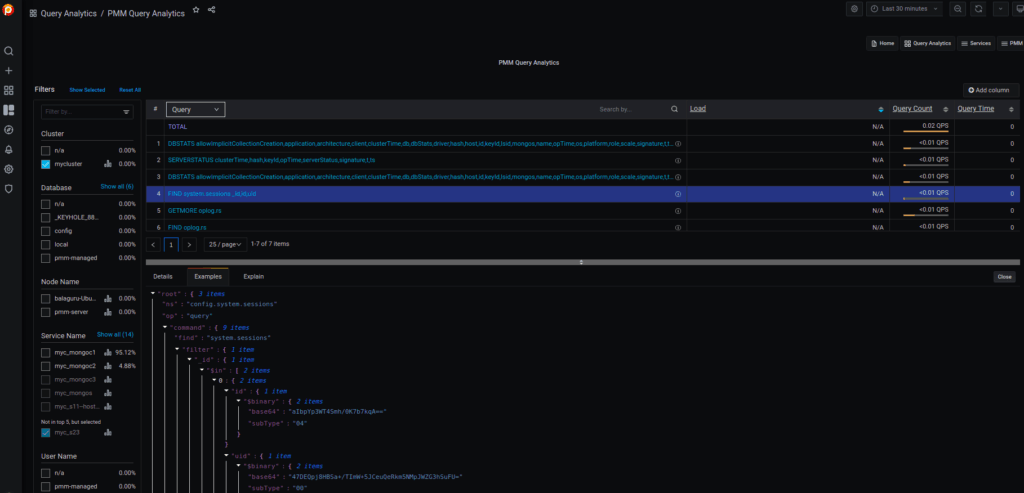
If you enable the profiling, then you could see the queries used in the database here. You can filter them easily as shown in the screenshot below. Also, you can get the explain plan to check whether they utilize the COLLSCAN (disk reads) or IXSCAN (uses index). Also, you can check the counts, load, etc.
As said, Percona Monitoring and Management 2 is very easy to configure to monitor the databases and it is recommended too. It’s better now rather than late to configure the monitoring. PMM2 is managed by Percona which is totally free and you can raise any bugs here – https://jira.percona.com/. If you have doubts, you can leave your questions here – https://forums.percona.com.
Complete the 2021 Percona Open Source Data Management Software Survey




