

There and in coming posts I am going to cover main features of Percona XtraDB Cluster. The first feature is High Availability.
But before jumping to HA, let’s review general architecture of the Percona XtraDB Cluster.
1. The Cluster consists of Nodes. Recommended configuration is to have at least 3 nodes, but you can make it running with 2 nodes too.
2. Each Node is regular MySQL / Percona Server setup. The point is that you can convert your existing MySQL / Percona Server into Node and roll Cluster using it as base. Or otherwise – you can detach Node from Cluster and use it as just a regular server.
3. Each Node contains the full copy of data. That defines XtraDB Cluster behavior in many ways. And obviously there are benefits and drawbacks.
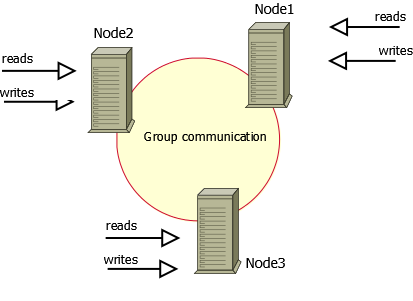
Benefits of such approach:
Drawbacks:
This basically defines how Percona XtraDB Cluster can be used for High Availability.
Basic setup: you run 3-nodes setup.
The Percona XtraDB Cluster will continue to function when you take any of nodes down.
At any point of time you can shutdown any Node to perform maintenance or make configuration changes.
Or Node may crash or become network unavailable. The Cluster will continue to work, you can continue to run queries on working nodes.
The biggest question there, what will happen when the Node joins the cluster back, and there were changes to data while the node
was down.
Let’s focus on this with details.
There is two ways that Node may use when it joins the cluster: State Snapshot Transfer (SST) and Incremental State Transfer (IST).
mysqldump and rsync is that your cluster becomes READ-ONLY for time that takes to copy data from one node to another (SST applies FLUSH TABLES WITH READ LOCK command).Xtrabackup SST does not require READ LOCK for full time, only for syncing .frm files (the same as with regular backup).
You can monitor current state of Node by usingSHOW STATUS LIKE 'wsrep_local_state_comment', when it is ‘Synced (6)’, the node is ready to handle traffic.





Vadim,
I wonder if you looked into what is practical limit of .frm files which can be synchronized without large downtime ?
I wonder what technologies could be used to reduce the downtime. Can we sync .frm files with no lock first and when do
second round with lock when most likely no files will need to be transferred as well as it is more likely they are in cache.
Peter,
In the recent version of MySQL Enterprise Backup they announced “lockless” backup of .frm files for InnoDB tables.
I am not sure how this is done, I guess the individual table is still gets locked on short period of time ( datadict->mutex or something) and frm files are copied together with .ibd.
We can look how we can make the same in XtraBackup.
Vadim,
What I mentioned is rather rync like method to copy files and when copy them again under lock if they are changed. It would not reduce locking but can reduce locking time significantly. As I understand fuzzy copy might be possible by reconstructing .frm updates from records in transaction log
Vadim, as for “not scaling writes” it turns out Galera is much better at this than you’d believe at first sight. Yes, it is not a sharding solution (like NDB or some NoSQL solutions) but it actually does improve performance.
– First, remember that even if your workload isn’t read-only, it also isn’t write-only. For instance in sysbench oltp, all transactions have 75% selects and 25% writes. You could not scale this workload on a traditional master-slave setup, because there are no read-only transactions. However you can distribute this over a multi-master Galera cluster. This offloads the selects of your mixed workload. So in the sysbench case you can easily scale 4x with this method (by using a 4 or 5 node Galera cluster).
– Second, and this is really surprising result, Alex and Seppo claim they can also scale a 100% write-only workload by roughly 2x. This is because also writes compose of MySQL level tasks like sql parsing, optimization and such, whereas the row based replication events are cheap and consist mostly of the actual writing to disk part. It turns out the SQL overhead is about 50%.
I have not verified the second claim, but I believe it. It correlates with reports (see Haidong Ji) that HandlerSocket can give a 2x benefit on write only workload.
Henrik,
Sure there will be some X times scaling for writes, but you can expect it grows with adding nodes.
It is also workload depended.
So in general I do not recognize this architecture as designed to scale writes, but you may get improvement
under some circumstances. ( yes, I do expect that Codership guys will not agree with me)
Vadim, I agree this is not designed to scale writes, except as much as stated in my first point: most workloads are mixed and will benefit from a multi-master architecture a few multiples. The second point is just pure luck, but still counts.
Otoh, in total 8x performance improvement on a workload is quite a lot, so I’ve started to be more nuanced in my statements, even if I also used to say “Galera will not scale writes”.
I would not consider it a real HA cluster when working with SST synchronization, since it implies moving the cluster to RO mode.
But, are write operations permited during IST synchronization?
Thanks!
Luis,
With SST xtrabackup, cluster gets RO only for short period of time. Later we will look into how to avoid this at all.
IST does permit write operations.
Luis: One node has to block for the time it is donor to the SST. The other nodes continue to the work and once SST is finished the donor and joiner become part of the cluster. So you just need to make sure you at all times have more than 1 node in the cluster, otherwise you cannot add nodes without downtime. (Except now with Percona introducing the xtrabackup method… and also IST helps to minimize such situations.)
So if you’re unsure, you could make a habit of running 4 node clusters. When doing maintenance on one node, you’re left with 3 operational. When the fourth node comes back, for a time the third is a donor and 2 are still operational.
Henrik,
You are correct, the other nodes continue to work.
There is however another issue what I see.
If write load on the other node is significant, both joiner and donor may end up in “never catching master” situation.
As they get disconnected from the cluster from some period of time, it may happen that it takes very long time
to apply all changes made while they were disconnected.
And while they apply that changes – new changes are being made on working node. This lend to “never-ending-loop”,
which can’t be resolved unless we decrease load from application.
I would like to see the cluster is able to throttle load (or to have at least option to force cluster to do that) to allow nodes disconnected for some time to be able to catch up.
But with non-blocking xtrabackup SST, the donor would not fall behind, right?
I can imagine for a large (3+ nodes) and write heavy cluster, let’s say the cluster is absorbing as many writes as a node can handle, it becomes even theoretically impossible for the joiner to ever catch up. Poor joiner even has to start with cold caches so it has a disadvantage.
Thanks for your help!
I am currently testing galera; I suppose SST, IST and all clustering related components are the same in Percona XtraDB cluster.
Henrik,
1. with xtrabackup SST the donor still is disconnected from cluster for short period of time. I am trying to convince Codership team that this is not needed at all.
2. With LRU dump/restore in Percona Server/XtraDB Cluster https://www.percona.com/doc/percona-server/5.5/management/innodb_lru_dump_restore.html the joiner will start with pre-loaded buffer pool, that helps a lot for a fast start.
Hi,
We are using percona mysql server and percona xtrabackup for backup.Let me know how to tack full backup without using the lock file and backup’s are in .sql format.Can you please help me on this.
In EC2 environment, a new node can be started from the EBS snapshot within 5-15 minutes. What needs to be done on that node to prepare it to join the cluster?
Gene: Galera supports a pluggable API for taking the SST snapshot. So what you are asking for is simply for a new way to do that, using EBS. If you/someone is interested in building EBS support I would recommend looking into the SST scripts that implement rsync SST and then modify them to manage an EBS snapshot instead.
Vadim,
Replicating to cluster from another mysql instance does not seem to work. The node in the cluster who act as slave of a regular mysql does get all the transactions from it’s master, but the other nodes do not see them.
Transactions directly applied on any of the nodes (not through regular mysql replication) do get to all the others.
The source MySQL uses MIXED format, all nodes in cluster use ROW. Not sure if that makes any difference.
Also to mention, if mysql replication on the cluster node (the slave) had any problem (dup key or something like that), after fix the replication, this node will NOT distribute/receive transactions within the cluster. No errors until reboot.
Vadim,
I did setup galera cluster on three separate node successfully using the link provided in the percona site ( https://www.percona.com/doc/percona-xtradb-cluster/3nodesec2.html ).
This is my setup:
node1 is master
node2 and node3 are slaves, and these nodes has the master IP for wrep_cluster_address parameter.
The problem is, when I stop node1 manually and if I enter data in node2, the node 3 is not catching up the latest from node2. Then I started node1 and node1 is not catching up the latest data from node2 either. Then I restarted node2, the node2 loses all his latest data and synching up with node1.
I am not sure, is this is a bug in the product or am I missing any parameter specification in my.cnf file. I tried to enter secondary ip address for wrep_cluster_address in node3 and it is not accepting and returns the error when I restart node3.
How do I specify multiple IP address for node3(or node1 or node2), so that it can act as master and slave.
-Bala
Above problem is resolved….before turning node1 online, ensure to change the cluster address to point other node(node2 or node3) on node1 my.cnf file, to synchronize data from other nodes.
What happens when there is change in node after it is deatached from the cluster and after some time joins the cluster?
In reply to Db (May 14).
It depends on the size of gcache.
If, while the node was down, the gcache of another node was large enough to store all the updates, only an IST occurs.
Otherwise, its a SST…
gcache can be changed – there are howtos on Percona site.
Thank you Alain,
When a node is disconnected from a cluster, its database cannot be accessed right?(while using rsync)
Not quite.
A disconnected node can be accessed provided it is not still part of the cluster – in other words, it is possible to disconnect a node from the cluster and use it as a “normal” database.
I am however assuming you mean the node is disconnected because it needs to do an SST (its “broken”).
In this case, the node is not accessible – you will notice that while the node is doing an SST, you cannot access mysql at all.
On the Donor Node, the status will be “Donor” and the node will be read only while doing a RSYNC. So you can access it for READS.
Thank you Alain.