
Editor’s Note: This article was originally authored by Inel Pandzic.
Migrating data between MongoDB clusters is rarely a five-minute job. A large initial clone followed by days of change-stream replication is normal, and for all that time, Percona ClusterSync for MongoDB (PCSM) is a critical piece of your infrastructure. Until now, it was also a single point of failure: if the host, container, or pod running PCSM crashed, replication stopped dead. Nobody took over. An operator had to notice the outage and manually recover the process before synchronization could resume.
That changes with PCSM 1.0.0, which introduces built-in active-standby high availability for the replication phase.
You can now run multiple PCSM instances pointed at the same source and target clusters. They coordinate through a MongoDB-backed lease stored on the target cluster: exactly one instance holds the lease and is ACTIVE — it runs replication. The rest stay STANDBY and take over automatically when the lease expires. No external coordinator— the target MongoDB cluster you already have is the source of truth.
Best of all, HA is always on and requires zero configuration changes. A single instance simply wins the lease immediately and behaves exactly as before. If you want failover, just start a second (or third) instance with the same source and target, and you’re done.
Three mechanisms make failover safe: lease-based election, term fencing, and checkpoint-based recovery.
All coordination state lives in the percona_clustersync_mongodb database on the target. Election is a single atomic conditional write: an instance claims the lease only if the current one has expired, and expiry is evaluated against the server clock. Two racing standbys cannot both win, and clock skew between PCSM hosts is irrelevant — MongoDB’s clock is the only one that matters.
The lease itself is one small document – percona_clustersync_mongodb.lease:
|
1 2 3 4 5 6 7 |
{ "_id": "lease", "term": 7, "instanceId": "b3f1c2a4-9d7e-4c11-8a2f-1e6b0d5c9a77", "electionDate": { "$date": "2026-07-17T09:14:02.190Z" }, "expiresAt": { "$date": "2026-07-17T09:20:41.882Z" } } |
The term field a monotonic fencing token that increments on every election (every ACTIVE->STANDBY change), and it’s stamped into every checkpoint (percona_clustersync_mongodb.checkpoints) write the ACTIVE makes. Consider the classic distributed-systems nightmare: an ACTIVE stalls (GC pause, network partition, pod killed and instance restarted before the lease expired), its lease expires, a standby is promoted — and then the old instance wakes up and keeps writing as if nothing happened. With term fencing, that “zombie” active’s checkpoint writes carry a stale term. The target rejects them, the deposed instance notices, and it self-demotes to STANDBY. The new ACTIVE’s state is never corrupted.
On promotion, the new ACTIVE resumes replication from the persisted checkpoint — the same crash-recovery mechanism PCSM has always used, now triggered automatically. Timings are fixed in this release: the lease TTL is 10 seconds, the ACTIVE renews every 3 seconds, and each instance heartbeats every 3 seconds. In practice, a hard-killed ACTIVE is replaced within roughly the lease TTL.
One boundary to know: HA covers the change-stream replication phase. The initial clone currently is not resumable. If the ACTIVE dies mid-clone, a standby is still promoted, detects the interrupted clone during recovery, and fails cleanly with an explicit reason surfaced in both the logs and /status: initial clone interrupted by failover and is not resumable; start a new run to re-clone from scratch Recovery is a plain /start on the new ACTIVE, which restarts the sync from scratch. Automatic failover kicks in once the clone completes and continuous replication begins.
Each instance maintains a liveness document (percona_clustersync_mongodb.members) on the target, and API responses include a cluster envelope so an operator hitting any node can see who is ACTIVE: me (the instance you reached), role, and the full member list with every live instance’s host, port, and role. If you send an operational command (/start, /pause, /finalize, …) to a STANDBY, it responds with HTTP 409 and error: "not_active" — with the same envelope in the body, so your client can immediately locate the ACTIVE and retry there:
|
1 2 3 4 5 6 7 8 9 10 11 12 13 14 15 16 17 18 19 20 21 22 23 24 25 |
HTTP/1.1 409 Conflict { "ok": false, "error": "not_active", "me": { "instanceId": "6a2d8e10-4b3c-4f97-9c0a-2f7e1b4d6c88" }, "role": "STANDBY", "group": { "term": 7, "members": [ { "instanceId": "b3f1c2a4-9d7e-4c11-8a2f-1e6b0d5c9a77", "host": "pcsm0", "port": 2242, "role": "ACTIVE" }, { "instanceId": "6a2d8e10-4b3c-4f97-9c0a-2f7e1b4d6c88", "host": "pcsm1", "port": 2243, "role": "STANDBY" } ] } } |
No guessing, no stale DNS tricks.
Two operational notes:
/metrics (and pprof) are served on every role.For cleanup, two new direct commands clear HA state on the target while no server is running: pcsm reset members and pcsm reset lease.
Each instance exports HA metrics on /metrics, on every role:
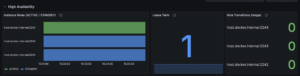
percona_clustersync_mongodb_ha_active — gauge; 1 = ACTIVE, 0 = STANDBYpercona_clustersync_mongodb_ha_term — gauge; current lease termpercona_clustersync_mongodb_ha_role_transitions_total — counter; role changes on this instanceWith these few metrics you can build a dashboard that tells the whole HA story at a glance: a state timeline of ha_active per instance doubles as the deployment roster and shows who is ACTIVE and since when, ha_term shows the current fencing term, and the rate of ha_role_transitions_total per instance works as a flap detector (0 means stable; a climbing number means trouble). We ship exactly such a board with the project — grab the Grafana dashboard JSON from the repo and use it as a starter for your own monitoring.
Here is a healthy three-instance deployment: one ACTIVE, two STANDBYs, term 1, no transitions.
And the same deployment right after the ACTIVE was killed: the instance on port 2243 took over, the lease term incremented to 2, and its transition counter recorded the promotion. The old ACTIVE rejoined as a STANDBY.
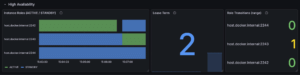
One glance at the timeline tells you the full failover story — who held the lease, when it changed hands, and whether the deployment has been stable since.
Upgrade note: replication state from 0.9.0 is not compatible with 1.0.0. Run pcsm reset against the target before starting replication with the new version.
Then simply start more than one instance:
|
1 2 |
pcsm --source "mongodb://src-mongos:27017" \ --target "mongodb://tgt-mongos:27017" |
Run the same command on a second host, check /status on either one, and you’ll see one ACTIVE and one STANDBY. Kill the ACTIVE and watch the standby pick up replication from the last checkpoint within seconds.
Percona thrives on community collaboration. As we continue to refine PCSM and celebrate its production-ready GA release, we invite you to get involved. We welcome bug reports, feature suggestions, and code contributions. Your input helps us build the tools the MongoDB community actually needs. We encourage you to deploy PCSM in your production environments today! Check out the PCSM repository and join the journey with us!
Ready to break free from vendor lock-in? Check out the PCSM Documentation to get started with your first sync today.
Resources
RELATED POSTS