

One day, my friend Martín told me about a problem he and his team were dealing with.
Every time they needed to run a pre-production test, they had to restore a copy of the production database into their test cluster. That process alone takes about three hours because of the size of the database.
If something went wrong during the test and they needed to run it again, they had no choice but to sit through the entire restore cycle again.
Three hours. Twice (or more) just to run the pre-production test.
That’s what motivated me to build mongorewind, a terminal UI tool that watches your MongoDB cluster for changes and lets you instantly undo all of them, inserts, updates, replaces, and deletes. In reverse order, without touching your backup.
mongorewind opens a cluster-wide change stream and records every data-modifying operation to a local log file. When you press R to rewind, it applies the inverse of each recorded operation in reverse chronological order:
| Recorded operation | Rewind action |
| insert | deleteOne |
| update / replace | replaceOne with pre-image (upsert) |
| delete | replaceOne with pre-image (upsert) |
To undo updates and deletes correctly, mongorewind needs to know what the document looked like before the change.
It captures this automatically using MongoDB’s changeStreamPreAndPostImages feature, which it enables on every collection it finds — and on any new collection the moment it is created.
|
1 2 3 |
git clone https://github.com/zelmario/mongorewind.git cd mongorewind go build -o mongorewind . |
Or install directly:
|
1 |
go install github.com/zelmario/mongorewind@latest |
Start mongorewind pointing at your cluster before running any tests:
|
1 |
mongorewind --uri "mongodb://host1:27017,host2:27017,host3:27017/?replicaSet=rs0" |
While mongorewind is running, you will see a terminal dashboard showing the operations it has recorded:
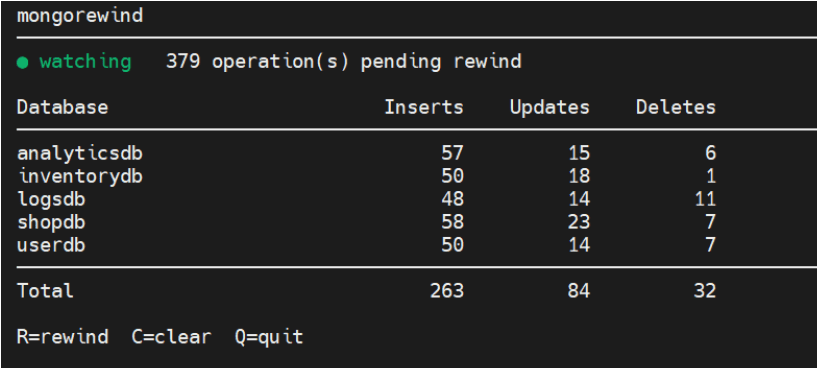
The status indicator shows ● watching (green) while the change stream is active. When you press R, it switches to ○idle (yellow) while the rewind is in progress.
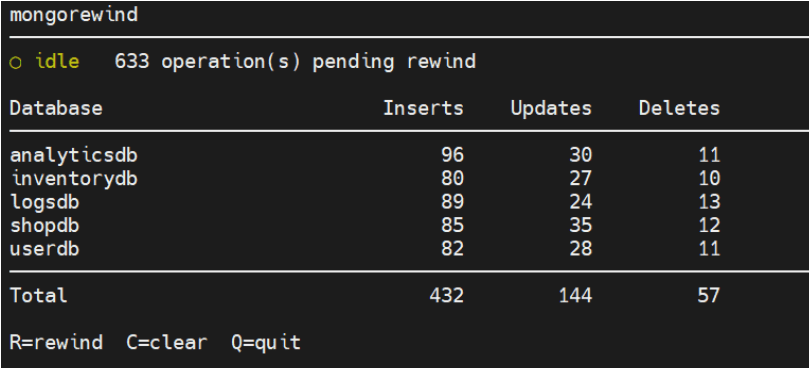
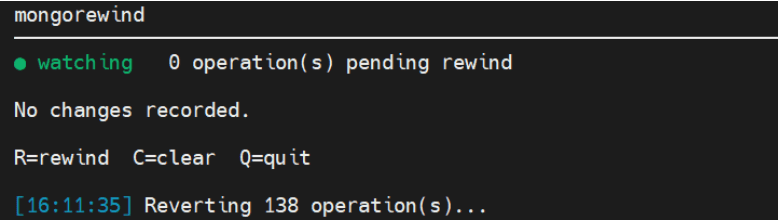
Once the test run is complete and something went wrong, you can press R and mongorewind undoes every change it recorded — bringing the data back to exactly the state it was in before the test started. No restore, no waiting.
If you are running automated tests in a CI environment, mongorewind also supports a non-interactive mode. You can start the watcher in a terminal or the background and trigger rewinds from your scripts:
bash
|
1 2 3 4 5 6 7 8 9 10 11 12 13 14 15 16 |
# Start the watcher in the background mongorewind --uri "mongodb://..." & # Run your test suite run_tests # Rewind all changes and run again mongorewind --rewind run_tests |
mongorewind –rewind exits with code 0 on success and 1 on error, so it integrates naturally into any CI pipeline.
If you use a custom log path, pass the same –log value to both commands so they share the same socket:
|
1 2 3 |
mongorewind --log /tmp/mytest.log --uri "mongodb://..." & mongorewind --log /tmp/mytest.log --rewind |
Replica set required. Change streams need a replica set or sharded cluster. If you are working locally, you can start a single-node replica set with:
|
1 |
mongod --replSet rs0 |
And then run rs.initiate() in the mongo shell.
The log file is scoped to a session. The file is truncated on startup and after a successful rewind, so each test session starts clean. System databases (admin, local, config) and system.* collections are ignored automatically.
Pre-images are enabled automatically. mongorewind polls every 2 seconds to catch newly created collections and enables changeStreamPreAndPostImages on them. You don’t need to configure anything manually.
With mongorewind, Martín’s team does the restoration once. After that, every time a test fails and they need to start over, they just run mongorewind –rewind. The database goes back to its original state in seconds, and the test runs again. Three hours become just a few seconds.
Contributions are welcome! Since I’m not a developer, your feedback is valuable. If you are a developer and notice any mistakes or want to enhance the script, please feel free to contribute!
Resources
RELATED POSTS




Откопировать датакаталог на другой диск, чтоб потом моментально рестартануть СУБД на нём – не?
That works if you have access to the hosts. But you have to stop mongod and reset every node from the same copy, and the copy only works once. After the test it’s dirty, so you
copy again, and that takes time proportional to the database size. mongorewind needs only a URI and no downtime. The rewind takes time proportional to the changes the test made, not to the database size.