

Hello friends, at Percona Managed Services, we usually do different types of things every day, including routine tasks, monitoring, and, very frequently, answering questions that are not always easy to answer.
A few days ago, a client asked us the following question: “Hey Percona, I have a question and a problem simultaneously: I want to delete rows from a table from a specific date back because the data is not necessary. I tried to run the DELETE command, which gave me this error: Cannot delete or update a parent row: a foreign key constraint fails. Could you please help me?”
At first glance, the error message was obviously clear: the table from which rows were to be deleted had a child table, which prevented the execution of the DELETE directly.
“Don’t worry, we’ll take a look at the issue, and accordingly, we’ll proceed to suggest an execution plan,” we replied. And this is how this blog originates so that if you find yourself in the same situation, proceed similarly or at least consider some of the practices used to meet the objective.
First of all, let’s review the structure of the table, its size, and its constraints.
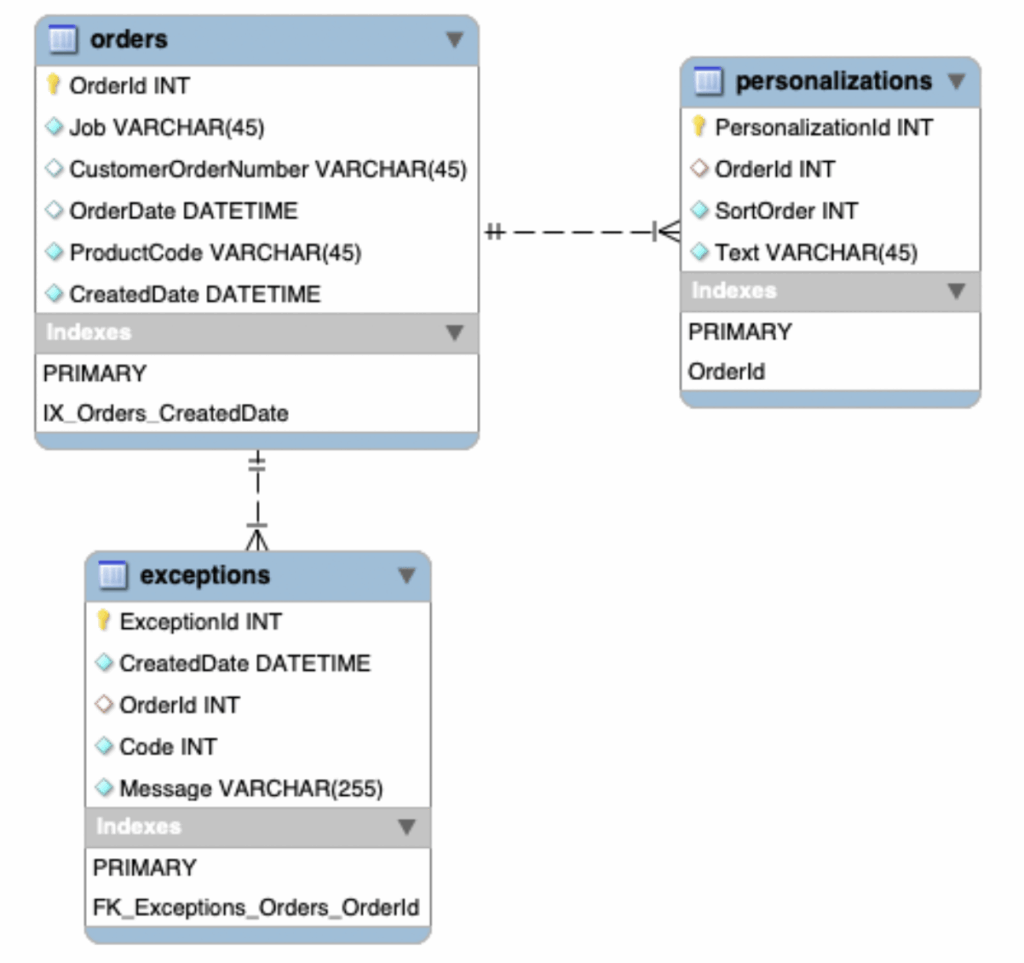
Let’s check the table size (the numbers of the table sizes are real, they don’t match the structure of the table, as I have removed the relevant columns to keep the whole thing anonymous).
|
1 2 3 4 5 6 7 |
+--------------+------------------+------------+---------+----------+---------+----------+ | table_schema | table_name | table_rows | DATA_MB | INDEX_MB | FREE_MB | TOTAL_MB | +--------------+------------------+------------+---------+----------+---------+----------+ | cust | orders | 101703010 | 50990 | 25760 | 70 | 76820 | | cust | exceptions | 15251900 | 2110 | 640 | 50 | 2800 | | cust | personalizations | 119541910 | 9310 | 7090 | 60 | 16460 | +--------------+------------------+------------+---------+----------+---------+----------+ |
The constraints:
|
1 2 3 4 5 6 7 8 9 10 11 12 13 14 15 16 17 18 19 20 21 22 23 24 25 26 27 28 29 |
mysql> SELECT * FROM information_schema.REFERENTIAL_CONSTRAINTS WHERE REFERENCED_TABLE_NAME IN ( 'orders' )G *************************** 1. row *************************** CONSTRAINT_CATALOG: def CONSTRAINT_SCHEMA: cust CONSTRAINT_NAME: FK_Exceptions_Orders_OrderId UNIQUE_CONSTRAINT_CATALOG: def UNIQUE_CONSTRAINT_SCHEMA: cust UNIQUE_CONSTRAINT_NAME: PRIMARY MATCH_OPTION: NONE UPDATE_RULE: NO ACTION DELETE_RULE: NO ACTION TABLE_NAME: exceptions REFERENCED_TABLE_NAME: orders *************************** 2. row *************************** CONSTRAINT_CATALOG: def CONSTRAINT_SCHEMA: cust CONSTRAINT_NAME: OrderId UNIQUE_CONSTRAINT_CATALOG: def UNIQUE_CONSTRAINT_SCHEMA: cust UNIQUE_CONSTRAINT_NAME: PRIMARY MATCH_OPTION: NONE UPDATE_RULE: NO ACTION DELETE_RULE: NO ACTION TABLE_NAME: personalizations REFERENCED_TABLE_NAME: orders 2 rows in set (0.03 sec) |
Finally, we show you below the topology presented by the client in question:
|
1 2 |
1. mysqlserver01=127.0.0.2 [RW] [ver: 8.0.31-23] |___ 2. mysqlserver02=127.0.0.3 [SR] [ver: 8.0.31-23] (Slave_delay: 0) |
This means the following:
What can we say or respond to this situation?
What does all this imply?
So what should we do in these cases?
When you need to do this type of operation in which a large number of rows are involved, with constraints, it is always advisable to carry out certain checks, make a backup of the information before it is deleted, delete the data from the child tables using the criteria of the parent table (with pt-archiver).
Very well. We are going to do the necessary tests for this to be carried out successfully, for which we will use the following test environment:
Below is the test topology (as you can see, we’re using the same version of Percona Server for MySQL).
|
1 2 |
1. PS8_Primary=192.168.0.70 [RW] [ver: 8.0.31-23] |___ 2. PS8_Replica=192.168.0.71 [SR] [ver: 8.0.31-23] (Slave_delay: 0) |
Once created and loaded the tables (you can use this link to do so), we have something like this:
|
1 2 3 4 5 6 7 |
+--------------+------------------+------------+---------+----------+---------+----------+ | TABLE_SCHEMA | TABLE_NAME | TABLE_ROWS | DATA_MB | INDEX_MB | FREE_MB | TOTAL_MB | +--------------+------------------+------------+---------+----------+---------+----------+ | test | orders | 10000 | 2 | 0 | 4 | 6 | | test | exceptions | 20000 | 2 | 0 | 4 | 6 | | test | personalizations | 20000 | 3 | 0 | 3 | 6 | +--------------+------------------+------------+---------+----------+---------+----------+ |
Now, for the test, let’s remove a significant number of rows from the table. For this, we will execute this query in test.orders and use the CreatedDate field as a reference:
|
1 2 3 4 5 6 7 |
PS8_Primary (none)> select count(1) from test.orders where CreatedDate < '2022-07-30'; +----------+ | count(1) | +----------+ | 3749 | +----------+ 1 row in set (1.04 sec) |
Let’s try doing the same thing the client did to check if he was right:
|
1 2 |
PS8_Primary (none)> delete from test.orders where CreatedDate < '2022-07-30'; ERROR 1451 (23000): Cannot delete or update a parent row: a foreign key constraint fails (`test`.`exceptions`, CONSTRAINT `FK_Exceptions_Orders_OrderId` FOREIGN KEY (`OrderId`) REFERENCES `orders` (`OrderId`)) |
The procedure
Let’s create the /home/percona/Backup directory and check if there is enough disk space for such a backup (based on the table size, it should be at least the same or less). For this, we will use the replica so as no impact the operation of the primary instance.
|
1 2 3 4 5 6 7 8 9 10 11 |
[percona@PS8_Replica ~]$ pwd /home/percona [percona@PS8_Replica ~]$ mkdir /home/percona/Backup [percona@PS8_Replica ~]$ cd /home/percona/Backup/ [percona@PS8_Replica Backup]$ pwd /home/percona/Backup [percona@PS8_Replica Backup]$ |
For the backup, we will use mydumper, which allows us to use the following:
Next, these are the commands to execute for the backups. And we verify that each step finished OK:
|
1 2 3 4 |
[percona@PS8_Replica ~]$ mydumper --host=localhost --compress --verbose 3 --less-locking --database test --tables-list test.orders --where "CreatedDate < '2022-07-30'" --outputdir /home/percona/Backup --logfile /home/percona/Backup/test_orders.log [percona@PS8_Replica ~]$ echo $? 0 |
|
1 2 3 4 |
[percona@PS8_Replica ~]$ mydumper --host=localhost --compress --verbose 3 --less-locking --database test --tables-list test.exceptions --where "OrderId in (select OrderId from test.orders WHERE CreatedDate < '2022-07-30')" --outputdir /home/percona/Backup/ --logfile /home/percona/Backup/test_exceptions.log [percona@PS8_Replica ~]$ echo $? 0 |
|
1 2 3 4 |
[percona@PS8_Replica ~]$ mydumper --host=localhost --compress --verbose 3 --less-locking --database test --tables-list test.personalizations --where "OrderId in (select OrderId from test.orders WHERE CreatedDate < '2022-07-30')" --outputdir /home/percona/Backup/ --logfile /home/percona/Backup/test_personalizations.log [percona@PS8_Replica ~]$ echo $? 0 |
Let’s verify that the backup files exist and have data:
|
1 2 3 4 5 6 7 8 9 10 11 12 13 14 15 |
[percona@PS8_Replica Backup]$ ls -l /home/percona/Backup/* -rw-rw-r--. 1 percona percona 226 Feb 23 19:29 /home/percona/Backup/metadata -rw-rw-r--. 1 percona percona 151 Feb 23 19:29 /home/percona/Backup/test-schema-create.sql.gz -rw-rw-r--. 1 percona percona 4 Feb 23 19:28 /home/percona/Backup/test.exceptions-metadata -rw-rw-r--. 1 percona percona 327 Feb 23 19:28 /home/percona/Backup/test.exceptions-schema.sql.gz -rw-rw-r--. 1 percona percona 59531 Feb 23 19:28 /home/percona/Backup/test.exceptions.00000.sql.gz -rw-rw-r--. 1 percona percona 4 Feb 23 19:28 /home/percona/Backup/test.orders-metadata -rw-rw-r--. 1 percona percona 306 Feb 23 19:28 /home/percona/Backup/test.orders-schema.sql.gz -rw-rw-r--. 1 percona percona 42736 Feb 23 19:28 /home/percona/Backup/test.orders.00000.sql.gz -rw-rw-r--. 1 percona percona 4 Feb 23 19:29 /home/percona/Backup/test.personalizations-metadata -rw-rw-r--. 1 percona percona 304 Feb 23 19:29 /home/percona/Backup/test.personalizations-schema.sql.gz -rw-rw-r--. 1 percona percona 57352 Feb 23 19:29 /home/percona/Backup/test.personalizations.00000.sql.gz -rw-rw-r--. 1 percona percona 2794 Feb 23 19:28 /home/percona/Backup/test_exceptions.log -rw-rw-r--. 1 percona percona 2735 Feb 23 19:28 /home/percona/Backup/test_orders.log -rw-rw-r--. 1 percona percona 2806 Feb 23 19:29 /home/percona/Backup/test_personalizations.log |
|
1 2 3 4 5 6 7 8 9 10 11 |
[percona@PS8_Primary Backup]$ zcat /home/percona/Backup/test.exceptions.00000.sql.gz | head /*!40101 SET NAMES binary*/; /*!40014 SET FOREIGN_KEY_CHECKS=0*/; /*!40103 SET TIME_ZONE='+00:00' */; INSERT INTO `exceptions` VALUES(1,"2022-02-23 00:00:00",1,222,"Exception Detail for order # 1") ,(2,"2022-02-23 00:00:00",1,222,"Exception Detail for order # 1") ,(3,"2022-02-23 00:00:00",2,444,"Exception Detail for order # 2") ,(4,"2022-02-23 00:00:00",2,444,"Exception Detail for order # 2") ,(5,"2022-02-23 00:00:00",3,666,"Exception Detail for order # 3") ,(6,"2022-02-23 00:00:00",3,666,"Exception Detail for order # 3") ,(7,"2022-02-23 00:00:00",4,888,"Exception Detail for order # 4") |
|
1 2 3 4 5 6 7 8 9 10 11 |
[percona@PS8_Replica Backup]$ zcat /home/percona/Backup/test.orders.00000.sql.gz | head /*!40101 SET NAMES binary*/; /*!40014 SET FOREIGN_KEY_CHECKS=0*/; /*!40103 SET TIME_ZONE='+00:00' */; INSERT INTO `orders` VALUES(1,"OrderNumber 1","Job 1","2022-02-23 00:00:00","Product Number 1","2022-02-23 00:00:00") ,(2,"OrderNumber 2","Job 2","2022-02-23 00:00:00","Product Number 2","2022-02-23 00:00:00") ,(3,"OrderNumber 3","Job 3","2022-02-23 00:00:00","Product Number 3","2022-02-23 00:00:00") ,(4,"OrderNumber 4","Job 4","2022-02-23 00:00:00","Product Number 4","2022-02-23 00:00:00") ,(5,"OrderNumber 5","Job 5","2022-02-23 00:00:00","Product Number 5","2022-02-23 00:00:00") ,(6,"OrderNumber 6","Job 6","2022-02-24 00:00:00","Product Number 6","2022-02-24 00:00:00") ,(7,"OrderNumber 7","Job 7","2022-02-24 00:00:00","Product Number 7","2022-02-24 00:00:00") |
|
1 2 3 4 5 6 7 8 9 10 11 |
[percona@PS8_Replica Backup]$ zcat /home/percona/Backup/test.personalizations.00000.sql.gz | head /*!40101 SET NAMES binary*/; /*!40014 SET FOREIGN_KEY_CHECKS=0*/; /*!40103 SET TIME_ZONE='+00:00' */; INSERT INTO `personalizations` VALUES(1,1,1,"Personalization Detail for OrderID # 1") ,(2,1,2,"Personalization Detail for OrderID # 1") ,(3,2,2,"Personalization Detail for OrderID # 2") ,(4,2,4,"Personalization Detail for OrderID # 2") ,(5,3,3,"Personalization Detail for OrderID # 3") ,(6,3,6,"Personalization Detail for OrderID # 3") ,(7,4,4,"Personalization Detail for OrderID # 4") |
Let’s start with test.exceptions table first. We will run all the archivers on the primary server as follows:
|
1 2 3 4 5 6 7 8 9 10 11 12 13 14 15 16 17 18 19 |
[percona@PS8_Primary ~]$ pt-archiver --noversion-check --source h=localhost,D=test,t=exceptions --where "OrderId in (select OrderId from test.orders WHERE CreatedDate < '2022-07-30')" --progress=500 --retries=5 --limit=1000 --commit-each --sentinel=/tmp/pt-archiver-test_exceptions --max-lag=30 --check-slave-lag=h=192.168.0.71 --primary-key-only --purge --bulk-delete --no-check-charset TIME ELAPSED COUNT 2023-02-23T19:31:34 0 0 2023-02-23T19:31:35 0 500 2023-02-23T19:31:35 0 1000 2023-02-23T19:31:36 1 1500 2023-02-23T19:31:37 2 2000 2023-02-23T19:31:38 3 2500 2023-02-23T19:31:39 4 3000 2023-02-23T19:31:40 5 3500 2023-02-23T19:31:40 5 4000 2023-02-23T19:31:42 7 4500 2023-02-23T19:31:42 7 5000 2023-02-23T19:31:44 9 5500 2023-02-23T19:31:44 10 6000 2023-02-23T19:31:45 10 6500 2023-02-23T19:31:46 11 7000 2023-02-23T19:31:48 13 7498 |
We verify that there are no rows that meet the purging criteria, and we verify how many rows are left in the table.
|
1 2 3 4 5 6 |
[percona@PS8_Primary ~]$ mysql -te "select count(1) from test.exceptions where OrderId in (select OrderId from test.orders WHERE CreatedDate < '2022-07-30')" +----------+ | count(1) | +----------+ | 0 | +----------+ |
Let’s continue with test.personalizations table:
|
1 2 3 4 5 6 7 8 9 10 11 12 13 14 15 16 17 18 19 |
[percona@PS8_Primary ~]$ pt-archiver --noversion-check --source h=localhost,D=test,t=personalizations --where "OrderId in (select OrderId from test.orders WHERE CreatedDate < '2022-07-30')" --progress=500 --retries=5 --limit=1000 --commit-each --sentinel=/tmp/pt-archiver-test_personalizations --max-lag=30 --check-slave-lag=h=192.168.0.71 --primary-key-only --purge --bulk-delete --no-check-charset TIME ELAPSED COUNT 2023-02-23T19:34:15 0 0 2023-02-23T19:34:15 0 500 2023-02-23T19:34:15 0 1000 2023-02-23T19:34:17 1 1500 2023-02-23T19:34:17 2 2000 2023-02-23T19:34:18 3 2500 2023-02-23T19:34:18 3 3000 2023-02-23T19:34:20 4 3500 2023-02-23T19:34:20 5 4000 2023-02-23T19:34:21 6 4500 2023-02-23T19:34:22 6 5000 2023-02-23T19:34:23 7 5500 2023-02-23T19:34:23 8 6000 2023-02-23T19:34:24 9 6500 2023-02-23T19:34:24 9 7000 2023-02-23T19:34:26 10 7498 |
We verify that there are no rows that meet the purging criteria:
|
1 2 3 4 5 6 |
[percona@PS8_Primary ~]$ mysql -te "select count(1) from test.personalizations where OrderId in (select OrderId from test.orders WHERE CreatedDate < '2022-07-30')" +----------+ | count(1) | +----------+ | 0 | +----------+ |
To finally finish with the test.orders table:
|
1 2 3 4 5 6 7 8 9 10 11 12 |
[percona@PS8_Primary ~]$ pt-archiver --noversion-check --source h=localhost,D=test,t=orders --where "CreatedDate < '2022-07-30'" --progress=500 --retries=5 --limit=1000 --commit-each --sentinel=/tmp/pt-archiver-test_orders --max-lag=30 --check-slave-lag=h=192.168.0.71 --primary-key-only --purge --bulk-delete --no-check-charset TIME ELAPSED COUNT 2023-02-23T19:35:15 0 0 2023-02-23T19:35:15 0 500 2023-02-23T19:35:16 0 1000 2023-02-23T19:35:17 1 1500 2023-02-23T19:35:17 2 2000 2023-02-23T19:35:19 3 2500 2023-02-23T19:35:19 4 3000 2023-02-23T19:35:21 5 3500 2023-02-23T19:35:21 5 3749 |
We verify that there are no rows that meet the purging criteria:
|
1 2 3 4 5 6 |
[percona@PS8_Primary ~]$ mysql -te "select count(1) from test.orders where CreatedDate < '2022-07-30'" +----------+ | count(1) | +----------+ | 0 | +----------+ |
When you need to do this type of operation in which a large number of rows are involved, with the constraints fence, it is always advisable to carry out all the previously mentioned checks, make a backup of the information before it is deleted, delete the data from the child tables using the criteria of the parent table (with pt-archiver) and constantly control the replication process during the process (in fact, the tool will not allow the lag to be greater than the one stipulated in the command –max-lag=30).
Finally, remove the data from the originally required table.
This process may take longer than a simple and traditional DELETE. Still, my friend, the most important thing is the availability of the data, integrity, and good response times. Always.
If necessary, you can restore the deleted rows using the backup as follows:
|
1 2 3 4 5 6 7 8 9 10 11 12 13 14 15 16 17 18 19 20 21 22 23 24 25 26 27 28 |
[percona@PS8_Replica Backup]$ zcat test.personalizations.00000.sql.gz | mysql -h 192.168.0.70 test -A [percona@PS8_Replica Backup]$ zcat test.exceptions.00000.sql.gz | mysql -h 192.168.0.70 test -A [percona@PS8_Replica Backup]$ zcat test.orders.00000.sql.gz | mysql -h 192.168.0.70 test -A [percona@PS8_Replica Backup]$ mysql -h 192.168.0.70 test -A -e "select count(1) from test.personalizations" +----------+ | count(1) | +----------+ | 20000 | +----------+ [percona@PS8_Replica Backup]$ mysql -h 192.168.0.70 test -A -e "select count(1) from test.exceptions" +----------+ | count(1) | +----------+ | 20000 | +----------+ [percona@PS8_Replica Backup]$ mysql -h 192.168.0.70 test -A -e "select count(1) from test.orders" +----------+ | count(1) | +----------+ | 10000 | +----------+ |
Percona Distribution for MySQL is the most complete, stable, scalable, and secure open-source MySQL solution available, delivering enterprise-grade database environments for your most critical business applications… and it’s free to use!
Resources
RELATED POSTS




