

This blog was first authored by Ibrar Ahmed in 2021. We’ve updated it in 2025 for clarity and relevance, reflecting current practices while honoring their original perspective.
You think your PostgreSQL setup is secure. That is, until you actually try to document it.
That’s usually when the questions start. Who has access to what? Are we encrypting data in transit? What happens if we get audited… or worse, breached?
It’s not that you overlooked security. It’s that PostgreSQL, out of the box, gives you just enough to feel like things are under control. However, default settings are not secure settings, and not all distributions ship with the same protections. Extensions, user roles, encryption, and auditing are all things you have to configure, monitor, and maintain on your own.
The more your environment grows, the harder it is to keep it all straight.
This guide walks you through what a secure PostgreSQL setup really looks like, where things tend to go off track, and how to lock it all down without blowing your budget or your weekend.
Let’s get something out of the way: PostgreSQL doesn’t have a giant red button labeled “Make Me Secure.”

Instead, it offers a rich toolkit, and what you do with it is up to you. And that’s where things often go sideways:
You don’t need to run a bank or be a secret agent to be a target. Whether it’s customer data, payment details, or proprietary information, your PostgreSQL environment holds something valuable, or it wouldn’t exist. Right? Right.
All of this is fixable… but only if you know what to look for.
Every PostgreSQL security conversation should start with the same three questions: Who gets in? What can they do? And how will we know if something goes wrong?

The answers live in a trio often abbreviated as AAA: Authentication, Authorization, and Accounting. On paper, it’s simple enough to tick off one by one. But in practice, it can be incredibly complex.
Too often, the first user accounts are created in a rush to get things working. Permissions are granted broadly “just for now.” Logging isn’t configured until someone asks for it. That “temporary” setup becomes permanent. That is, until there’s an incident or an audit, and everything needs to be unraveled.
PostgreSQL gives you the capabilities to control who gets access, restrict what they can do, and monitor what happens next. But those controls only matter if they’re used with intention. Let’s break down what that looks like in practice:
 Start with authentication because if this part’s wrong, nothing else matters. PostgreSQL supports multiple methods, but not all are created equal, and they fall into three main categories:
Avoid trust authentication unless it’s for something isolated and short-lived. MD5? Time to move on. Use SCRAM-SHA-256 wherever you can as it’s secure, modern, and built in. And if your database is part of a larger system, you’ll probably need to plug it into your existing identity infrastructure.
 That’s authorization, and it’s where things often get sloppy. PostgreSQL gives you fine-grained control over permissions, but that flexibility cuts both ways. Roles get copied and reused. GRANTs are handed out broadly and rarely cleaned up. Over time, no one’s quite sure who can access what.
PostgreSQL uses Role-Based Access Control (RBAC), meaning you define what each role (or user or group) is allowed to do, and on which objects. This includes:
A clear role strategy, regular audits, and the principle of least privilege are your best friends here. Don’t wait until you’re prepping for an audit to figure out what those roles actually do.
 If something goes wrong or someone starts asking questions, you need an audit trail. This is accounting, and it’s a non-negotiable for compliance, monitoring, and incident response. PostgreSQL’s built-in logging covers the basics: connection attempts, disconnections, and queries. But that’s just one layer. A solid audit setup should cover:
For deeper visibility into database activity, install pgAudit. It adds session-level and object-level detail, which is exactly what you’ll need when someone asks, “Who touched this table and when?“
Security isn’t just about what’s in place. It’s about what you can stand behind when someone asks the hard questions. Maybe it’s an auditor digging into your access controls. Maybe it’s your CTO wanting to know if a vendor breach puts your data at risk. Or maybe it’s the middle of the night, you can’t sleep because something feels off, and you’re combing through logs.
You can’t “secure” PostgreSQL by flipping a few switches and putting your feet up, but you probably already know that. Because if you’re the one responsible for PostgreSQL, you’ve likely had that moment, where someone flags a risk, or something weird shows up in the logs, or you realize you have no idea who set up access for that reporting tool six months ago.
It comes down to layering defenses that actually work together when things go sideways. It’s about being able to say, “If this fails, something else is ready to catch it.” Think of it like protecting your home. You lock your door, turn on your camera, and arm the alarm. It’s not one or the other; it’s all of them.
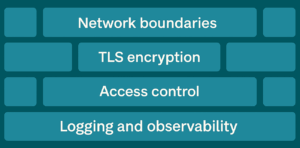
Let’s walk through these layers, the way you’d experience them when something goes wrong:
Start at the edge. If someone shouldn’t be able to reach your database, stop them before they even try.

It’s always surprising how many “temporary” dev instances accidentally end up exposed. No one means to do it. But it happens fast.
Just because a connection is allowed doesn’t mean it’s safe. Encrypt everything that travels between client and server.
If someone can intercept unencrypted traffic (even internally), they’ve got everything they need. Don’t give them that chance.
This is the part most people overcomplicate. Or maybe underthink? Either way, you don’t need to build a maze of roles, but you do need to:
Most issues we see in audits aren’t because someone got in; they’re because someone had way too much access once they were inside.
Eventually, something’s going to happen. And when it does, whether it’s a failed login, an unauthorized query, or a full-blown breach, you’ll need more than intuition to respond. You’ll need records.
PostgreSQL offers multiple layers of logging, and each one tells part of the story:

For PostgreSQL-specific visibility, install pgAudit. It adds essential session-level and object-level tracking that goes well beyond the built-in defaults. Need to answer, “Who modified this table last Tuesday?” That’s your tool.
And don’t just collect logs; correlate them. Feed them into Percona Monitoring and Management (PMM) or another observability platform so you can detect suspicious behavior, performance anomalies, or usage trends before they become a problem.
You don’t think about logs until they’re all you have. In a compliance audit or incident investigation, they’re either your lifeline or your biggest regret.
At this point, you’ve put in the work. You’ve hardened access, cleaned up old roles, turned on logging, and maybe even tested your audit trail. You’re finally in that place where PostgreSQL feels stable and secure.

But if you’ve been in this role long enough, you know that getting secure isn’t the end. It’s the maintenance. The requests that creep in. The compliance updates. The architecture changes. That’s where things get tricky… and expensive.
Maybe you’re considering Transparent Data Encryption, and you find it’s locked behind an enterprise license. Maybe your audit logs aren’t deep enough, and pgAudit is now a must-have. Or maybe your backup and failover strategy needs to be revisited, and you’re not sure if your current setup can handle it without a mess of scripts and weekend work.
This is where many PostgreSQL environments start to sprawl. Security turns into a patchwork, and teams either burn out duct-taping solutions together or start shopping for enterprise features they didn’t budget for.
If you’re at the point where PostgreSQL is working but starting to wear you out, there’s a better way forward. You can run PostgreSQL without the trade-offs, with a fully open source solution that’s secure, free from lock-in, and built to avoid surprise costs. Here’s how to do it right.
If the last section hit a little too close to home and you’re feeling the pressure or the creeping complexity, don’t panic. You don’t need to rebuild your entire setup overnight.
Sometimes, a few small moves can go a long way.
If you’re looking for smart, targeted improvements that raise your security baseline without kicking off a six-month project, here are a few things to get you started.
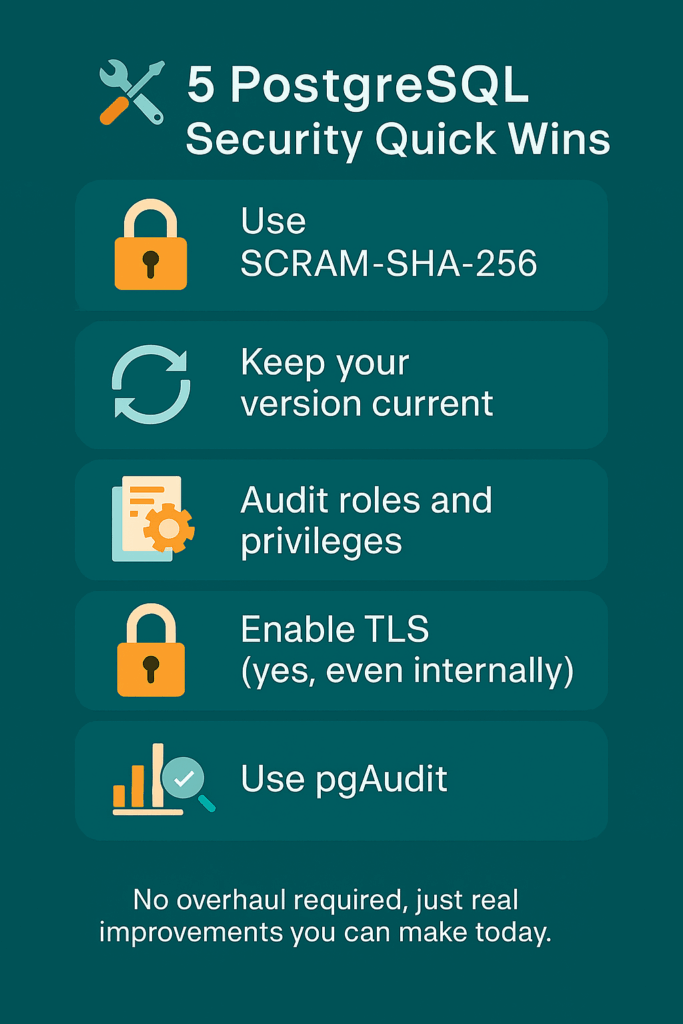
These aren’t silver bullets that will solve all your security woes. But they’re solid, manageable improvements that bring you one step closer to a PostgreSQL setup you can feel confident about.
If you’ve made it this far, it’s clear you care about doing PostgreSQL security the right way. You’ve tightened controls, cleaned up roles, turned on logging, and maybe even convinced your team to take compliance seriously.
But keeping PostgreSQL secure isn’t just about today. It’s about staying secure as your environment grows, shifts, or gets audited again next quarter. That’s where the real challenge shows up.
We’ve put together a central resource with tools and guidance to help you run PostgreSQL securely and reliably, without committing to expensive tools or giving up control.

And if you’re wondering what secure PostgreSQL should actually look like, we’ve also created a detailed guide that walks through how our distribution handles authentication, encryption, auditing, and more.
Not quite ready to switch yet? Just want to assess how secure your current PostgreSQL setup really is?
Evaluate the security of your database
This blog post is the first of the PostgreSQL Security series. The following post is on PostgreSQL Internal Authentication!
PostgreSQL security encompasses measures and best practices to protect the database from unauthorized access, data breaches, and other threats. It’s crucial for safeguarding sensitive data, ensuring data integrity, maintaining business continuity, and complying with legal/regulatory requirements like GDPR or HIPAA.
Common vulnerabilities include SQL injection (if queries are not properly parameterized), weak passwords allowing unauthorized access, unencrypted data transmission (if PostgreSQL SSL/TLS Encryption isn’t used), misconfigured permissions in pg_hba.conf or via GRANT, and unpatched software exposing known exploits.
Securely manage access using PostgreSQL Role-Based Access Control (RBAC). Create specific roles for different job functions, grant only necessary privileges (least privilege principle), use GRANT/REVOKE precisely, implement PostgreSQL Row-Level Security (RLS) for fine-grained data access, and regularly audit permissions.
PostgreSQL supports various PostgreSQL authentication methods configured in pg_hba.conf. For password security, it uses methods like SCRAM-SHA-256 (recommended), which stores hashed passwords securely. It also supports external methods like LDAP, Kerberos, and certificate-based authentication.
pgAudit is a popular PostgreSQL security extension used for detailed PostgreSQL Compliance and Auditing. It provides granular logging of database activities (like specific DML/DDL statements, reads, writes) beyond standard logging, helping organizations track user actions, detect suspicious activity, and meet compliance requirements.
Resources
RELATED POSTS





Hi,
You should add “passwords” to internal authentication.
Thanks
$psql -c “SELECT pg_read_file(‘pg_hba.conf’);” | head -n -41 | tail -n 3
# METHOD can be “trust”, “reject”, “md5”, “password”, “gss”, “sspi”, “krb5”, +
# “ident”, “pam”, “ldap” or “cert”. Note that “password” sends passwords +
# in clear text; “md5” is preferred since it sends encrypted passwords. +
==> Informations from hba_conf_file.