

 We are excited to announce the latest release of Percona Monitoring and Management (PMM) – V2.33. This release includes several new features and improvements that make PMM even more effective and user-friendly. Some of the key highlights of PMM V2.33 include:
You can get started using PMM in minutes with our PMM Quickstart guide to check out the latest version of PMM V2.33.
This new feature ensures that the PMM Client saves the monitoring data locally when a connection to the PMM server is lost, preventing gaps in the data. When the connection is restored, the data is sent to the PMM server, allowing the monitoring of your systems to continue without any data loss.
Note:
The client node is currently limited to storing only 1 GB of offline data. So, if your instance is down for three days and generates more than 1 GB of data during that time, all the data will not be retrieved.
One of the core principles of our open-source philosophy is transparency, and we are committed to sharing our roadmap openly and transparently with our users. We are happy to share the roadmap for the implementation of PMM high availability (HA) in three stages, which has been a highly requested feature by our users.
PMM HA will be rolled out in three stages. Stage one, which is included in PMM 2.33.0, involves the implementation of a data loss prevention solution using VictoriaMetrics integration for short outages. This feature is now available in the latest release of PMM. Stages two and three of PMM HA will be rolled out, including additional features and enhancements to provide a complete high availability solution for PMM. We are excited to bring this much-anticipated feature to our users, and we look forward to sharing more details in the coming months.
| Stages of PMM HA | Solutions Provided |
|---|---|
| Stage one (included in PMM 2.33.0) | As an initial step toward preventing data loss we have developed the following:
Offline metric collection for short outages |
| Stage two (will be rolled out in 2023) | As part of PMM HA stage two in HA we plan to implement the following:
HA data sources As part of stage two, we will let the users use external data sources thereby decreasing dependency on the file system. |
| Stage three (will be rolled out in 2023) | As part of PMM HA stage three we plan to implement the following:
HA Clustered PMM Servers Clustered PMM will be the focus of stage three. Detailed information will be included in the upcoming release notes. |
Please feel free to book a 1:1 meeting with us to share your thoughts, needs, and feedback about PMM HA.
Tip: To improve the availability of the PMM Server until the general availability of PMM HA, PMM administrators can deploy it on Kubernetes via the Helm chart. The Kubernetes cluster can help ensure that PMM is available and able to handle different types of failures, such as the failure of a node or the loss of network connectivity.
In PMM 2.33.0, we have updated Grafana to version 9.2.5, which includes important security fixes. This upgrade addresses several critical and moderate vulnerabilities, including CVE-2022-39328, CVE-2022-39307, and CVE-2022-39306. For more details, please see the Grafana 9.2.5 release notes. We strongly recommend that all users upgrade to the latest version of PMM to ensure the security of their systems.
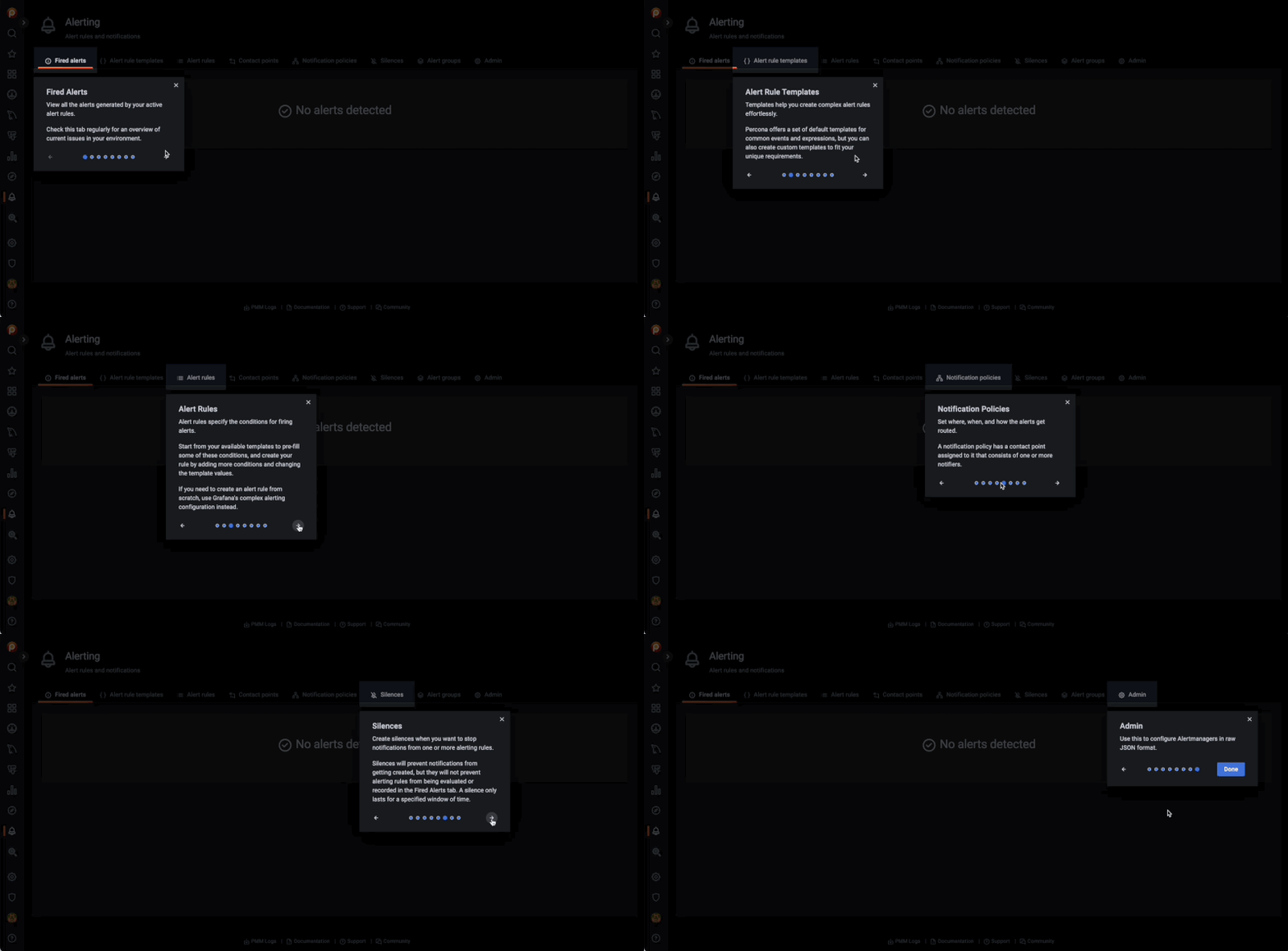
In the 2.31.0 release of PMM, we added a new feature called Percona Alerting, which provides a streamlined alerting system. To help users get started with this new feature, we have added a short in-app tutorial that automatically pops up when you first open the Alerting page. This tutorial will guide you through the fundamentals of Percona Alerting, and help you explore the various features and options available. We hope this tutorial will make it easier for users to get started with Percona Alerting and take full advantage of its capabilities.
Building upon the significant improvements for MongoDB backup management introduced in the previous release, we are now simplifying the process for restoring physical MongoDB backups. Starting with this release, you can restore physical backups straight from the UI, and PMM will handle the process end-to-end. Prior to this, you would need to perform additional manual steps to restart your MongoDB database service so that your applications could make use of the restored data.
pmm-admin is a command-line tool that is used to manage and configure PMM. It is part of the PMM Client toolset and can be used to perform various administrative tasks, such as managing inventory. We have added tab completion for the pmm-admin CLI command. This means that you no longer have to know the entire command when using pmm-admin. Instead, you can simply type the initial part of the command and press Tab, and the rest of the command will be automatically completed for you. This new feature makes it easier to use the command line interface and ensures that you can quickly and easily access all of the powerful features of PMM.
Install PMM 2.33 now or upgrade your installation to V2.33 by checking our documentation for more information about upgrading.
At Percona, we are grateful for our supportive community and dedicated team, who work together to shape the future of PMM. If you would like to be a part of this community, you can join us on our forums to request new features, share your feedback, and ask for support. We value the input of our community and welcome all members to participate in the ongoing development of PMM.




