

It’s not essential to understand how MySQL® and Percona Server for MySQL build indexes. However, if you have an understanding of the processing, it could help when you want to reserve an appropriate amount of space for data inserts. From MySQL 5.7, developers changed the way they built secondary indexes for InnoDB, applying a bottom-up rather than the top-down approach used in earlier releases. In this post, I’ll walk through an example to show how an InnoDB index is built. At the end, I’ll explain how you can use this understanding to set an appropriate value for innodb_fill_factor.
To build an index on a table with existing data, there are the following phases in InnoDB
Until version 5.6, MySQL built the secondary index by inserting one record at a time. This is a “top-down” approach. The search for the insert position starts from root (top) and reaches the appropriate leaf page (down). The record is inserted on leaf page pointed to by the cursor. It is expensive in terms of finding insert position and doing page splits and merges (at both root and non-root levels). How do you know that there are too many page splits and merges happening? You can read about that in an earlier blog by my colleague Marco Tusa, here.
From MySQL 5.7, the insert phase during add index uses “Sort Index Build”, also known as “Bulk Load for Index”. In this approach, the index is built “bottom-up”. i.e. Leaf pages (bottom) are built first and then the non-leaf levels up to root (up).
A sorted index build is used in these cases:
For the last two use cases, ALTER creates a intermediate table. The intermediate table indexes (both primary and secondary) are built using “sorted index build”.
For the sake of simplicity, the above algorithm skipped the details about compressed pages and the handling of BLOBs (externally stored BLOBs).
Using an example, let’s see how a secondary index is built, bottom-up. Again for simplicity’s sake, assume the maximum number of records allowed in leaf and non leaf pages is three.
|
1 2 3 4 5 6 7 8 9 10 11 12 13 |
CREATE TABLE t1 (a INT PRIMARY KEY, b INT, c BLOB); INSERT INTO t1 VALUES (1, 11, 'hello111'); INSERT INTO t1 VALUES (2, 22, 'hello222'); INSERT INTO t1 VALUES (3, 33, 'hello333'); INSERT INTO t1 VALUES (4, 44, 'hello444'); INSERT INTO t1 VALUES (5, 55, 'hello555'); INSERT INTO t1 VALUES (6, 66, 'hello666'); INSERT INTO t1 VALUES (7, 77, 'hello777'); INSERT INTO t1 VALUES (8, 88, 'hello888'); INSERT INTO t1 VALUES (9, 99, 'hello999'); INSERT INTO t1 VALUES (10, 1010, 'hello101010'); ALTER TABLE t1 ADD INDEX k1(b); |
InnoDB appends the primary key fields to the secondary index. The records of secondary index k1 are of format (b, a). After the sort phase, the records are
(11,1), (22,2), (33,3), (44,4), (55,5), (66,6), (77,7), (88,8), (99,9), (1010, 10)
Let’s start with record (11,1).
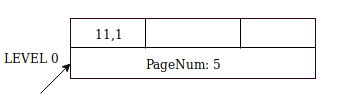
The arrow shows where the cursor is currently pointing. It is currently at page number 5, and the next inserts go to this page.
There are two more free slots, so insertion of the records (22,2) and (33,3) is straightforward.
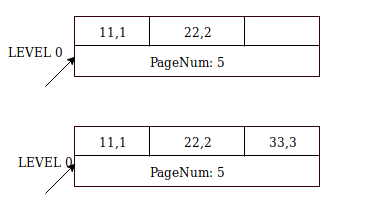
For the next record (44, 4), page number 5 is full. Here are the steps
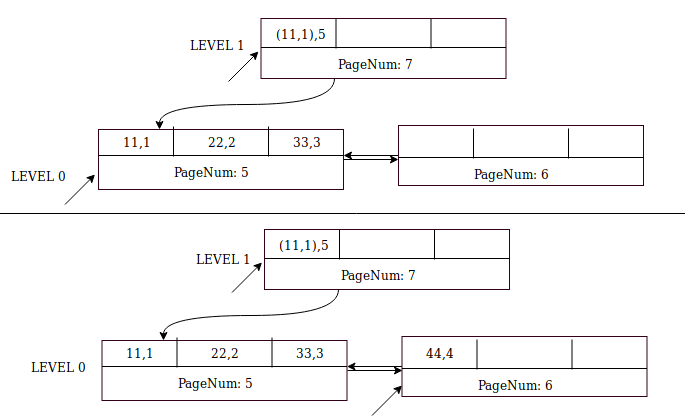
The next inserts – of (55,5) and (66,6) – are straightforward and they go to page 6.
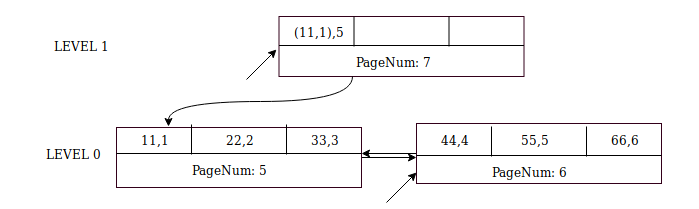
Insertion of record (77,7) is similar to (44,4) except that the parent page (page number 7) already exists and it has space for two more records. Insert node pointer ((44,4),8) into page 7 first, and then record (77,7) into sibling page 8.
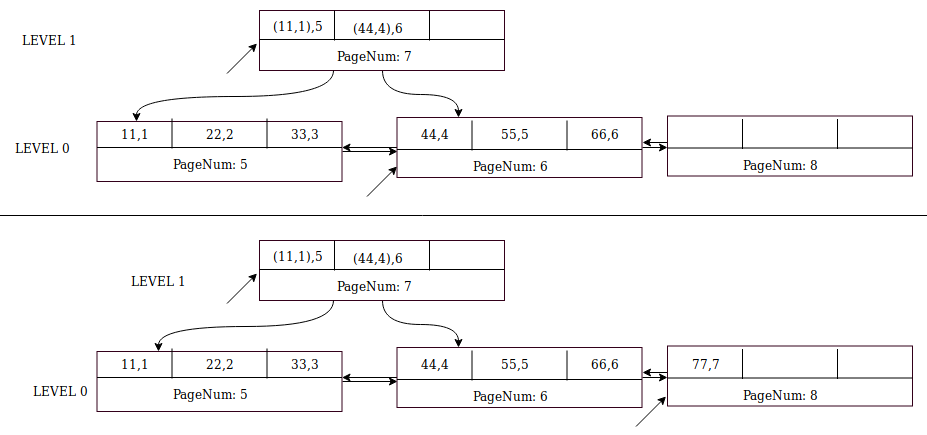
Insertion of records (88,8) and (99,9) is straightforward because page 8 has two free slots.
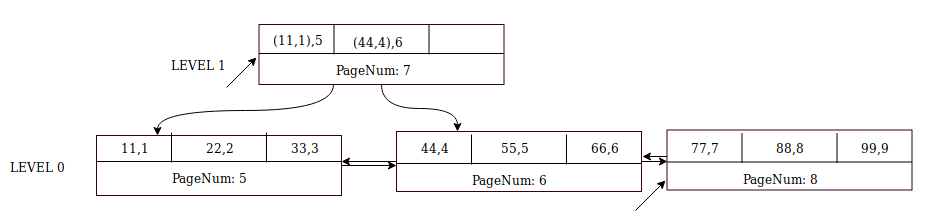
Next insert (1010, 10). Insert node pointer ((77,7),8) to the parent page (page number 7) at Level 1.
MySQL creates sibling page number 9 at Level 0. Insert record (1010,10) into page 9 and change the cursor to this page.

Commit the cursors at all levels. In the above example, the database commits page 9 at Level 0 and page 7 at Level 1. We now have a complete B+-tree index that is built from bottom-up!
The global variable “innodb_fill_factor” sets the amount of space in a Btree page to be used for inserts. The default value is 100, which means the entire page is used (exclude page headers, trailers). A clustered index has an exemption with innodb_fill_factor = 100. In this case, 1/16th of clustered index page space is kept free. ie. 6.25% space is reserved for future DMLs.
A value of 80 means that MySQL uses 80% of the page for inserts, and leaves 20% for future updates.
If innodb_fill_factor is 100, there is no free space left for future inserts into the secondary index. If you expect more DMLs on the table after add index, this can lead to page splits and merges again. In such cases, it is advisable to use values between 80-90. This variable value also affects the indexes recreated with OPTIMIZE TABLE or ALTER TABLE DROP COLUMN, ALGORITHM=INPLACE.
You should not use values that are too low – for example below 50 – because the index then occupies significantly more disk space. With low values there are more pages in an index, and index statistics sampling might not be optimal. The optimizer could choose wrong query plans with sub-optimal statistics.
None… Well, OK, there is one and it deserves a separate blog post 🙂 Stay tuned!
Resources
RELATED POSTS





Hi, in your opinion, what’s the average innodb_fill_factor percent value suggested for all purpose tables?
I understood 100 isn’t good enough.
Thanks in advance
Hello Fernando,
If you foresee that there will lot of DMLs after add index/ optimize table, then 90 should be a good value start with.
Suggest to have good strategy to do such changes. May be try on slave first.