

In this blog series, I will share my experiences as I migrate commercial databases (i.e., Microsoft SQL or Oracle) to open source (MySQL). More specifically, we will look at how you can migrate from MS SQL Server to MySQL.
For this first blog post I’ve chosen Jira database as an example, and used three different tools to migrate Jira database in Microsoft SQL Server to MySQL:
When I started my research, I was under the impression that Jira database would be easy to migrate (no stored procedures, no triggers, etc.). It turned out that there were some problems that I was able to fix.
One of the reasons I chose Jira as opposed to some standard MS SQL database (such as AdventureWorks2014) is that it is a non-standard choice. Most of the software vendors use standard databases to test their software, and it works perfectly on those standard databases. Jira is not a usual choice and will be closer to real life.
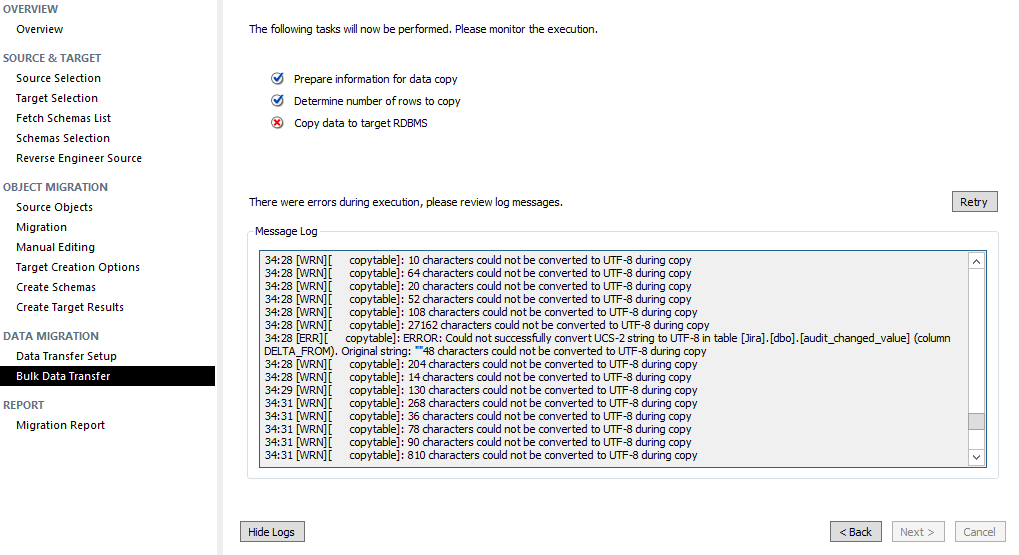
MySQL Workbench supports Microsoft SQL Server migration. The migration is straightforward except the issues with character sets. I have experienced the error “Could not successfully convert UCS-2 string to UTF-8”.
It turns out (with the help of Martin Brennan’s blog) that we will need to use “ODBC (FreeTDS)” drive for MS SQL, and enable sending Unicode data as UTF8:
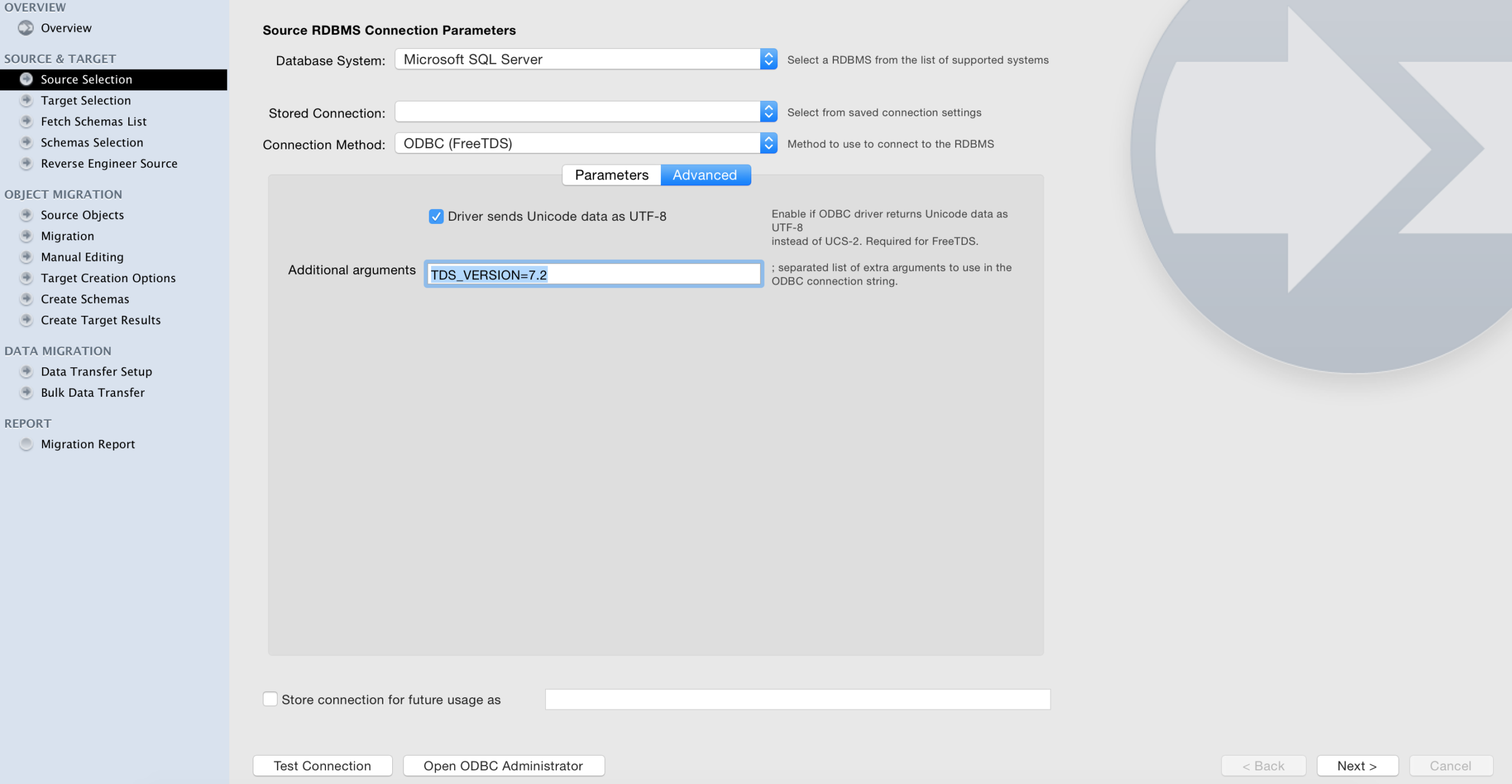
After changing those settings, I was able to successfully migrate Jira database from MS SQL to MySQL.
Advantages and disadvantages:
Amazon DMS
AWS Database Migration Service supports migrating from MS SQL to MySQL, but the actual migration method is different from other tools. It uses the source database (MS SQL server in this case) replication feature to stream the data to the target database (MySQL). Amazon DMS starts a temporary “migration” instance that is used to stream data. Both the source and destination database can be in AWS (EC2 or RDS) or outside AWS (no restriction).
The important limitation for MS SQL migration: it only works with MS SQL Server versions that support replication (subscription service). It doesn’t work with MS SQL Express edition. Also, if the subscription service is not enabled the DMS can’t even see the schema(s) to migrate (full list of limitations for MS SQL Server migration).
I’ve also gotten errors around the “constraint” name being too long:
|
1 2 3 |
2016-04-02T18:20:23 [TARGET_LOAD ]E: Failed to execute statement: 'ALTER TABLE `dbo`.`AO_38321B_CUSTOM_CONTENT_LINK` ADD CONSTRAINT `AO_38321B_CUSTOM_CONTENT_LINK_pk_AO_38321B_CUSTOM_CONTENT_LINK_ID` PRIMARY KEY ( `ID` )' [122502] ODBC general error. (ar_odbc_stmt.c:4048) |
The problem here is that “AO_38321B_CUSTOM_CONTENT_LINK_pk_AO_38321B_CUSTOM_CONTENT_LINK_ID” is too long a string for MySQL. At the same time, this name does not really matter as this is the PRIMARY KEY.
After changing the “constraint” name in MS SQL to smaller strings, I could migrate all tables to MySQL.
Amazon DMS notes: Amazon DMS lets you migrate from a database located anywhere (not necessarily in AWS) to another database located anywhere (not necessarily in AWS) — however, the traffic will go thru AWS. Thus the migration path is fastest and the most beneficial if either the source or target (or both) instances are in AWS (for example, ec2 or rds instances).
Advantages and disadvantages:
Potential issues
(This section has been updated) I’ve figured out that the table structures generated by Workbench, Amazon DMS and SQLWays are different. For example:
Workbench generated:
|
1 2 3 4 5 6 7 8 9 |
CREATE TABLE `AO_38321B_CUSTOM_CONTENT_LINK` ( `CONTENT_KEY` varchar(255) DEFAULT NULL, `ID` int(11) NOT NULL AUTO_INCREMENT, `LINK_LABEL` varchar(255) DEFAULT NULL, `LINK_URL` varchar(255) DEFAULT NULL, `SEQUENCE` int(11) DEFAULT '0', PRIMARY KEY (`ID`), KEY `index_ao_38321b_cus1828044926` (`CONTENT_KEY`) ) ENGINE=InnoDB DEFAULT CHARSET=latin1 |
AWS DMS generated:
|
1 2 3 4 5 6 7 8 |
CREATE TABLE `AO_38321B_CUSTOM_CONTENT_LINK` ( `CONTENT_KEY` varchar(255) CHARACTER SET ucs2 DEFAULT NULL, `ID` int(11) NOT NULL, `LINK_LABEL` varchar(255) CHARACTER SET ucs2 DEFAULT NULL, `LINK_URL` varchar(255) CHARACTER SET ucs2 DEFAULT NULL, `SEQUENCE` int(11) DEFAULT NULL, PRIMARY KEY (`ID`) ) ENGINE=InnoDB DEFAULT CHARSET=latin1 |
SQLWays wizard generated:
|
1 2 3 4 5 6 7 8 9 |
CREATE TABLE `AO_38321B_CUSTOM_CONTENT_LINK` ( `CONTENT_KEY` varchar(255) CHARACTER SET utf8 DEFAULT NULL, `ID` int(11) NOT NULL AUTO_INCREMENT, `LINK_LABEL` varchar(255) CHARACTER SET utf8 DEFAULT NULL, `LINK_URL` varchar(255) CHARACTER SET utf8 DEFAULT NULL, `SEQUENCE` int(11) DEFAULT '0', PRIMARY KEY (`ID`), KEY `index_ao_38321b_cus1828044926` (`CONTENT_KEY`(191)) ) ENGINE=InnoDB DEFAULT CHARSET=latin1 |
In AWS DMS version, the index on CONTENT_KEY is missing and ID is not declared as auto_increment. However, the Workbench “lost” the character set. SQLWays wizard has created partial key (191 characters).
At the same time, I was able to start Jira on top of two versions of the MySQL database (migrated by using Workbench and Amazon DMS).
Ispirer MnMTK 2015
Ispirer MnMTK 2015 toolkit is a commercial (not open-source) software application that lets you migrate from MS SQL Server to MySQL (among other databases). Ispirer has provided me with a demo license so I can test the migration.
I was able to migrate the Jira database from MS SQL to MySQL with the Ispirer SQLWays Wizard:
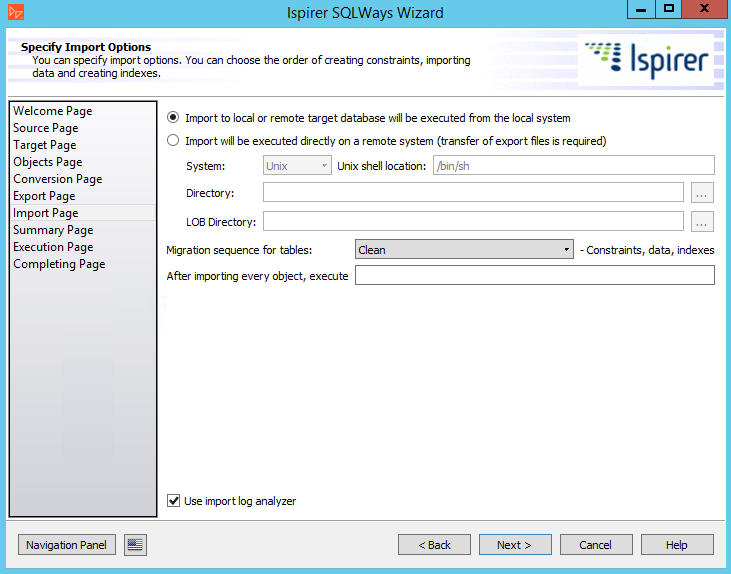
One issue with this process is that SQL Ways Wizard relies on the MySQL command line utility (“mysql”), which should be in the path. If you do not have MySQL installed on the migration machine, or it is not in the path, the migration will fail:
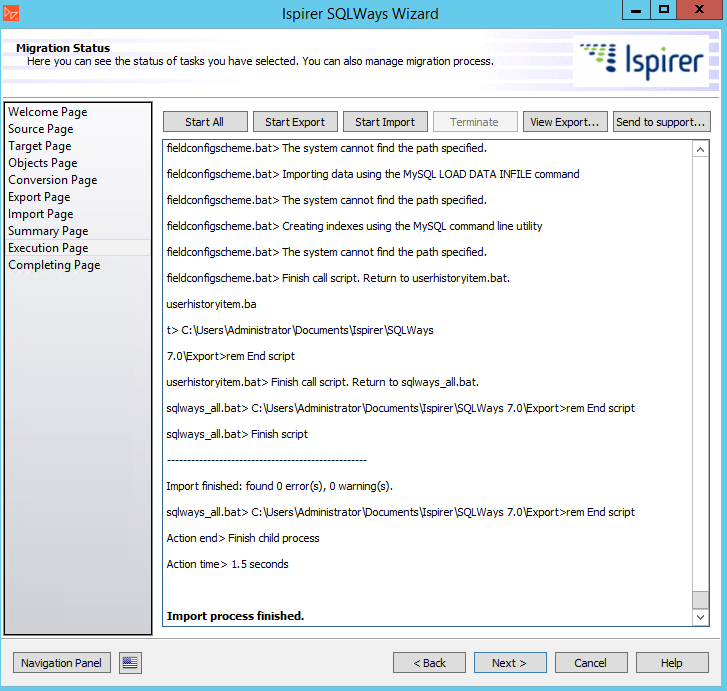
To fix simply add the MySQL “bin” directory to the path. In addition, you can use the SQL Ways Wizard to generate scripts and run those scripts on the destination host where the utilities are installed.
Advantages and disadvantages:
Conclusion
All tools I tried finally worked, but at the same time I was surprised with the number of issues I found. Migrating a very simple database (no stored procedures, no triggers, no foreign key constraints) should be easier.
Another surprise was that all tools are focused on a nice GUI with “next” buttons. For migrating one database to another, I would prefer using a command line tool interface (may be similar to Percona toolkit or iconv):
|
1 |
# dbmigrate --source user:pass@sqlserverhost:1433 --target user:pass@mysqlhost:3309 --parallel 8 --verbose --overwrite |
Actually, Ispirer MnMTK does have a command line migration utility included, but it only works on Windows.
Until somebody develops a better command line tool, any of the above solutions will help you migrate from MS SQL Server to MySQL.
Learn more about Percona Server for MySQL





Alexander, Couple of comments
First I wonder what was the table structure SQLWays generated was it any different ? Also what was the original MS SQL Table structure (for the same example table)
I am puzzled about the example table through. You posted messages about UTF8 conversion while the table you show created by Workbench has latin1 character set and it does not use any column level character sets.
Peter, the utf8 issues (for workbench only) were with the different table called audit_changed_value.
Here is the version of the same table, imported by sql_ways (will update the blog with this information):
CREATE TABLE
AO_38321B_CUSTOM_CONTENT_LINK(CONTENT_KEYvarchar(255) CHARACTER SET utf8 DEFAULT NULL,IDint(11) NOT NULL AUTO_INCREMENT,LINK_LABELvarchar(255) CHARACTER SET utf8 DEFAULT NULL,LINK_URLvarchar(255) CHARACTER SET utf8 DEFAULT NULL,SEQUENCEint(11) DEFAULT ‘0’,PRIMARY KEY (
ID),KEY
index_ao_38321b_cus1828044926(CONTENT_KEY(191))) ENGINE=InnoDB DEFAULT CHARSET=latin1
Hi Alexander,
Thanks for the post. I’ve personally used MySQL Workbench before and it does work great. But, I haven’t tested it with migrating SPs and I hoped that this post would. It would be interesting if you later update this post (or write another post) to include the migration of a complex database that leverages the power of MS SQL and see how that goes.
By the way, how big was that Jira database – I’m asking this because it seems that the second software that you used took only 1.5 seconds to migrate it.
One last question: what’s with the errors in Ispirer MnMTK tool?
Fadi, thank you for your comment.
The Jira db size was < 100Mb, I've only use it as a test. However, the 1.5 sec is because of error - MySQL was not in the path, so the actual migration was aborted. I will plan to test a larger MS SQL with SP, etc in the future.
We tested AWS DMS for migrating of MySQL databases from RDS to EC2 and found it to be wholly unreliable. Tables were often reported as being completed when they weren’t, or the migration one run indefinitely never reporting it was completed. I certainly wouldn’t trust it to migrate databases of the same type, never mind cross vendor.
‘@Alexander Rubin, This is really very useful information. We have performed some migrations earlier from MS SQL to MySQL. We have followed different approaches and all are manual. I have tries to use MySQL work bench but it is very slow and not sure on the exact reason. I hope workbench is definitely not a good option to migrate huge amount of data (200 GB). We have created SSIS package which exports data using the manual commands and import the same uinsg load commands into MySQL. Here why we used manual commands is to handle bit data type columns (which need to converted to varchar before export otherwise import gives errors) as well as null values (basically printed as empty string in out file). This approach is simple for few number of tables but very hard for the huge table count.
I am eagerly waiting to see your test cases with workbench and DMS for SPs migration. Frankly I don’t prefer commercial tools as I am here to reduce the cost to my company.
vidyadhar, thank you for your information!
‘@Alexander,
you wrote to Workbench ” Minus: needed some tweaks to work with character sets “.
Guess I face the same here and I wonder if you could share your experience.
My migration works fine with Data Source ODBC FreeTDS, but the Umlauts (ä,ö,ü) are replaced as “?”.
If the source of the data is utf8, try checking “driver sends unicode data in UTF8” on the “advanced” tab (as on the screenshot above).
Interesting article alexander, thanks.
As a SQL Server guy though, I wonder what would be the business case for migration of a SQL Server database, especially a large one to My SQL. I would imagine that there would be a tremendous amount of testing, performance tuning, perhaps even schema changes in order for such migration to be successful.
Hi Alexander,
It was interesting article.
Few comments.
1. You did not mention what version of SQL Server, MySQL Workbench and Free TDS drivers you used. It is important, because some versions don’t work well.
2. You did not mention whether you ran MySQL Workbench as well as SQL Ways Wizard on Windows or on Linux (I think Amazon only runs on Linux, but it would be nice to know what OS was on AWS)
3. MySQL Workbench does provide command line tool. It is very convenient way for data migration.
Workbench allows you to generate data migration script. Once you generate it, you don’t need any GUI at all. It is quite unfortunate that you did not use it – it is a great option.
Jacob
here you are only talking about data what about procedures / view migration from MS SQL to Mysql ?
anyone have done it and is their any good tool you like to suggesst
https://dbconvert.com/mssql/mysql/ can convert views from MS SQL to MySQL