

What is a Delay Replica and how does it help?
MySQL Replication is useful, easy to set up, and used for very different purposes. For example:
To learn more, check out How Does MySQL Replication Work?
It’s important to mention that a replication server is not a backup by itself. A mistake on the source, for example, a DROP DATABASE or an UPDATE without a WHERE clause will be replicated nearly instantly to all replica servers. Simply having a replica is not going to be helpful here. How can we avoid that kind of mistake? By having a replica server that intentionally lags behind.
We can never avoid human error in database infrastructure operations. But rollback to the last known good condition from delayed Source/Replica is the best thing recommended during the entire database infrastructure corruption scenarios.
Delayed replication can be used for several purposes:
Let’s understand the situation first: Someone deleted the data on a Percona XtraDB Cluster 8 (PXC) server accidentally. As per architecture, we always configure a delayed replica. We have stopped the replication on the delayed replica and now we will restore the deleted records.
From the initial investigation, we came to know from the application operation team that the below query was executed.
|
1 |
delete from Schema_g2.per_sch order by id desc; |
Almost 20k records were deleted. Let us do our pre-reqs and initial investigation based on the requirements we have.
In this article, PXC-8 is our source and pxc-backup is our delayed backup Replica. Click through to learn about our product Percona XtraDB Cluster and our backup solution Percona XtraBackup.
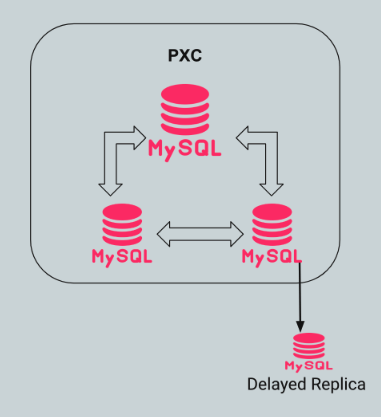
pxc-backup to retrieve these records. All deleted records are present here right now. Below are the number of records we have until replication was stopped.|
1 2 3 4 5 6 |
Pxc-backup > select count(*) from Schema_g2.per_sch; +----------+ | count(*) | +----------+ | 21762 | +----------+ |
At this point, we have already stopped the backup replica.
|
1 2 3 4 5 6 |
PXC-8 (none)> select count(*) from Schema_g2.per_sch; +----------+ | count(*) | +----------+ | 215 | +----------+ |
|
1 |
id int(11) NOT NULL AUTO_INCREMENT, |
|
1 2 3 4 5 6 7 8 |
PXC-8 (none)> select * from Schema_g2.per_sch; +--------+---------------+-----------+-------+ | id | permission_id | school_id | grant | +--------+---------------+-----------+-------+ | 178852 | 446 | 48887 | 0 | | 178853 | 448 | 48887 | 0 | ... |
|
1 2 3 4 5 6 7 8 9 10 11 12 13 14 15 |
Pxc-backup > select * from Schema_g2.per_sch limit 10; +-----+---------------+-----------+-------+ | id | permission_id | school_id | grant | +-----+---------------+-----------+-------+ | 0 | 0 | 0 | 0 | | 105 | 426 | 1 | 0 | | 429 | 89 | 16 | 0 | | 431 | 93 | 16 | 0 | ... | 178629 | 194 | 35758 | 0 | | 178630 | 195 | 35758 | 0 | | 178631 | 8239 | 35758 | 0 | +--------+---------------+-----------+-------+ |
|
1 |
START SLAVE UNTIL MASTER_LOG_FILE = 'PXC-8-bin.001611', MASTER_LOG_POS = 613996753; |
From binlog we see below:
|
1 2 3 4 5 6 7 8 9 10 11 12 13 14 15 16 17 18 19 20 |
#210922 11:44:05 server id 8 end_log_pos 613996753 CRC32 0xee39f244 Query thread_id=36995659 exec_time=0 error_code=0 SET TIMESTAMP=1632300245/*!*/; BEGIN /*!*/; # at 613996753 #210922 11:44:05 server id 8 end_log_pos 613997049 CRC32 0x92aea136 Table_map: `Schema_g2`.`usr` mapped to number 109 # at 613997049 #210922 11:44:05 server id 8 end_log_pos 613997697 CRC32 0x1132b4ad Update_rows: table id 109 flags: STMT_END_F ### UPDATE `Schema_g2`.`usr` ....... #210922 11:44:04 server id 8 end_log_pos 613997872 CRC32 0xf41297bc Query thread_id=37823889 exec_time=0 error_code=0 SET TIMESTAMP=1632300244/*!*/; BEGIN /*!*/; # at 613997872 #210922 11:44:04 server id 8 end_log_pos 613997943 CRC32 0xe341c435 Table_map: `Schema_g2`.`per_sch` mapped to number 664 # at 613997943 #210922 11:44:04 server id 8 end_log_pos 614006154 CRC32 0xd71595b1 Delete_rows: table id 664 |
|
1 |
START SLAVE UNTIL MASTER_LOG_FILE = 'PXC-8-bin.001611', MASTER_LOG_POS = 613996753; |
Verify binlog position and that it is caught up till above and verify new record count on the backup server.
Verify replication is stopped again.
|
1 |
select count(*) from Schema_g2.per_sch; |
-Verify last id is < 178852
Use –where clause IF we notice any duplicate duplicates rows same as PXC-8 on the backup server.
|
1 |
<span style="font-weight: 400;">--where="id < 178852"</span> |
|
1 |
mysqldump -h backup-server-ip --single-transaction --skip-add-drop-table --no-create-info Schema_g2 per_sch > per_sch_backup.sql |
Verify no drops/created are present in the backup file.
|
1 |
mysql -h Source-server-ip Schema_g2 < per_sch_backup.sql |
Verify it completes ok and records are added back on source:
|
1 |
mysql -h Source-server-ip -e "select count(*) from Schema_g2.per_sch" |
Verify records < 178852 and above also exist on the source.
|
1 2 3 |
stop slave; start slave; |
With loading the record on the source, it will get replicated to delay replica and other replicas and the data will be in sync again.
It is always recommended to have a Delay Replica in your architecture to avoid and quickly resolve such data losses.




