

 Percona Server for MySQL 8.0.18 ships all functionality to run Group Replication and InnoDB Cluster setups, so I decided to evaluate how it works and how it compares with Percona XtraDB Cluster in some situations.
For this I planned to use three bare metal nodes, SSD drives, and a 10Gb network available for in-between nodes communication, but later I also added tests on three bare metal nodes with NVMe drives and 2x10Gb network cards.
To simplify deployment, I created simple ansible scripts.
The first initial logical step is to load data into an empty cluster, so let’s do this with our sysbench-tpcc script.
|
1 |
./tpcc.lua --mysql-host=10.30.2.5 --mysql-user=sbtest --mysql-password=sbtest --mysql-db=sbtest --time=300 --threads=64 --report-interval=1 --tables=100 --scale=10 --db-driver=mysql --use_fk=0 --force_pk=1 --trx_level=RC prepare |
The resulted dataset is about 100GB.
The time to finish the script is 61 minutes, 19 seconds.
Let’s review how the network was loaded on a secondary node in Group Replication during the execution:
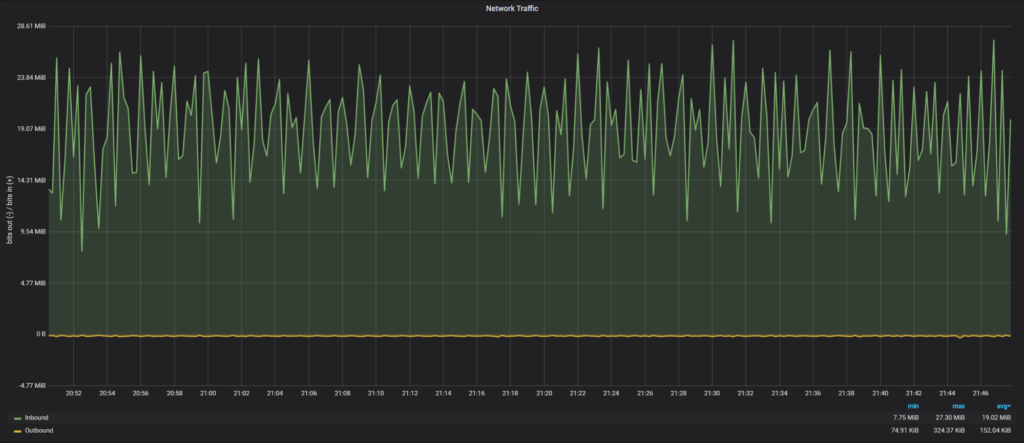
Average network traffic: 19.02 MiB/sec
The time to finish the script is 39 minutes, 27 seconds.
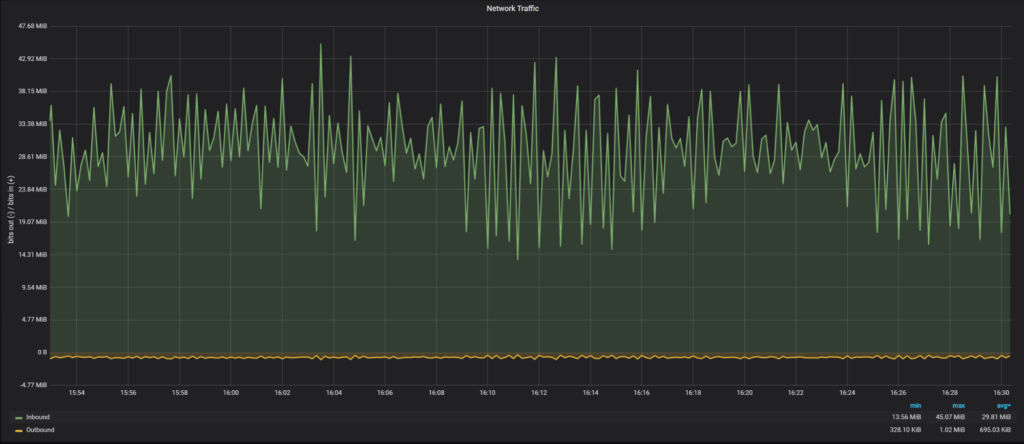
Average network traffic: 29.81 MiB/sec
The time to finish the script is 43 minutes, 22 seconds.
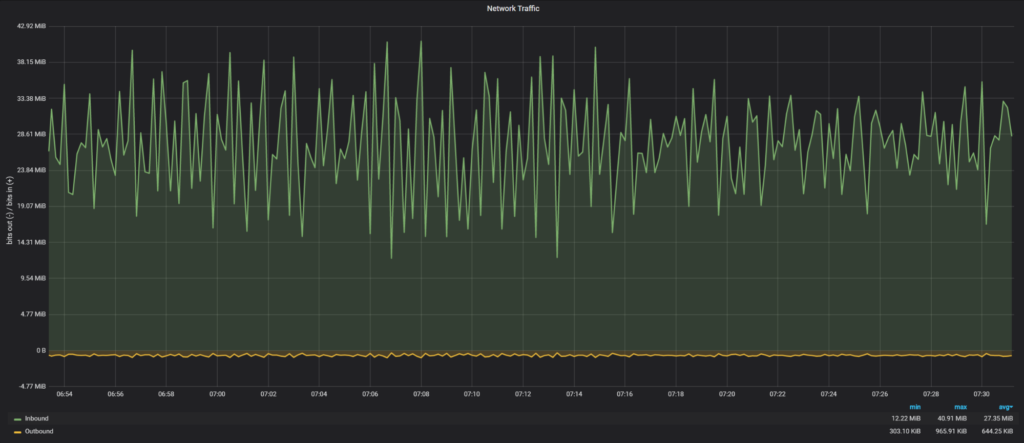
Average network traffic: 27.35 MiB/sec
To see how PXC would perform without network interactions, I loaded data into a one node PXC cluster and it took 36 minutes, 34 seconds. So there is a minimal network overhead for PXC 5.7 (36 minutes for one node vs 39 minutes for three nodes).
The next experiment I wanted to perform is to see how long it would take for a new node to join the cluster with data loaded in the previous part. The Group Replication supports two methods to catch-up: incremental (loading data from binary logs) and the clone plugin (physical copy of data).
Let’s measure time for a new node to join to catch-up with both methods:
|
1 2 3 4 5 |
Start: 2020-01-08T17:05:04.934618Z 60 [System] [MY-010562] [Repl] Slave I/O thread for channel 'group_replication_recovery': connected to master '[email protected]:3306',replication started in log 'FIRST' at position 4 End: 2020-01-08T18:57:02.350199Z 59 [Note] [MY-011585] [Repl] Plugin group_replication reported: 'Terminating existing group replication donor connection and purging the corresponding logs. |
It took 1 hour and 52 minutes for a node to join and apply binary logs.
It might not be obvious, but actually it is possible to have an incremental state transfer for big dataset changes in Percona XtraDB Cluster too, we just need to use a big enough gcache.
For testing purposes, I will set wsrep_provider_options=”gcache.size=150G” to check how long it will take to ship and apply IST in PXC.
Log extract:
|
1 2 3 4 5 6 7 8 9 10 11 12 |
2020-01-16T20:12:03.261978Z 2 [Note] WSREP: Receiving IST: 155275 writesets, seqnos 155273-310548 2020-01-16T20:12:03.262165Z 0 [Note] WSREP: Receiving IST... 0.0% ( 0/155275 events) complete. …. 2020-01-16T20:41:23.777620Z 0 [Note] WSREP: Receiving IST... 99.7% (154768/155275 events) complete. 2020-01-16T20:41:32.391378Z 0 [Note] WSREP: Receiving IST...100.0% (155275/155275 events) complete. 2020-01-16T20:41:32.723172Z 2 [Note] WSREP: IST received: fd361be5-3889-11ea-8450-c3f366733bd0:310548 2020-01-16T20:41:32.723546Z 0 [Note] WSREP: 0.0 (node3): State transfer from 2.0 (node4) complete. 2020-01-16T20:41:32.723576Z 0 [Note] WSREP: SST leaving flow control 2020-01-16T20:41:32.723585Z 0 [Note] WSREP: Shifting JOINER -> JOINED (TO: 310548) 2020-01-16T20:41:32.723838Z 0 [Note] WSREP: Member 0.0 (node3) synced with group. 2020-01-16T20:41:32.723850Z 0 [Note] WSREP: Shifting JOINED -> SYNCED (TO: 310548) |
In total it took 29 minutes 30 seconds to transfer and apply IST. So it was four times faster to apply IST than to apply binary logs.
I show the full log during the clone process, as it contains interesting information:
|
1 2 3 4 5 6 7 8 9 10 11 12 13 14 15 16 17 18 19 20 21 22 23 24 25 26 27 28 29 30 31 32 33 34 35 36 37 38 39 40 41 42 43 44 45 46 47 48 49 50 51 52 53 54 55 56 57 58 59 60 61 62 63 64 65 |
2020-01-08T20:00:58.102913Z 113 [Note] [MY-013272] [Clone] Plugin Clone reported: 'Client: Task Connect.' 2020-01-08T20:00:58.108244Z 113 [Note] [MY-013272] [Clone] Plugin Clone reported: 'Client: Master ACK Connect.' 2020-01-08T20:00:58.108311Z 113 [Note] [MY-013457] [InnoDB] Clone Apply Begin Master Version Check 2020-01-08T20:00:58.117149Z 113 [Note] [MY-013457] [InnoDB] Clone Apply Version End Master Task ID: 0 Passed, code: 0: 2020-01-08T20:00:58.117188Z 113 [Note] [MY-013457] [InnoDB] Clone Apply Begin Master Task 2020-01-08T20:00:58.117478Z 113 [Warning] [MY-013460] [InnoDB] Clone removing all user data for provisioning: Started 2020-01-08T20:00:58.117498Z 113 [Note] [MY-011977] [InnoDB] Clone Drop all user data 2020-01-08T20:00:58.194686Z 113 [Note] [MY-011977] [InnoDB] Clone: Fix Object count: 178 task: 0 2020-01-08T20:00:58.231760Z 113 [Note] [MY-011977] [InnoDB] Clone Drop User schemas 2020-01-08T20:00:58.231861Z 113 [Note] [MY-011977] [InnoDB] Clone: Fix Object count: 5 task: 0 2020-01-08T20:00:58.234517Z 113 [Note] [MY-011977] [InnoDB] Clone Drop User tablespaces 2020-01-08T20:00:58.234829Z 113 [Note] [MY-011977] [InnoDB] Clone: Fix Object count: 6 task: 0 2020-01-08T20:00:58.238720Z 113 [Note] [MY-011977] [InnoDB] Clone Drop: finished successfully 2020-01-08T20:00:58.238777Z 113 [Warning] [MY-013460] [InnoDB] Clone removing all user data for provisioning: Finished 2020-01-08T20:00:58.433336Z 113 [Note] [MY-013272] [Clone] Plugin Clone reported: 'Client: Command COM_INIT.' 2020-01-08T20:00:58.539294Z 113 [Note] [MY-013458] [InnoDB] Clone Apply State Change : Number of tasks = 1 2020-01-08T20:00:58.539328Z 113 [Note] [MY-013458] [InnoDB] Clone Apply State FILE COPY: 2020-01-08T20:00:58.544270Z 113 [Note] [MY-011978] [InnoDB] Clone estimated size: 122.32 GiB Available space: 1.60 TiB 2020-01-08T20:01:03.616526Z 113 [Note] [MY-013272] [Clone] Plugin Clone reported: 'Client: Tune Threads from: 1 to: 2 prev: 1 target: 2.' 2020-01-08T20:01:03.623412Z 0 [Note] [MY-013272] [Clone] Plugin Clone reported: 'Client: Task Connect.' 2020-01-08T20:01:03.623752Z 0 [Note] [MY-013457] [InnoDB] Clone Apply Begin Task ID: 1 2020-01-08T20:01:03.623795Z 0 [Note] [MY-013272] [Clone] Plugin Clone reported: 'Client: Command COM_ATTACH.' 2020-01-08T20:01:08.630627Z 113 [Note] [MY-013272] [Clone] Plugin Clone reported: 'Client: Tune continue, Data: 503 MiB/sec, Target: 333 MiB/sec.' 2020-01-08T20:01:08.630671Z 113 [Note] [MY-013272] [Clone] Plugin Clone reported: 'Client: Tune Threads from: 2 to: 4 prev: 2 target: 4.' 2020-01-08T20:01:08.637751Z 0 [Note] [MY-013272] [Clone] Plugin Clone reported: 'Client: Task Connect.' 2020-01-08T20:01:08.637891Z 0 [Note] [MY-013272] [Clone] Plugin Clone reported: 'Client: Task Connect.' 2020-01-08T20:01:08.638129Z 0 [Note] [MY-013457] [InnoDB] Clone Apply Begin Task ID: 2 2020-01-08T20:01:08.638184Z 0 [Note] [MY-013272] [Clone] Plugin Clone reported: 'Client: Command COM_ATTACH.' 2020-01-08T20:01:08.638208Z 0 [Note] [MY-013457] [InnoDB] Clone Apply Begin Task ID: 3 2020-01-08T20:01:08.638261Z 0 [Note] [MY-013272] [Clone] Plugin Clone reported: 'Client: Command COM_ATTACH.' 2020-01-08T20:01:13.646289Z 113 [Note] [MY-013272] [Clone] Plugin Clone reported: 'Client: Tune stop, Data: 504 MiB/sec, Target: 628 MiB/sec..' 2020-01-08T20:04:28.608808Z 113 [Note] [MY-013272] [Clone] Plugin Clone reported: 'Client: Total Data: 104776 MiB @ 498 MiB/sec, Network: 104782 MiB @ 498 MiB/sec.' 2020-01-08T20:04:28.772189Z 113 [Note] [MY-013458] [InnoDB] Clone Apply State Change : Number of tasks = 4 2020-01-08T20:04:28.772252Z 113 [Note] [MY-013458] [InnoDB] Clone Apply State PAGE COPY: 2020-01-08T20:04:28.872381Z 113 [Note] [MY-013272] [Clone] Plugin Clone reported: 'Client: Total Data: 104776 MiB @ 498 MiB/sec, Network: 104782 MiB @ 498 MiB/sec.' 2020-01-08T20:04:29.074705Z 113 [Note] [MY-013458] [InnoDB] Clone Apply State Change : Number of tasks = 4 2020-01-08T20:04:29.074771Z 113 [Note] [MY-013458] [InnoDB] Clone Apply State REDO COPY: 2020-01-08T20:04:29.175383Z 113 [Note] [MY-013272] [Clone] Plugin Clone reported: 'Client: Total Data: 104776 MiB @ 497 MiB/sec, Network: 104782 MiB @ 497 MiB/sec.' 2020-01-08T20:04:29.375428Z 113 [Note] [MY-013458] [InnoDB] Clone Apply State Change : Number of tasks = 4 2020-01-08T20:04:29.375487Z 113 [Note] [MY-013458] [InnoDB] Clone Apply State FLUSH DATA: 2020-01-08T20:04:29.472201Z 113 [Note] [MY-013458] [InnoDB] Clone Apply State FLUSH REDO: 2020-01-08T20:04:29.473225Z 113 [Note] [MY-012651] [InnoDB] Progress in MB: 100 200 300 400 500 600 700 800 900 1000 1100 1200 1300 1400 1500 1600 1700 1800 1900 2000 2100 2200 2300 2400 2500 2600 2700 2800 2900 3000 3100 3200 3300 3400 3500 3600 3700 3800 3900 4000 4100 4200 4300 4400 4500 4600 4700 4800 4900 5000 5100 5200 5300 5400 5500 5600 5700 5800 5900 6000 6100 6200 6300 6400 6500 6600 6700 6800 6900 7000 7100 7200 7300 7400 7500 7600 7700 7800 7900 8000 8100 8200 8300 8400 8500 8600 8700 8800 8900 9000 9100 9200 9300 9400 9500 9600 9700 9800 9900 10000 10100 10200 2020-01-08T20:04:51.402971Z 113 [Note] [MY-012651] [InnoDB] Progress in MB: 100 200 300 400 500 600 700 800 900 1000 1100 1200 1300 1400 1500 1600 1700 1800 1900 2000 2100 2200 2300 2400 2500 2600 2700 2800 2900 3000 3100 3200 3300 3400 3500 3600 3700 3800 3900 4000 4100 4200 4300 4400 4500 4600 4700 4800 4900 5000 5100 5200 5300 5400 5500 5600 5700 5800 5900 6000 6100 6200 6300 6400 6500 6600 6700 6800 6900 7000 7100 7200 7300 7400 7500 7600 7700 7800 7900 8000 8100 8200 8300 8400 8500 8600 8700 8800 8900 9000 9100 9200 9300 9400 9500 9600 9700 9800 9900 10000 10100 10200 2020-01-08T20:05:13.272231Z 113 [Note] [MY-013458] [InnoDB] Clone Apply State DONE 2020-01-08T20:05:13.272328Z 113 [Note] [MY-013272] [Clone] Plugin Clone reported: 'Client: Command COM_EXECUTE.' 2020-01-08T20:05:13.272683Z 113 [Note] [MY-013272] [Clone] Plugin Clone reported: 'Client: Master ACK COM_EXIT.' 2020-01-08T20:05:13.273129Z 113 [Note] [MY-013272] [Clone] Plugin Clone reported: 'Client: Master ACK Disconnect : abort: false.' 2020-01-08T20:05:13.314232Z 0 [Note] [MY-013272] [Clone] Plugin Clone reported: 'Client: Command COM_EXECUTE.' 2020-01-08T20:05:13.314636Z 0 [Note] [MY-013272] [Clone] Plugin Clone reported: 'Client: Task COM_EXIT.' 2020-01-08T20:05:13.315092Z 0 [Note] [MY-013272] [Clone] Plugin Clone reported: 'Client: Task Disconnect : abort: false.' 2020-01-08T20:05:13.315217Z 0 [Note] [MY-013457] [InnoDB] Clone Apply End Task ID: 3 Passed, code: 0: 2020-01-08T20:05:13.354941Z 0 [Note] [MY-013272] [Clone] Plugin Clone reported: 'Client: Command COM_EXECUTE.' 2020-01-08T20:05:13.355371Z 0 [Note] [MY-013272] [Clone] Plugin Clone reported: 'Client: Task COM_EXIT.' 2020-01-08T20:05:13.355818Z 0 [Note] [MY-013272] [Clone] Plugin Clone reported: 'Client: Task Disconnect : abort: false.' 2020-01-08T20:05:13.355865Z 0 [Note] [MY-013457] [InnoDB] Clone Apply End Task ID: 1 Passed, code: 0: 2020-01-08T20:05:13.369189Z 0 [Note] [MY-013272] [Clone] Plugin Clone reported: 'Client: Command COM_EXECUTE.' 2020-01-08T20:05:13.369579Z 0 [Note] [MY-013272] [Clone] Plugin Clone reported: 'Client: Task COM_EXIT.' 2020-01-08T20:05:13.370027Z 0 [Note] [MY-013272] [Clone] Plugin Clone reported: 'Client: Task Disconnect : abort: false.' 2020-01-08T20:05:13.370072Z 0 [Note] [MY-013457] [InnoDB] Clone Apply End Task ID: 2 Passed, code: 0: 2020-01-08T20:05:13.373781Z 113 [Note] [MY-013272] [Clone] Plugin Clone reported: 'Client: Task COM_EXIT.' 2020-01-08T20:05:13.374303Z 113 [Note] [MY-013272] [Clone] Plugin Clone reported: 'Client: Task Disconnect : abort: false.' 2020-01-08T20:05:13.374589Z 113 [Note] [MY-013457] [InnoDB] Clone Apply End Master Task ID: 0 Passed, code: 0: 2020-01-08T20:05:13.375236Z 113 [ERROR] [MY-013462] [Server] Clone shutting down server as RESTART failed. Please start server to complete clone operation. |
In total it took about 5 minutes for a new node to catch up, as we see Group Replication automatically Network load during clone transfer:
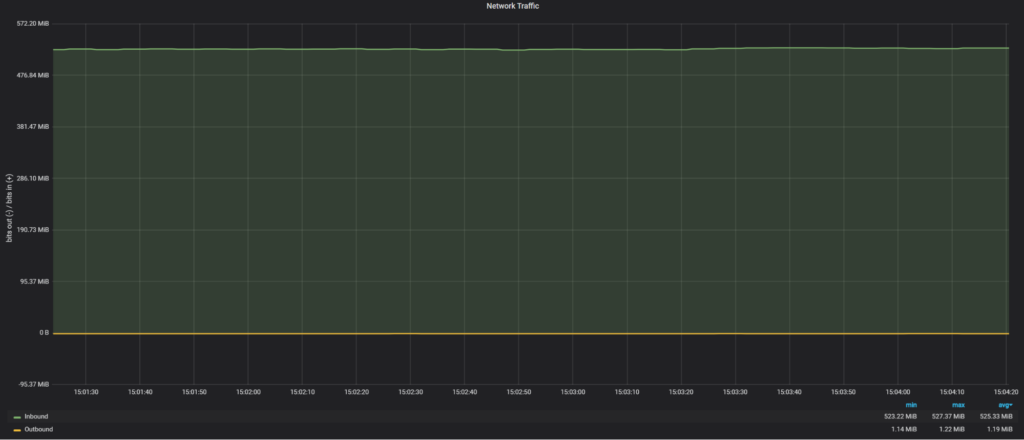
Network traffic was 525 MiB/sec, which about half of 10Gb network bandwidth.
Notes about Clone: It required a new node to restart, and MySQL could not do it automatically as I used a custom systemctl file, so it seems MySQL could not handle a restart. I had to perform a manual restart.
Actually, in this case, we are limited by SATA SSD read performance, that’s why we see only 525MiB/sec.
This brings up an interesting topic because although the clone plugin is working fast, it also shows that it can exhaust available resources, and if there is a live client load, likely it will be affected.
Let’s compare how SST in Percona XtraDB Cluster performs for joining a new node.
|
1 2 3 4 |
Start: 2020-01-08T21:13:44.055593Z 2 [Note] WSREP: Requesting state transfer: success, donor: 0 Finish: 2020-01-08T21:22:50.622981Z 0 [Note] WSREP: SST complete, seqno: 155275 |
So it took 9 minutes for SST to complete and a new node to join.
Network load during SST:
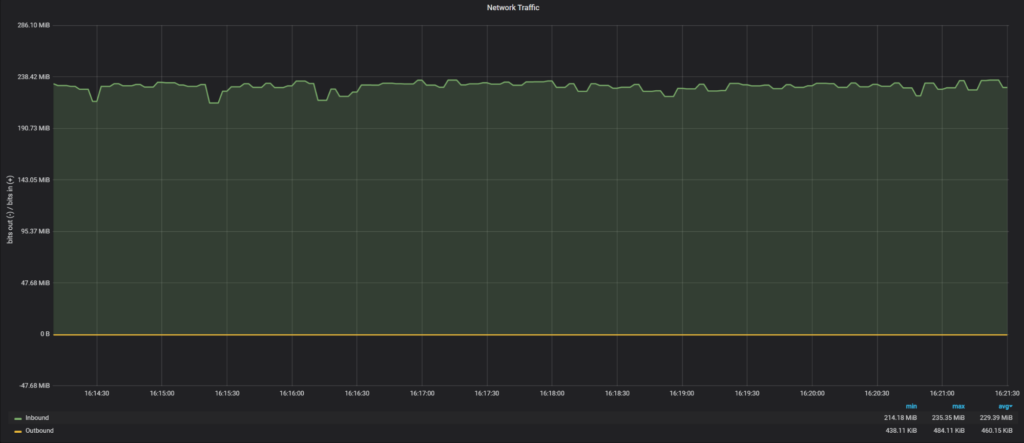
Network traffic during SST was 229 MiB/sec, which is only 25% of 10Gb network bandwidth. The reason why SST uses less network bandwidth is a bug in the SST script, where our xbstream binary does not use multi-threading.
If we apply the fix to use multiple threads:
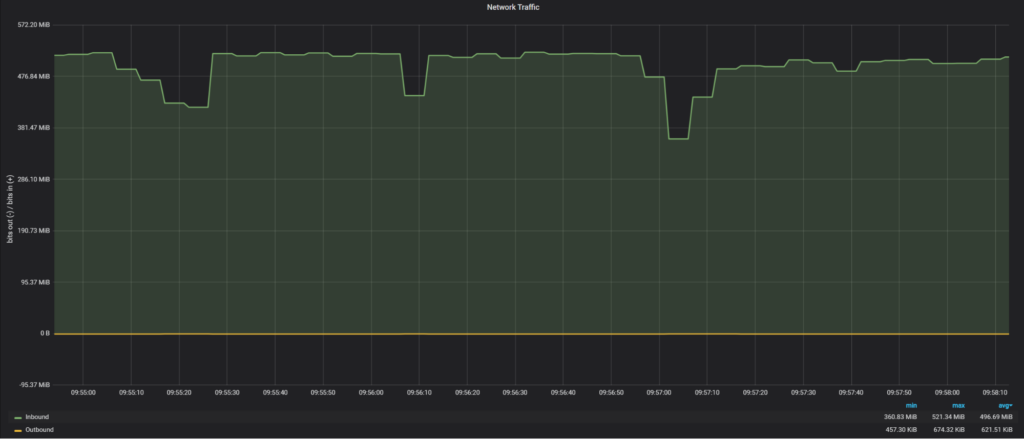
|
1 2 3 4 5 6 |
2020-01-16T14:54:23.679198Z 0 [Note] WSREP: Member 0.0 (node3) requested state transfer from 'node4'. Selected 2.0 (node4)(SYNCED) as donor. 2020-01-16T14:54:23.679219Z 0 [Note] WSREP: Shifting PRIMARY -> JOINER (TO: 155271) …. 2020-01-16T14:59:46.339803Z 0 [Note] WSREP: Shifting JOINER -> JOINED (TO: 155271) 2020-01-16T14:59:46.340135Z 0 [Note] WSREP: Member 0.0 (node3) synced with group. 2020-01-16T14:59:46.340144Z 0 [Note] WSREP: Shifting JOINED -> SYNCED (TO: 155271) |
We are back to 496MiB/sec of transfer and the total time for SST is 5 minutes, 23 seconds.
In previous cases our transfer rate was limited by SATA SSD read performance, so let’s see if we are able to achieve a faster transfer time when more resources are available. The data is stored on NVMe devices and for the network, I used a 2x10Gb network connection.
The raw network throughput I am able to achieve with iPerf3 is 17.8 Gbits/sec (or 2.23 GiB/sec).
Clone plugin:
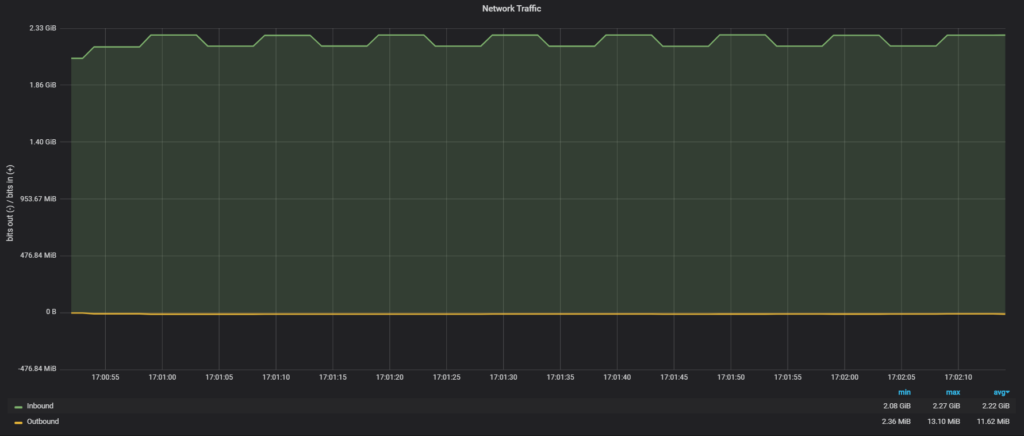
So the clone plugin used all available network bandwidth in 2.22GiB/sec, finishing the transfer four times faster than with SATA SSD and 10Gb network.
As for PXC SST, without a fix for xbstream:
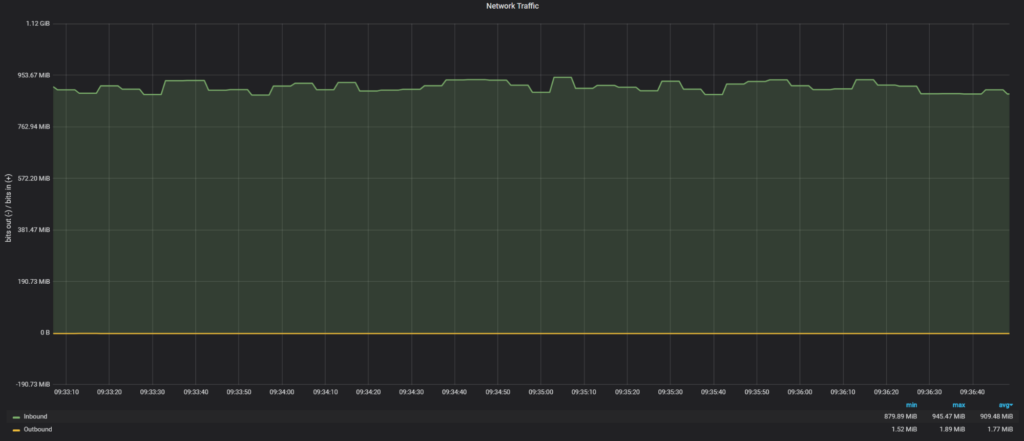
There I see only 909MiB/sec.
And with the fix for xbstream:
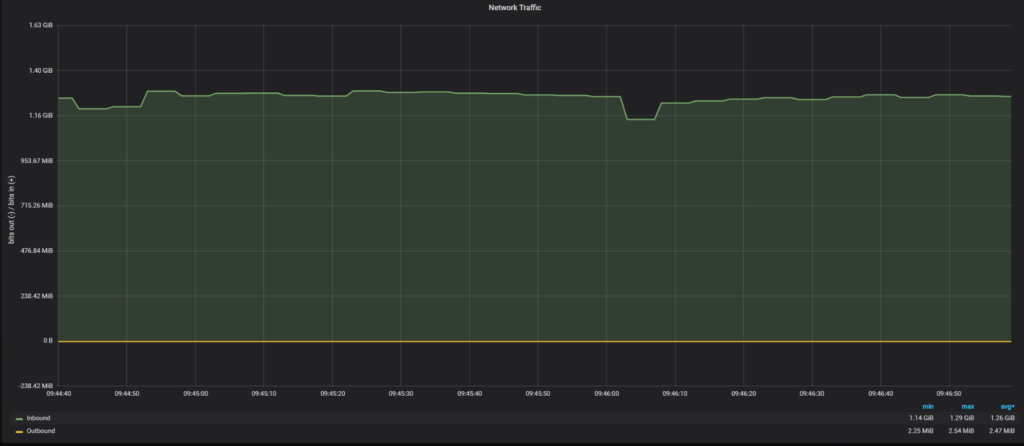
In this case, we get 1.26GiB/sec, which is noticeably slower than the clone plugin. I do not know yet why with SST we can get to the 2GiB/sec throughput.
The clone plugin is really a fast way to transfer data, and in my experiments was faster than SST in Percona XtraDB Cluster. The only downside it could not join a new node without a manual restart.
The incremental update was really slow and not the best way to perform a node join, but Group Replication chose this way by default even though it was not the optimal decision.
Both technologies are sensitive to available hardware, and the hardware upgrade (storage, network) could be viable options to improve performance.
As for loading data, the 3-node Group replication cluster was slower than the Percona XtraDB Cluster: 61 minutes for Group Replication and 39 minutes for PXC.





Hi Vadim, Thank you for evaluating!
Group Replication uses (classic) Replication for incremental mode. Configure MTS writeset based replication to improve catchup performance! MTS LOGICAL_CLOCK is already enabled but binlog_transaction_dependency_tracking=WRITESET is missing (https://dev.mysql.com/doc/refman/8.0/en/replication-options-binary-log.html#sysvar_binlog_transaction_dependency_tracking)
In your custom systemctl, to enable RESTART in MySQL 8.0, make sure to set MYSQLD_PARENT_PID=1 (https://dev.mysql.com/doc/mysql-secure-deployment-guide/8.0/en/secure-deployment-post-install.html#secure-deployment-systemd-startup)
Awesome insights @Vadim Tkachenko. By any chance, did you performed multi-master stress use-cases on GR and PXC?! I think, there would be significant difference in both as well.
Hi Vadim,
Thank you for testing MySQL Group Replication and InnoDB Clone !
I checked a bit your config and I think some adjustments might provide you better results with the tpcc prepare workload.
Could you try to set these on **all members** of the group (using set persist as below or in your ansible playbook):
set persist binlog_transaction_dependency_tracking=WRITESET;
set persist binlog_transaction_dependency_history_size=1000000;
set persist slave_checkpoint_period=3000;
set persist slave_pending_jobs_size_max=13421772800;
set persist slave_checkpoint_group=52420;
— IIRC, these you should already have —
set persist slave_parallel_workers=16;
set persist slave_parallel_type = LOGICAL_CLOCK;
I’m looking forward to see your results !
Cheers,
lefred.