


I recently worked on a customer engagement where the customer needed to archive a high amount of rows from different tables into another server (in this example for simplicity I am just archiving the results into a file).
As explained in this other blog post, “Want to archive tables? Use Percona Toolkit’s pt-archiver“,you can use pt-archiver to purge/archive rows from a table that match any “WHERE” condition, but this case was not that easy as the archive/delete condition was complex and involved joining many tables…
The archive conditions involved four tables with the following query and the following table schema. In the example, there are no foreign keys, but this method can be used also with foreign keys by reordering the table archive/purge.
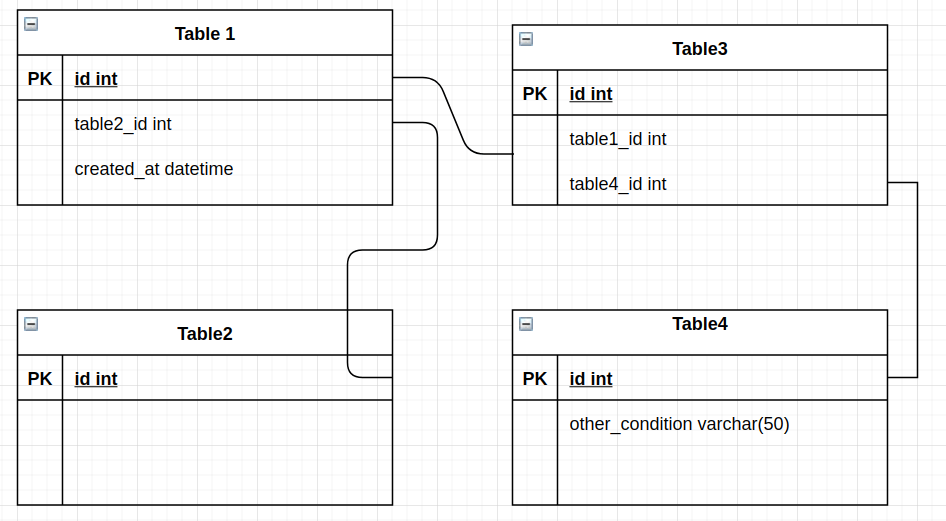
And the delete condition is the following:
|
1 2 3 4 5 6 |
DELETE table1, table2, table3, table4 FROM table1 INNER JOIN table3 ON table1.id = table3.table1_id INNER JOIN table2 ON table1.table2_id = table2.id INNER JOIN table4 ON (table3.table4_id = table4.id AND table4.cond = 'Value1') WHERE table1.created_at < '2020-01-01 00:00:00'; |
It can be seen that for a row to be archived, it depends on the existence and condition of other rows in other tables. Trying to purge/archive one table at a time is not a possible solution, because once a row has been purged/archived, it is not possible to find the other referenced rows that need to be purged/archived together with that one.
So, how do we proceed in this case?
For tackling the above problem, the best is to set up a transient table containing all the pairs of rows to be purged/archived, i.e:
|
1 2 3 4 5 6 7 8 9 |
mysql> select * from tmp_ids_to_remove ; +-----------+-----------+-----------+-----------+ | table1_id | table2_id | table3_id | table4_id | +-----------+-----------+-----------+-----------+ | 1 | 1 | 1 | 1 | | 1 | 1 | 2 | 1 | | 1 | 1 | 3 | 1 | | 3 | 3 | 5 | 3 | +-----------+-----------+-----------+-----------+ |
For the above example, the following rows from each table have to be purged:
Then the pt-archiver from Percona Toolkit can be used to purge/archive one table at a time, checking that the row to be purged does exist on “tmp_ids_to_remove”. The pt-archiver expression would be similar to:
|
1 |
--where 'EXISTS(SELECT tableX_id FROM percona.tmp_ids_to_remove purge_t WHERE id=purge_t.tableX_id)' |
And the query for populating table should be something similar to INSERT INTO tmp_ids_to_remove ( SELECT <query with the delete condition>) i.e:
|
1 2 3 4 5 6 |
INSERT INTO percona.tmp_ids_to_remove ( SELECT table1.id, table2.id, table3.id, table4.id FROM table1 INNER JOIN table3 ON table1.id = table3.table1_id INNER JOIN table2 ON table1.table2_id = table2.id INNER JOIN table4 ON (table3.table4_id = table4.id AND table4.cond = 'Value1') WHERE table1.created_at < '2020-01-01 00:00:00'); |
Things to consider:
Note: The above solution aims for data consistency at the cost of performance. If for whatever reason the purge/archive gets stopped halfway through, you will still know which rows ids are meant for purging since they are kept on tmp_ids_to_remove table.
On my GitHub repository, you can find an example scenario file and an example script for doing a test archive. The script is POC (proof of concept) and you should execute on a test env:
Instructions for usage are:
|
1 2 |
curl https://raw.githubusercontent.com/ctutte/blog_complex_archive/master/setup.sql > setup.sql curl https://github.com/ctutte/blog_complex_archive/blob/master/archiver_script.sh > archiver_script.sh |
|
1 |
mysql -u root -p < setup.sql |
|
1 |
chmod a+x archiver_script.sh |
|
1 |
./archiver_script.sh |
The archived rows are deleted from the DB, and the archived rows are written to /tmp/table_name.out file.
Trying to purge/archive rows for complex conditions or when trying to keep data consistency can be hard. The above solution will generate an intermediate table and be based on pt-archiver for purging/archiving rows in a tidy way and can be automated to be able to purge/archive millions of rows that otherwise would not be possible to do manually.
Note: This example is from a real case scenario but was obfuscated and simplified. It might still seem “unnecessarily complex” but it was kept like that so that the proposed solution makes sense.
Under similar scenarios, a much easier/faster solution might be suitable, but other times due to business logic or other restrictions, a more complex solution must be implemented.
Resources
RELATED POSTS




