

In this blog post, we’ll discuss best practices for configuring optimal MySQL memory usage.
Correctly configuring memory is critical for MySQL performance and stability. Default settings in MySQL 5.7 use very little memory, which is inefficient—but over-allocation can cause instability or crashes.
Key rule: MySQL should never cause the operating system to swap. Even small amounts of swapping activity can severely degrade performance.
Some swap usage is fine (for idle OS processes), but active swapping—visible in the si and so columns of vmstat—should be avoided.
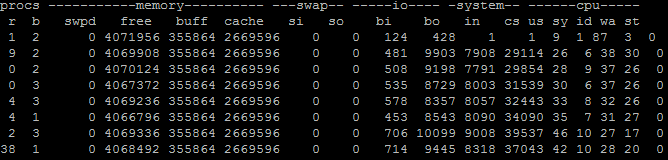
Example: No Significant Swapping
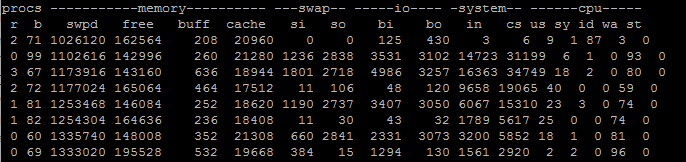
Example: Heavy Swapping
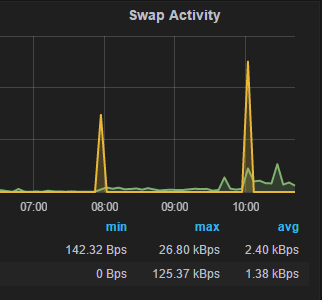
If you’re using Percona Monitoring and Management, you can monitor swap activity directly.
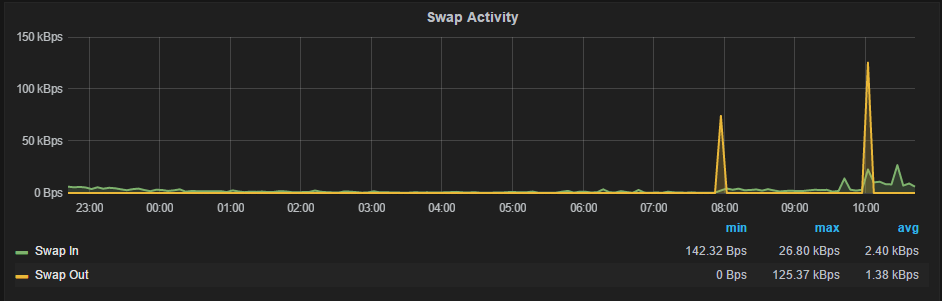
Swap spikes over ~1MB/sec or sustained activity indicate memory misconfiguration.
MySQL memory usage includes:
Because of this complexity, it’s best to monitor actual usage via VSZ:
|
1 |
ps aux | grep mysqld |
|
1 |
mysql 3939 30.3 53.4 11635184 8748364 ? Sl Apr08 9106:41 /usr/sbin/mysqld |
The 5th column shows VSZ (~11GB here).
Recommendation: Keep mysqld VSZ under ~90% of system memory.
Typically, MySQL should use no more than 90% of system memory to leave room for the OS and other processes.
Use less if:
Memory allocation considerations:
Main components:
innodb_buffer_pool_sizekey_buffer_sizequery_cache_sizetable_open_cacheNote: InnoDB buffer pool uses an additional 5–10% overhead.
System: 16GB RAM
Final recommendation:
|
1 |
innodb_buffer_pool_size=12G |
Keep swap enabled (minimum ~4GB or 25% RAM):
Reduce swap usage tendency:
|
1 |
echo 1 > /proc/sys/vm/swappiness |
Prevent MySQL from being killed first:
|
1 |
echo -800 > /proc/$(pidof mysqld)/oom_score_adj |
On multi-socket systems:
|
1 |
innodb_numa_interleave=1 |
Or use:
|
1 |
numactl --interleave=all |

Resources
RELATED POSTS





Hi Peter,
What an excellent post!
About the swap, we typically set it to the exact size of the RAM. So, if a server has 64GB of RAM, then the swap is also 64GB. The thing is with SSDs, the swap is now more efficient than ever. Do you think that’s too much, given the fact that we have a generous amount of disk space? (Note: We did have a client who set the swap to 0, and the moment MySQL ran out of memory, the whole server crashed, so I see your point about the necessity of the swap).
About “innodb_buffer_pool_size” – you said to set it at around 12GB on a MySQL dedicated server with 16GB of RAM. Now, assuming an application with a heavy write activity, will there be a performance hit? I am assuming that the innodb_buffer_pool_size works the same way as the query_cache_size, which causes a performance hit when there is a table change because of invalidation.
Hi Fadi,
1) Setting swap to match RAM size is quite common and OK to do so. My at least 25% guidance come to very large size boxes – if you’re looking for 256GB of memory 256GB of Swap, especially on expensive SSD can be too much. Note you still do not want a lot of swapping to happen even with SSD.
2) Innodb Buffer Pool is very different from Query Cache from many points of view. Specifically when it comes to invalidation Query Cache has to invalidate all queries corresponding to the given table with any update to that table so larger sizes do not work well. Buffer pool does not have such requirement and update simply marks one or more of buffer pool pages “dirty” which are later flushed in the due time. 12GB is not really large buffer pool – for many high end installations you can see buffer pools of 300GB and more.
Thank you for the useful post!
Do we have a way to know the overhead of the InnoDB buffer pool to retain additional data structure?
And since this is good, I translated this into Japanese https://yakst.com/ja/posts/3983.
Please let me know if it’s a problem.
I think InnoDB Fulltext Index has different strategics to using Memory and If someone use Fulltext on Big table, he should control fultext variables to avoid eat Memory
Nice post, Peter!
I think making MySQL a less likely candidate to be killed by the OOM killer should be done with cautious though. Typically, on the dedicated database machines MySQL will be consuming about 90% of the memory and no other applications should be running there except for the operating system. Killing an OS process won’t release so much memory and it might corrupt the filesystem (I had a case where memory pressure corrupted the system bus).
In other words, killing MySQL is not the worst scenario in all cases!
Hi, I have a dual core with 256 GB virtual MySQL running on it. At times the machine runs very slow even to process a simple count query, Any reason…
Stroed procedures/functions and triggeres – are couse of high memory usage (all affected MySQL, Percona, MariaDB)
scripts and description here: https://jira.percona.com/projects/PS/issues/PS-6800
Any ideas how to control it? Config tips?