

 Quite a common request that we receive from the community and customers is to provide a way to manage database users with Operators – both MongoDB and MySQL. Even though we see it as an interesting task, our Operators are mainly a tool to simplify the deployment and management of our software on Kubernetes. Our goal is to provide the database cluster which is ready to host mission-critical applications and deployed with the best practices.
There are few use cases:
We want to have the functionality to provision users with Operators, but it does not seem to be the right solution to do it separately for each Operator. It looks like it can be unified.
What if we take it to another level and create a way to provision users on any database through the Kubernetes control plane? The user has created the MySQL instance on a public cloud through the control plane, so why not create the DB user the same way?
Crossplane.io – A Kubernetes addon that enables users to declaratively describe and provision the infrastructure through the k8s control plane. By design, it is extendable through “providers”. One of them – provider-sql – enables the functionality to manage MySQL and PostgreSQL users (and even databases) through CRDs. Let’s see how to make it work with Percona XtraDB Cluster Operator.
Prerequisites:
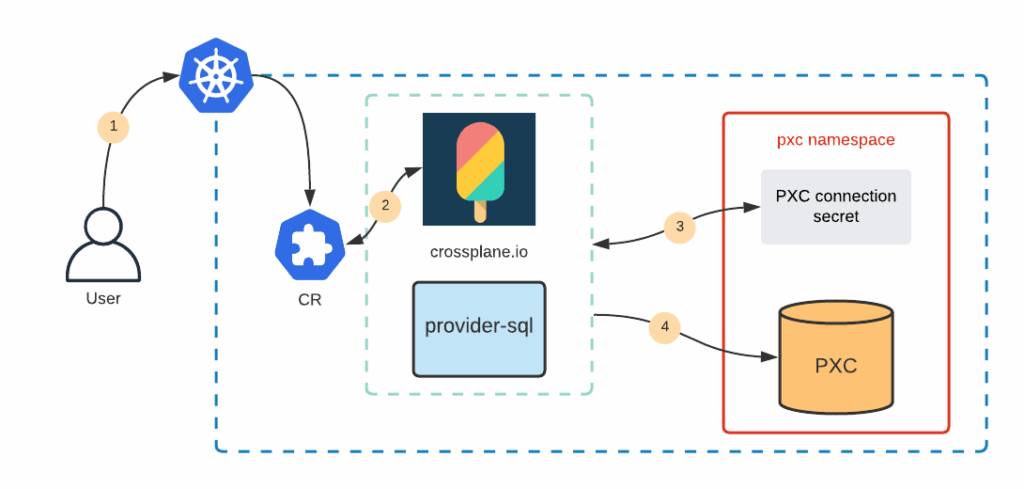
The goal is to create a Custom Resource (CR) object through Kubernetes API to trigger crossplane.io to create the user on the PXC cluster. As a summary it will look like this:
I have placed all the files for this blog post into the public github repository along with the condensed runbook which just lists all the steps. You can find it all here.
The simplest way is to do it through helm:
|
1 2 3 |
kubectl create namespace crossplane helm repo add crossplane-alpha https://charts.crossplane.io/alpha helm install crossplane --namespace crossplane crossplane-alpha/crossplane |
Other installation methods can be found in crossplane.io documentation.
Provider in Crossplane is a concept similar to Terraform’s provider. Everything in crossplane is done through Kubernetes API and that includes the installation of Providers:
|
1 2 3 4 5 6 7 8 9 |
$ cat crossplane-provider-sql.yaml apiVersion: pkg.crossplane.io/v1beta1 kind: Provider metadata: name: provider-sql spec: package: "crossplane/provider-sql:master" $ kubectl apply -f crossplane-provider-sql.yaml |
This is going to install Custom Resource Definitions for provider-sql which is going to be used to manage MySQL users on our PXC cluster. Full docs for provider-sql can be found here, but they are not very detailed.
Everything is installed and needs a last configuration touch.
|
1 2 3 4 5 6 7 8 9 10 11 12 13 |
$ cat crossplane-secret.yaml apiVersion: v1 kind: Secret metadata: name: crossplane-secret namespace: pxc stringData: username: root password: <root password> endpoint: cluster1-haproxy.pxc.svc.cluster.local port: "3306" type: Opaque |
You can get the root password from the secret which is created when PXC is deployed through the Operator. Quick way to get it is like this:
|
1 2 |
$ kubectl get secret -n pxc my-cluster-secrets -o yaml | awk '/root:/ {print $2}' | base64 --decode && echo <root password> |
Crossplane will use the endpoint and port as a MySQL connection string, and username and password to connect to it. Configure provider-sql to get the information from the secret:
|
1 2 3 4 5 6 7 8 9 10 11 12 13 |
$ cat crossplane-mysql-config.yaml apiVersion: mysql.sql.crossplane.io/v1alpha1 kind: ProviderConfig metadata: name: cluster1-pxc spec: credentials: source: MySQLConnectionSecret connectionSecretRef: namespace: pxc name: crossplane-secret $ kubectl apply -f crossplane-mysql-config.yaml |
Let’s verify that configuration is in place:
|
1 2 3 |
$ kubectl get providerconfig.mysql.sql.crossplane.io NAME AGE cluster1-pxc 14s |
All set. Crossplane can now connect to the database and create the users. From the Kubernetes and user perspective, it is just creating the custom resources through the control plane API.
|
1 2 3 4 5 6 7 8 9 10 11 12 13 14 15 |
$ cat crossplane-db.yaml apiVersion: mysql.sql.crossplane.io/v1alpha1 kind: Database metadata: name: my-db spec: providerConfigRef: name: cluster1-pxc $ kubectl apply -f crossplane-db.yaml database.mysql.sql.crossplane.io/my-db created $ kubectl get database.mysql.sql.crossplane.io NAME READY SYNCED AGE my-db True True 14s |
This created the database on my Percona XtraDB Cluster:
|
1 2 3 4 5 6 7 8 9 10 |
$ mysql -u root -p -h cluster1-haproxy Server version: 8.0.22-13.1 Percona XtraDB Cluster (GPL), Release rel13, Revision a48e6d5, WSREP version 26.4.3 ... mysql> show databases like 'my-db'; +------------------+ | Database (my-db) | +------------------+ | my-db | +------------------+ 1 row in set (0.01 sec) |
The DB can be deleted through Kubernetes API as well – just delete the corresponding database.mysql.sql.crossplane.io object.
The user needs a password. Password should never be stored as plain text, so let’s put it into a Secret:
|
1 2 3 4 5 6 7 8 |
$ cat user-secret.yaml apiVersion: v1 kind: Secret metadata: name: my-user-secret stringData: password: mysuperpass type: Opaque |
We can create the user now:
|
1 2 3 4 5 6 7 8 9 10 11 12 13 14 15 16 17 18 19 20 21 22 23 |
$ cat crossplane-user.yaml apiVersion: mysql.sql.crossplane.io/v1alpha1 kind: User metadata: name: my-user spec: providerConfigRef: name: cluster1-pxc forProvider: passwordSecretRef: name: my-user-secret namespace: default key: password writeConnectionSecretToRef: name: connection-secret namespace: default $ kubectl apply -f crossplane-user.yaml user.mysql.sql.crossplane.io/my-user created $ kubectl get user.mysql.sql.crossplane.io NAME READY SYNCED AGE my-user True True 11s |
And add some grants:
|
1 2 3 4 5 6 7 8 9 10 11 12 13 14 15 16 17 18 19 20 21 22 23 24 |
$ cat crossplane-grants.yaml apiVersion: mysql.sql.crossplane.io/v1alpha1 kind: Grant metadata: name: my-grant spec: providerConfigRef: name: cluster1-pxc forProvider: privileges: - DROP - CREATE ROUTINE - EVENT userRef: name: my-user databaseRef: name: my-db $ kubectl apply -f crossplane-grants.yaml grant.mysql.sql.crossplane.io/my-grant created $ kubectl get grant.mysql.sql.crossplane.io NAME READY SYNCED AGE ROLE DATABASE PRIVILEGES my-grant True True 7s my-user my-db [DROP CREATE ROUTINE EVENT] |
Verify that the user is there:
|
1 2 3 4 5 6 7 8 |
mysql> show grants for 'my-user'; +-----------------------------------------------------------------+ | Grants for my-user@% | +-----------------------------------------------------------------+ | GRANT USAGE ON *.* TO `my-user`@`%` | | GRANT DROP, CREATE ROUTINE, EVENT ON `my-db`.* TO `my-user`@`%` | +-----------------------------------------------------------------+ 2 rows in set (0.00 sec) |
Kubernetes is declarative and its controllers always do their best to keep the declared configuration and real state in sync. It means that if you are going to delete the user manually from the database (not through Kubernetes API), on the next pass of a reconcile loop Crossplane will sync the state and recreate the user and grants again.
Some functionality in one database engine differs a lot from the other, but sometimes there is a pattern. User creation is one of these patterns that can be unified across multiple database engines. Luckily Cloud Native Foundation landscape is huge and consists of a lot of building blocks which when used together can deliver wonderful infrastructures or applications.
This blog post shows that the community might have already found a better solution to the problem and re-inventing it might be a waste of time.
Extending crossplane.io providers to support other database engines (like MongoDB) is a challenge but can be solved. We are drafting a proposal and will work with our teams and community to deliver this.
Resources
RELATED POSTS




