| TL;DR: Starting with PBM 2.15.0 and PCSM 0.9.0, every release artifact – binary tarballs, RPM and DEB packages, and Docker images – ships a CycloneDX 1.6 Software Bill of Materials in JSON. Scan it with Trivy, Grype, or any CycloneDX-compatible tool. For Docker images, the fastest path is a Trivy image –sbom-sources oci <image>. There is nothing to enable, as the SBOM is already a part of the artifact you were going to download. |
If you run Percona Backup for MongoDB (PBM) or Percona ClusterSync for MongoDB (PCSM), both part of the Percona Software for MongoDB family, you can now answer one of the stressful questions in operations: “Is my database tooling affected by this CVE?” in seconds instead of days. And when a customer or auditor asks for a parts list of what you deployed, you can hand it over as a single file instead of starting a multi-day investigation.
That parts list is a Software Bill of Materials (SBOM), and starting with PBM 2.15.0 and PCSM 0.9.0, it comes along in every channel we publish – tarballs, RPM and DEB packages, and Docker images. This post shows what is in it, where to find it, and three ways to scan it.
Most MongoDB operators run database tooling assembled by someone else – official RPMs, official containers, official tarballs. When something goes wrong upstream, the first question is always the same: what is actually inside this artifact, and is any of it affected?
Two incidents made that question a board-level concern, and a third made it personal for MongoDB teams. Log4Shell in late 2021 forced thousands of teams to manually audit Java dependencies they did not know they had. The xz-utils backdoor disclosed in early 2024 hid in a compression library buried deep inside Linux base images. Then, in December 2025, MongoBleed (CVE-2025-14847) forced MongoDB teams to urgently identify which server and tooling versions were actually deployed. In every case, teams that already had an SBOM per artifact answered “are we affected?” in minutes; teams that did not took days.
The other version of the problem is that the SBOM is something someone else asks of you – a customer running a security review, an auditor checking EU Cyber Resilience Act or US Executive Order 14028 compliance, or a procurement team working through a vendor questionnaire. Without one, every such request turns into a discovery project.
An SBOM is a machine-readable inventory of every component, library, and OS package inside a built artifact, with versions, licenses, and dependency relationships. Think of it as a packing slip for a software shipment, except a computer can parse it, search it, and cross-reference it against vulnerability databases.
Plenty of vendors now ship SBOMs. What matters is whether the SBOM is actually usable, and PBM and PCSM cover the three things that decide that. The format is CycloneDX 1.6, an OWASP-backed JSON standard that every major tool reads: Trivy, Grype, Snyk, and Dependency-Track. The files are generated with Syft from the actual built binary and the staged file tree, so the inventory reflects what was really packaged, not what the source tree implies. And the SBOM ships in every distribution channel, not just one:
| Distribution channel | SBOM location |
|---|---|
| Binary tarball | <product>-<version>.cdx.json at the root of the archive |
| RPM package | /usr/share/doc/<product>/<product>-<version>.cdx.json |
| DEB package | /usr/share/doc/<product>/<product>-<version>.cdx.json |
| Docker image | Two SBOMs ship side by side — see below |
Docker images get special treatment because they bundle two different things: our binary on top of a base operating system. Each PBM and PCSM image, therefore, carries two SBOMs with overlapping scopes.
The embedded SBOM is stored in the image filesystem (the same file the RPM installs) and describes our binary and its Go modules. This is the SBOM to use in offline or air-gapped clusters where you cannot reach a registry.
The OCI-attached SBOM lives next to the image in the registry as an OCI 1.1 referrer artifact and describes the full image, including the base OS packages. This is the canonical SBOM for a Docker image, and the easiest to fetch programmatically.
| SBOM | Scope / how you reach it |
|---|---|
| Embedded (installed by the RPM) | Our package only: Go modules of the binary; inside the image filesystem |
| OCI-attached (registry-side) | Full image: our package + UBI9 OS packages; via the OCI Referrers API |
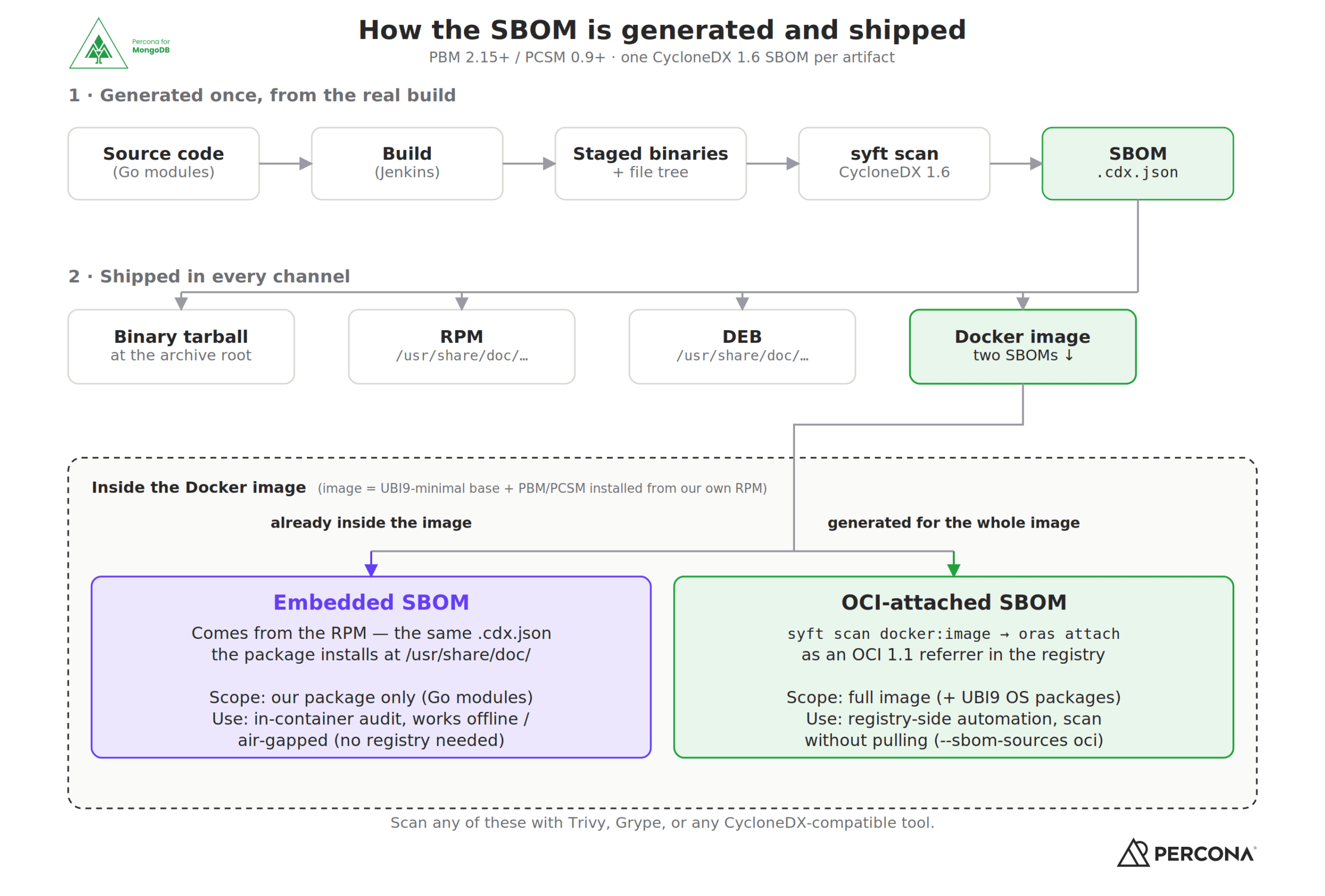
How the SBOM is generated across PBM and PCSM artifacts, and why a Docker image carries two.
The examples below use Trivy because it is the most common choice in Percona QA pipelines, but Grype, Snyk, and any other CycloneDX-compatible scanner accept the same .cdx.json files unchanged. By default, these commands report everything the scanner finds. In a CI pipeline, you would want to narrow down the output by leaving only –severity HIGH, CRITICAL to focus on the most serious findings, and –ignore-unfixed to skip CVEs that have no upstream fix yet.
Once the artifact is on disk, the SBOM is just a file in a predictable location. Point Trivy at it:
|
1 2 |
trivy sbom --severity HIGH,CRITICAL,MEDIUM,LOW \ /usr/share/doc/percona-clustersync-mongodb/percona-clustersync-mongodb-0.9.0.cdx.json |
The same command works against the SBOM extracted from a tarball or installed by an RPM or DEB package – only the file path changes. For Oracle Linux, replace with the exact compatible RHEL minor, e.g., --distro redhat/9.8, since Trivy does not recognize the ol OS family on its own, but the RHEL vulnerability database is binary-compatible.
For Docker images, Trivy can fetch the OCI-attached SBOM straight from the registry. No image pull, no extraction step:
|
1 2 |
trivy image --severity HIGH,CRITICAL,MEDIUM,LOW --sbom-sources oci \ docker.io/percona/percona-clustersync-mongodb:0.9.0 |
Trivy resolves the multi-arch index, picks your platform-specific child digest, asks the registry for any attached SBOMs via the OCI Referrers API, and scans whichever one it finds. A typical run looks like this:
Report Summary:
| Target | Type | Vulnerabilities |
|---|---|---|
| docker.io/percona/percona-clustersync-mongodb:0.9.0 (redhat 9.8) | redhat | 0 |
| usr/bin/pcsm | gobinary | 8 |
Two targets, two scopes: the base OS layer (no findings) and the PCSM binary (eight Go standard-library CVEs, all flagged because the image was built against a Go release that has since been superseded). The same –sbom-sources oci flag works for PBM images, and against both the public percona/ images on Docker Hub and the engineering perconalab/ images.
If you would rather inspect the OCI artifact directly, to confirm what is attached, or pull the SBOM to disk, the ORAS CLI does that without a scanner in the loop:
|
1 2 |
oras discover --format tree \ docker.io/percona/percona-clustersync-mongodb:0.9.0-amd64 |
The per-arch tag (:<version>-<arch>) resolves straight to the image manifest that the SBOM is attached to. From there, oras pull <digest> writes the .cdx.json to disk for archival or for feeding into a scanner of your choice.
For operators, the upgrade story gets simpler. When a new CVE is disclosed, you no longer have to guess whether your PBM or PCSM deployment is affected; you scan the SBOM that shipped with the exact version you are running and get a yes/no answer in seconds. The SBOM is also a stable input for the dashboards you already run (Dependency-Track, DefectDojo, your SIEM), so PBM and PCSM are no longer blind spots in the inventory.
For security and platform teams, the OCI-attached SBOM means you can pre-screen container images in CI before they ever reach a cluster. Pull-request gates that already scan first-party images for HIGH/CRITICAL findings can pick up PBM and PCSM with no extra glue code: –sbom-sources oci is enough.
SBOMs ship starting with PBM 2.15.0 and PCSM 0.9.0 across every channel we publish: tarballs, RPM, DEB, and Docker. There is nothing to switch on: download the artifact you would have downloaded, and the SBOM is already there.Full details, including the ORAS walkthrough and per-channel paths, are in the PBM and PCSM documentation (PBM, PCSM).&amp;amp;amp;amp;amp;amp;amp;amp;amp;lt;/p>
Run a scanner over your Percona Backup for MongoDB or Percona ClusterSync for MongoDB deployment using one of the commands above. If the result surprises you in any direction, if you have a finding you would like us to address, or if a workflow did not behave as our docs imply, we would like to hear about it, and the SBOM lets you point us to the exact component and version rather than a hunch. Open an issue in the PBM or PCSM Jira project, or stop by the Percona Community Forum.
One last thing: an SBOM tells you what is inside the artifact, not what we have determined about each finding. That second part is coming. Alongside the per-artifact SBOMs described here, we also plan to publish source SBOMs in the repository, and a follow-up in this series will cover the VEX (Vulnerability Exploitability eXchange) documents that record, for each finding, whether it is fixed, not exploitable in our build, or still under investigation. Watch for both in future re
leases.
Resources
RELATED POSTS