Percona Operator for MongoDB 1.23.0 makes the operator a place you move to, not just a place you start. A new ClusterSync component clones a live source and follows its change streams, so leaving a hosted service is a short cutover rather than a long outage. Alongside it, this release adds semantic vector search and storage-layer snapshot backups, two features that matter most once the data is yours to run.
The three headline features are Percona ClusterSync for MongoDB, vector search, and PVC snapshot backups. ClusterSync clones and continuously replicates a live source into an operator-managed cluster. Vector search brings semantic queries to Percona Server for MongoDB. PVC snapshot backups move backups off the network path and onto the storage layer.
This release also widens where you can run it, adding official Rancher Kubernetes Engine (RKE2) support and full ARM64 images. Much of what shipped here traces back to requests on forums.percona.com and the public issue tracker.
In this post, you’ll learn about:
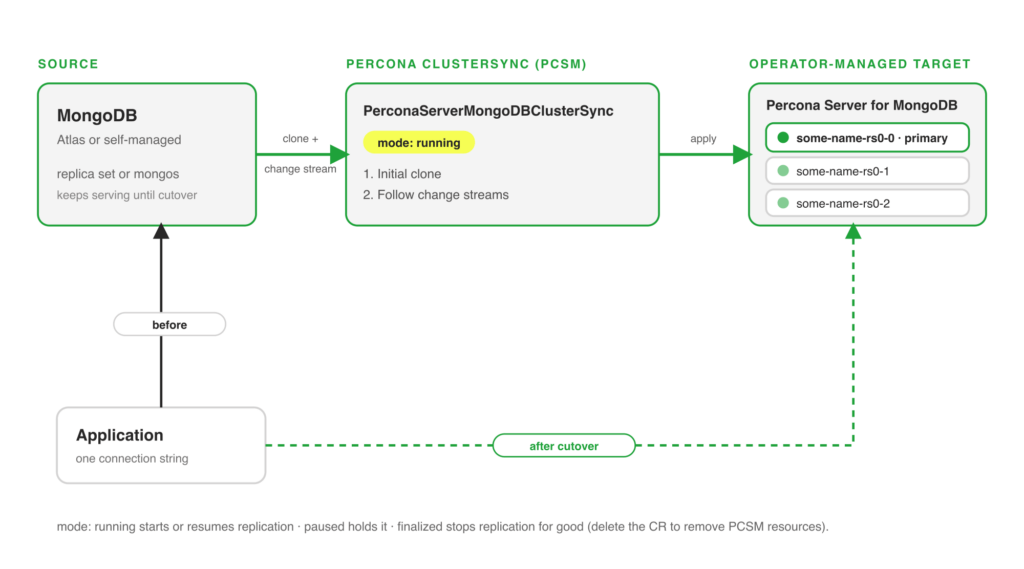
Moving a live MongoDB database onto the operator has always been the awkward first step. Dump-and-restore needs a maintenance window sized to your data, and hand-built replication between a source and a target is fragile to set up and easy to get wrong. This release introduces Percona ClusterSync for MongoDB (PCSM) as an operator-managed component, so the migration path is via a Kubernetes object rather than a runbook.
The common case is migrating a hosted MongoDB service, for example MongoDB Atlas, for an operator-managed Percona Server for MongoDB cluster you control end to end. A typical trigger in production is a hosted-service bill that climbs with the workload, or a compliance requirement to keep data inside your own VPC and region: a team running a user-profile store on Atlas points PCSM at it, lets the target catch up over a day or two while the application keeps serving from Atlas, then cuts over in a maintenance window measured in seconds. PCSM clones the existing data, then tracks ongoing changes through MongoDB change streams, so the target stays current while you validate it. When you are ready, you cut the application over during a short window rather than a long one. The same mechanism keeps a continuously updated replica for non-production use or a hybrid-cloud copy.
PCSM runs as its own container, deployed and managed through a new PerconaServerMongoDBClusterSync custom resource. It performs an initial clone from the source connection string, then consumes change stream events to apply subsequent writes to the target. A mode field controls the lifecycle: running starts or resumes replication, paused holds it, and finalized stops replication.
|
1 2 3 4 5 6 7 8 9 10 11 12 13 14 15 16 17 18 19 |
apiVersion: psmdb.percona.com/v1 kind: PerconaServerMongoDBClusterSync metadata: name: my-cluster-sync spec: clusterName: my-target-cluster-name image: percona/percona-clustersync-mongodb:0.9.0 # mode controls the PCSM lifecycle intent. Allowed values: # running - start/resume replication (default) # paused - pause an active replication # finalized - stop replication mode: running source: uri: mongodb://source-cluster-mongos.source-namespace.svc.cluster.local:27017 credentialsSecret: my-cluster-sync-source # excludeNamespaces lists MongoDB namespaces (db or db.collection) to skip. # excludeNamespaces: # - admin # - local |
clusterName names the operator-managed target that receives the data. source.uri and source.credentialsSecret point at the database you are migrating from, which can be Atlas, a self-managed replica set, or another operator cluster. mode is the control you drive the cutover with: run to catch up, pause to hold, then finalize once the application points at the new cluster. The optional excludeNamespaces list skips databases or collections you do not want to copy.
The cutover is yours to time, not the operator’s. During the running replication, the target trails the source by the change-stream lag, which you watch until it is small and steady. You then stop writes on the source, let the last events drain, and repoint the application at the target cluster. Because the source keeps serving until you move the application, a rollback before cutover is simply leaving the application where it is. After cutover, treat the move as one-way once writes flow to the target, so verify the target thoroughly during the sync window rather than after.
Note: The PCSM component ships at version 0.9.0 with this release. Test the full migration and cutover against a staging copy before you run it on production data, and keep the source available until you have verified the target.
Vector search retrieves results by meaning rather than exact keyword match, which is the retrieval pattern behind semantic search and retrieval-augmented generation for AI applications. Teams that already store their data in MongoDB have had to copy vectors into a separate engine to do this, which adds a system to run and a pipeline to keep in sync. In production, this is the pattern behind a support tool that surfaces past tickets describing the same problem in different words, a product catalog that returns items by intent rather than exact keywords, and a RAG service that grounds a model on internal documents. This release lets you store and query vector data alongside your regular documents in Percona Server for MongoDB, so those workloads query one system instead of two.
The operator deploys and manages the mongot search process, wires its authentication and TLS to the rest of the cluster, and keeps the search index synchronized for both replica set and sharded deployments. Applications query the index through the same MongoDB connection they already use, so you add semantic search without a second client, a second driver, or a second set of credentials. You do not stand up or secure a separate search tier; the operator treats mongot as another managed component of the cluster.
Enable the search component in the custom resource:
|
1 2 3 4 5 6 7 8 9 10 11 12 13 14 |
spec: search: enabled: true image: perconalab/percona-server-mongodb-operator:main-mongot size: 1 storage: persistentVolumeClaim: resources: requests: storage: 10Gi resources: requests: cpu: "2" memory: 2Gi |
size sets how many search nodes to run, and storage gives the search index its own PersistentVolumeClaim so it does not compete with the database volume. Size the resources block to your index: vector indexes are memory-sensitive, so give mongot enough headroom for the corpus you intend to query.
Note: Vector search is a tech preview in 1.23.0 and is not recommended for production yet. It requires Percona Server for MongoDB 8.3 or later.
Logical and streamed physical backups both push data across the network to object storage, and for a multi-terabyte cluster, that path is the bottleneck. Backups run long, restores run longer, and both compete with production traffic for CPU and bandwidth. This release adds backups built on PersistentVolumeClaim snapshots, which takes the storage layer directly.
A PVC snapshot is a point-in-time copy of your data volumes taken at the storage layer through the Kubernetes VolumeSnapshot API. Because the operator asks the storage provider for a snapshot instead of streaming bytes out, a backup typically completes in seconds or minutes regardless of database size, and a restore is correspondingly fast. Two production situations show the difference: a nightly backup that no longer fits its window as a cluster grows past a few terabytes, and a staging refresh that ties up resources for hours while it restores a streamed copy. A storage-layer snapshot turns both into a near-instant operation. The speed comes from how the storage layer implements snapshots: instead of copying the whole volume, most backends record only the blocks that changed since the previous snapshot and reference the rest, so the cost tracks your change rate rather than the total database size. Snapshots also work with encrypted and TLS-enabled clusters, and they use fewer cluster resources because there is no long-running data-transfer job.
The operator takes snapshot backups in two ways: on demand through a PerconaServerMongoDBBackup object, or on a schedule through a backup task. The scheduled form looks like this, using the external type and a VolumeSnapshotClass:
|
1 2 3 4 5 6 7 8 9 10 11 12 |
spec: backup: tasks: - name: daily-snapshot enabled: false schedule: "0 0 * * *" retention: count: 1 type: count deleteFromStorage: true type: external volumeSnapshotClass: YOUR-VOLUME-SNAPSHOT-CLASS |
type: external tells the operator to take a storage-layer snapshot rather than stream a backup, and volumeSnapshotClass names the VolumeSnapshotClass your CSI driver provides. The retention block prunes old snapshots on the schedule you set. Your storage provider must support the Kubernetes VolumeSnapshot API for this to work.
Snapshot backups complement the streamed and logical backups the operator already supports; they do not replace them. Snapshots usually live in the same storage account and region as the volumes they copy, so keep a streamed backup to object storage for off-site and cross-region disaster recovery. A practical policy pairs frequent fast snapshots for quick local recovery with a less frequent streamed backup for durability, and the operator runs both from the same backup.tasks list.
Note: PVC snapshot backups are a tech preview in 1.23.0 and are not recommended for production yet. Snapshot portability and retention semantics depend on your CSI driver, so test restores before you rely on them.
Beyond the three headline features, 1.23.0 ships a set of enhancements that smooth day-two operations:
For the full list, including bug fixes, see the release notes linked below.
Percona Operator for MongoDB 1.23.0 covers the arc from getting data in to keeping it safe: ClusterSync brings a live database onto the operator with a short cutover, vector search lets one system serve both documents and semantic queries, and PVC snapshot backups take the network out of the backup path. With RKE2 and full ARM64 support added, more of that runs on the platforms teams actually use. If there is a workflow you still script around the operator, tell us on the forum, since that is where releases like this one come from.
Resources
RELATED POSTS