

Recently, I wrote an overview about what you need to know about PostgreSQL security. For this post, I want to write about PostgreSQL authentication. It is divided into three categories: 1. PostgreSQL Internal Authentication, 2. OS-based Authentication, and 3. External Server-Based Authentication. In most cases, PostgreSQL is configured to be used with internal authentication, so here we will discuss each and every internal authentication method in detail. The next blog will cover the OS authentication methods such as PAM, Peer, and Ident.
Unlock PostgreSQL Expertise: Download the Percona Support for PostgreSQL datasheet to learn more!
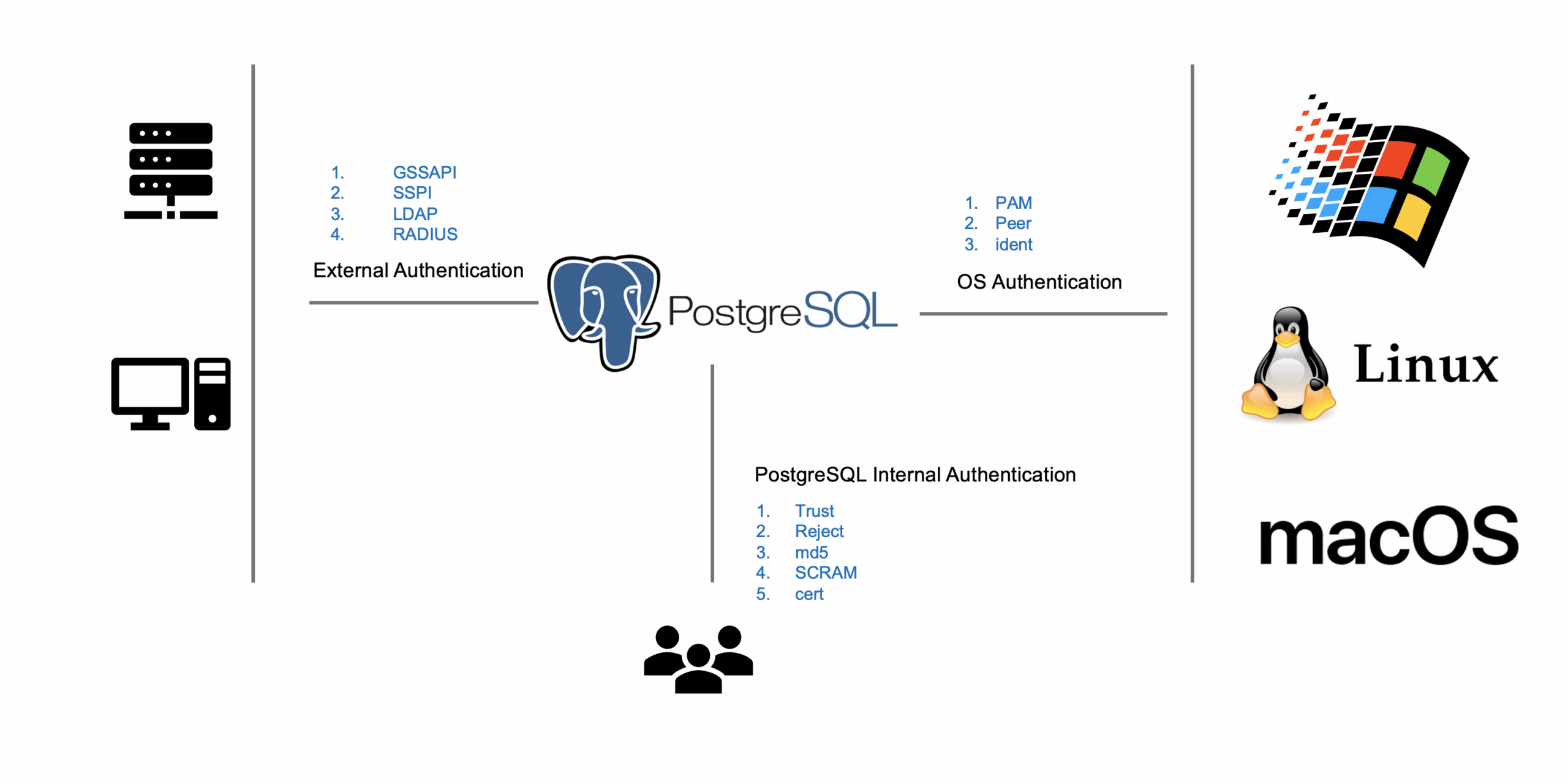
The following is the list of PostgreSQL internal authentication supported methods.
PostgreSQL has a configuration file to configure authentication called pg_hba.conf. All the authentication-related settings are part of this configuration file. Here is the sample pg_hba.conf file:
|
1 2 3 4 5 6 |
host database user address auth-method [auth-options] ------+--------------- +-----------------+----------------+--------------+--------------- Local | all | all | | trust host | all | all | 127.0.0.1/32 | trust host | postgres | postgres | 192.168.1.1/24 | md5 host | replication | postgres | 127.0.0.1/32 | md5 |
The first column of the “pg_hbaa.conf” file is the “host”. It can be either local or host. The local is fixed for the Unix-Domain socket, and in the case of a host, you need to specify the host IP address in the address column. The second column is the database, which is used to specify the database name. You can set the authentication method based on databases, meaning your database can have its own authentication method. If these values are set to all, then all the databases will use the same authentication method. The third column of the file is the user, which means you can set separate authentication methods for different users and “all” means apply to all users. The fourth parameter is to specify the IP address, which means which IP address can use that authentication method. The next column is the auth-method which can be any of the authentication methods shown in Figure 1. The last column is auth-options, in case any authentication method has some options.
When you specify the authentication method Trust, then any user who fulfills the requirement will not require any password. Similarly, in the case of Reject, any user who fulfills the requirement will not be allowed to login into the system. Here is the example of Trust and Reject:
|
1 2 3 4 |
host database user address auth-method [auth-options] ------+-----------------+-----------------+----------------+-------------------------+-------------------- host | all | all | 127.0.0.1/32 | trust host | all | all | 127.0.0.1/32 | Reject |
The pg_hba.conf file has two entries; the first one has authentication method trust and the second one has authentication method reject. A local host user no longer needs to have a password and will be granted permission to login into the system without the password. But any computer other than localhost will be rejected, because of the second line of the pg_hba.conf file.
|
1 2 3 4 |
postgres@127.0.01:~$ psql postgres -h 127.0.0.1 -U postgres psql (12.4) Type "help" for help. postgres=> |
|
1 2 3 |
postgres@10.0.2.2:~$ psql postgres -h 10.0.2.1 -U postgres psql: error: could not connect to server: FATAL: pg_hba.conf rejects connection for host "10.0.2.2", user "postgres", database "postgres" |
In the case of md5 authentication, you need to provide the password. Let’s look at a simple example of that.
|
1 2 3 |
host database user address auth-method [auth-options] ------+-----------------+-----------------+-----------+-------------------------+-------------------- host | all | all | 10.0.2.2/32 | md5 |
|
1 2 3 4 5 |
vagrant@vagrant:~$ psql postgres -h 10.0.2.1 -U postgres Password for user postgres: psql (12.4) Type "help" for help. postgres=> |
The SCRAM, or more specifically scram-sha-256, is a challenge-response scheme that prevents password sniffing on untrusted connections. It is one of the most secure authentication methods, using secure, cryptographically-hashed security, to store the passwords on the server.
Step 1: Change the password of the user
|
1 2 3 4 5 |
postgres=# SET password_encryption = 'scram-sha-256'; SET postgres=# ALTER USER postgres WITH PASSWORD 'test'; ALTER ROLE |
Step 2: Change the pg_hba.conf file.
|
1 2 3 |
host database user address auth-method [auth-options] ------+-----------------+-----------------+-----------+-------------------------+-------------------- host | all | all | 10.0.2.2/32 | <span class="s1">scram-sha-256</span> |
Step 3: Test the connection
|
1 2 3 4 5 |
$ psql postgres -U postgres Password for user postgres: psql (13.0) Type "help" for help. |
Percona Distribution for PostgreSQL is free to download and use. It is the best and most critical enterprise-level components from the open-source community, designed and tested to work together in one single source.
Step 1: Generate Server keys
|
1 2 3 4 5 6 7 8 9 10 11 12 13 |
$ openssl genrsa -des3 -out server.key 1024 Generating RSA private key, 1024 bit long modulus (2 primes) .+++++ ..................+++++ e is 65537 (0x010001) Enter pass phrase for server.key: Verifying - Enter pass phrase for server.key: $ openssl rsa -in server.key -out server.key Enter pass phrase for server.key: writing RSA key $ chmod og-rwx server.key |
Step 2: Generate Server Certificate
|
1 2 3 4 5 6 7 8 9 10 11 12 |
$ openssl req -new -key server.key -days 3650 -out server.crt -x509 ----- Country Name (2 letter code) [AU]:PK State or Province Name (full name) [Some-State]:ISB Locality Name (eg, city) []:Islamabad Organization Name (eg, company) [Internet Widgits Pty Ltd]:Percona Organizational Unit Name (eg, section) []:Dev Common Name (e.g. server FQDN or YOUR name) []:localhost Email Address []:ibrar.ahmad@gmail.com $ cp server.crt root.crt |
Step 3: Generate a client certificate
|
1 2 3 4 5 6 7 8 9 10 11 12 13 14 15 16 17 18 19 20 21 22 23 24 25 26 27 28 29 |
$ openssl genrsa -des3 -out /tmp/postgresql.key 1024 Generating RSA private key, 1024 bit long modulus (2 primes) ..........................+++++ .....................................................+++++ e is 65537 (0x010001) Enter pass phrase for /tmp/postgresql.key: Verifying - Enter pass phrase for /tmp/postgresql.key: $ openssl rsa -in /tmp/postgresql.key -out /tmp/postgresql.key Enter pass phrase for /tmp/postgresql.key: writing RSA key $ openssl req -new -key /tmp/postgresql.key -out /tmp/postgresql.csr ----- Country Name (2 letter code) [AU]:PK State or Province Name (full name) [Some-State]:ISB Locality Name (eg, city) []:Islamabad Organization Name (eg, company) [Internet Widgits Pty Ltd]:Percona Organizational Unit Name (eg, section) []:Dev Common Name (e.g. server FQDN or YOUR name) []:127.0.0.1 Email Address []:ibrar.ahmad@gmail.com Please enter the following 'extra' attributes to be sent with your certificate request A challenge password []:pakistan An optional company name []:Percona |
Step 4: Copy root.crt to the client.
|
1 |
$ cp $PGDATA/root.crt /tmp/ |
Step 5: In postgrsql.conf file set ssl = on
|
1 2 3 4 5 |
# - SSL - ssl = on #ssl_ca_file = '' #ssl_cert_file = 'server.crt' |
Step 6: Restart PostgreSQL
|
1 |
pg_ctl restart |
Now, all set here, and you can test the connection using the psql command.
|
1 2 3 4 5 |
$ psql 'host=localhost port=5432 dbname=postgres user=vagrant sslmode=verify-full sslcert=/tmp/postgresql.crt sslkey=/tmp/postgresql.key sslrootcert=/tmp/root.crt' psql (13.0) SSL connection (protocol: TLSv1.3, cipher: TLS_AES_256_GCM_SHA384, bits: 256, compression: off) Type "help" for help. postgres=# |
This is the second part of the security series blog, and in the first blog post, we see the main features of security we need to consider. In this blog, we started with authentication and only focused on the PostgreSQL authentication mechanism and still need to see how external authentication methods work in PostgreSQL. Stay tuned!
Percona Distribution for PostgreSQL provides the best and most critical enterprise components from the open-source community, in a single distribution, designed and tested to work together.
Resources
RELATED POSTS





Thanks for the article, it’s great and helps a lot to get a better understanding of the different methods used for internal authentication. I’m just confused in the example used in the “Trust and Reject” section; isn’t the “reject” line in the pg_hba.conf wrong? Or am I missing something? I think with that pg_hba.conf file PostgreSQL would never reach to the second line because it would always allow that connection from localhost using the first line.
Thanks!
Thanks for that, yes it is typo reject line should be
10.0.2.2/32 | Reject