

 Following my post MySQL/ZFS Performance Update, a few people have suggested I should take a look at BTRFS (“butter-FS”, “b-tree FS”) with MySQL. BTRFS is a filesystem with an architecture and a set of features that are similar to ZFS and with a GPL license. It is a copy-on-write (CoW) filesystem supporting snapshots, RAID, and data compression. These are compelling features for a database server so let’s have a look.
Many years ago, in 2012, Vadim wrote a blog post about BTRFS and the results were disappointing. Needless to say that since 2012, a lot of work and effort has been invested in BTRFS. So, this post will examine the BTRFS version that comes with the latest Ubuntu LTS, 20.04. It is not bleeding edge but it is likely the most recent release and Linux kernel I see in production environments. Ubuntu 20.04 LTS is based on the Linux kernel 5.4.0.
Doing benchmarks is not my core duty at Percona, as, before all, I am a consultant working with our customers. I didn’t want to have a cloud-based instance running mostly idle for months. Instead, I used a KVM instance in my personal lab and made sure the host could easily provide the required resources. The test instance has the following characteristics:
The storage bandwidth limitation is to mimic the AWS EBS behavior capping the IO size to 16KB. With KVM, I used the following iotune section:
|
1 2 3 4 |
<iotune> <total_iops_sec>500</total_iops_sec> <total_bytes_sec>8192000</total_bytes_sec> </iotune> |
These IO limitations are very important to consider in respect to the following results and analysis.
For these benchmarks, I use Percona Server for MySQL 8.0.22-13 and unless stated otherwise, the relevant configuration variables are:
|
1 2 3 4 5 6 7 8 9 10 11 12 |
[mysqld] skip-log-bin datadir = /var/lib/mysql/data innodb_log_group_home_dir = /var/lib/mysql/log innodb_buffer_pool_chunk_size=32M innodb_buffer_pool_size=2G innodb_lru_scan_depth = 256 # given the bp size, makes more sense innodb_log_file_size=500M innodb_flush_neighbors = 0 innodb_fast_shutdown = 2 # skip flushing innodb_flush_method = O_DIRECT # ZFS uses fsync performance_schema = off |
For this post, I used the sysbench implementation of the TPCC. The table parameter was set to 10 and the size parameter was set to 20. Those settings yielded a MySQL dataset size of approximately 22GB uncompressed.
All benchmarks used eight threads and lasted two hours. For simplicity, I am only reporting here the total number of events over the duration of the benchmark. TPCC results usually report only one type of event, New order transactions. Keep this in mind if you intend to compare my results with other TPCC benchmarks.
Finally, the dataset is refreshed for every run either by restoring a tar archive or by creating the dataset using the sysbench prepare option.
BTRFS was created and mounted using:
|
1 2 3 4 |
mkfs.btrfs /dev/vdb -f mount -t btrfs /dev/vdb /var/lib/mysql -o compress-force=zstd:1,noatime,autodefrag mkdir /var/lib/mysql/data; mkdir /var/lib/mysql/log; chown -R mysql:mysql /var/lib/mysql |
ZFS was created and configured using:
|
1 2 3 4 5 6 |
zpool create -f bench /dev/vdb zfs set compression=lz4 atime=off logbias=throughput bench zfs create -o mountpoint=/var/lib/mysql/data -o recordsize=16k -o primarycache=metadata bench/data zfs create -o mountpoint=/var/lib/mysql/log bench/log echo 2147483648 > /sys/module/zfs/parameters/zfs_arc_max echo 0 > /sys/module/zfs/parameters/zfs_arc_min |
Since the ZFS file cache, the ARC, is compressed, an attempt was made with 3GB of ARC and only 256MB of buffer pool. I called this configuration “ARC bias”.
|
1 2 |
mkfs.ext4 -F /dev/vdb" mount -t ext4 /dev/vdb /var/lib/mysql -o noatime,norelatime" |
The performance results are presented below. I must admit my surprise at the low results of BTRFS. Over the two-hour period, btrfs wasn’t able to reach 20k events. The “btrfs tar” configuration restored the dataset from a tar file instead of doing a “prepare” using the database. This helped BTRFS somewhat (see the filesystem size results below) but it was clearly insufficient to really make a difference. I really wonder if it is a misconfiguration on my part, contact me in the comments if you think I made a mistake.
The ZFS performance is more than three times higher, reaching almost 67k events. By squeezing more data in the ARC, the ARC bias configuration even managed to execute more events than ext4, about 97k versus 94k.
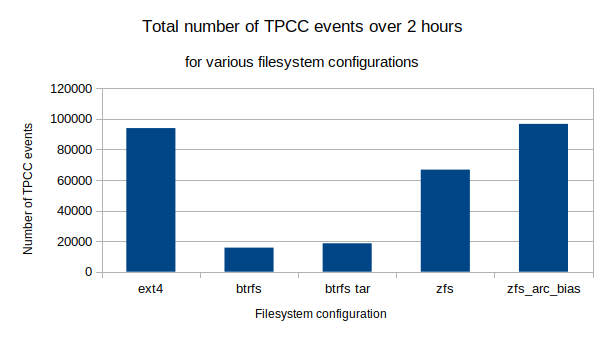
Performance, although an important aspect, is not the only consideration behind the decision of using a filesystem like BTRFS or ZFS. The impacts of data compression on filesystem size is also important. The resulting filesystem sizes are presented below.
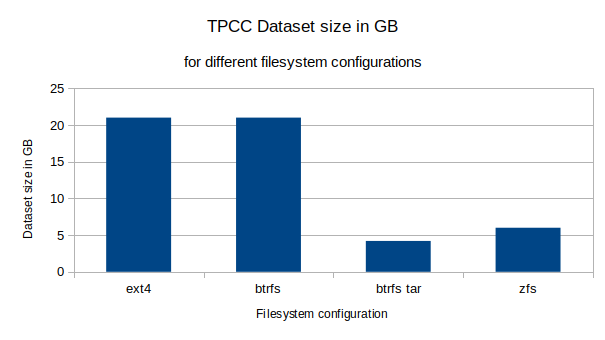
The uncompressed TPCC dataset size with ext4 is 21GB. Surprisingly, when the dataset is created by the database, with small random disk operations, BTRFS appears to not compress the data at all. This is in stark contrast to the behavior when the dataset is restored from a tar archive. The restore of the tar archive causes large sequential disk operations which trigger compression. The resulting filesystem size is 4.2GB, a fifth of the original size.
Although this is a great compression ratio, the fact that normal database operations yield no compression with BTRFS is really problematic. Using ZFS with lz4 compression, the filesystem size is 6GB. Also, the ZFS compression ratio is not significantly affected by the method of restoring the data.
The performance issues of BTRFS have also been observed by Phoronix; their SQLite and PostgreSQL results are pretty significant and inline with the results presented in this post. It seems that BTRFS is not optimized for the small random IO type of operations requested by database engines. Phonorix recently published an update for the kernel 5.14 and the situation may have improved. The BTRFS random IO write operation results still seems to be quite low.
Although I have been pleased with the ease of installation and configuration of BTRFS, a database workload seems to be far from optimal for it. BTRFS struggles with small random IO operations and doesn’t compress the small blocks. So until these shortcomings are addressed, I will not consider BTRFS as a prime contender for database workloads.
Resources
RELATED POSTS





thanks a lot for this test.
you should use a better hash algorithm as crc32 is not recommended.
mkfs.btrfs –checksum xxhash
But i dont think it will change a lot of thing. I dont think autodefrag is a good idea as it seems it will launch an action at each write. We use here a btrfs balance cron for this in the btrfs-tools package.
For the kernel, perhaps you could try after installing
linux-image-5.14.0-1011-oem linux-modules-5.14.0-1011-oem
as its in the ubuntu repo
best regards
ghislain
from the doc autodefrag should not be used for databases:
autodefrag
noautodefrag
(since: 3.0, default: off)
Enable automatic file defragmentation. When enabled, small random writes into files (in a range of tens of kilobytes, currently it’s 64K) are detected and queued up for the defragmentation process. Not well suited for large database workloads.
The read latency may increase due to reading the adjacent blocks that make up the range for defragmentation, successive write will merge the blocks in the new location.
Random over-write workloads suck on Btrfs. If you’ve ever seen me give talks about Btrfs it’s the first thing I talk about. We specifically don’t use Btrfs for our mysql workloads inside of Meta. Things like RocksDB work significantly better for Btrfs, so MyRocks would probably perform much better, but a lot of people don’t use that. But generally, yes random write workloads are a weakness of Btrfs, we are aware, and we generally recommend using something else if that’s what your workload requires.
You can do things to mitigate the pain. Firstly using “-o autodefrag” is going to lead to sadness for mysql, because basically every write is going to trigger a defrag operation, which is going to slow you way down. Secondly you can use “chattr +C /var/lib/mysql” to disable COW for data files. We recommend this for things like virt images (this is what Fedora does for it’s qemu images directory if you have btrfs), and for people that really want to use mysql on btrfs. However if you take a snapshot it’ll still trigger a COW on the first write after the snapshot, so you can still induce the pain of COW despite turning it off for specific files.
Eventually we will get around to these workloads and see if we can improve them, but generally speaking if you are running mysql you don’t care about the fancy things that Btrfs brings you, you just want the file system to get out of the way. xfs and ext4 are perfect for that, so generally we recommend using that instead of btrfs for that style of workload.
well when you design a filesystem to make all integrated with no funcky partitions anymore, no raid blind system and complete ease of use of the storage compare to legacy systemes previously made of 3/4 moving parts working badly together ( lvm on mdam on ext4 ?) but in the end you have to manage fixed partition with different filesystems and one btrfs one xfs over mdadm you completly loose the purpose to have btrfs or ZFS in the first place 🙂
Of course at meta size you dont have the issue because your mysql will be on another machine or such but for smaller player with lamp on one machine it a real bummer not to be able to use btrfs everywhere 🙂
anyway thanks for all the work you put on btrfs and i hope you will be able to make progress on this part !
Is integrity (bit-rot protection) not of any concern in regards to MySQL? That would be my most important reason to run btrfs with MySQL.Never ever had integrity issues with legacy storage (ext4) myself, but I’m getting more and more influenced by what I read about how often other people experience bit-rot issues and that they are being fixed by btrfs
Thanks Joseph, I’ll check your presentations.
Also, you should disable direct-io(/use buffered io) in mysql for btrfs. This way btrfs will actually compress writes and you should get better performance. ZFS just ignores direct-io btw.
for btrfs and zfs I used: innodb_flush_method fsync
There are a number of things that you might test in btrfs.
newer kernels or ubuntu 22.04.
space_cache=v2 (has to be used the 1st time with clear_cache)
compress=zstd
ssd, discard=async (do not know if this has any influence in AWS)
autodefrag
You can also turn off COW on a folder with chattr +C <folder>, it needs to be empty and compression will not work.
autodefrag seems to have a regression on kernel 5.16, fixed on 5.17.
I’m surprised that the author did not mention the elephant in the room. Btrfs is a copy-on-write filesystem. As such, it perfectly suited for snapshots and deduplication, but not at all for database workloads. If you are using btrfs it for databases, it is essential that you turn copy-on-write off.
COW shouldn’t be an issue with databases, ZFS performs well with databases. Maybe the COW implementation of Btrfs needs improvements. Snapshots are quite an important feature for database so COW has to be enabled.
i agree on that 🙂
would be interesting to see how kernel 6.1 works on this as it has async by default and had several improvements in perf.
ubuntu package are ok now https://kernel.ubuntu.com/~kernel-ppa/mainline/v6.1.7/
Without COW and compression, why would anyone use Btrfs with a database, those are the strong selling points for such workload. Since Btrfs is still under heavy development, I’ll certainly revisit in the future but I’ll enable COW and compression. I’ll keep your proposed settings for then.
modern filesystem say they get rid of partition and those old paradigm. You cannot then tell that for this you need ext4, for that xfs, and for static file only btrfs.
no one will want to manage machines with 10 partition, one formated for each use, modern FS should work for most of them if not all 🙂
and i agree that snapshot is a must.