

My previous post I finished with the graph with unstable results.
There I won’t analyze causes, but rather I want to show some different ways to present results.
I enjoy working with R, and though I am not even close to be proficient in it, I want to share some graphs you can build with R + ggplot2.
The conditions of the benchmark are the same as in the previous post, with difference there are results for 4 and 16 tables cases running MySQL 5.5.20.
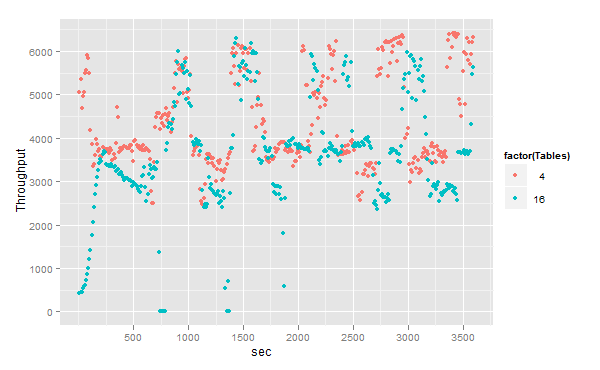
Let me remind how I do measurements. I run benchmark for 1 hours, with measurements every 10 seconds.
So we have 360 points – metrics.
If we draw them all, it will look like:
I will also show my R code how to make it
|
1 2 3 |
m <- ggplot(dv.ver, aes(x = sec, Throughput, color=factor(Tables))) m + geom_point() |
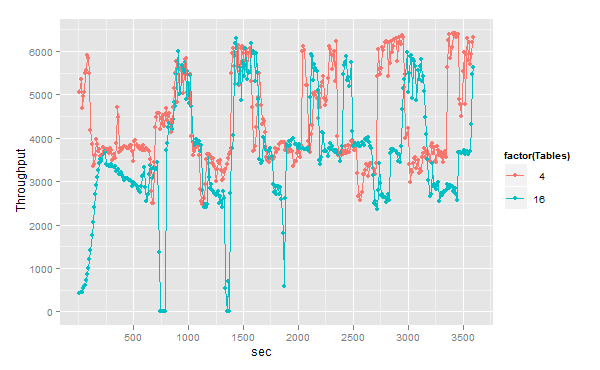
The previous graph is not very representative, so we may add some lines to see a trend.
|
1 |
m + geom_point() + geom_line() |
This looks better, but still you may have hard time answering: which case shows the better throughput? what number we should take as the final result?
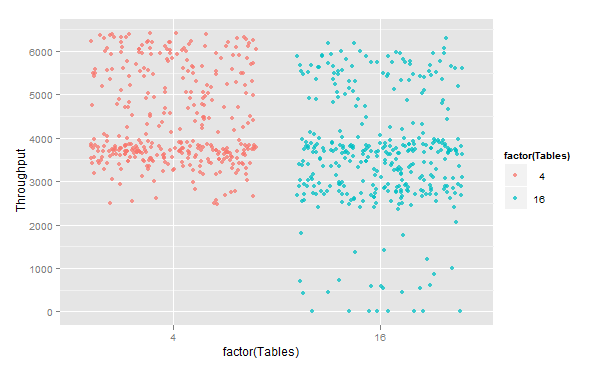
Jitter graph may help:
|
1 2 3 |
m <- ggplot(dv.ver, aes(x = factor(Tables), Throughput, color=factor(Tables))) m + geom_jitter(alpha=0.75) |
With jitter we see some dense areas, which shows “most likely” throughput.
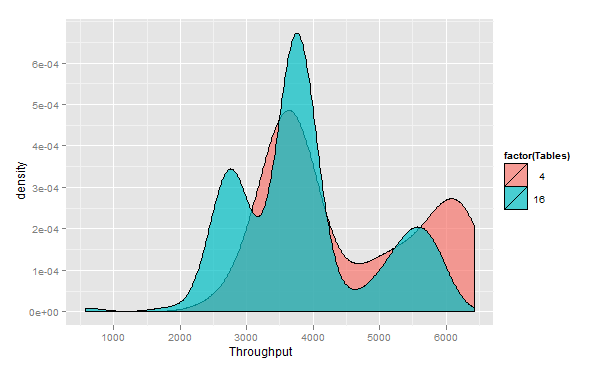
So let’s build density graphs:
|
1 2 3 |
m <- ggplot(dd, aes(x = Throughput,fill=factor(Tables))) m+geom_density(alpha = 0.7) |
or
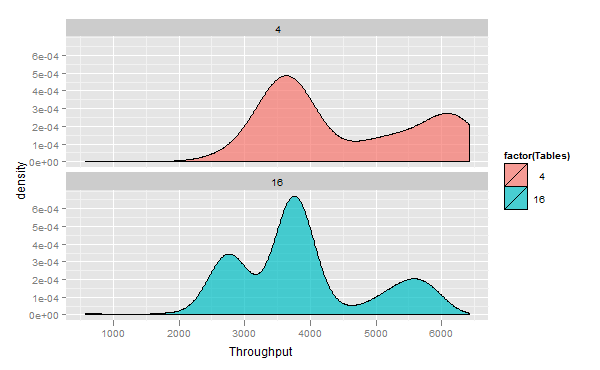
|
1 |
m+geom_density(alpha = 0.7)+facet_wrap(~Tables,ncol=1) |
In these graphs Axe X is Throughput and Axe Y represents density of hitting given Throughput.
That may give you an idea how to compare both results, and that the biggest density is around 3600-3800 tps.
And we are moving to numbers, we can build boxplots:
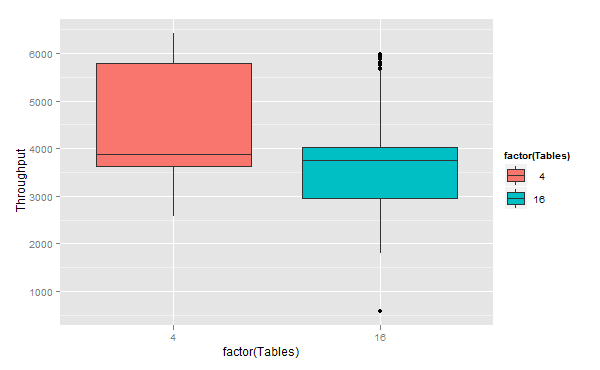
|
1 2 3 |
m <- ggplot(dd, aes(x = factor(Tables),y=Throughput,fill=factor(Tables))) m+geom_boxplot() |
That may be not easy to read if you never saw boxplots. There is good reading on this way to represent data. In short – the middle line inside a box is median (line that divides top 50% and bottom 50%),
the line that limits the top of a box – 75% quantile (divides 75% bottom and 25% top results), and correspondingly
– the line at the bottom of a box – 25% quantile (you should have an idea already what does that mean).
You may decide what measurements you want to take to compare the results – median, 75%, etc.
And finally we can combine jitter and boxplot to get:
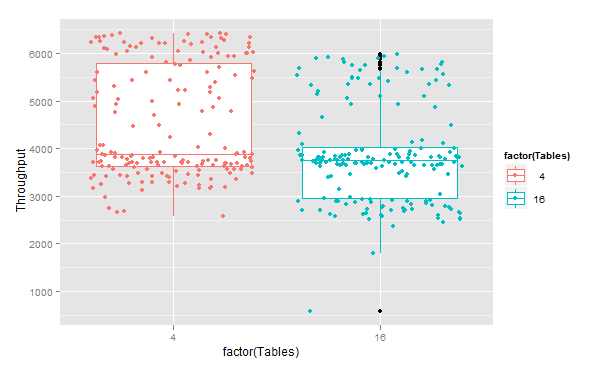
|
1 2 3 |
m <- ggplot(dd, aes(x = factor(Tables),y=Throughput,color=factor(Tables))) m+geom_boxplot()+geom_jitter() |
That’s it for today.
The full script sysbench-4-16.R with data you can get on benchmarks launchpad
If you want to see more visualizations idea, you may check out Brendan’s blog:
And, yes, if you wonder what to do with such unstable results in MySQL – stay tuned. There is a solution.
Resources
RELATED POSTS





Hey Vadim, nice post, but reading through it I kept wondering why you didn’t plot a simple histogram with the hist( ) command, with a superimposed mean or median line. That would have shown you just about all you wanted.
marcos,
That’s true. As I said I am not that proficient in R, there probably are better ways to do what I did.
I just liked these graphs and wanted to share them.
Do you have any examples of how to actually extract the values out of that? The graphs are pretty and all, but it’s important to have the actual concrete numbers.
Will,
That is also not so hard, though some time is needed to figure it out.
you can use ddply and summarize, something like that:
where
It is equal to SQL language:
SELECT q50(Throughput) FROM data GROUP BY Server, Threads
Vadim,
Been poking around “R” , your blog gave it a boost! Thanks for sharing it.