

As companies grow from startups to larger organizations, they establish a hierarchical structure of roles and responsibilities that changes year to year. As a result, it becomes increasingly important to protect the confidentiality of information to prevent data leaks and facilitate easy access to relevant data sources and tools for the related teams without having to sift through unrelated databases or environmental data. This is particularly important for large enterprises, where implementing least privilege access to all software used within the organization is likely required. To achieve this in a secure and efficient manner, a key requirement for any database monitoring and management software is to have robust access management features.
Label-based access control is a security mechanism that allows companies to control who can access specific metrics based on their labels. Monitored data may contain sensitive data that needs to be protected, and label-based access control can be used to ensure that only authorized individuals can access that data.
In a nutshell, here are a few reasons why companies may need label-based access control for their monitoring solution:
To ensure compliance: Many industries have regulatory requirements that mandate specific data handling and protection practices. Access control can help ensure that companies comply with these regulations by limiting access to data to only those employees who are authorized to view it.
Let’s say you are a member of a company selling a subscription-based streaming service that provides a wide variety of TV shows, movies and other video content to its subscribers. Your company operates a massive distributed architecture that spans multiple data centers and cloud providers, and your databases are a crucial part of this infrastructure. So, you have dozens of teams with hundreds of engineers who are responsible for ensuring high availability and reliability, including employing fault-tolerant systems, and implementing rigorous testing and monitoring procedures. Your organization may have several teams, which are:
Let’s take a look at an example of why you might need and how you could use label-based access control (LBAC) in your authorization flow.
Once data has been ingested into a database and then into PMM’s dashboards, the organizations have a massive amount of data from different sources that is waiting for the DBAs, Developers, SREs, etc., to monitor and diagnose. +50 applications, +1000 nodes, three environments, including qa, dev, production, are all being monitored by PMM. And it is becoming hard to diagnose, isolate, and analyze any applications or environments for which a specific team may be responsible.
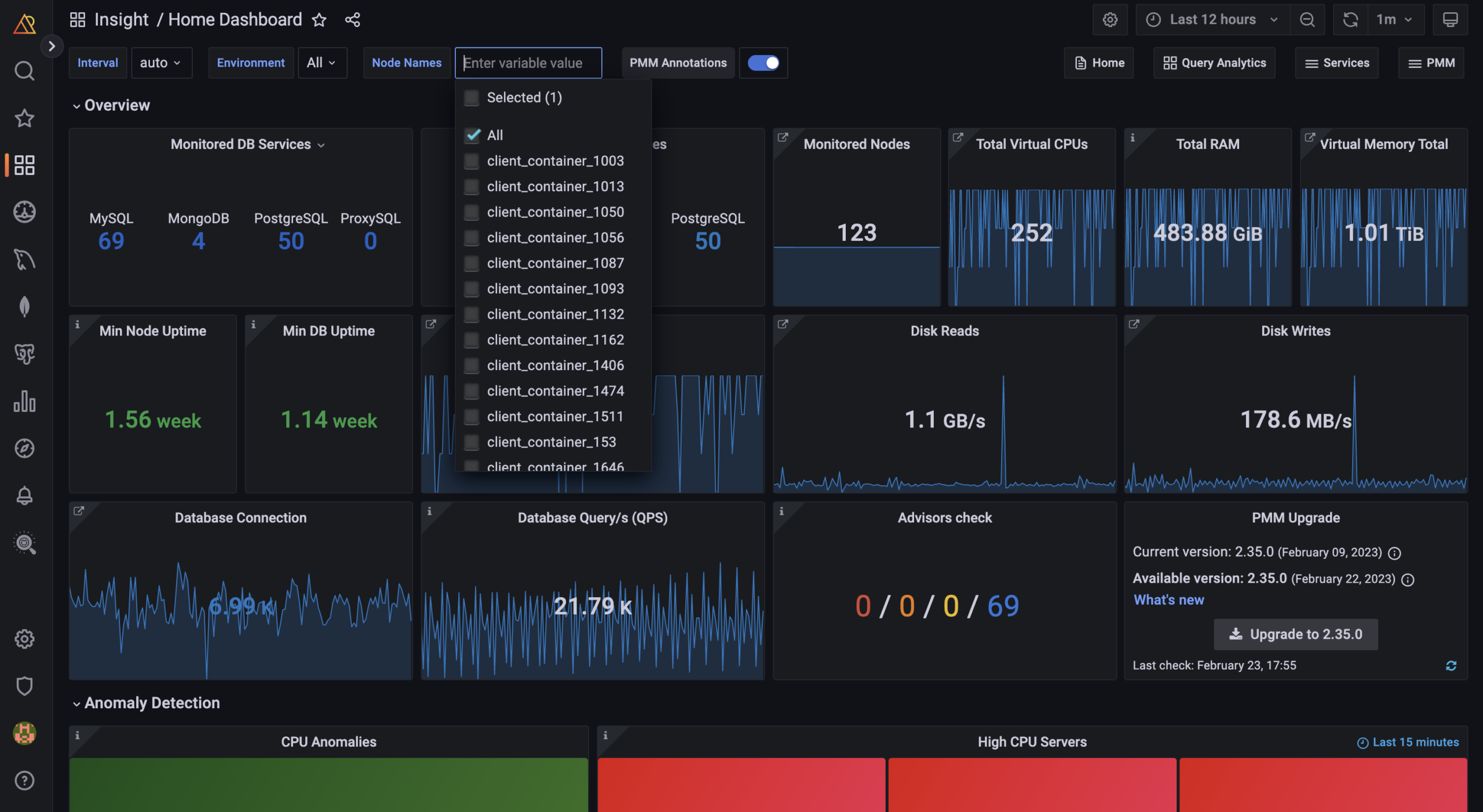
Vanessa is the database administrator in the company, and she would like to set up label-based access control inside PMM to make data access more secure and easy for her organization. The idea is to limit each team’s access to the data and environments that are relevant to their specific responsibilities. For example, the QA team would only have access to data from the QA environment rather than having access to the production environment.
This approach, known as least privilege access, ensures that each team only has access to the data they need to perform their duties, while limiting the risk of unauthorized access to sensitive information. By implementing this solution, she can protect its confidential data and make it easier for teams to find the information they need without being bogged down by irrelevant data.
Vanessa has an Admin role in PMM with all privileges and can create users and roles and grant them privileges.
As a first task, Vanessa plans an access control roll-out strategy. She starts with answering these questions:
Considering needs, Vanessa decides to use both basic roles and Access Roles, which provides label-based permissions. She then created the table below as an Access Control implementation schema.
Note: You can take advantage of your current authentication provider to manage user and team permissions for basic roles. Access Roles doesn’t provide user management with authentication provider yet. It’s currently part of our roadmap, so please stay tuned for upcoming releases of PMM and keep an eye on the release notes.
| Team/User | Role name | Description | Labels* | Privilege |
| DBA Team-1 (MySQL) | role_dba_mysql | Read Privilege MySQL database metrics of all apps on the prod and qa environment | environment~=”(dev|prod)”, service=”mysql” | Mysql,
Prod and dev, All apps |
| DBA Team-2 (MongoDB) | role_dba_mongodb | Read Privilege to MongoDB database metrics of all apps on the prod and dev environment | environment=”dev, prod”, service=”mongodb” | MongoDB,
Prod and dev, All apps |
| Dev Team-1 (App A) | role_dev_appA | Read Privilege to database metrics of App A on the prod and dev environment | environment=”dev, prod”, app=”A” | Prod and dev,,
App A |
| Dev Team-2 (App B) | role_dev_appB | Read Privilege to database metrics of App B on the prod and dev environment | environment=”dev, prod”, app=”B” | Prod and dev,
App B |
| QA Team | role_qa | Read Privilege to database metrics of the qa environment | environment=”qa” | QA
All apps |
| Monitoring Team | role_monitoring | Read Privilege to database metrics of the prod environment |
environment=”prod” |
Prod
All apps |
* Labels must be in key=”value” format, both the key and value must begin with a letter, and they can only contain letters, numbers, hyphens, or dashes. Please check the labels for access control page on the product documentation.
Note: Note: Team-level role assignment is currently part of our roadmap, so please keep an eye out for future releases of PMM. If you require the team-level role assignment feature, please don’t hesitate to reach out to us on the forum and let us know.
A privilege comes with a label and READ permission assigned to a role. So, a role can be granted the READ permission based on labels.
Although Vanessa, a DBA, prefers to enable and configure Access Control via the UI, it is possible to enable it when deploying PMM Server via Docker. Read more on this configuration on our product documentation page. To configure access control from the PMM UI, she does the following:
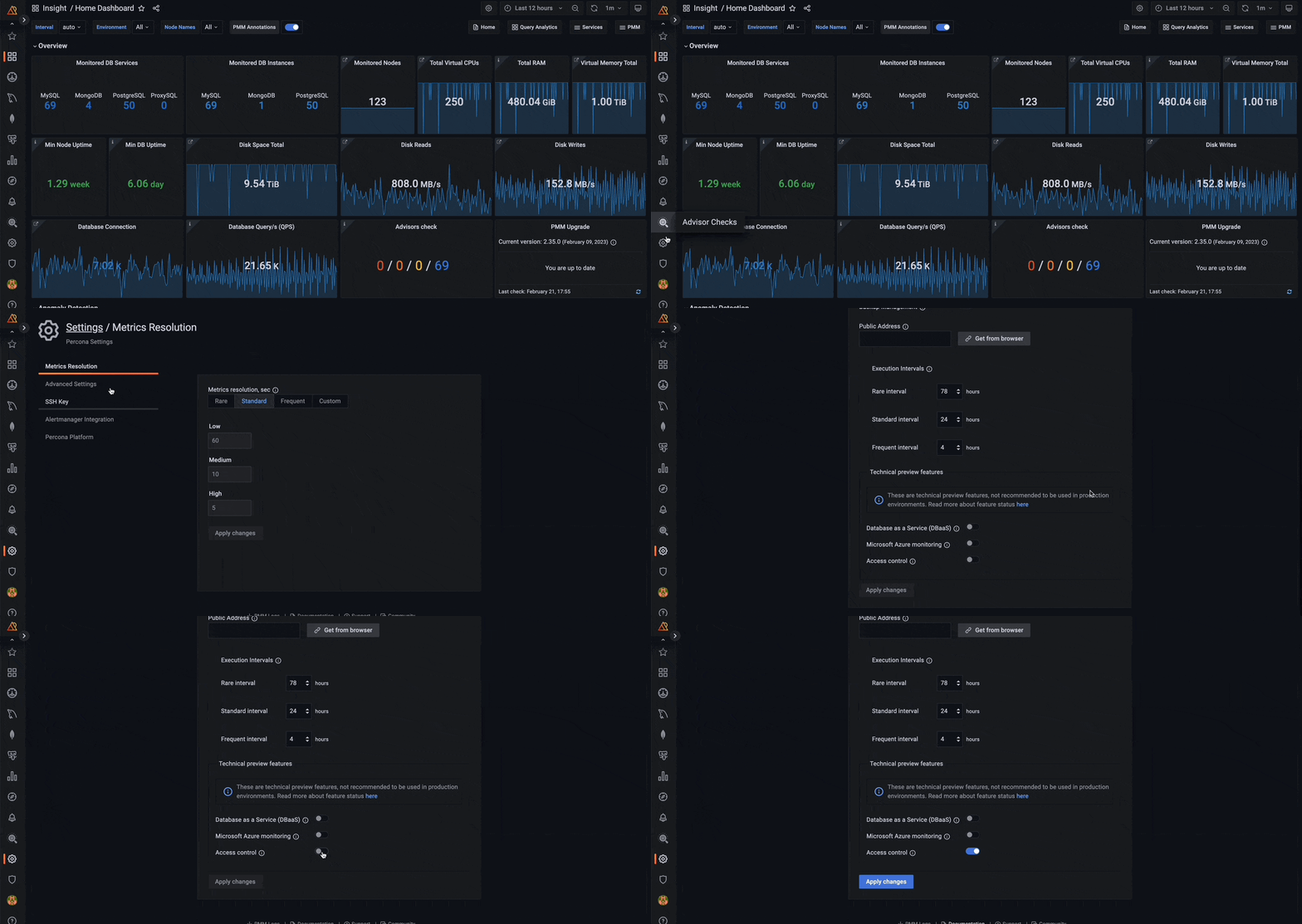
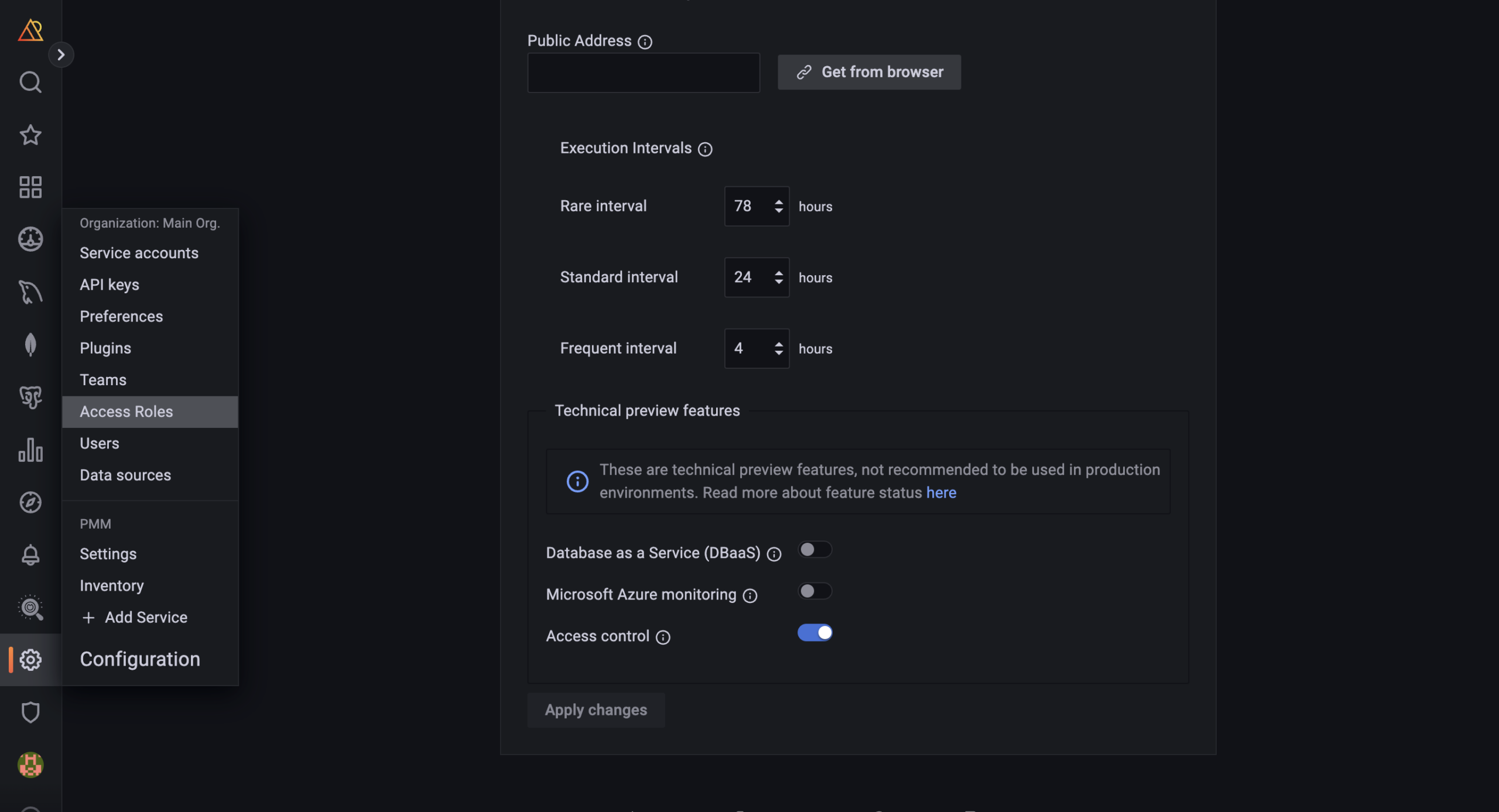
After Vanessa enables Access Control, the Access Roles page will automatically be displayed on the main menu.
Note that when Access Control is enabled, Full Access is automatically assigned as the default role to all users, granting them access to all metrics. When users log in to PMM for the first time without a designated role, they will be automatically assigned the “Default Role.” For administrators, the default role provides a convenient way to configure default permissions for new users.
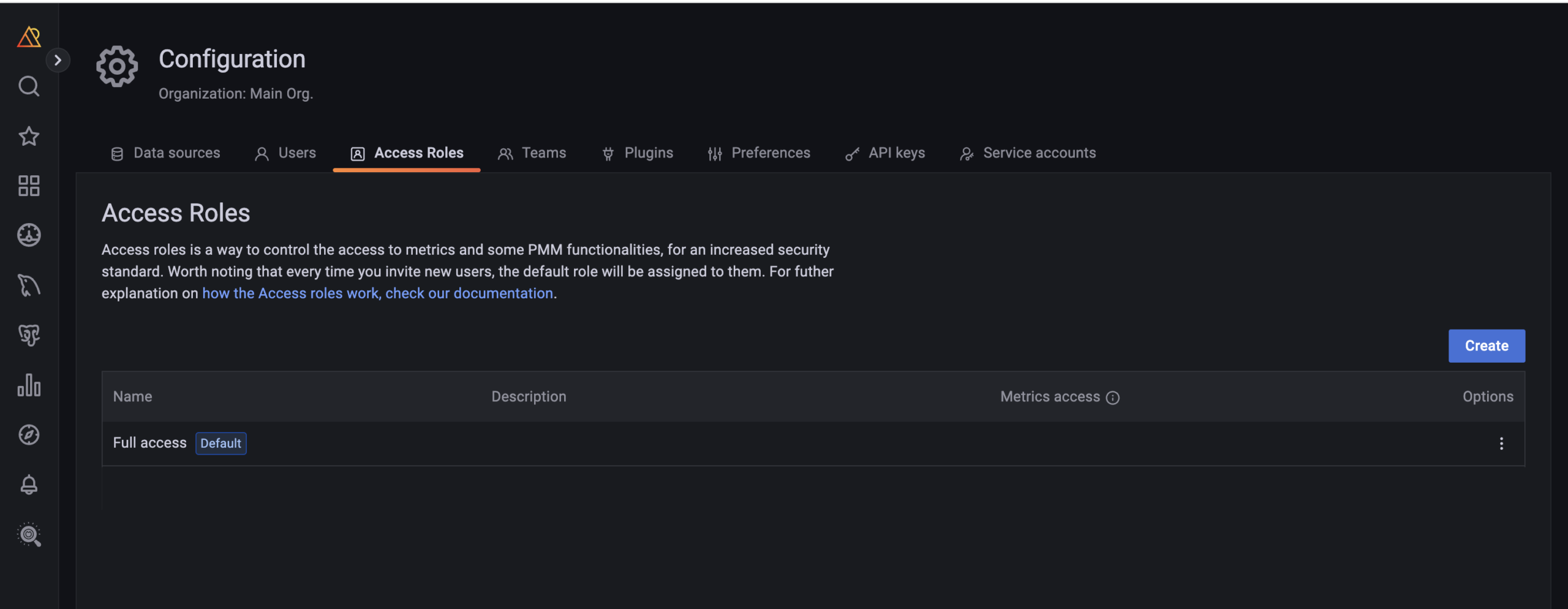
It’s possible to change the default role from UI or pmm-admin. Visit the feature documentation to see how you can change the default role.
Note: To create roles, you must have admin privileges. For more information, see this related page.
Follow the following steps:
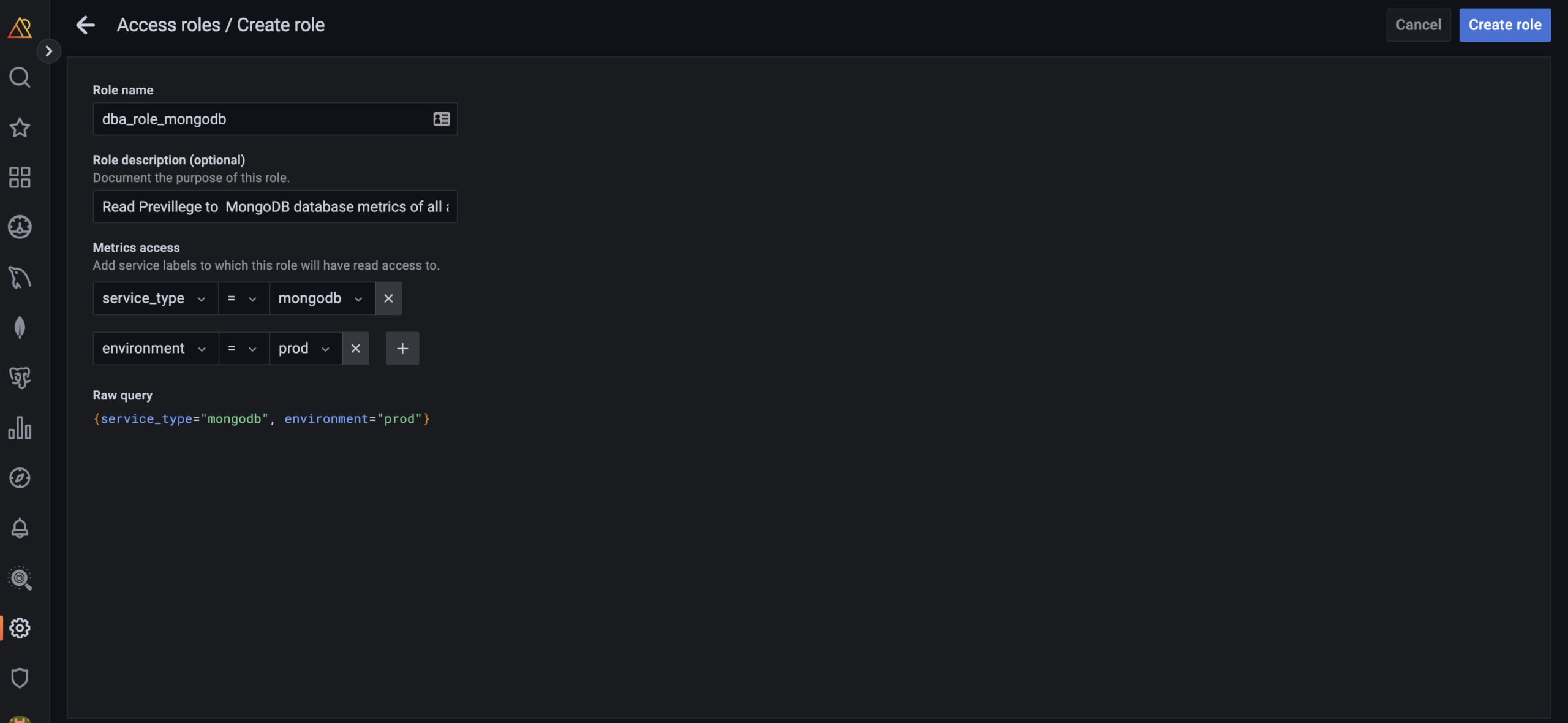
The following label matching operators exists:
Note: The filter uses PromQL which is a query language of Prometheus. Find more on Prometheus documentation.
To assign a role to users;
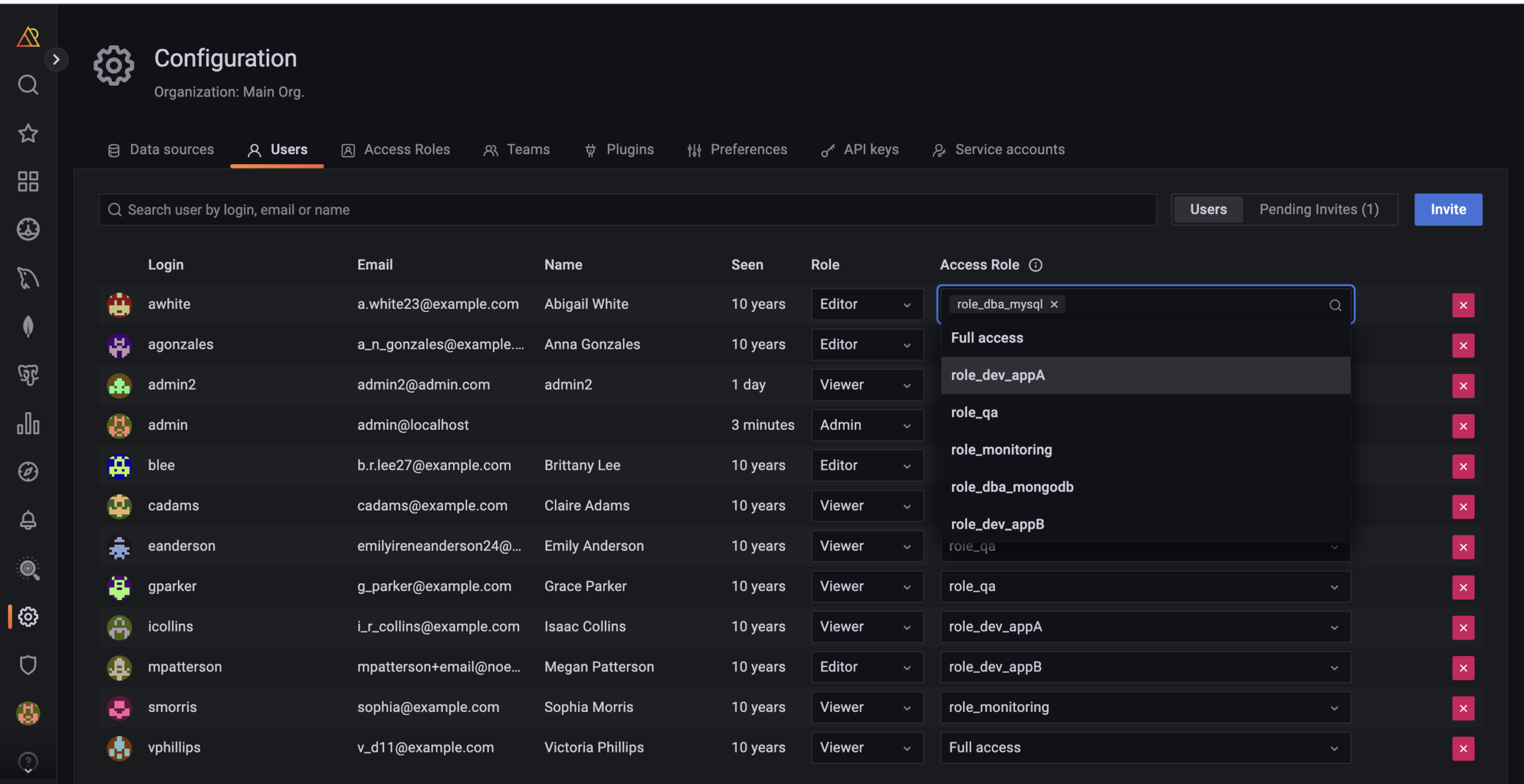
Role presents basic roles, which are Viewer, Editor and Admin:
Access roles are presented to allow Admins to create new user roles based on labels, which are designed to limit access to metrics. These roles are only available when Access Control is enabled.
Basic roles and Access roles complement each other and are independent of each other. Access roles is used to filter data based on the assigned filters to the role.
Note: Team-level role assignment is currently part of our roadmap, so please keep an eye out for future releases of PMM. If you require the team-level role assignment feature, please don’t hesitate to reach out to us on the forum and let us know.
[button link=”https://forums.percona.com/t/feedback-on-pmm-access-control-tech-preview-in-pmm-2-35/20277″]Community Forum[/button]
To edit Access Roles, follow these steps:
For more information, visit the Manage Access Control documentation.
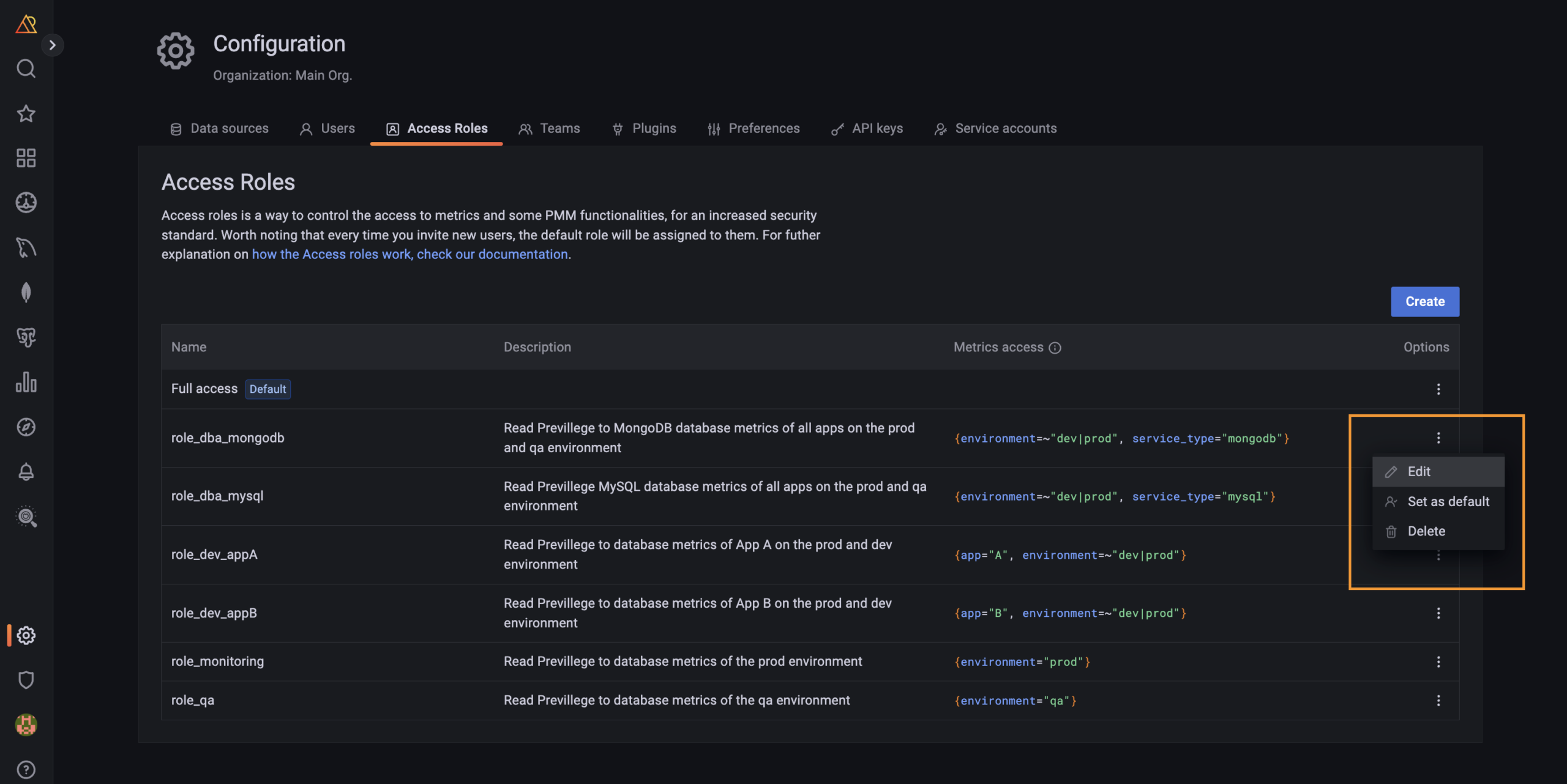
Note: You can only remove a role not assigned to any user. To remove any role, first unassign the users from this role.
To edit access roles, follow these steps:
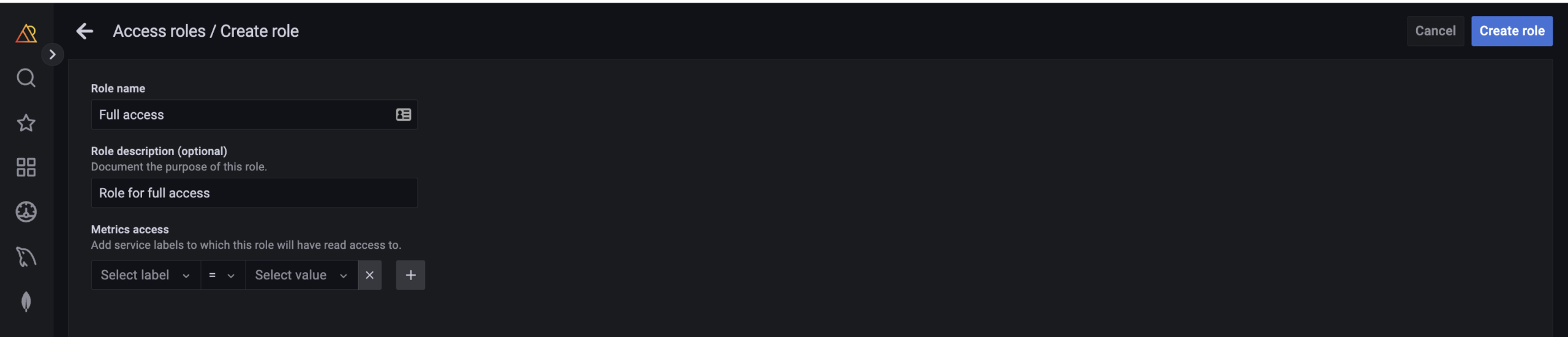
Can I add a role with full access?
Yes, you can. Simply follow the same steps as you would for role creation, but make sure to leave the metric filter field blank before saving the role.
Where can I create labels?
You can add custom or predefined labels in PMM while adding a service for monitoring in PMM. You can add predefined labels using both API and UI. To add a label using API, see API documentation. Also you can create their own custom labels and filter by them as well, check our API documentation.
Where can I assign labels?
Admin can assign labels to services using PMM UI or pmm-admin. Metrics inherit lables from the service. Please check this page for more.
Where can labels be used?
Once a label has been created and/or has been used to filter metrics within the PMM instance, Admin can use these labels to restrict which metrics can display on dashboards and organize metrics by viewing metric data on dashboards based on labels.
Can I delete a label?
No, labels can not be deleted.
Can I rename a label?
Yes, Labels can be renamed by editing a service. Please check the feature page for more.
How does assigning a user permissions based on labels work?
Labels are additive, so you can only further restrict a user’s permissions by adding more labels. If a user has access to everything labeled environment:prod, we assume no restrictions on any other category of label. This user has less restricted permissions than another user who has access to everything with environment:prod AND app:A.
For example, if the following metrics had these set of labels:
Environments = prod, dev
Applications: App A, App B
|
1 2 3 4 5 |
| Role | Labels | |--------|---------------------------| | Role-1 | environment:prod, app:A | | Role-2 | environment:prod | | Role-3 | environment:dev, app:B | |
Then the following through users with Source, Admin restricted with Labels will only have access to the following metrics:
|
1 2 3 4 5 6 |
| User | Role with Labels | Access to Metrics | |--------|------------------|-----------------------------------------| | Matej | Role-1 | environment:prod, app:A | | Michal | Role-2 | environment:prod, any application | | Maxim | Role-2, Role-3 | environment:prod, any application | | | | environment:dev, app:B | |
Can I limit access to PMM features like QAN, Alerting, and Backup?
Unfortunately, label-based access control is only the initial phase of PMM Access Control and does not currently encompass role-based access control. However, we have plans to incorporate it in 2023.
We’d like to hear your needs and feedback regarding Access Control. Feel free to book a 30-min call with our product team to share feedback.
Book a 30-min call with Percona Monitoring and Management team
Resources
RELATED POSTS




