

 In our previous post, we showed how Orchestrator can handle complex replication topologies. Today we will discuss how the Orchestrator-agent complements Orchestrator by monitoring our servers, and provides us a snapshot and recovery abilities if there are problems.
Please be aware that the following scripts and settings in this post are not production ready (missing error handling, etc.) – this post is just a proof of concept.
Orchestrator-agent is a sub-project of Orchestrator. It is a service that runs on the MySQL servers, and it gives us the seeding/deploying capability.
In this context “seeding” means copying MySQL data files from a donor server to the target machine. Afterwards, the MySQL can start on the target machine and use the new data files.
/etc/my.cnf)The following image shows us an overview of a specific host (click on an image to see a larger version):
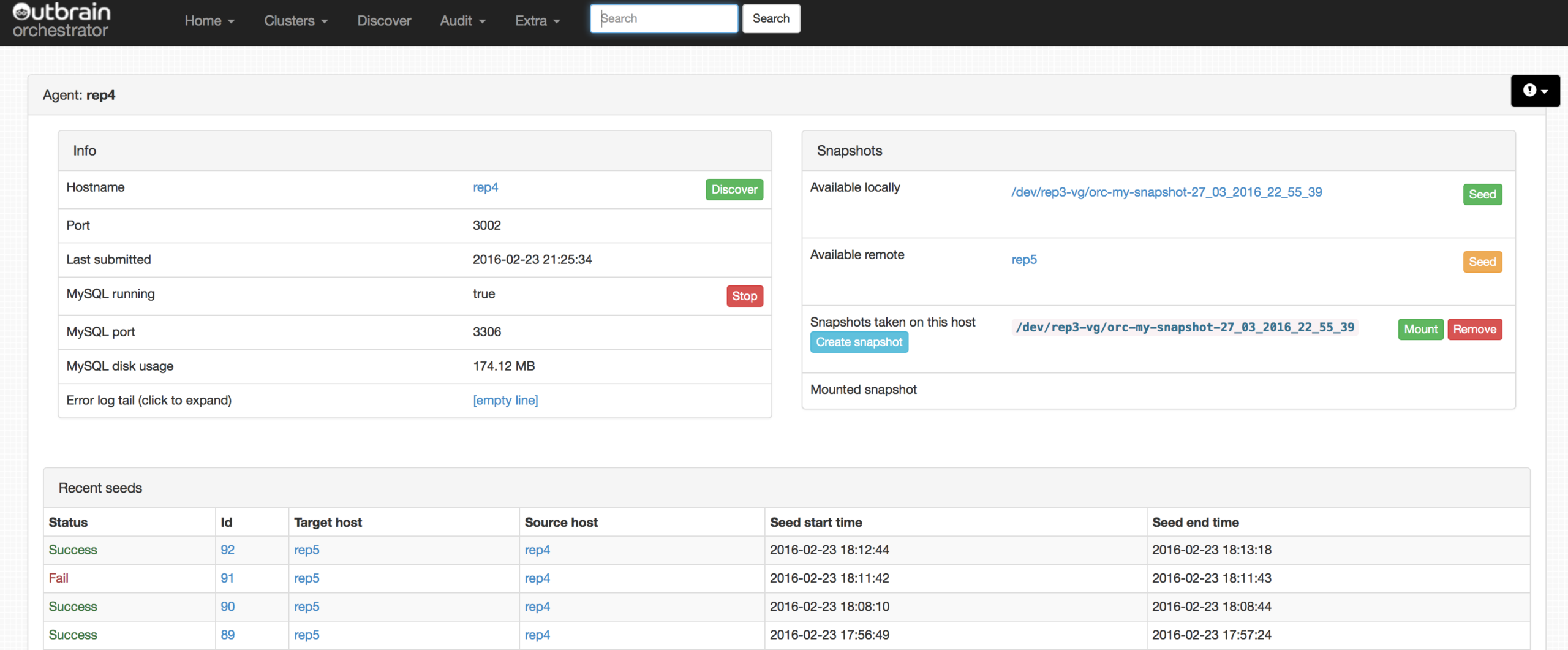
The Orchestrator-agent runs on the MySQL server as a service, and it connects to Orchestrator through an HTTP API. Orchestrator-agent is controlled by Orchestrator. It uses and is based on LVM and LVM snapshots: without them it cannot work.
The agent requires external scripts/commands example:
If these external commands are configured, a snapshot can be created through the Orchestrator web interface example. The agent gets the task through the HTTP API and will call an external script, which creates a consistent snapshot.
There are many configuration options, some of which we’ll list here:
As we mentioned before, these scripts are not production ready.
"CreateSnapshotCommand": "/usr/local/orchestrator-agent/create-snapshot.sh",
|
1 2 3 4 5 6 7 8 9 10 |
#!/bin/bash donorName='MySQL' snapName='my-snapshot' lvName=`lvdisplay | grep "LV Path" | awk '{print $3}'|grep $donorName` size='500M' dt=$(date '+%d_%m_%Y_%H_%M_%S'); mysql -e"STOP SLAVE; FLUSH TABLES WITH READ LOCK;SELECT SLEEP(10);" &>/dev/null & lvcreate --size $size --snapshot --name orc-$snapName-$dt $lvName |
This small script creates a consistent snapshot what agent can use later, but it is going to Lock all the tables for 10 seconds. (Better solutions can be exists but this is a proof of concept script.)
"AvailableLocalSnapshotHostsCommand": "lvdisplay | grep "LV Path" | awk '{print $3}'|grep my-snapshot",
We can filter the available snapshots based on the “SnapshotVolumesFilter” string.
"AvailableSnapshotHostsCommand": "echo rep4",
You can define a command that can show where the available snapshots in your topology are, or you can use a dedicated slave. In our test, we easily used a dedicated server.
"SnapshotVolumesFilter": "-my-snapshot",
“-my-snapshot” is the filter here.
"ReceiveSeedDataCommand": "/usr/local/orchestrator-agent/receive.sh",
|
1 2 3 4 5 6 7 8 9 10 11 12 13 |
#!/bin/bash directory=$1 SeedTransferPort=$2 echo "delete $directory" rm -rf $directory/* cd $directory/ echo "Start nc on port $SeedTransferPort" `/bin/nc -l -q -1 -p $SeedTransferPort | tar xz` rm -f $directory/auto.cnf echo "run chmod on $directorty" chown -R mysql:mysql $directory |
The agent passes two parameters to the script, then it calls the script like this:
/usr/local/orchestrator-agent/recive.sh /var/lib/mysql/ 21234
The script cleans the folder (you can not start while mysqld is running; first you have to stop it on the web interface or command line), listens on the specified port and it waits for the compressed input. After it removes “auto.cnf”, MySQL recreates a new UUID at start time. Finally, make sure every file has the right owner.
"SendSeedDataCommand": "/usr/local/orchestrator-agent/seed.sh",
|
1 2 3 4 5 6 7 8 |
#!/bin/bash directory=$1 targetHostname=$2 SeedTransferPort=$3 cd $directory echo "start nc" `/bin/tar -czf - -C $directory . | /bin/nc $targetHostname $SeedTransferPort` |
The agent passes three parameters to the script:
/usr/local/orchestrator-agent/seed.sh /tmp/MySQLSnapshot rep5 21234
The first parameter is the mount point of the snapshot, and the second one is the destination host and the port number. The script easily compresses the data and sends it through “nc”.
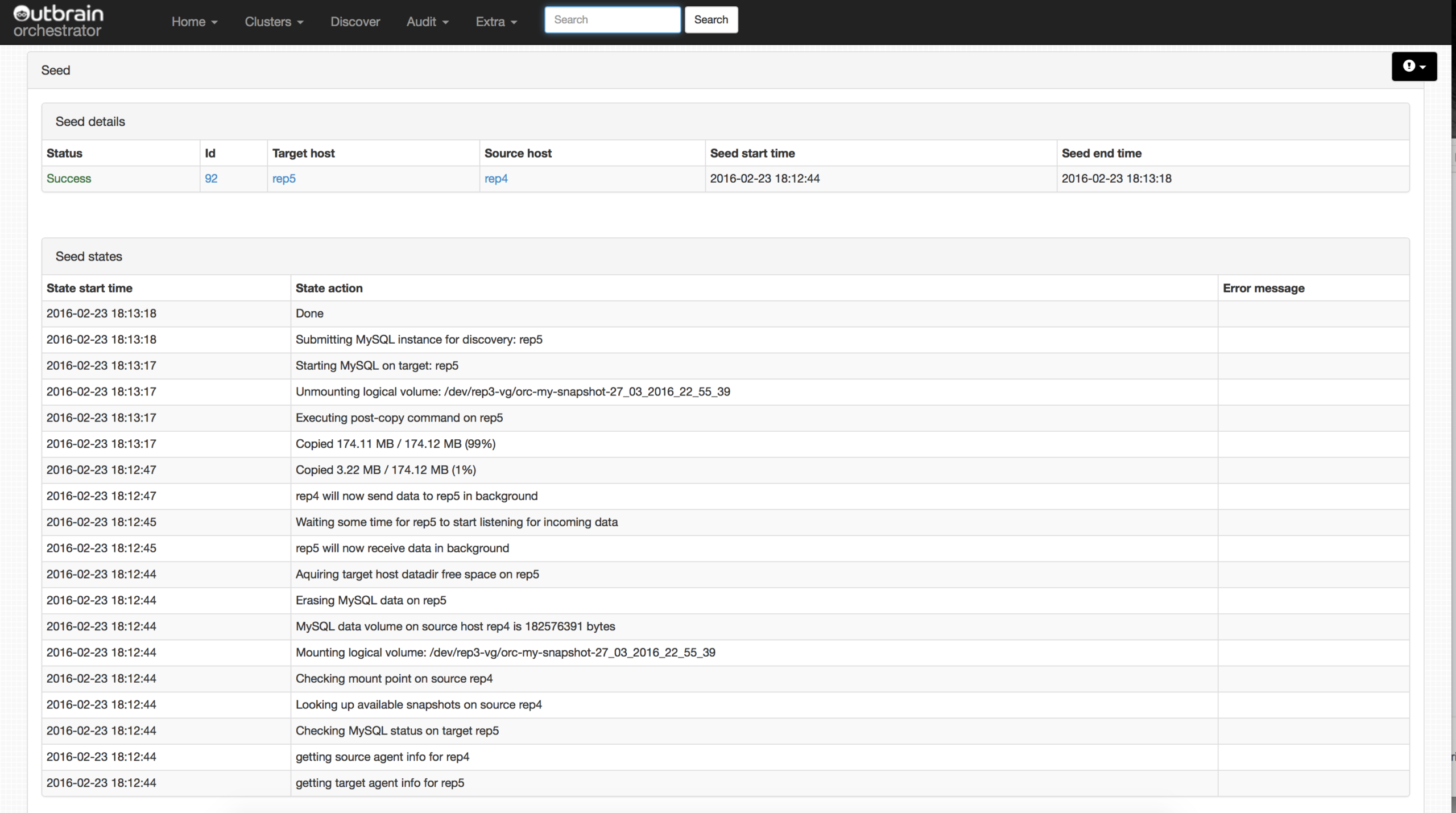
A detailed log can be found from every seed. These logs can be really helpful in discovering any problems during the seed.
If you have a larger MySQL topology where you frequently have to provide new servers, or if you have a dev/staging replica set where you want to easily go back to a previous production stage, Orchestrator-agent can be really helpful and save you a lot of time. Finally, you’ll have the time for other fun and awesome stuff!
Orchestrator-agent does its job, but adding a few extra abilities could make it even better:
Shlomi did a great job again, just like with Orchestrator.
Orchestrator and Orchestrator-agent together give us a useful platform to manage our topology and deploy MySQL data files to the new servers, or re-sync old ones.
Resources
RELATED POSTS





Tibor,
I realize that these scripts are not production ready but I think your “create-snapshot.sh” won’t actually create a consistent snapshot because FTWRL won’t hold a global lock when the session is ended. Do you know some workaround for this?
Regards
Hi Sebastian,
Thanks for the response, and yes as I said they are not production ready, but this is a good catch , there is an easy workaround for that example you can put it in background for a few sec like this:
mysql -e”STOP SLAVE; FLUSH TABLES WITH READ LOCK;select sleep(10);” &>/dev/null &
Probably there is a better solution than locking the tables for 10sec but this could work. I am going to think about it what could be the best solution and come back to you.
I update the script with this new line.
Thanks,
Tibi
Pretty Informative Post…
One must be aware of backup plans and process….
I like that one can even pick the backup option accordingly…. People like me who are non tech savvy… for them lot of information is been shared above in the post. Generally we hire experts for data retrieval… that can be stopped and with backup plans we can safe lot of time and money.
I believe that experts must be hired only in the severe case…
I liked your post and I will definitely apply all the tips and suggestions you have mentioned above in the post.
Good Read!!