

 This blog post discusses Orchestrator: MySQL Replication Topology Manager.
Orchestrator is a replication topology manager for MySQL.
It has many great features:
Here’s a gif that demonstrates this (click on an image to see a larger version):
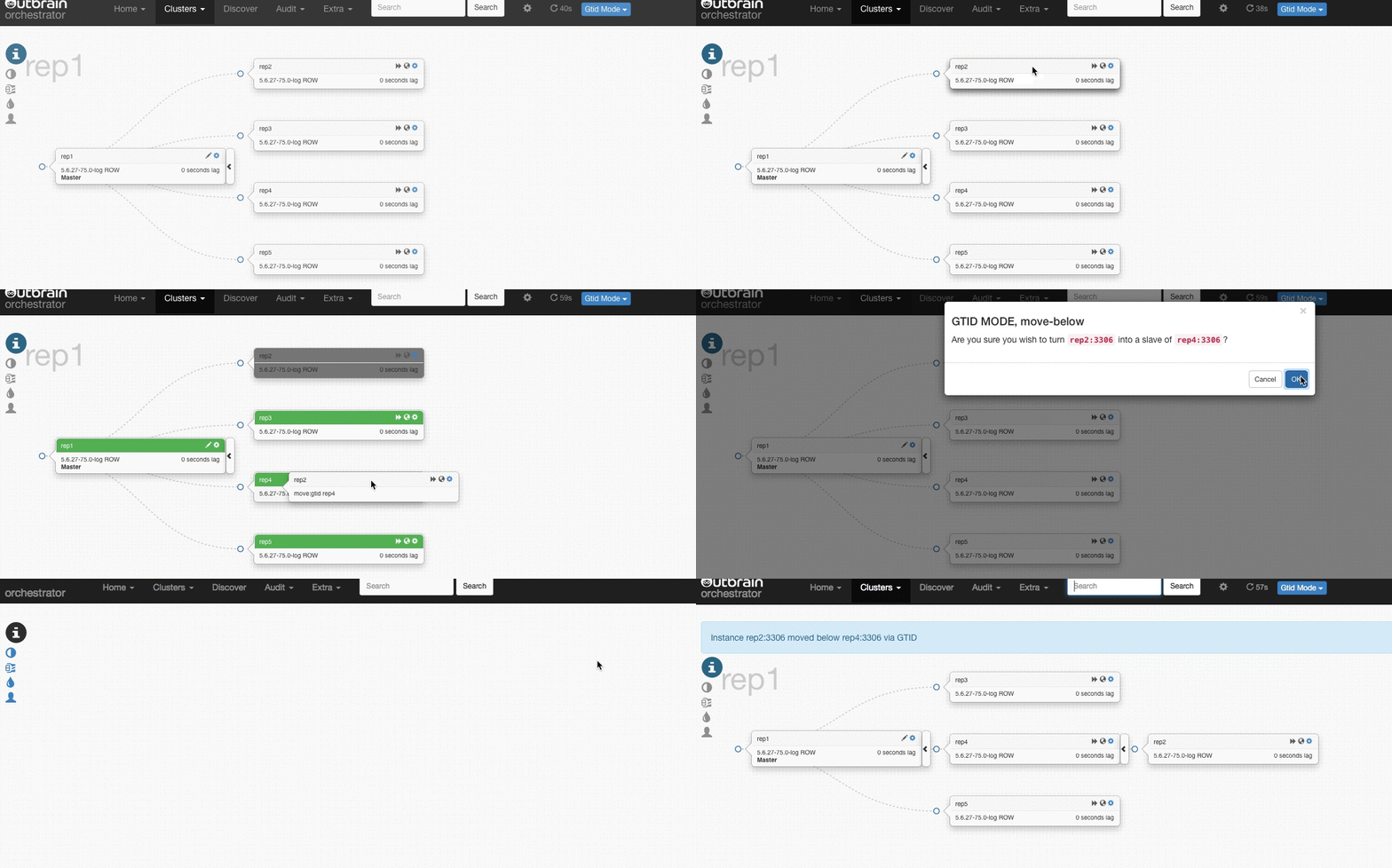
Orchestrator’s manual is quite extensive and detailed, so the goal of this blogpost is not to go through every installation and configuration step. It will just give a global overview on how Orchestrator works, while mentioning some important and interesting settings.
Orchestrator is a go application (binaries, including rpm and deb packages are available for download).
It requires it’s own MySQL database as a backend server to store all information related to the Orchestrator managed database cluster topologies.
There should be at least one Orchestrator daemon, but it is recommended to run many Orchestrator daemons on different servers at the same time – they will all use the same backend database but only one Orchestrator is going to be “active” at any given moment in time. (You can check who is active under the Status menu on the web interface, or in the database in the active_node table.)
If the Orchestrator MySQL database is gone, it doesn’t mean the monitored MySQL clusters stop working. Orchestrator just won’t be able to control the replication topologies anymore. This is similar to how MHA works: everything will work but you can not perform a failover until MHA is back up again.
At this moment, it’s required to have a MySQL backend and there is no clear/tested support for having this in high availability (HA) as well. This might change in the future.
Orchestrator only needs a MySQL user with limited privileges ( SUPER, PROCESS, REPLICATION SLAVE, RELOAD) to connect to the database servers. With those permissions, it is able to check the replication status of the node and perform replication changes if necessary. It supports different ways of replication: binlog file positions, MySQL&MariaDB GTID, Pseudo GTID and Binlog servers.
There is no need to install any extra software on the database servers.
One example of what Orchestrator can do is promote a slave if a master is down. It will choose the most up to date slave to be promoted.
Let’s see what it looks like:
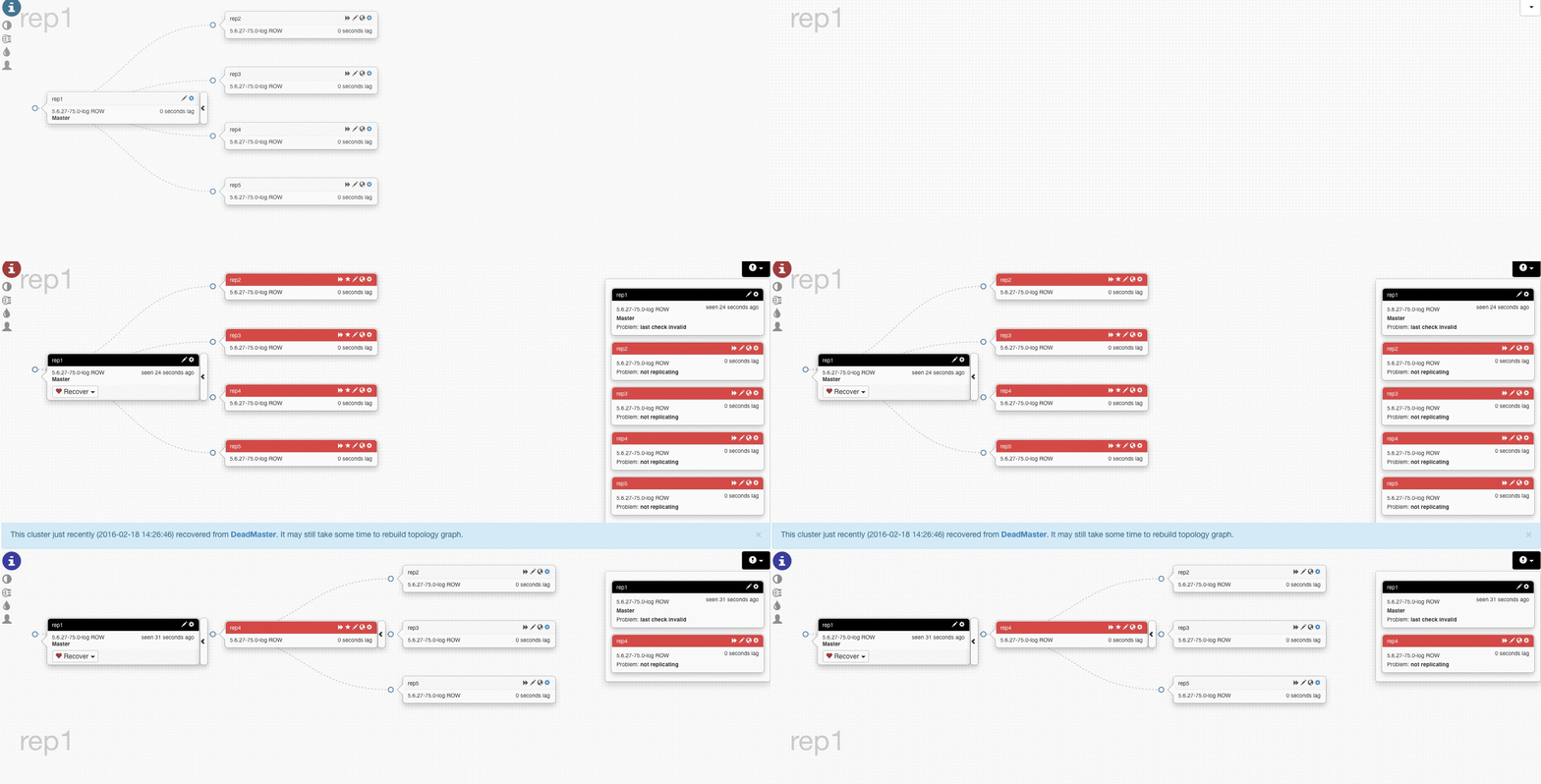
In this test we lost rep1 (master) and Orchestrator promoted rep4 to be the new master, and started replicating the other servers from the new master.
With the default settings, if rep1 comes back rep4 is going to continue the replication from rep1. This behavior can be changed with the setting ApplyMySQLPromotionAfterMasterFailover:True in the configuration.
Orchestrator has a nice command line interface too. Here are some examples:
|
1 2 3 4 5 6 |
> orchestrator -c topology -i rep1:3306 cli rep1:3306 [OK,5.6.27-75.0-log,ROW,>>] + rep2:3306 [OK,5.6.27-75.0-log,ROW,>>,GTID] + rep3:3306 [OK,5.6.27-75.0-log,ROW,>>,GTID] + rep4:3306 [OK,5.6.27-75.0-log,ROW,>>,GTID] + rep5:3306 [OK,5.6.27-75.0-log,ROW,>>,GTID] |
|
1 |
orchestrator -c relocate -i rep2:3306 -d rep4:3306 |
|
1 2 3 4 5 6 |
> orchestrator -c topology -i rep1:3306 cli rep1:3306 [OK,5.6.27-75.0-log,ROW,>>] + rep3:3306 [OK,5.6.27-75.0-log,ROW,>>,GTID] + rep4:3306 [OK,5.6.27-75.0-log,ROW,>>,GTID] + rep2:3306 [OK,5.6.27-75.0-log,ROW,>>,GTID] + rep5:3306 [OK,5.6.27-75.0-log,ROW,>>,GTID] |
As we can see, rep2 now is replicating from rep4 .
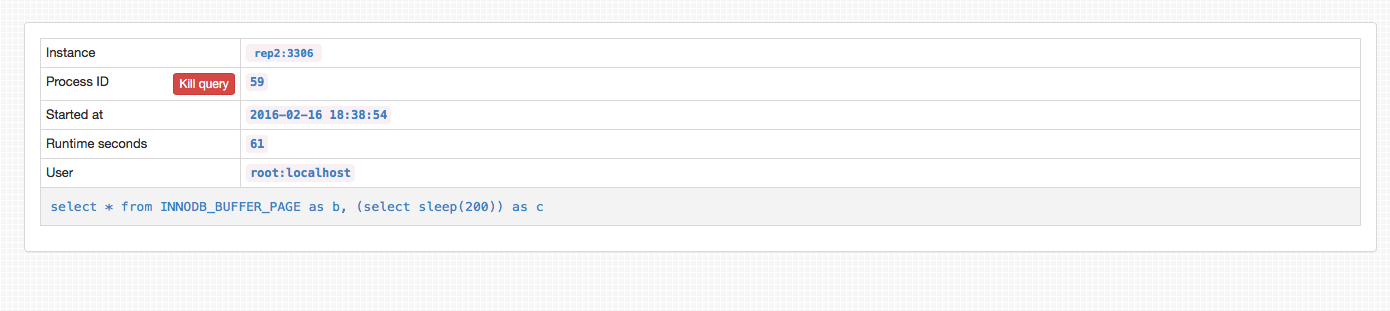
One nice addition to the GUI is how it displays slow queries on all servers inside the replication tree. You can even kill bad queries from within the GUI.
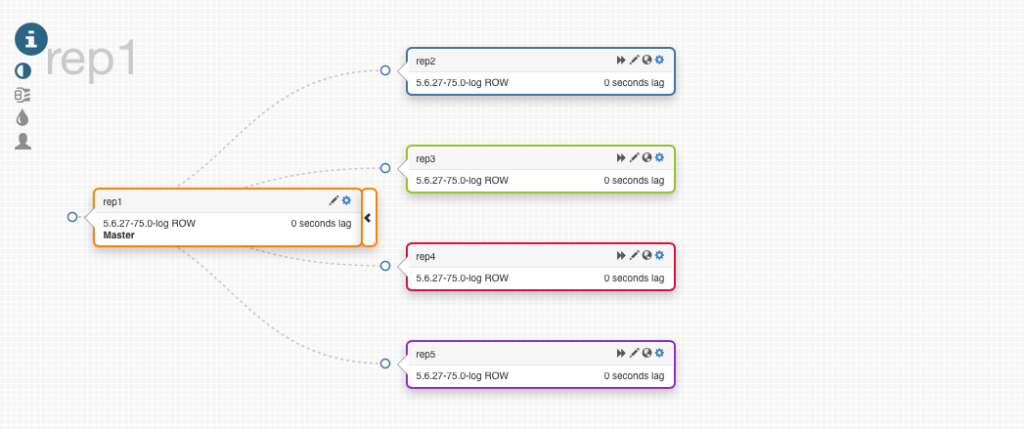
Orchestrator’s daemon configuration can be found in /etc/orchestrator.conf.json. There are many configuration options, some of which we elaborate here:
While being a very feature-rich application, there are still some missing features and limitations of which we should be aware.
One of the key missing features is that there is no easy way to promote a slave to be the new master. This could be useful in scenarios where the master server has to be upgraded, there is a planned failover, etc. (this is a known feature request).
In order to integrate this in your HA architecture or include in your fail-over processes you still need to manage many aspects manually, which can all be done by using the different hooks available in Orchestrator:
The work that needs to be done is comparable to having a setup with MHA or MySQLFailover.
This post also doesn’t completely describe the decision process that Orchestrator takes to determine if a server is down or not. The way we understand it right now, one active Orchestrator node will make the decision if a node is down or not. It does check a broken node’s slaves replication state to determine if Orchestrator isn’t the only one losing connectivity (in which it should just do nothing with the production servers). This is already a big improvement compared to MySQLFailover, MHA or even MaxScale’s failoverscripts, but it still might cause some problems in some cases (more information can be found on Shlomi Noach’s blog).
The amount of flexibility and power and fun that this tool gives you with a very simple installation process is yet to be matched. Shlomi Noach did a great job developing this at Outbrain, Booking.com and now at GitHub.
If you are looking for MySQL Topology Manager, Orchestrator is definitely worth looking at.
Resources
RELATED POSTS





Does the Orchestrator get the old master’s Binlog and merge slave’s Binlog.
Is it as MHA?
Hi! orchestrator dev and maintainer here. Thank you for researching orchestrator and for this writeup! A few comments:
> At this moment, it’s required to have a MySQL backend and there is no clear/tested support for having this in high availability (HA) as well. This might change in the future.
You have a few options. To begin with, please note that the orchestrator backend database is likely to be very small, less than a 1GB in size for most installations. Binary logs are going to consume more than the data.
– Setup Galera / XtraDB as backend
– Use NDB Cluster as backend (right now orchestrator strictly created tables as InnoDB)
I have not experimented with either the above options
– I’m working to support (yet to be published & documented) active-active master-master statement based replication. At this time orchestrator is known to not cause collisions and gracefully overwrite and converge data.
Right now I’m already using active-active (writable-writable) setup under HAProxy with
firstload balancing algorithm. The remaining concern right now is the case of a backend database failover at the time of performing a crash recovery on another cluster, and I’m working to make that failover graceful as well. Semi-sync is likely to play a role here.Anything failing not-while-performing-failover is good to go.
> One example of what Orchestrator can do is promote a slave if a master is down. It will choose the most up to date slave to be promoted.
It is more than that, actually. You can mark designated servers to be “candidates”, and orchestrator will prefer to promote them on best-effort basis.
To that effect, even if such a candidate server is not the most-up-to-date one, orchestrator will first promote a more fresh replica, converge your candidate instance onto that, and then promote it on top.
There is further ongoing work on further considerations such as conflicting configurations and versions. The most-up-to-date server is not always the one you actually want to promote.
Again, semi-sync can play a major role in this.
AgentAutoDiscover– this actually has to do withorchestrator-agent, which is an altogether different beast and unrelated to auto-discovering your topology. You are likely to keep this variables asfalse.> If semi-synchronous replication needs to be used to avoid data loss in case of master failure, this has to be manually added to the hooks as well
There is a contributor working on that right now.
> In order to integrate this in your HA architecture or include in your fail-over processes you still need to manage many aspects manually, which can all be done by using the different hooks available in Orchestrator
Orchestrator tries to be a general-purpose tool which you should be comfortable with deploying regardless of your network/configuration/topology setup. However this pain of “the final steps” of master promotion is shared to everyone. We’re working to suggest a complete failover mechanism that would be generally applicable to many, based on orchestrator and other common open source software.
> The way we understand it right now, one active Orchestrator node will make the decision if a node is down or not. It does check a broken node’s slaves replication state to determine if Orchestrator isn’t the only one losing connectivity (in which it should just do nothing with the production servers).
Correct. Orchestrator analyses the topology as a whole and expects agreement from all servers involved to make sure it is not the only one who doesn’t see right. Read more on: http://code.openark.org/blog/mysql/what-makes-a-mysql-server-failurerecovery-case
The case where an orchestrator node is completely network partitioned is being examined thank to feedback from @Kenny Gryp.
Thank you for attributing Outbrain, Booking.com and GitHub, who all deserve deep respect for supporting open source in general and the open development of this tool in particular. The people in those companies (DBAs, Sys admins, Devs) have all contributed important feedback and I would like to recognize them for that.
Lastly, the project is open to contributions and there is already a group of awesome contributors, so if you feel like contributing, the door is open!
‘@nnn
> Does the Orchestrator get the old master’s Binlog and merge slave’s Binlog.
It does not. It runs agent-free thus does not merge master binlog entries that were not fetched by replicas. My orientation is to not pursue this, as semi-sync is an available mechanism that fills this need. A nice observations is the the original author of MHA uses (a variant of) semi sync for ensuring lossless failover at Facebook. Orchestrator is not aiming in particular at lossless failover, but with 5.7 semisync you should get just that.
There is expected work on semi-sync support in orchestrator. A contributor is working on that at this time.
‘@shlomi Could you not use SQLite to handle the backend stuff? This could reduce setup complexity and remove the SPOF, no?
‘@Matthew:
– remove SPOF how? Via ActorDB? rqlite? I’m unfamiliar with these enough. Are they stable?
Is there a way for multiple orchestrator services to communicate to a single SQLite server, or otherwise to reliably read/write to a consensus-based, synchronous group of SQLite databases?
– Otherwise there’s mostly the small-ish-and-yet-blocking limitation of no
INSERT...ON DUPLICATE KEY UPDATEin SQLite. At least my limited knowledge of SQLite shows this. Possibly there’s an easy way around this.Shlomi, there are some upsert options in SQLite. https://stackoverflow.com/questions/418898/sqlite-upsert-not-insert-or-replace
‘@Shlomi
> Does the Orchestrator get the old master’s Binlog and merge slave’s Binlog.
I think this would be valuable, especially in environments where there is not the ability or will to go semi-sync
‘@manjotsinghpercona, I do not argue this could be useful & valuable. However it implies an agent-based solution as opposed to agent-less solution. This is of course doable, and there is, in fact, an
orchestrator-agent. It’s a different complexity.BTW another solution for you is to only put servers with
log_slave_updateson 1st replication tier, and have all the result below them. This ensures you do not lose replicas because orchestrator can rearrange the promotes servers anyway it likes.‘@shlomi – does the Orchestrator will work with MYSQL 5.7 in case we won’t use “multi-source replication” feature?
Is there a plan to support “multi-source replication” feature?
We do use Orchestrator with MySQL 5.7. I had a brief look into what’s needed to support multi-source in Orchestrator and that needs quite a bit of work, but should be doable.
‘@Yuval,
^ what Daniel said; also, for me multi-source is not on the roadmap; I’ve discussed with Daniel & friends the implications for supporting multi-source. Some aspects would be easy wins, others would require quite the change to the codebase.
Thanks for your reply Daniel and Shlomi.We will probably first migrate to 5.7 without using “multi-source replication” feature. When we will decide to use the feature we might make some changes in order to keep using the Orchestrator.
any way we will let you know.
I think Orchestrator is kind of limited for it’s a go application that run on one database on one physical machine.
For DBaas services, use drag & drop is user friendly, may I try to extract your front end code to integregate with openstack?
‘@zdt I’m uncertain what you mean; to clarify, we run multiple orchestrator services in an HA setup, coordinating operations, managing many databases (the largest known setup to me runs thousands of databases).
Past contributions included Vagrant config (https://github.com/github/orchestrator/blob/master/Vagrantfile) ; recent contributions include Docker config.
I’m happy if you can further clarify what it is you wish to achieve, and preferably you can open an issue on https://github.com/github/orchestrator/issues?
You are of course free to do anything you like under the terms of the license (Apache 2)
Are there any working examples of scripts which should bring up VIPs or change proxy configuration?
‘@Matthew SQLite is now supported in the orchestrator/raft setup: http://code.openark.org/blog/mysql/orchestratorraft-pre-release-3-0
@Marko unfortunately not at this stage. Bringing up VIPs is too much ties to your specific infrastructure. For changing proxy configuration I suggest consul with consul-template (and in the future I’ll provide working examples of integrating orchestrator & consul).
Given this blog post is popular, and given people ask me questions based on the contents of this post, I wish to list here some updates:
– orchestrator supports planned failovers, via:
orchestrator -c graceful-master-takeover -alias mycluster # Gracefully discard master and promote another (direct child) instance instead, even if everything is running well
This will make replica catch up to master, promote replica, attempt to set up old master below new master (reverse replication).
– orchestrator supports user-initiated non-graceful (panic) failovers. So a user can kick a failover even if orchestrator is confused, or doesn’t see the problem, or is configured to not failover a specific cluster, etc. For master failover:
orchestrator -c force-master-failover -alias mycluster
This promotes a replica without waiting for it to catch up ; just kick the failover process.
orchestrator/raft is now released, and provides HA without MySQL backend HA. In fact, you can run orchestrator/raft on SQLite if you wish. The raft consensus protocol ensures leadership over quorum.
‘@shlomi and Team
I just wondering if we can switch from Master (not the intermediate master) into slave and vice versa ?
thanks