

 Lately I have been working with a set of customers on a longer term basis which has given me time to explore new tools using their environments. One tool that I am finding very helpful is called SchemaSpy.
SchemaSpy is a Java-based tool (requires Java 5 or higher) that analyzes the metadata of a schema in a database and generates a visual representation of it in a browser-displayable format. It lets you click through the hierarchy of database tables via child and parent table relationships as represented by both HTML links and entity-relationship diagrams. It’s also designed to help resolve the obtuse errors that a database sometimes gives related to failures due to constraints.
One of the things that I like about ERD tools is that I can quickly generate a graphic representation of the database to see which tables are referenced the most, and which are candidates for dropping (why keep old data if you don’t need to?). I get up to speed a lot faster and can contribute to the Development process a lot more effectively when I know the relationships between tables versus observing queries only. An additional benefit is that SchemaSpy is command-line driven and builds the html after each run, so I find it convenient to set it up on crontab so that schema changes are automatically picked up. Nice, eh?
Usage of this tool is very straightforward and it does a lot of the work for you. Basically if your database has Foreign Keys then you’re laughing, if not don’t despair, you just have a bit more work ahead of you. Most of the time SchemaSpy “does the right thing” but sometimes you need to give it a little help in the form of metadata files.
While not explicitly required, I prefer to create this once so that the command line is shorter and neater. In my case here is the properties file in use for my Percona Server 5.6.10 sandbox:
|
1 2 3 4 |
description=MySQL driver=com.mysql.jdbc.Driver connectionSpec=jdbc:mysql://127.0.0.1:5610/schemaspy driverPath=/usr/share/java/mysql-connector-java.jar |
|
1 2 3 4 |
CREATE TABLE `parent` ( `parent_id` int(10) unsigned NOT NULL AUTO_INCREMENT, PRIMARY KEY (`parent_id`) ) ENGINE=InnoDB DEFAULT CHARSET=latin1 |
|
1 2 3 4 5 |
CREATE TABLE `child_A` ( `id` int(10) unsigned NOT NULL AUTO_INCREMENT, `parent_id` int(10) unsigned DEFAULT NULL, PRIMARY KEY (`id`) ) ENGINE=InnoDB DEFAULT CHARSET=latin1 |
|
1 2 3 4 5 6 7 |
CREATE TABLE `child_B` ( `id` int(10) unsigned NOT NULL AUTO_INCREMENT, `parent_id` int(10) unsigned DEFAULT NULL, PRIMARY KEY (`id`), KEY `parent_id` (`parent_id`), CONSTRAINT `child_B_ibfk_1` FOREIGN KEY (`parent_id`) REFERENCES `parent` (`parent_id`) ) ENGINE=InnoDB DEFAULT CHARSET=latin1 |
Notice that in the case of child_A there is an implicit FK relationship to parent via parent_id, however in child_B it is explicit. This has an impact on how SchemaSpy identifies the relationship, and whether you need to provide a hint or not.
When you run schemaSpy without a metadata file, you will see that the relationship between parent and child_B is properly displayed:
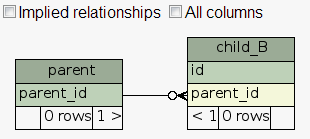
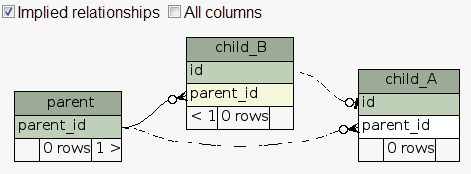
Table child_A can be made to display if you tag the Implied relationships box, but this generally only works if you have used the exact same name (in this case, parent_id) in the child and parent tables. Your environment may be like a lot of shops that we see, where the parent table is known as id, and on the child tables they reference it as parent_id — this might make sense to Developers but it doesn’t help SchemaSpy at all. This is where Metadata files come in to play
The format of the metadata file is XML-based. I have included the metadata file I used to properly link child_A to parent table:
|
1 2 3 4 5 6 7 8 9 10 11 12 13 14 15 16 17 18 19 20 |
<?xml version="1.0" encoding="UTF-8"?> <schemaMeta xmlns_xsi="http://www.w3.org/2001/XMLSchema-instance" xsi:noNamespaceSchemaLocation="http://schemaspy.sourceforge.net/xmlschema/2011/02/05/schemaspy.meta.xsd"> <comments> Main Production Database. Percona, Michael Coburn </comments> <tables> <table name="parent" comments="Parent table"> <column name="parent_id" primaryKey="true"> </column> </table> <table name="child_A" comments="Non-FK relationship, implicit relationship to parent"> <column name="id" primaryKey="true"> </column> <column name="parent_id"> <foreignKey table="parent" column="parent_id"/> </column> </table> </tables> </schemaMeta> |
If you’re looking for other examples you can find a more comprehensive example here.
The syntax below if specific for MySQL, but note that SchemaSpy works for pretty much all the popular RDBMS out there.
|
1 |
java -jar schemaSpy_5.0.0.jar -t mysql -u msandbox_ro -p msandbox -meta schemaspy.meta.xml -o /var/www/schemaspy/ |
The -o directive tells SchemaSpy where to write the output to, make sure this is a directory that can then be accessed by a web server. Also note that since I created the mysql.properties file in the same directory as the jar file, I don’t need to pass any host:port or schema name information.
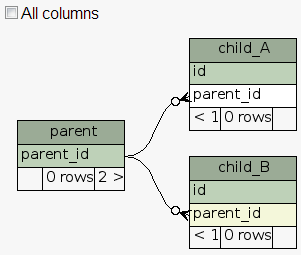
A completed Relationships view of these three tables should look like this:
While I find the Relationships tab the most useful component of SchemaSpy, I don’t want to leave you with the impression that this is the only component of the tool. There are additional tabs:
Finally don’t forget to automate SchemaSpy via crontab once you’re done.
What are some ERD tools you use and how do they compare with SchemaSpy? Feel free to answer via the comments. Thanks for reading!
Resources
RELATED POSTS





The ERD tools I use are MySQL Workbench and SchemaSpy. The anomalies tab of SchemaSpy has been quite helpful. However both tools can’t really cope with really large schemas.
Daniël, thank you for your feedback.
* How do you define large schemas, and what do you mean by can’t cope?
* Is this a concern regarding crashes of the tool, or certain features don’t work past N number of tables?
In my experience, the schemas I have under SchemaSpy reach at max approximately 3,000 tables per schema and perhaps 10,000 tables per mysqld instance. SchemaSpy does take some time to execute but this is generally no more than a couple minutes. I haven’t tried pulling this schema into Workbench so I can’t comment as to how well it scales at this volume of tables.
Good to hear that there is a tool like this, that can also integrate to MySQL. We used DBForge Studio For MySQL.
As I did not already try to use SchemaSpy I can’t compare what is the difference between the two.
I think the only difference for now is :
SchemaSpy is a “FREE” software. And DBForge is not .(Although we can try to evaluate it for 30 days).
I will try this tool and do some comparison. And to know what is the best to use?
Although I did not try to use SchemaSpy and as I’ve read on this blog it has a limited components compare to DBforge
But one of the best question that is on my mind now is :
It is worth to pay for Express, Standard or Professional Edition of DBForge Studio?
OR
It is much better to use the free software like SchemaSpy?
Well, we will see after some test regarding functionality etc;. 😉
Can Schema spy be used to detect differences in schema between two versions? Basically i would like to know if the schema has changed between builds
I’m not aware of this type of functionality built into SchemaSpy, for this you might need to look outside of SchemaSpy and instead look at doing diffs between mysqldump –no-data schemas.
Hi !
i try to use a documentation tool for database. i import the example tables via copy and paste into an existing database.
i started SchemaSpy – but in the Relationship is no entry !
did you have an idea for this mistake?
sorry i am a greenhorn – may the reason the database-basic parameters ?
regards Jan
New version of SchemaSpy 6.0 you can find on https://github.com/schemaspy/schemaspy
If you would like to see what can look your database documentation go to http://schemaspy.org Sample Output section