

As a MySQL database administrator, you’re likely familiar with the SHOW REPLICA STATUS command. It is an important command for monitoring the replication status on your MySQL replicas. However, its output can be overwhelming for beginners, especially regarding the binary log coordinates. I have seen confusion amongst new DBAs on which binary log file and position represent what in the replication.
In this guide, we’ll simplify the SHOW REPLICA STATUS output, focusing on the critical binary log coordinates essential for troubleshooting and managing replication.
Before we delve into the output, let’s understand the key binlog coordinates we’ll be working with:
I thought of creating the following image to effectively make you understand the binary log coordinates in the show replica status output.
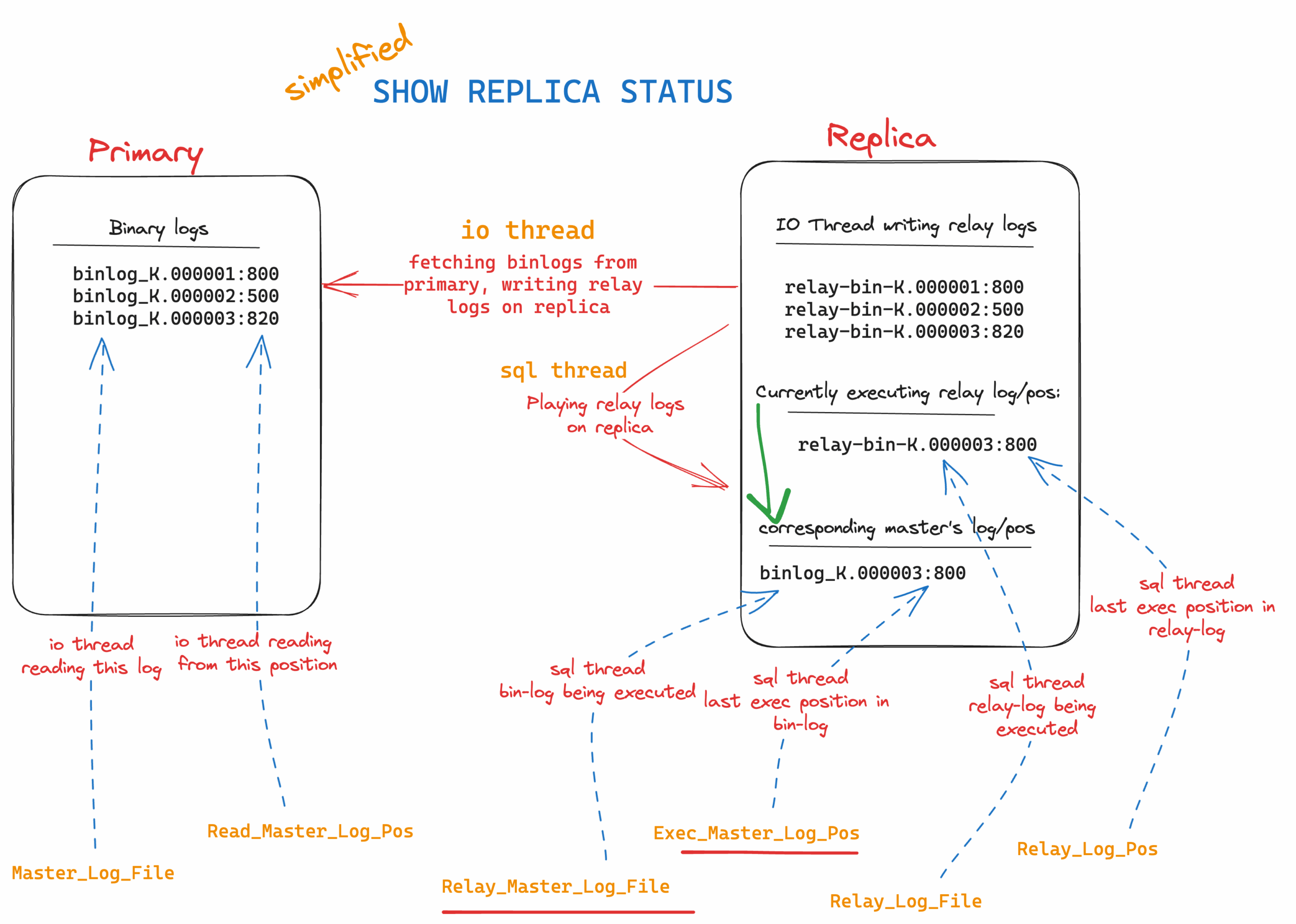
Now, let’s break down the SHOW REPLICA STATUS output to understand these binlog coordinates:
Understanding these binlog coordinates simplifies troubleshooting and managing replication:
By grasping these key binlog coordinates, you can confidently manage MySQL replication, resolve issues efficiently, and keep your databases in sync.
We know monitoring is one of the important components of your architecture. We recommend using Percona Monitoring and Management, the best monitoring tool for your open source databases.
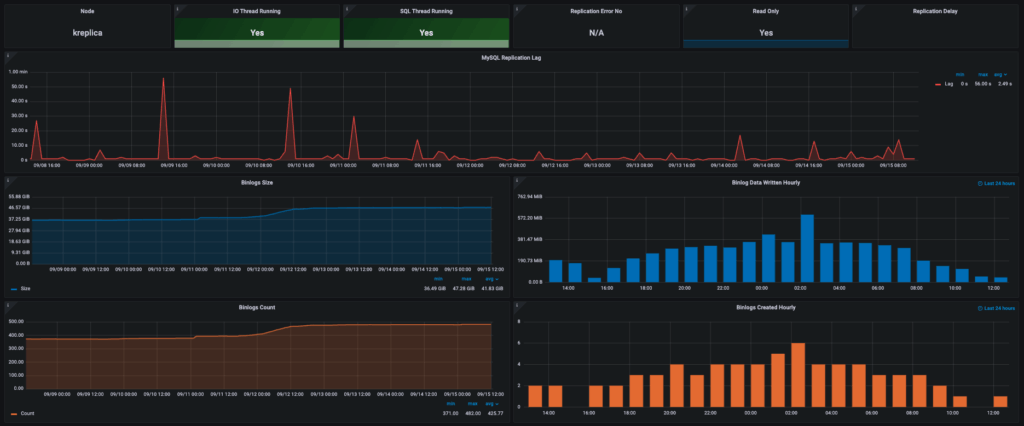
The MySQL Replication Summary dashboard comes in really handy when monitoring the replication status. Please find the sample snapshot from our test monitoring node:
The SHOW REPLICA STATUS output shouldn’t be something confusing you. By focusing on the binlog coordinates, you gain valuable insights into the replication process. Whether you’re troubleshooting a broken replica or monitoring ongoing replication, these coordinates guide success in managing MySQL replication. Next time you encounter the SHOW REPLICA STATUS output, remember that it’s simply telling you where your replication stands in the grand scheme of your MySQL environment.
Percona Monitoring and Management is a best-of-breed open source database monitoring solution. It helps you reduce complexity, optimize performance, and improve the security of your business-critical database environments, no matter where they are located or deployed.
Resources
RELATED POSTS





Hello.
Perhaps I am running group replication and the master is going down, how I can ensure that the new master will start from the place old master is left?
the table: mysq.slave_worker_info seems not replicated to the slaves in group replication.
What is possibilities please?
Thank you very much
Evgeny
Hi Evgeny,
The table, mysql.slave_worker_info, doesn’t seem to be related to group replication, but standard replication. You can confirm the group replication status by querying
I encourage you to search MySQL group replication articles in Percona blog (there are plenty) or even head over to the Percona Forum to get solution from experts.
Thanks,
K
Thank you for your response.
I apologize for the misformulation of my question.
Let me clarify:
Imagine a scenario where we have group replication that accepts changes from another data center:
Site A → Replication → Site B
On Site A, there is a source database running without GTID enabled, referred to as SDB.
On Site B, there is a Group Replication cluster (GRC) consisting of three servers: M1 (master), S1 (slave), and S2 (slave).
The replication channel, configured with ASSIGN_GTIDS_TO_ANONYMOUS_TRANSACTIONS, is defined on M1.
However, when M1 experiences an outage, a new master is automatically chosen.
My objective is to relocate the replication channel from the currently down M1 to the new master. I aim to ensure uninterrupted replication from SDB, regardless of the current master within the GRC.
While I can identify the newly chosen master using ProxySQL, the challenge lies in the channel metadata not being replicated. There are relevant tables under the mysql database, including:
It appears that tables like mysql.slave_XXX are not replicated and do not get updated on the replicas within the group replication cluster. Interestingly, other tables, such as mysql.user, are successfully replicated.
This situation raises questions about whether this behavior is by design or possibly indicative of a bug.
Thank you,
Evgeny