

Ingress is a resource that is commonly used to expose HTTP(s) services outside of Kubernetes. To have ingress support, you will need an Ingress Controller, which in a nutshell is a proxy. SREs and DevOps love ingress as it provides developers with a self-service to expose their applications. Developers love it as it is simple to use, but at the same time quite flexible.
High-level ingress design looks like this:
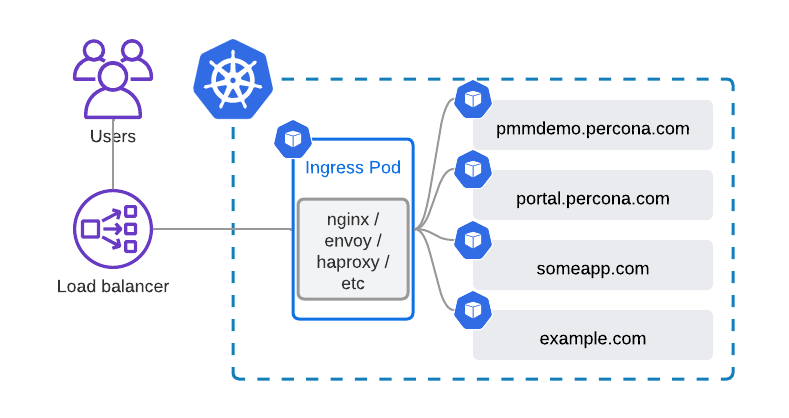
The beauty and value of such a design is that you have a single Load Balancer serving all your websites. In Public Clouds, it leads to cost savings, and in private clouds, it simplifies your networking or reduces the number of IPv4 addresses (if you are not on IPv6 yet).
Quite interestingly, some ingress controllers also support TCP and UDP proxying. I have been asked on our forum and Kubernetes slack multiple times if it is possible to use ingress with Percona Operators. Well, it is. Usually, you need a load balancer per database cluster:
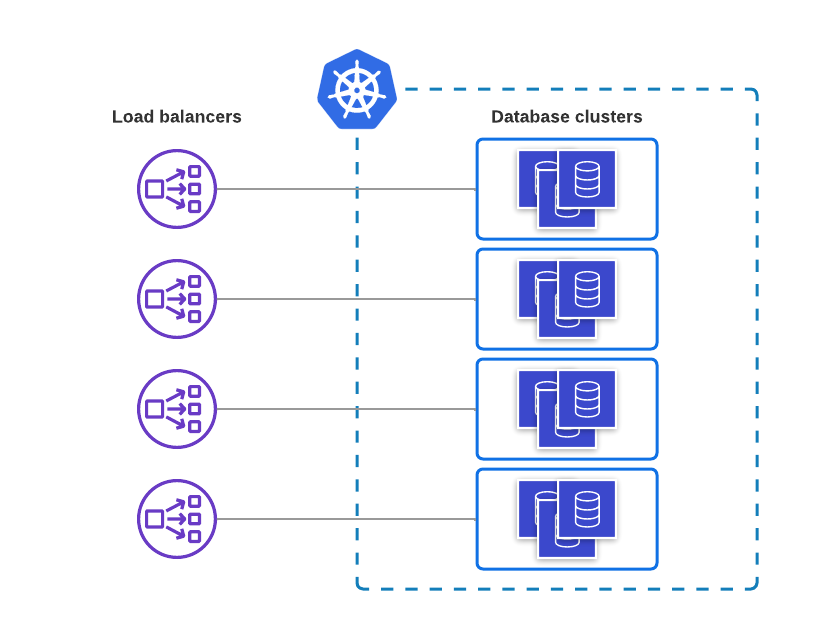
The design with ingress is going to be a bit more complicated but still allows you to utilize the single load balancer for multiple databases. In cases where you run hundreds of clusters, it leads to significant cost savings.
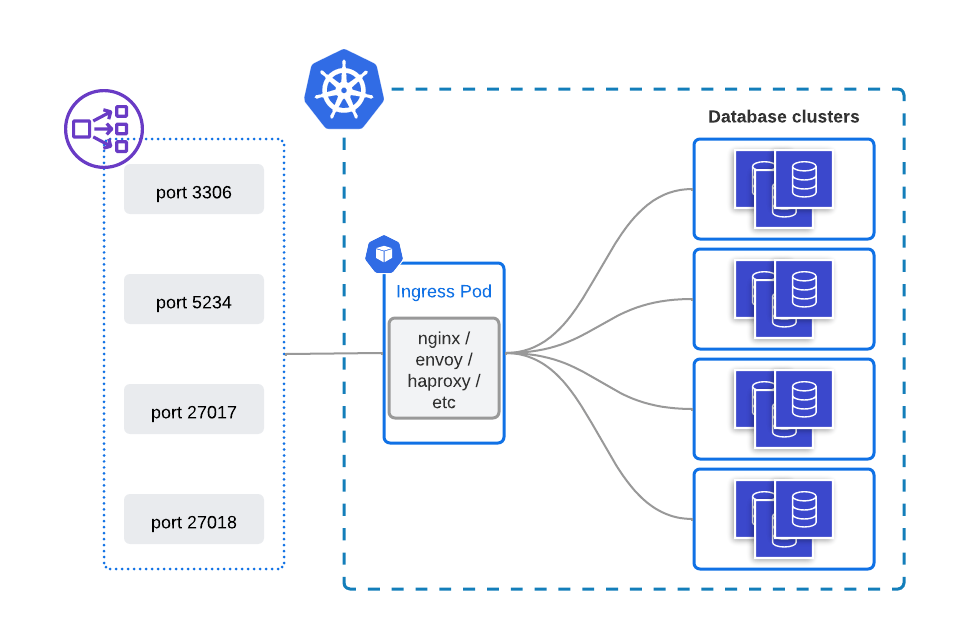
The obvious downside of this design is non-default TCP ports for databases. There might be weird cases where it can turn into a blocker, but usually, it should not.
My goal is to have the following:
All configuration files I used for this blog post can be found in this Github repository.
The following commands are going to deploy the Operator and three clusters:
|
1 2 3 4 5 |
kubectl apply -f https://raw.githubusercontent.com/spron-in/blog-data/master/operators-and-ingress/bundle.yaml kubectl apply -f https://raw.githubusercontent.com/spron-in/blog-data/master/operators-and-ingress/cr-minimal.yaml kubectl apply -f https://raw.githubusercontent.com/spron-in/blog-data/master/operators-and-ingress/cr-minimal2.yaml kubectl apply -f https://raw.githubusercontent.com/spron-in/blog-data/master/operators-and-ingress/cr-minimal3.yaml |
|
1 2 3 4 5 |
helm upgrade --install ingress-nginx ingress-nginx --repo https://kubernetes.github.io/ingress-nginx --namespace ingress-nginx --create-namespace --set controller.replicaCount=2 --set tcp.3306="default/minimal-cluster-haproxy:3306" --set tcp.3307="default/minimal-cluster2-haproxy:3306" --set tcp.3308="default/minimal-cluster3-haproxy:3306" |
This is going to deploy a highly available ingress-nginx controller.
Here is the load balancer resource that was created:
|
1 2 3 4 |
$ kubectl -n ingress-nginx get service NAME TYPE CLUSTER-IP EXTERNAL-IP PORT(S) AGE … ingress-nginx-controller LoadBalancer 10.43.72.142 212.2.244.54 80:30261/TCP,443:32112/TCP,3306:31583/TCP,3307:30786/TCP,3308:31827/TCP 4m13s |
As you see, ports 3306-3308 are exposed.
This is it. Database clusters should be exposed and reachable. Let’s check the connection.
Get the root password for minimal-cluster2:
|
1 2 |
$ kubectl get secrets minimal-cluster2-secrets | grep root | awk '{print $2}' | base64 --decode && echo kSNzx3putYecHwSXEgf |
Connect to the database:
|
1 2 3 4 |
$ mysql -u root -h 212.2.244.54 --port 3307 -p Enter password: Welcome to the MySQL monitor. Commands end with ; or g. Your MySQL connection id is 5722 |
It works! Notice how I use port 3307, which corresponds to minimal-cluster2.
What if you add more clusters into the picture, how do you expose those?
Helm
If you use helm, the easiest way is to just add one more flag into the command:
|
1 2 3 4 5 6 |
helm upgrade --install ingress-nginx ingress-nginx --repo https://kubernetes.github.io/ingress-nginx --namespace ingress-nginx --create-namespace --set controller.replicaCount=2 --set tcp.3306="default/minimal-cluster-haproxy:3306" --set tcp.3307="default/minimal-cluster2-haproxy:3306" --set tcp.3308="default/minimal-cluster3-haproxy:3306" --set tcp.3309="default/minimal-cluster4-haproxy:3306" |
No helm
Without Helm, it is a two-step process:
First, edit the configMap which configures TCP services exposure. By default it is called ingress-nginx-tcp:
|
1 2 3 4 5 6 7 8 |
kubectl -n ingress-nginx edit cm ingress-nginx-tcp … apiVersion: v1 data: "3306": default/minimal-cluster-haproxy:3306 "3307": default/minimal-cluster2-haproxy:3306 "3308": default/minimal-cluster3-haproxy:3306 "3309": default/minimal-cluster4-haproxy:3306 |
Change in configMap will trigger the reconfiguration of nginx in ingress pods. But as a second step, it is also necessary to expose this port on a load balancer. To do so – edit the corresponding service:
|
1 2 3 4 5 6 7 8 9 |
kubectl -n ingress-nginx edit services ingress-nginx-controller … spec: ports: … - name: 3309-tcp port: 3309 protocol: TCP targetPort: 3309-tcp |
The new cluster is exposed on port 3309 now.
Cloud providers usually limit the number of ports that you can expose through a single load balancer:
If you hit the limit, just create another load balancer pointing to the ingress controller.
Cost-saving is a good thing, but with Kubernetes capabilities, users expect to avoid manual tasks, not add more. Integrating the change of ingress configMap and load balancer ports into CICD is not a hard task, but maintaining the logic of adding new load balancers to add more ports is harder. I have not found any projects that implement the logic of reusing load balancer ports or automating it in any way. If you know of any – please leave a comment under this blog post.
Resources
RELATED POSTS




