

Deploying databases on Kubernetes is getting easier every year. The part that still hurts is making deployments repeatable and predictable across clusters and environments, especially from Continuous Integration(CI) perspective. This is where PR-based automation helps; you can review a plan, validate changes, and only apply after approval, before anything touches your cluster.
If you’ve ever installed an operator by hand, applied a few YAMLs, changed a script “just a bit”, and then watched the same setup behave differently in another environment, this post is for you.
In this tutorial, we’ll deploy Percona Operator for MySQL and a sample three-node MySQL cluster using OpenTofu – a fully open-source Terraform fork. Then we’ll take the exact same deployment and run it through CI using OpenTaco (formerly known as Digger), so that infrastructure changes can be validated and applied from Pull Requests.
We’ll use this demo repository throughout the guide: GitHub Demo Percona Operator MySQL OpenTaco.
OpenTofu and OpenTaco shine when infrastructure and databases must be reviewed, validated, and approved before they ever touch the cluster.
Databases are central to most stacks, and changes should be handled with more care. We want a workflow where updates are reviewed and validated before they are ever deployed to a cluster. That’s exactly what OpenTofu + OpenTaco enables: a PR shows the plan output for review, and apply happens only when you approve it.
OpenTofu (and Terraform) already gives us the “Infrastructure as Code” part: plan what will change, apply it, and store state. The problem is operational, for example, in a team: who runs “apply”, when do they run it, and how do we avoid collisions?
OpenTaco sits on top of your existing CI system (in our case, GitHub Actions). Instead of someone manually running tofu plan and tofu apply, you can run those steps through a Pull Request workflow, where:
By the end of this blog post, we will have:
You need a Kubernetes cluster you can reach using kubectl. That can be local (kind/minikube) or managed (GKE/EKS/AKS). Before going further, make sure these work:
|
1 2 3 4 5 6 7 8 9 10 11 12 |
kubectl cluster-info # Output Kubernetes control plane is running at https://34.57.102.230 kubectl get nodes # Output NAME STATUS ROLES AGE VERSION gke-k8s-testing-auto-k8s-testing-auto-31c0c085-16vr Ready <none> 13h v1.32.9-gke.1675000 gke-k8s-testing-auto-k8s-testing-auto-4cd48431-vd43 Ready <none> 13h v1.32.9-gke.1675000 gke-k8s-testing-auto-k8s-testing-auto-b5c8ecb0-scp4 Ready <none> 13h v1.32.9-gke.1675000 |
You’ll also need:
This project automates deploying the Percona Operator for MySQL to Kubernetes using OpenTofu (a Terraform fork) and Digger for CI/CD.
|
1 2 3 4 5 6 7 8 9 10 11 |
demo-percona-operator-mysql-opentaco/ ├── .github/ │ └── workflows/ │ └── digger_workflow.yml # GitHub Actions CI/CD workflow ├── opentofu/ # OpenTofu infrastructure code │ ├── main.tf # Main infrastructure definitions │ ├── variables.tf # Input variables │ └── versions.tf # Version constraints & backend config ├── digger.yml # Digger CI/CD configuration ├── README.md # Project documentation └── .gitignore # Git ignore patterns |
What each part does:
Before we bring OpenTaco into the picture, it’s worth running the deployment once locally with OpenTofu. This is not a separate approach; it’s the same OpenTofu project that OpenTaco will run later in CI. Doing it locally first helps you confirm your Kubernetes access and Helm chart behaviour without also debugging CI credentials.
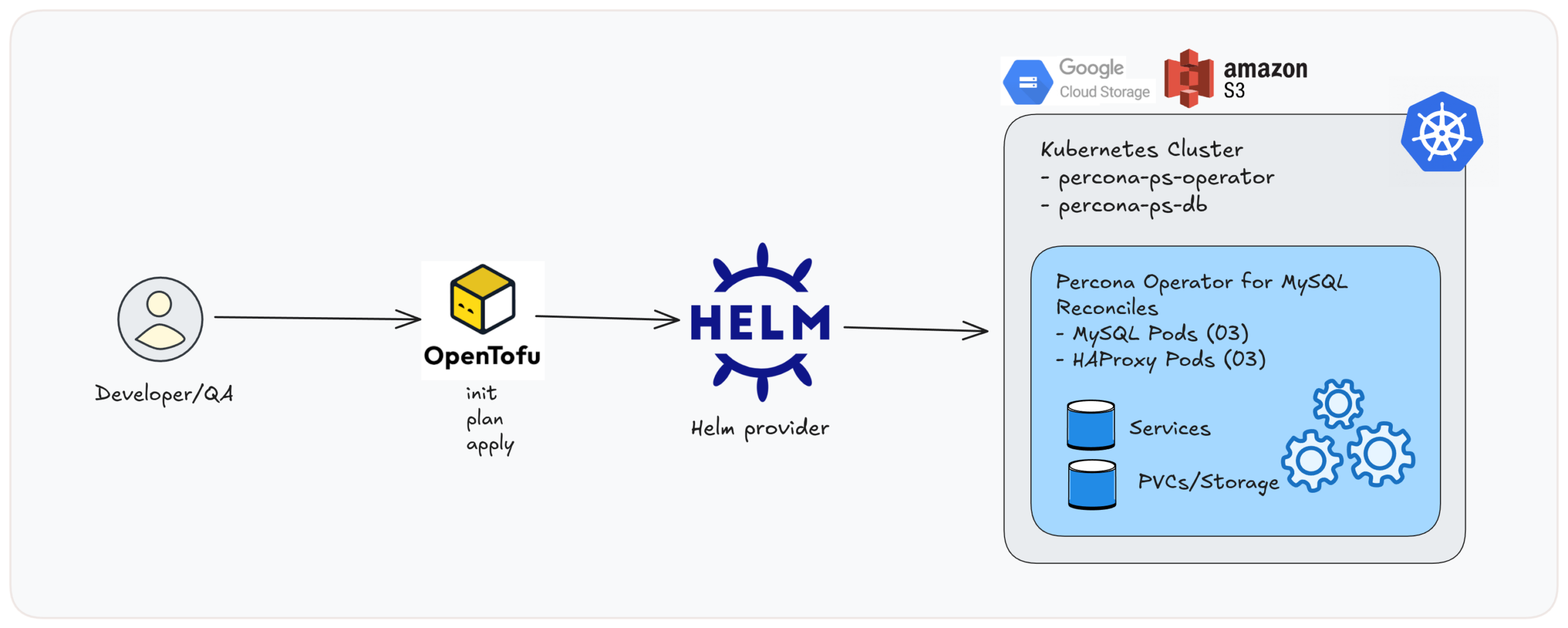
Image01: Local workflow overview.
|
1 2 3 |
git clone https://github.com/gkech/demo-percona-operator-mysql-opentaco.git cd demo-percona-operator-mysql-opentaco cd opentofu |
OpenTofu uses a state file to remember what it deployed, so it can plan changes and later destroy the same resources cleanly.
Option A: local state (quickest to start)
Comment out the backend block in versions.tf and run:
|
1 2 3 4 5 6 7 8 9 10 11 |
tofu init -->> Exampe Output Initializing the backend... Initializing provider plugins... Providers are signed by their developers. OpenTofu has created a lock file .terraform.lock.hcl to record the provider OpenTofu has been successfully initialized! You may now begin working with OpenTofu. Try running "tofu plan" to see any changes that are required for your infrastructure. commands will detect it and remind you to do so if necessary. |
Option B: remote state on S3 (recommended for CI)
|
1 2 3 4 5 |
backend "s3" { bucket = "s3-k8s-testing-automation-edithturn" key = "percona-opentaco/terraform.tfstate" region = "us-east-1" } |
Option C: remote state on GCS (also great for CI)
|
1 2 3 4 5 6 7 |
backend "gcs" { bucket = "percona-demo-opentaco" prefix = "terraform/state" } <b> </b> |
3. Run the tofu plan and tofu apply
tofu plan is a dry-run: it shows exactly what OpenTofu would create/change/destroy, without touching your cluster. In our case, it plans to create one namespace and two Helm releases (the Percona Operator chart and the MySQL cluster chart)
|
1 2 3 4 5 6 7 8 9 10 11 12 13 14 15 16 17 18 19 20 21 22 23 24 25 26 27 28 29 30 31 32 33 34 35 36 37 38 39 40 41 42 43 44 45 46 47 48 49 50 51 52 53 54 55 56 57 |
tofu plan -->> Example Output OpenTofu used the selected providers to generate the following execution plan. Resource actions are indicated with the following symbols: + create OpenTofu will perform the following actions: # helm_release.percona_db will be created + resource "helm_release" "percona_db" { + atomic = false + chart = "ps-db" + name = "percona-ps-db" + namespace = "opentaco-mysql" + repository = "https://percona.github.io/percona-helm-charts/" + status = "deployed" + timeout = 300 + values = [ + <<-EOT "mysql": "annotations": "open": "taco-taco" "resources": "limits": "memory": "5G" "requests": "memory": "2G" EOT, ] + verify = false + version = "1.0.0" + wait = true + wait_for_jobs = false } # helm_release.percona_operator will be created + resource "helm_release" "percona_operator" { + atomic = false + chart = "ps-operator" + name = "percona-ps-operator" + namespace = "opentaco-mysql" + repository = "https://percona.github.io/percona-helm-charts/" + status = "deployed" } # kubernetes_namespace.percona will be created + resource "kubernetes_namespace" "percona" { + id = (known after apply) + wait_for_default_service_account = false } Plan: 3 to add, 0 to change, 0 to destroy. Changes to Outputs: + namespace = "opentaco-mysql" + note = "Percona Operator and MySQL cluster deployed via Helm; see kubectl -n opentaco-mysql get pods" + operator_chart_version = (known after apply) |
When you run tofu apply, OpenTofu executes this plan and actually installs those Helm charts into the cluster. In this run, OpenTofu created the opentaco-mysql namespace first, then installed two Helm releases: percona-ps-operator (the Percona Operator) and percona-ps-db (the demo MySQL cluster). The final “Outputs” section confirms what was deployed, including the chart versions and the namespace.
|
1 2 3 4 5 6 7 8 9 10 11 12 13 14 15 16 17 18 19 20 21 22 23 24 25 26 27 28 29 30 31 32 33 34 35 36 37 38 39 |
tofu apply -auto-appove -->> Example Output OpenTofu used the selected providers to generate the following execution plan. Resource actions are indicated with the following symbols: + create OpenTofu will perform the following actions: # helm_release.percona_db will be created # helm_release.percona_operator will be created # kubernetes_namespace.percona will be created + resource "kubernetes_namespace" "percona" { + metadata { + name = "opentaco-mysql" } } Plan: 3 to add, 0 to change, 0 to destroy. Changes to Outputs: + namespace = "opentaco-mysql" + note = "Percona Operator and MySQL cluster deployed via Helm; see kubectl -n opentaco-mysql get pods" + operator_chart_version = (known after apply) kubernetes_namespace.percona: Creating... kubernetes_namespace.percona: Creation complete after 1s [id=opentaco-mysql] helm_release.percona_operator: Creating... helm_release.percona_operator: Still creating... [10s elapsed] helm_release.percona_operator: Creation complete after 13s [id=percona-ps-operator] helm_release.percona_db: Creating... helm_release.percona_db: Creation complete after 4s [id=percona-ps-db] Apply complete! Resources: 3 added, 0 changed, 0 destroyed. Outputs: database_chart_version = "1.0.0" namespace = "opentaco-mysql" note = "Percona Operator and MySQL cluster deployed via Helm; see kubectl -n opentaco-mysql get pods" operator_chart_version = "1.0.0" |
In this demo, OpenTofu is the “orchestrator”: it describes what should be installed, and then uses the Helm provider to install it into your Kubernetes cluster.
When you run tofu destroy, OpenTofu uninstalls the Helm releases, which removes the operator and the demo MySQL cluster (and whatever the charts are configured to clean up).
Now, let’s confirm everything is running. Let’s check the pods:
|
1 2 3 4 5 6 7 8 9 10 11 |
kubectl -n opentaco-mysql get pods # Output NAME READY STATUS RESTARTS AGE percona-ps-db-haproxy-0 2/2 Running 0 10m percona-ps-db-haproxy-1 2/2 Running 0 9m55s percona-ps-db-haproxy-2 2/2 Running 0 9m29s percona-ps-db-mysql-0 2/2 Running 0 12m percona-ps-db-mysql-1 2/2 Running 0 10m percona-ps-db-mysql-2 2/2 Running 0 8m39s percona-ps-operator-77bc4755c5-pv5rz 1/1 Running 0 12m |
You should see the operator pod, as well as the MySQL and HAProxy pods created by the operator.
Check the custom resource:
|
1 2 3 4 5 |
kubectl -n opentaco-mysql get perconaservermysql # Example Output NAME REPLICATION ENDPOINT STATE MYSQL HAPROXY percona-ps-db group-replication percona-ps-db-haproxy.opentaco-mysql ready 3 3 |
|
1 2 3 4 5 6 7 8 9 10 11 12 13 14 15 16 17 18 19 20 21 22 23 24 25 26 27 28 29 30 31 32 33 34 35 36 37 38 39 40 41 42 43 |
kubectl -n opentaco-mysql describe perconaservermysql percona-ps-db # Output Name: percona-ps-db Namespace: opentaco-mysql Labels: app.kubernetes.io/instance=percona-ps-db app.kubernetes.io/managed-by=Helm app.kubernetes.io/name=ps-db app.kubernetes.io/version=1.0.0 helm.sh/chart=ps-db-1.0.0 Annotations: meta.helm.sh/release-name: percona-ps-db meta.helm.sh/release-namespace: opentaco-mysql API Version: ps.percona.com/v1 Kind: PerconaServerMySQL Metadata: Finalizers: percona.com/delete-mysql-pods-in-order Spec: Backup: Enabled: true Image: percona/percona-xtrabackup:8.4.0-4.1 Image Pull Policy: Always Cr Version: 1.0.0 Mysql: Affinity: Anti Affinity Topology Key: kubernetes.io/hostname Annotations: Open: taco-taco Auto Recovery: true Cluster Type: group-replication Expose Primary: Enabled: true Grace Period: 600 Image: percona/percona-server:8.4.6-6.1 Image Pull Policy: Always . . . Events: Type Reason Age From Message ---- ------ ---- ---- ------- Warning ClusterStateChanged 18m ps-controller -> Initializing Warning ClusterStateChanged 12m ps-controller Initializing -> Ready |
This should show the operator is reconciling, and the cluster becomes ready.
Now, let’s check Services:
|
1 2 3 4 5 6 7 8 9 |
kubectl -n opentaco-mysql get svc -->> Example Output NAME TYPE CLUSTER-IP PORT(S) AGE percona-ps-db-haproxy ClusterIP 34.118.234.180 3306/TCP,3307/TCP,3309/TCP... percona-ps-db-mysql ClusterIP None 3306/TCP,33062/TCP... percona-ps-db-mysql-primary ClusterIP 34.118.227.76 3306/TCP,33062/TCP... percona-ps-db-mysql-proxy ClusterIP None 3306/TCP,33062/TCP,33060/TCP... percona-ps-db-mysql-unready ClusterIP None 3306/TCP,33062/TCPTCP... |
We can see the services for primary and HAProxy
Extract the MySQL root password:
|
1 2 3 4 |
kubectl -n opentaco-mysql get secret percona-ps-db-secrets -o jsonpath='{.data.root}' | base64 -d && echo # Example Output r]#s.KM~uu4XT<WO |
Port-forward to the primary service
|
1 2 3 |
kubectl -n opentaco-mysql port-forward svc/percona-ps-db-mysql-primary 3306:3306 Forwarding from 127.0.0.1:3306 -> 3306 Forwarding from [::1]:3306 -> 3306 |
Then connect using a MySQL client:
|
1 2 3 4 5 6 7 8 9 10 11 12 13 14 15 |
mysql -h 127.0.0.1 -u root -p Enter password: Welcome to the MySQL monitor. Commands end with ; or g. Your MySQL connection id is 4544 Server version: 8.4.6-6 Percona Server (GPL), Release 6, Revision dbba4396 Copyright (c) 2000, 2025, Oracle and/or its affiliates. Oracle is a registered trademark of Oracle Corporation and/or its affiliates. Other names may be trademarks of their respective owners. Type 'help;' or 'h' for help. Type 'c' to clear the current input statement. mysql> |
Once connected, let’s try:
|
1 2 3 4 5 6 7 8 9 10 11 12 |
mysql> SHOW DATABASES; +-------------------------------+ | Database | +-------------------------------+ | information_schema | | mysql | | mysql_innodb_cluster_metadata | | performance_schema | | sys | | sys_operator | +-------------------------------+ 6 rows in set (0.10 sec) |
If this works, our MySQL cluster is running correctly! Wohoo!!
After we are done, we can run: tofu destroy. This will uninstall both Helm releases (the operator and the demo MySQL cluster) and then delete the opentaco-mysql namespace, leaving your Kubernetes cluster itself untouched.
|
1 2 3 4 5 6 7 8 9 10 |
cd opentofu tofu destroy -auto-approve -->> Example Output OpenTofu will perform the following actions: # helm_release.percona_db will be destroyed # helm_release.percona_operator will be destroyed # kubernetes_namespace.percona will be destroyed Plan: 0 to add, 0 to change, 3 to destroy. |
This is the part that makes the demo useful for teams.
Once your repo is connected to OpenTaco Cloud (via the GitHub App), OpenTaco uses GitHub Actions to run your OpenTofu project and report results back to the Pull Request.
So you don’t need someone to run tofu manually on their laptop; your PR becomes the workflow.
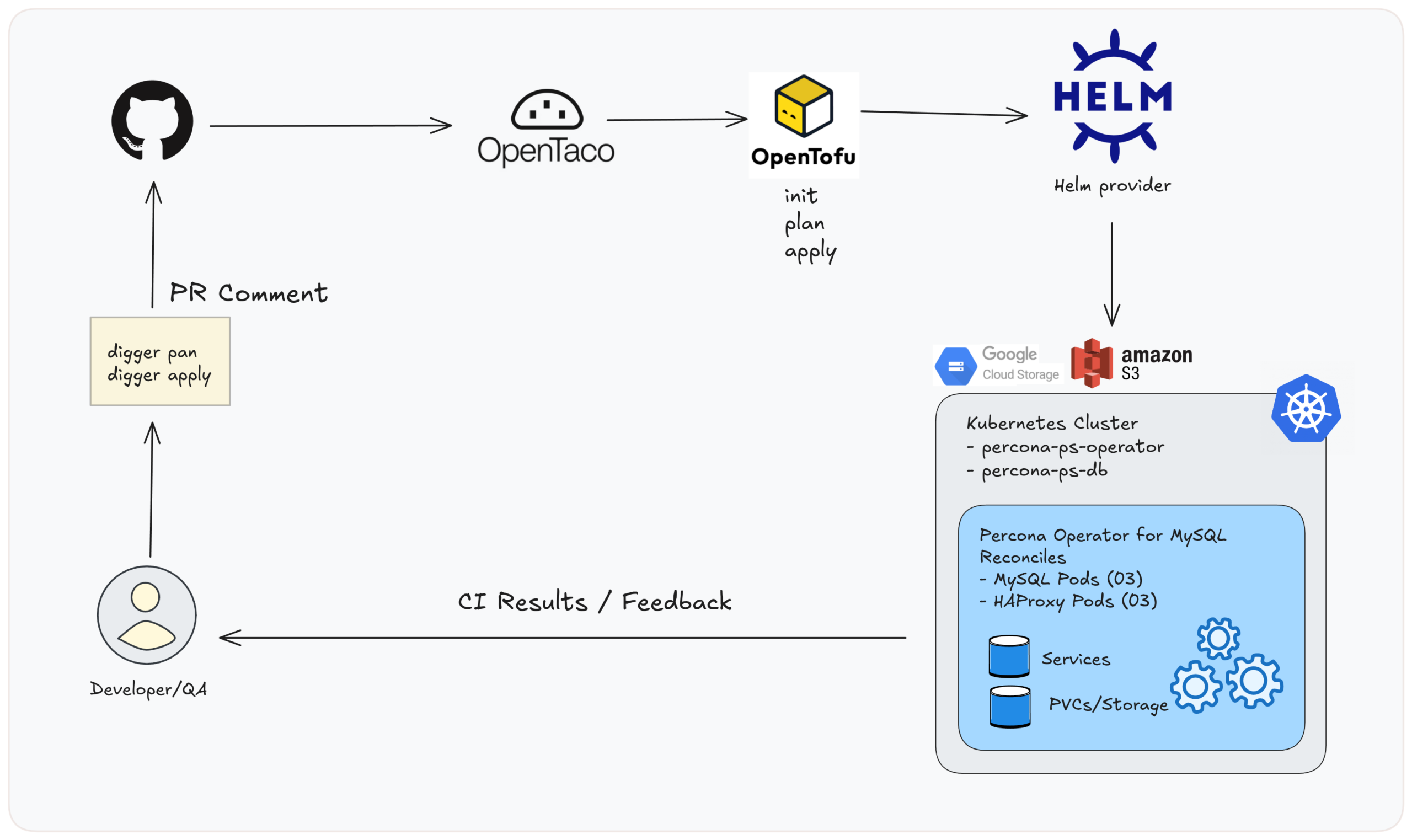
Image02: PR-based workflow overview.
1. Connect your repository to OpenTaco Cloud
After that, OpenTaco can react to PRs and run workflows.
OpenTaco (Digger) reads digger.yml in your repo to find:
apply|
1 2 3 4 5 6 7 8 9 10 11 12 13 14 15 16 17 |
projects: - name: percona-opentaco dir: opentofu workspace: default tool: opentofu workflow: default workflows: default: plan: steps: - init - plan apply: steps: - init - apply |
Let’s configure first GitHub Actions secrets because the runner needs access to:
You need these secrets in GitHub:
For GKE access:
For S3 backend (if you use it):
Note: When your state backend is S3, OpenTofu needs AWS credentials during init to read/write the state file. So in CI, you must authenticate to AWS (in addition to GKE/GCP). In this example, we use S3, so our GitHub Actions workflow includes an AWS credentials step before Digger runs.
|
1 2 3 4 5 6 |
- name: Configure AWS credentials uses: aws-actions/configure-aws-credentials@v4 with: aws-access-key-id: ${{ secrets.AWS_ACCESS_KEY_ID }} aws-secret-access-key: ${{ secrets.AWS_SECRET_ACCESS_KEY }} aws-region: ${{ secrets.AWS_REGION }} |
Now that we have the credentials, we create a branch and change something under opentofu/ (for example: bump the chart version, adjust MySQL memory limits, change values passed to the chart). In this example, we are changing the name of the namespace to opentaco-mysql-test in the variables.tf file.
Next step is to open a Pull Request and add a comment, with:
|
1 |
digger plan |
OpenTaco will run tofu init + tofu plan in GitHub Actions and post the plan output back to the PR.
Nothing is deployed yet; this is a dry run.
When you’re ready, run:
|
1 |
digger apply |
OpenTaco will run tofu init + tofu apply. This installs/updates the same Helm releases you tested locally:
After digger apply is applied successfully, we can check the output that looks like this:
Besides PR comments, otaco.app gives you a quick view of:
You should be able to verify that the cluster resources exist. Let’s explore the pods.
|
1 2 3 4 5 6 7 8 9 10 11 12 13 14 15 16 17 18 19 20 21 22 |
kubectl -n opentaco-mysql-test get pods # -->> Example Output NAME READY STATUS RESTARTS AGE percona-ps-db-haproxy-0 2/2 Running 0 8m59s percona-ps-db-haproxy-1 2/2 Running 0 8m38s percona-ps-db-haproxy-2 2/2 Running 0 8m18s percona-ps-db-mysql-0 2/2 Running 0 9m49s percona-ps-db-mysql-1 2/2 Running 0 9m2s percona-ps-db-mysql-2 2/2 Running 0 8m14s percona-ps-operator-676bf7c664-d2hdp 1/1 Running 0 9m56s kubectl -n opentaco-mysql-test get svc # -->> Example Output NAME TYPE CLUSTER-IP EXTERNAL-IP PORT(S) AGE percona-ps-db-haproxy ClusterIP 34.118.229.10 <none> 3306/TCP,3307/TCP,3309/TCP,33060/TCP,33062/TCP 10m percona-ps-db-mysql ClusterIP None <none> 3306/TCP,33062/TCP,33060/TCP,6450/TCP,33061/TCP 10m percona-ps-db-mysql-primary ClusterIP 34.118.228.29 <none> 3306/TCP,33062/TCP,33060/TCP,6450/TCP,33061/TCP 10m percona-ps-db-mysql-proxy ClusterIP None <none> 3306/TCP,33062/TCP,33060/TCP,6450/TCP,33061/TCP 10m percona-ps-db-mysql-unready ClusterIP None <none> 3306/TCP,33062/TCP,33060/TCP,6450/TCP,33061/TCP 10m |
You should also see the state object created in your backend.
For S3:
|
1 2 |
aws s3 ls s3://s3-k8s-testing-automation-edithturn/percona-opentaco/ --recursive 2025-12-21 20:20:02 1316 percona-opentaco/terraform.tfstate |
You’ll see JSON describing the OpenTofu resource (the type as “helm_release”) and the outputs like namespace and note. That’s expected: OpenTofu is tracking the execution wrapper, not each Kubernetes object.
|
1 2 3 4 5 6 7 8 9 10 11 12 13 14 15 16 17 18 19 20 21 22 23 24 25 26 27 28 29 30 31 32 33 34 |
aws s3 cp s3://s3-k8s-testing-automation-edithturn/percona-opentaco/terraform.tfstate - | jq # -->> Example Output { "version": 4, "terraform_version": "1.6.6", "serial": 1, "lineage": "9826ce3b-e10b-ed80-a19e-d433c5731b92", "outputs": { "database_chart_version": { "value": "1.0.0", "type": "string" }, "namespace": { "value": "opentaco-mysql-test", "type": "string" }, "note": { "value": "Percona Operator and MySQL cluster deployed via Helm; see kubectl -n opentaco-mysql-test get pods", "type": "string" }, "operator_chart_version": { "value": "1.0.0", "type": "string" } }, "resources": [ { "mode": "managed", "type": "helm_release", "name": "percona_db", "provider": "provider["registry.terraform.io/hashicorp/helm"]", "instances": [ { |
If you prefer to remove the database cluster and operator directly with Kubernetes/Helm, follow the official docs: Percona Operator for MySQL uninstall/delete cluster steps
At this point, you have a repeatable method for deploying the Percona Operator for MySQL and a demo MySQL cluster on Kubernetes. You can now run the same workflow locally or from a CI/CD pipeline. Your deployment becomes documented, reproducible, and team-friendly.
If you’d like to explore further, check out the demo-percona-operator-mysql-opentaco repo and try a few changes of your own. We’re happy to help if you run into issues with OpenTaco or the Percona Operator for MySQL. And if you do play with it, tell us how it went, share your findings, ideas, or improvements with us!
Resources
RELATED POSTS




