

 Following my blog post Evaluating the Python TPCC MongoDB Benchmark, I wanted to evaluate how MongoDB performs under workload with a bigger dataset. This time I will load a 1000 Warehouses dataset, which in raw format should equal to 100GB of data.
For the comparison, I will use the same hardware and the same MongoDB versions as in the blog post mentioned above. To reiterate:
For the client and server, I will use identical bare metal servers, connected via a 10Gb network.
The node specification:
|
1 2 3 4 5 6 7 8 9 10 11 12 13 14 |
# Percona Toolkit System Summary Report ###################### Hostname | beast-node4-ubuntu System | Supermicro; SYS-F619P2-RTN; v0123456789 (Other) Platform | Linux Release | Ubuntu 18.04.4 LTS (bionic) Kernel | 5.3.0-42-generic Architecture | CPU = 64-bit, OS = 64-bit # Processor ################################################## Processors | physical = 2, cores = 40, virtual = 80, hyperthreading = yes Models | 80xIntel(R) Xeon(R) Gold 6230 CPU @ 2.10GHz Caches | 80x28160 KB # Memory ##################################################### Total | 187.6G Swappiness | 0 |
For MongoDB I used:
I will load data using PyPy python version and using 100 clients and timing it:
|
1 |
time /mnt/data/vadim/bench/pypy2.7-v7.3.1-linux64/bin/pypy tpcc.py --config mconfig --warehouses 1000 --clients=100 --no-execute mongodb |
The results:
|
1 2 3 4 5 6 7 |
time /mnt/data/vadim/bench/pypy2.7-v7.3.1-linux64/bin/pypy tpcc.py --config mconfig --warehouses 1000 --clients 100 --no-execute mongodb 2020-06-17 13:21:35,159 [<module>:245] INFO : Initializing TPC-C benchmark using MongodbDriver 2020-06-17 13:21:35,159 [<module>:255] INFO : Loading TPC-C benchmark data using MongodbDriver real 19m43.605s user 100m19.637s sys 26m27.597s |
|
1 2 3 4 5 6 7 |
time /mnt/data/vadim/bench/pypy2.7-v7.3.1-linux64/bin/pypy tpcc.py --config mconfig --warehouses 1000 --clients=100 --no-execute mongodb 2020-06-17 13:28:48,325 [<module>:245] INFO : Initializing TPC-C benchmark using MongodbDriver 2020-06-17 13:28:48,325 [<module>:255] INFO : Loading TPC-C benchmark data using MongodbDriver real 13m34.238s user 87m30.806s sys 34m20.460s |
|
1 2 3 4 5 6 7 8 9 10 |
time /mnt/data/vadim/servers/pypy2.7-v7.3.1-linux64/bin/pypy tpcc.py --config mconfig --warehouses 1000 --no-execute --clients=100 mongodb 2020-06-17 14:02:26,426 [<module>:245] INFO : Initializing TPC-C benchmark using MongodbDriver 2020-06-17 14:02:26,426 [<module>:255] INFO : Loading TPC-C benchmark data using MongodbDriver real 259m40.658s user 83m36.256s sys 14m11.330s |
To Highlight:
4.2 loaded data a little faster than 4.0, and 4.4 performed extremely bad, being about 20 times slower than 4.2. I hope this is some Release Candidate bug which will be fixed for the release.
The size of MongoDB datadir is 165GB, it seems there is an overhead compared to the raw 100GB datasize.
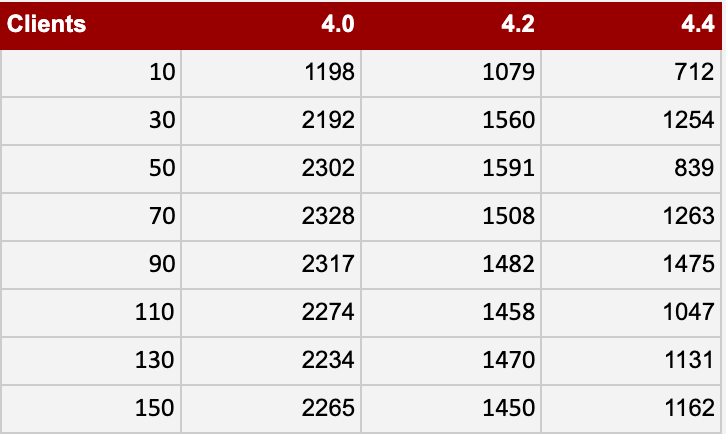
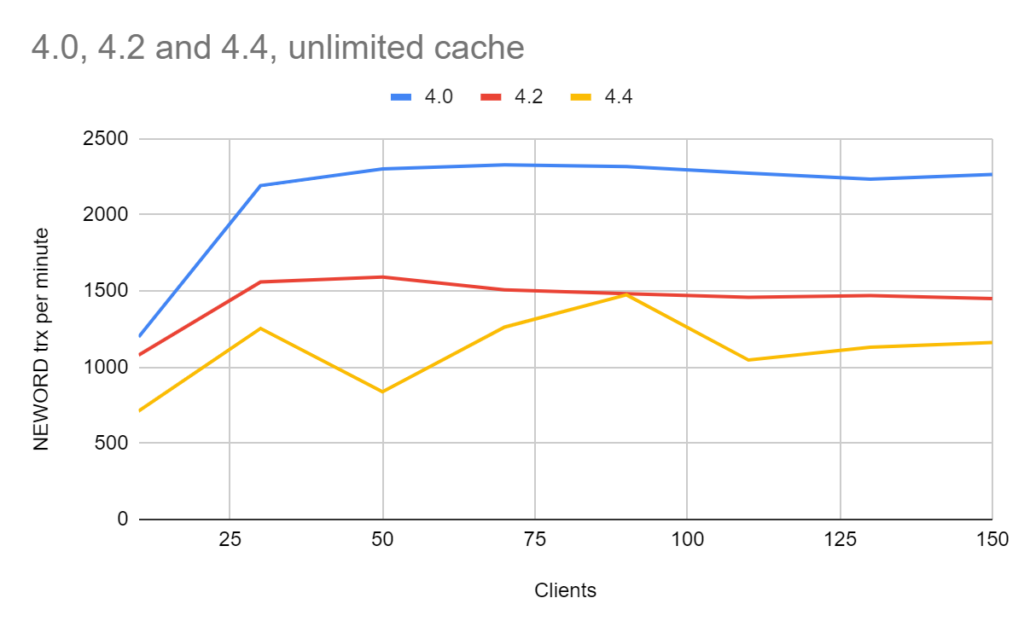
The results are in NEW ORDER transactions per minute, AKA more is better.
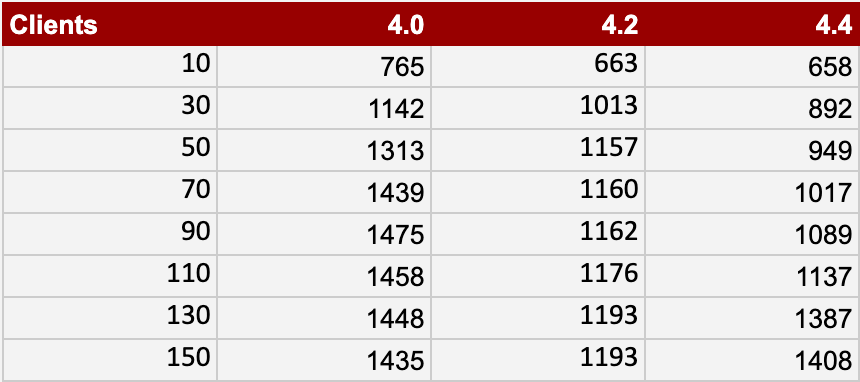
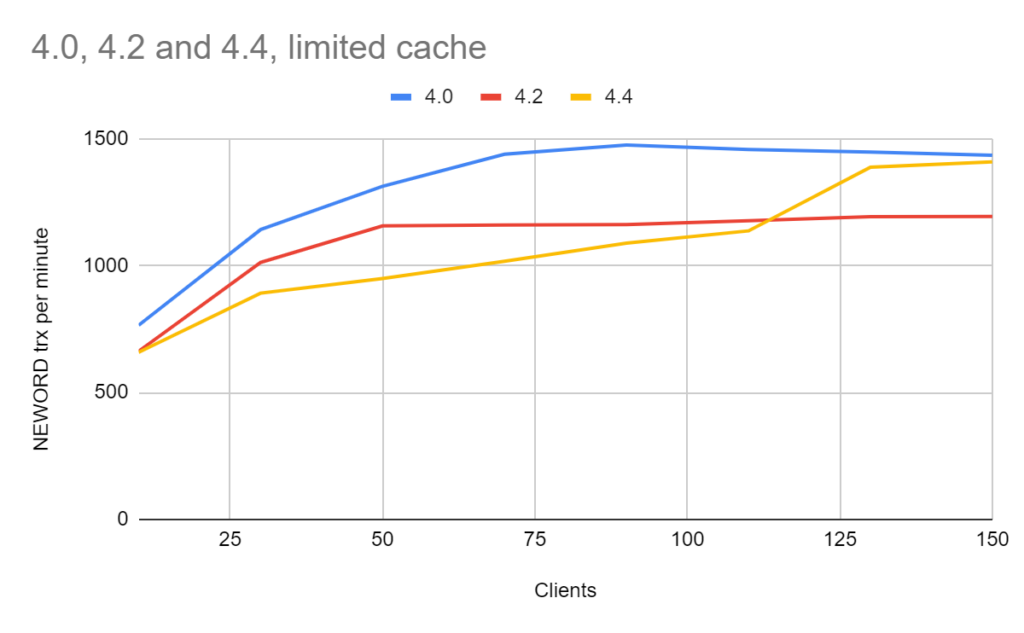
In this cache, I allocate only 25GB for WiredTiger and 50GB for the mongodb process in total.
The results are in NEW ORDER transactions per minute; more is better.
In this case, I only compare 4.0 and 4.2, as from the previous results, there is something going on with 4.4 and I want to wait until GA release to measure it in ReplicaSet setup.
‘write_concern’: 1 for this benchmark.
The results are in NEW ORDER transactions per minute, and more is better.
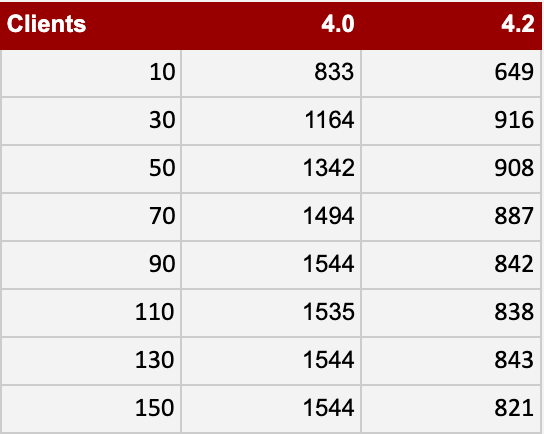
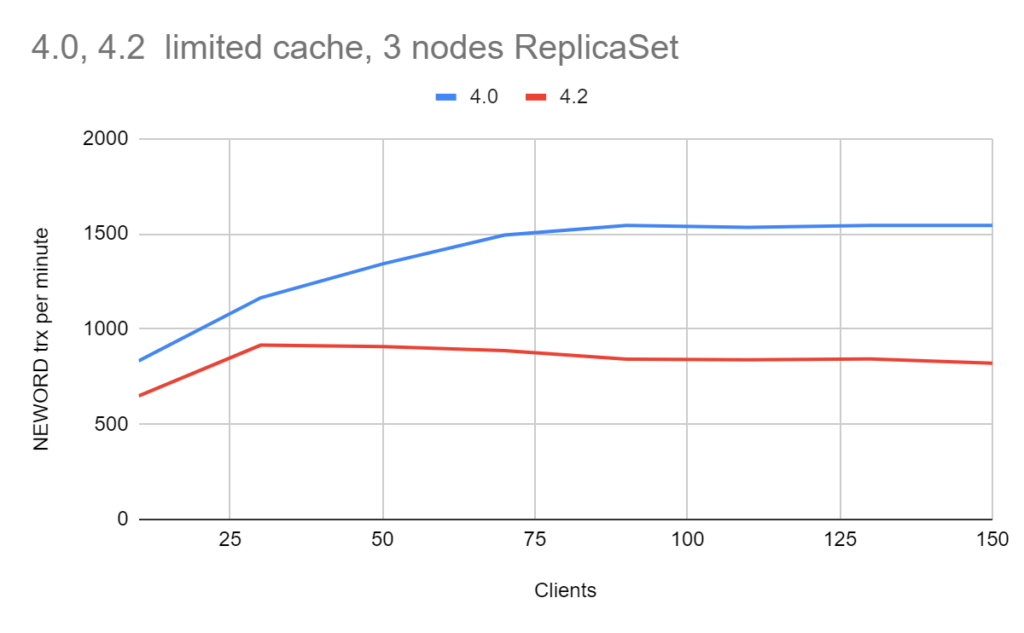
Now we can compare how much overhead there is from ReplicaSets:
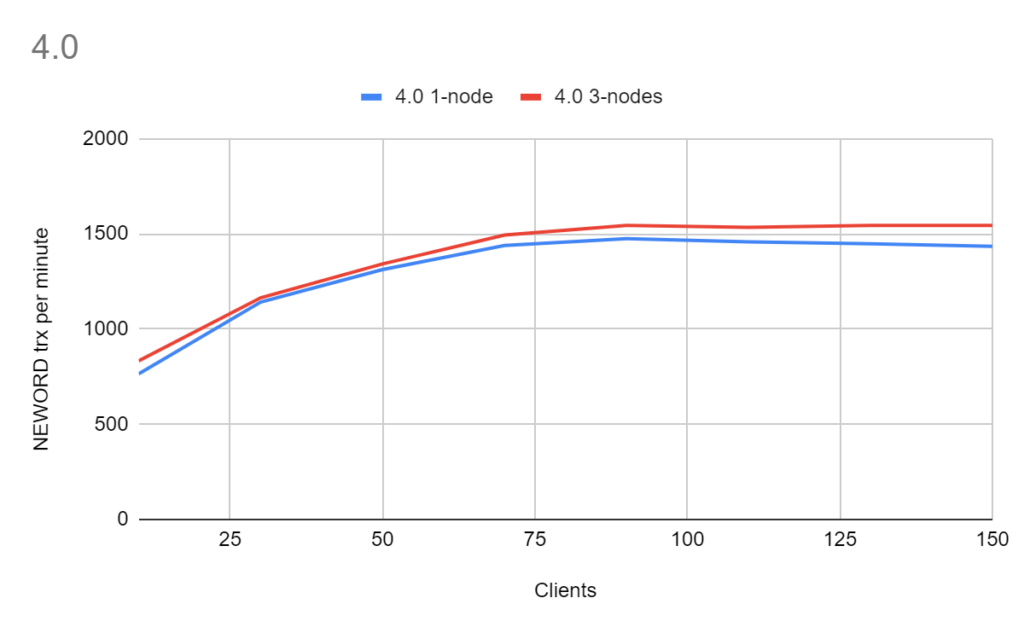
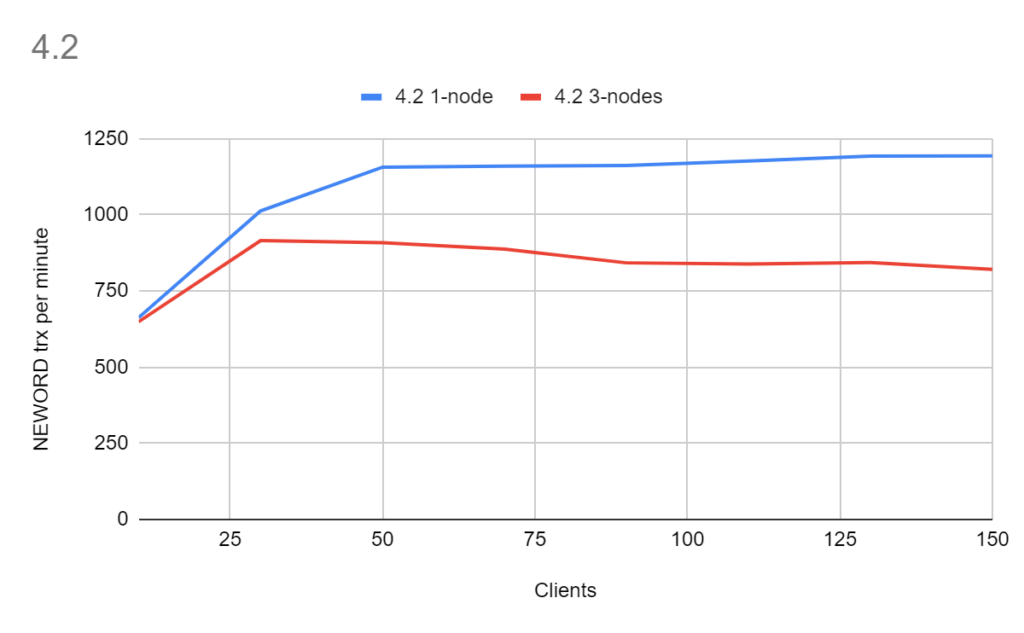
With ‘write_concern’: 1 there really should not be much overhead from replicaset, which is confirmed for version 4.0. However, 4.2 shows a noticeable difference, which is a point for further investigation.
What is obvious from the collective results is that the 4.2 version took a noticeable performance hit, sometimes showing as much as a 2x throughput decline compared to 4.0.
Version 4.4, as of the current RC status, showed long load times and variation in the performance results under high concurrent load. I want to wait for the GA release for the final evaluation.





You don’t provide the contents of the mconfig file – without that it’s hard to know what might be happening. Can you provide that info?
mconfig is here https://github.com/Percona-Lab-results/pytpcc-MongoDB-Jun2020/blob/master/mconfig
Vadim
Your last results are a great clue.
“Starting in MongoDB 4.2, administrators can limit the rate at which the primary applies its writes with the goal of keeping the majority committed lag under a configurable maximum value flowControlTargetLagSeconds”
https://docs.mongodb.com/manual/replication/
If you monitor for replication lag in your 4.0 test, you can confirm or deny my hypothesis.