
Your MongoDB cluster has been running fine for years on 4.4 or 6.0. Then the version goes end of life, a CVE shows up in an audit, or a new feature needs 8.0, and the MongoDB upgrade lands on your desk.
The upgrade itself is not hard. Knowing everything you have to check before, during and after each step is the hard part. We see the same pattern in support again and again: the upgrade stops halfway because one small requirement was buried in a page nobody opened.
MongoDB upgrades one major version at a time. Going from 4.4 to 8.0 means four hops (4.4 to 5.0, 6.0, 7.0 and 8.0), and each hop has its own upgrade page, its own compatibility notes and its own rollback rules. A few of the things that stop an upgrade halfway:
None of this is secret. It is spread across release notes, compatibility pages, driver tables and the docs for each tool, and you have to read all of it for every hop.
I built the MongoDB Upgrade Roadmap to put that documentation in one place. You tell it the current version, the target version and how the cluster runs. It returns every hop with:
It covers Percona Server for MongoDB and MongoDB Community, from 3.0 to 9.0, including the 8.2 and 8.3 minor releases. You can add your drivers, PBM, PMM and Operator versions, CPU and OS, and the plan checks them against each hop.
Three rules shaped it:
Pick Percona Server for MongoDB 6.0.29-23 as the current version, 8.3.13-4 as the target, a replica set and apt. The plan shows the path 6.0 to 7.0 to 8.0 to 8.3, three hops, with one tab per hop.
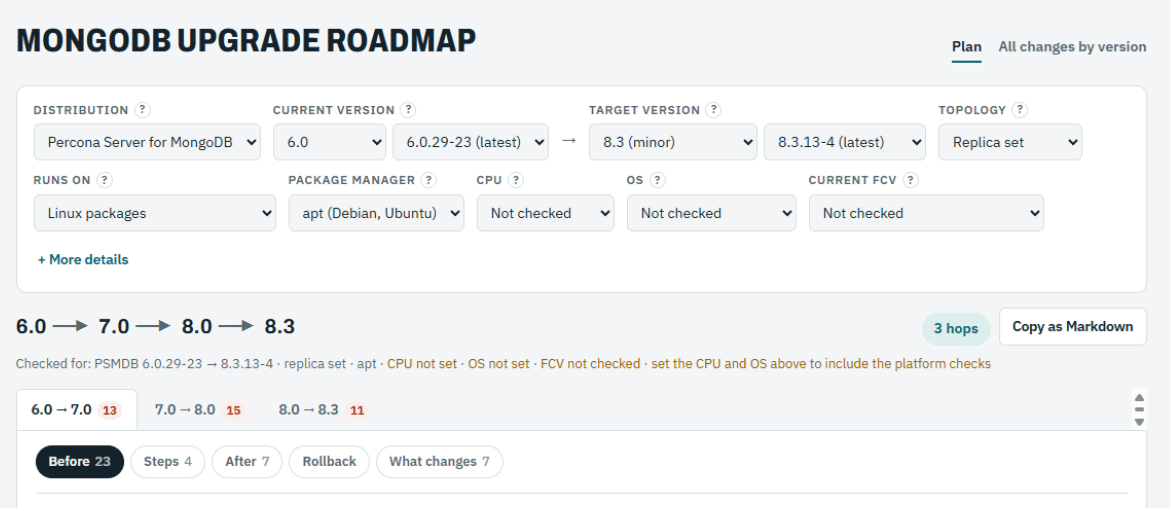
Each hop splits into Before, Steps, After, Rollback and What changes. For the 6.0 to 7.0 hop that is 23 pre-flight checks, 4 procedure steps and 7 post-upgrade checks. Each check has a checkbox, so you can track where you are, and Copy as Markdown puts the whole plan in your change ticket.
No. MongoDB supports upgrades one major version at a time, so 4.4 to 8.0 goes through 5.0, 6.0 and 7.0, and you set FCV at the end of each hop. The 8.2 and 8.3 minor releases follow their own documented paths.
After every member runs the new binaries and the cluster works as expected. Before that you can still go back to the previous binaries; after it, a downgrade is much harder.
No. The page runs in your browser and never contacts your cluster. You type the versions, and it builds the plan from the official documentation it ships with.
An upgrade that stops halfway is worse than one that never started: one member on the new binaries, FCV on the old version and a maintenance window running out. A plan that lists every requirement for every hop up front prevents that.
The plan is not a substitute for testing. Run it on a staging cluster first, with the same versions, drivers and tools you run in production.
If an in-place upgrade does not fit your window, you can migrate instead. Percona ClusterSync for MongoDB (PCSM) clones the data to a new cluster on the target version and keeps it in sync through change streams until you switch the applications over. Its compatibility matrix supports 6.0 to 7.0 or 8.0, and 7.0 to 8.0, so a 6.0 cluster can reach 8.0 in one step. Read the limitations first: users and roles are not synchronized, PCSM does not check FCV on the target, and there is no reverse sync to fall back on.
The page is at zelmario.github.io/mongodb-upgrade-roadmap, and the source and knowledge base are on GitHub. If you find a check that is missing or wrong, open an issue or a pull request. Every fix makes the next upgrade easier for someone else.
Resources
RELATED POSTS