
Percona ClusterSync for MongoDB (PCSM) synchronizes data from a source MongoDB cluster (including Atlas) to a target MongoDB cluster in two stages. It first creates a consistent starting point and clones the existing collections and indexes. At the same time, it captures source changes through MongoDB change streams. Once the initial copy is complete, PCSM applies those changes to the target until the target catches up with the source.
PCSM’s latest architectural changes introduce several new parameters to improve initial clone speed and continuous replication throughput. This post aims to equip you with some ideas to help tune PCSM for maximum performance.
As usual, tune gradually and monitor source and target CPU, disk, network usage, connection counts, and replication lag after each change. Use Percona Monitoring and Management (PMM) to help you identify any bottlenecks. Don’t forget to keep an eye on the same metrics for the host running PCSM as well.
The Initial cloning phase is mainly affected by collection parallelism, read and insert workers, segment size, and read batch size. You configure all of this while starting the pcsm process.
Parameter: clone-num-parallel-collections
The default is 2, which is quite conservative. This controls how many collections are cloned at the same time.
Increase it when:
It could be a good idea to start with 4 parallel collections for each CPU core and test higher values as long as the target is not saturated. Excessive parallelism will increase disk contention and connection usage.
Parameters:
Defaults are:
Read workers fetch documents from the source. Insert workers write batches to the target.
Increase the number of read workers when the source reads limit throughput. Increase insert workers when the target has available write capacity and insert queues are building up. Target indexes are maintained during clone inserts, so additional insert workers can increase write contention.
Do not increase both aggressively at the same time. If target CPU or disk latency increases without a corresponding increase in throughput, reduce insert concurrency.
For continuous replication, PCSM does expose queue-depth metrics you can check in PMM:
|
1 2 3 |
percona_clustersync_mongodb_repl_event_queue_size percona_clustersync_mongodb_repl_worker_event_queue_size{worker="..."} percona_clustersync_mongodb_repl_worker_bulk_queue_size{worker="..."} |
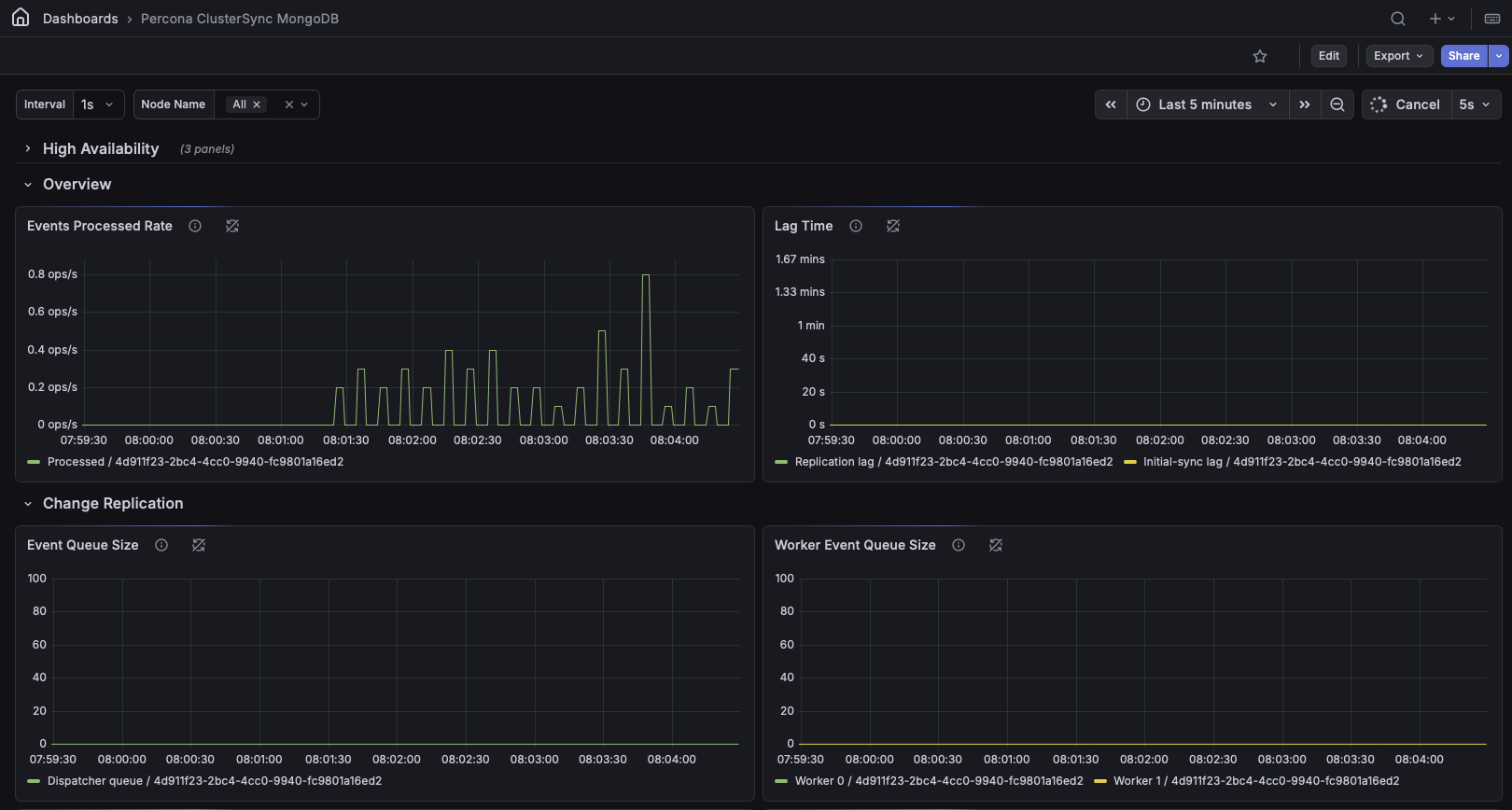
Continuous replication is mainly affected by worker count, change-stream batch size, queue sizes, bulk size, flush interval, and bulk-write mode.
Parameter: repl-num-workers
The default is the number of CPUs.
Increase this setting when worker queues grow and the target still has available CPU, storage, and connections. A useful test value is twice the number of CPUs.
More workers will not improve throughput for high contention workloads (e.g. operations targeting the same set of documents). Events for the same document remain processed in order on a single worker at a time.
Parameter: repl-change-stream-batch-size
The default is 10,000 events.
Larger values reduce change-stream round trips during sustained workloads. You may experiment with values such as 20,000 or 50,000.
Larger batches use more memory and may increase burst latency.
Parameters:
Both default to 5,000 events.
These queues absorb temporary bursts between change-stream reading, event routing, and target writes.
Test values such as 10,000 or 25,000 when queues fill briefly during write stalls. Larger queues do not improve sustained throughput if the target is permanently slower than the source.
The worker queue is allocated per worker, so its memory impact increases with repl-num-workers.
Parameters:
The default bulk size is 5,000 operations. The default flush interval is 1 second.
For higher throughput, test:
Larger bulks reduce MongoDB command overhead but may increase replication latency.
For lower latency, use a shorter flush interval, such as 100ms to 500ms.
Actual bulks remain limited by MongoDB’s wire-message size. Large documents may reach the byte limit before reaching the configured operation count.
Parameter: repl-worker-bulk-queue-size
The default is 3. This controls how many completed bulks can wait behind an in-flight write.
Test values of 5 or 10 when target writes are slower than event processing. Increasing this value can keep workers busy, but it also increases memory usage and may allow replication lag to grow when the target cannot keep up.
Parameter: use-collection-bulk-write
Benchmark this option against the default (false).
By default, a single bulk written can contain operations for multiple databases and collections. Collection-level bulk writes=true groups operations by namespace instead, and may improve workloads spread across many collections.
PCSM may select collection-level writes automatically for target versions without client-level bulk-write support.
PCSM supports the MongoDB URI option maxPoolSize. If it is omitted, the driver default is 100 connections per client.
Example:
|
1 |
mongodb://target-host/?maxPoolSize=300 |
Connection-pool sizing becomes important when increasing clone or replication workers.
Start with a moderate explicit value and increase it only when workers are waiting for connections. Avoid unlimited pools unless there is a specific reason to remove the limit.
PCSM supports separate compressor settings for source and target connections.
Parameters:
The default preference is:
snappy, zstd, zlib
PCSM matches the order the compressors are negotiated by MongoDB by default. Typically snappy is used since it has lowest overhead but the compression is not as good as zstd or zlib. You may try the other compressors if optimizing for least possible network bandwidth usage.
Now that we know the most important parameters, it makes sense to run some tests and keep iterating to find the optimal values.
The recommended workflow is:
In the end, the fastest configuration is the one that keeps PCSM and MongoDB busy without saturating storage, CPU, memory, or connections on either source or target.
Resources
RELATED POSTS