

When performing backups, reducing the amount of time your server is locked can significantly improve performance and minimize disruptions. Percona XtraBackup 8.4 Pro introduces improvements in how DDL (Data Definition Language) locks (aka Backup Locks) are managed, allowing for reduced locking during backups. In this post, we’ll explore the impact of these enhancements.
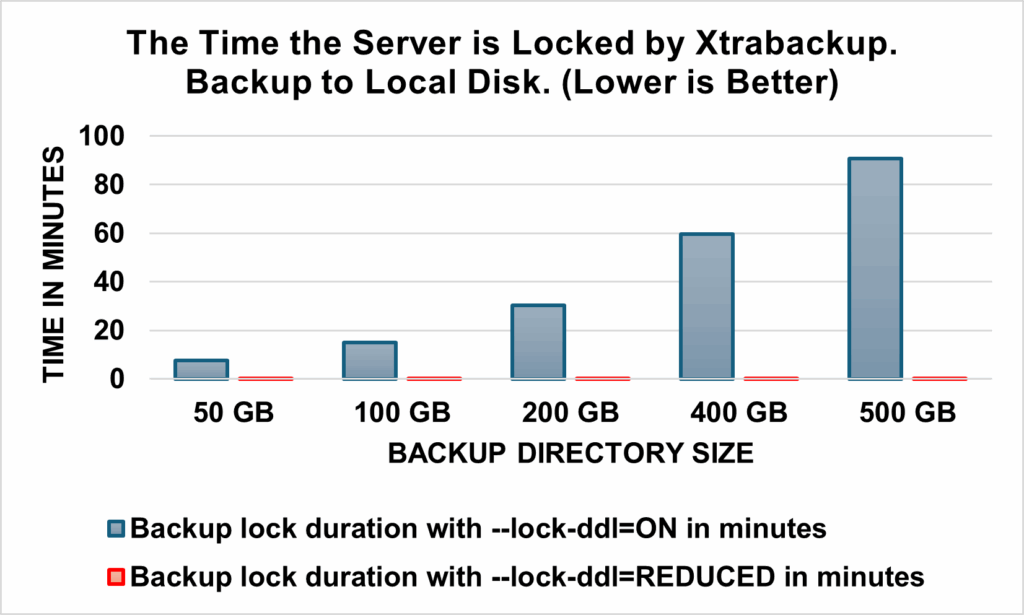
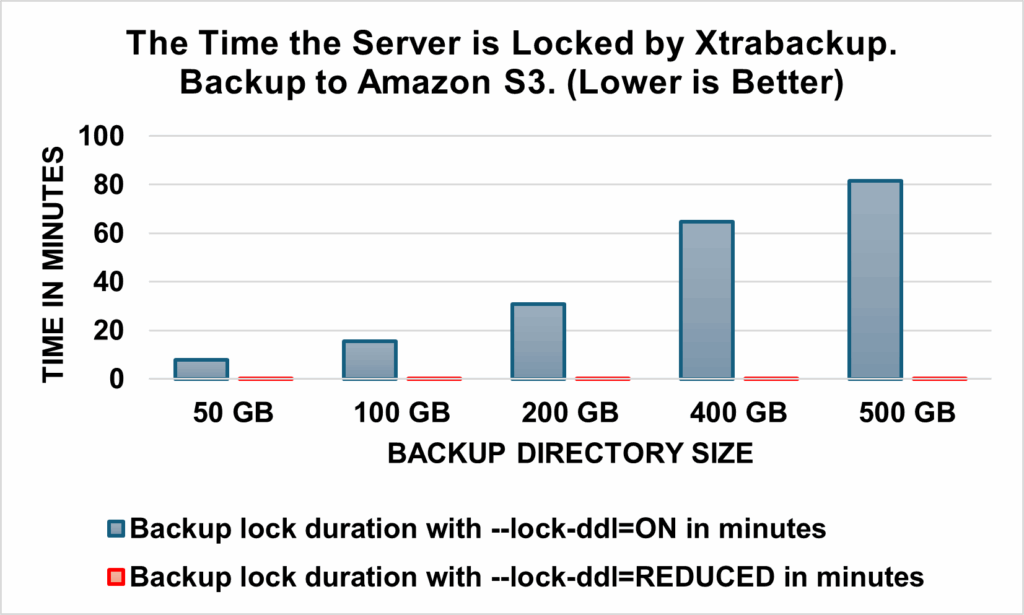
Percona XtraBackup 8.4 Pro dramatically reduces the time the server is locked during backups. With the new --lock-ddl=reduced option, backup lock duration is 200X to 4300X shorter than traditional full locking (--lock-ddl=on), making the backups significantly less disruptive. Critical DDL operations like ALTER TABLE, TRUNCATE TABLE, CREATE USER, and RENAME TABLE can proceed with minimal interference and replication lag is significantly reduced on replicas.
The main benefits of using the Percona XtraBackup 8.4 Pro’s reduced lock feature are the following:
Traditionally, backups taken with DDL locking enabled (--lock-ddl=on) could prevent certain DDL operations from being executed, leading to operational bottlenecks. Percona Xtrabackup acquires a backup lock (LOCK INSTANCE FOR BACKUP or LOCK TABLES FOR BACKUP) on the Server at the start of the backup to ensure consistency during backups, but this can block critical DDLs from proceeding.
This improvement applies if the server mainly contains InnoDB engine tables. This feature applies to both full backups and incremental backups and works with Percona Server for MySQL 8.4.x and Oracle MySQL 8.4.x versions
With Percona XtraBackup 8.4 Pro, the --lock-ddl=reduced option reduces the time the backup lock is held (see the Design section for more details), enabling backups to coexist with critical DDL operations while maintaining data consistency. The improvement applies to Servers with 100% InnoDB tables. The backup duration remains about the same; it may be slightly longer in some cases because additional tables are included. However, this can result in smaller incremental backups, improving overall efficiency.
Struggling with slow database performance? In complex environments, finding the root cause isn’t easy—but it’s essential. This eBook covers six common performance issues and how to resolve them. Download it today.
The following charts compare the time the server is locked for various backup directory sizes under two scenarios. Backup has 100% InnoDB tables.
--lock-ddl=on: Default behavior with full locking.--lock-ddl=reduced: New behavior with reduced locking.The table below highlights the improvements when backing up to a local disk:
For backups to Amazon S3, the improvements are similarly impressive:
Replication lag happens when the replica server falls behind the source server when processing updates. Changes on the source take time to show up on the replica.
There are two reasons why Percona XtraBackup may cause replication lag on the replica.
--safe-slave-backupBy adding the --lock-ddl=reduced option, you minimize the time the SQL thread is stopped. Instead of stopping the SQL thread for the entire duration of the backup, it stops only for the duration of operations performed under a lock. This significantly reduces replication lag.
--lock-ddl=reduced minimizes this issue by blocking the replica worker threads for only a very short duration.The benefits of reducing the replication lag are the following:

Resources
RELATED POSTS





If I understand correctly, the
--lock-ddl=reducedoption reduces the lock time by not taking backup locks when copying ibd files and moving file operations to the beginning of the prepare phase. Is that right?If there are operations on files copied under the non-lock phase, additional metadata files (.ren, .del, .new, .crpt) are created. These extra metadata operations are handled during the prepare phase.
The reduction in lock time comes from the fact that xtrabackup doesn’t acquire the backup lock for file-copy operations under phase 1.
This will be available to the Free version or only to the Pro?
As mentioned in Pro documentation, “Community users can receive all these capabilities by building Percona XtraBackup from the same source code.”