
I wrote a blog post in the past about a generic approach on how to expose databases in Kubernetes with Ingress controllers. Today, we will dive deeper into PostgreSQL with ingress and also review two different ways that can be taken to expose the TCP service. The goal is to expose multiple PostgreSQL clusters through a single ingress using different TCP ports:
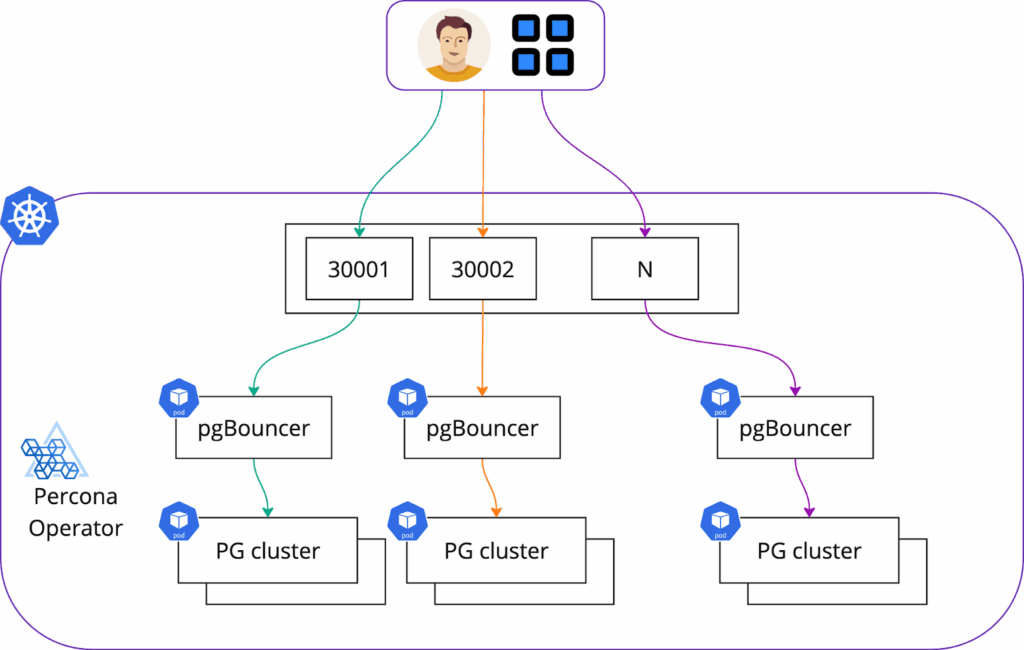
We are going to use Percona Operator for PostgreSQL to deploy the cluster. Deploy the Operator first. We will use Helm for that:
|
1 2 |
helm repo add percona https://percona.github.io/percona-helm-charts/ helm repo update |
|
1 |
helm install my-operator percona/pg-operator |
Now, we are ready to deploy the database. The default configuration is fine for this example:
|
1 |
helm install my-db percona/pg-db |
There are two ways how you can connect to the PostgreSQL cluster deployed with the Percona Operator:
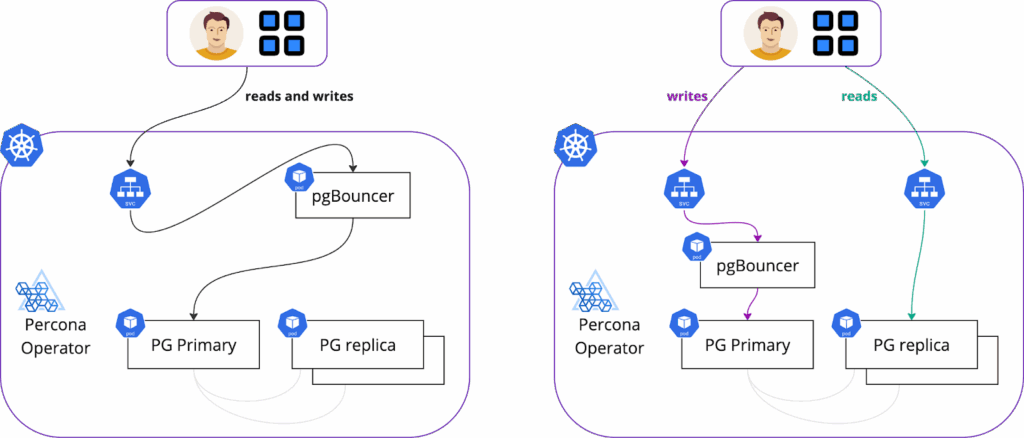
We recommend connecting through pgBouncer, as it provides connection pooling. Keep in mind, though, that when you connect through pgBouner, all your reads and writes go to a primary node. In that case, your replicas are sitting idle and needed for high availability only. In this blog post, we will be connecting to pgBouncer through Ingress.
We need to get the pgBouncer URI to configure ingress and test the connection later on.
|
1 2 |
$ kubectl -n default get secrets my-db-pg-db-pguser-my-db-pg-db -o jsonpath="{.data.pgbouncer-uri}" | base64 --decode |
We are going to use the most popular ingress controller, ingress-nginx. To be consistent, we will deploy it using Helm.
There are two ways somebody can expose additional TCP ports through ingress.
We will show how to do it and explain the differences between approaches below.
You can simply list the TCP ports and services that you want to have exposed. To expose my PostgreSQL cluster with pgBouncer on port 30001 with ingress my values manifest would look like this:
|
1 2 3 4 5 6 7 8 9 10 11 |
% cat ingress-values-tcp.yaml controller: service: enabled: true external: enabled: true type: LoadBalancer replicaCount: 2 tcp: 30001: "default/my-db-pg-db-pgbouncer:5432" |
Note the last line:
Deploy the controller:
|
1 2 3 |
helm upgrade --install ingress-nginx ingress-nginx --repo https://kubernetes.github.io/ingress-nginx --namespace ingress-nginx --create-namespace -f ingress-values-tcp.yaml |
With this approach, we define ports that we want to be exposed in the values.yaml of ingress, but the specific Service endpoint will be in the ConfigMap.
|
1 2 3 4 5 6 7 8 9 10 11 12 13 14 15 16 17 18 |
% cat ingress-values.yaml controller: service: enabled: true external: enabled: true type: LoadBalancer externalTrafficPolicy: Local allowSnippetAnnotations: true replicaCount: 2 extraArgs: tcp-services-configmap: "default/tcp-services-cm" tcp: 30001: "" 30002: "" 30003: "" 30004: "" |
The tcp-services-cm ConfigMap looks like this:
|
1 2 3 4 5 6 7 8 |
% cat tcp-services-cm.yaml apiVersion: v1 kind: ConfigMap metadata: name: tcp-services-cm data: 30001: "default/my-db-pg-db-pgbouncer:5432" |
Create the ConfigMap and deploy the ingress with helm:
|
1 2 3 4 |
kubectl apply -f tcp-services-cm.yaml helm upgrade --install ingress-nginx ingress-nginx --repo https://kubernetes.github.io/ingress-nginx --namespace ingress-nginx --create-namespace -f ingress-values.yaml |
Using a ConfigMap to expose your PostgreSQL cluster on port 30001 offers greater flexibility and control. Your teams can easily add new services without needing to redeploy the Ingress controller, saving time and effort. It also enhances security by allowing Kubernetes administrators to define which ports are exposed while developers maintain control over service exposure.

To connect to PostgreSQL, you need the following:
|
1 |
|
1 2 3 4 |
% kubectl get svc -n ingress-nginx NAME TYPE CLUSTER-IP EXTERNAL-IP PORT(S) AGE ingress-nginx-controller LoadBalancer 10.118.229.90 34.XX.XX.5 80:32161/TCP,443:30147/TCP,30001:30883/TCP,30002:31429/TCP,30003:31067/TCP,30004:31854/TCP 83m |
We will connect to the IP-address of the ingress controller and the port we defined – 30001. postgresql connection string for me looks like this:
|
1 2 3 4 5 6 7 |
psql (17.0, server 16.4 - Percona Distribution) SSL connection (protocol: TLSv1.3, cipher: TLS_AES_256_GCM_SHA384, compression: off, ALPN: none) Type "help" for help. my-db-pg-db=> |
Choosing ports is manual. So when your developers are going to create ConfigMaps to expose services, ports must not overlap. So, you can’t have two services exposed on the same TCP port. You can maintain the list of ports used or introduce additional validation webhooks that are going to check if a port is in use already.
Public clouds have limits on the number of TCP ports that can be exposed through a load balancer. For AWS, it is 50 TCP ports, and for Google Cloud, it is 100. Keep that in mind when you plan to use Ingresses to expose services.
Exposing a port through a LoadBalancer Service in Kubernetes does not guarantee that this port is going to be reachable. There might be various firewalls or network restrictions that you need to consider (for example, Access Lists on the cloud provider). Keep that in mind when troubleshooting the connection.
Ingresses are widely popular for exposing HTTP and HTTPS services, but they can also be used for TCP exposure. That way, you simplify your network and minimize the attack surface. This approach empowers development teams while maintaining robust security and control for Kubernetes administrators. However, it’s crucial to be mindful of potential challenges like port overlaps and cloud provider limits. By carefully planning your Ingress strategy and considering the potential pitfalls, you can ensure seamless and secure access to your PostgreSQL databases in Kubernetes.
Percona offers various software options to run PostgreSQL:
And, of course, if you are looking for help, support, or professional support – let our team know: https://www.percona.com/about/contact
Our community and Perconians are always ready to help you on Percona Forums.
Resources
RELATED POSTS