

Generative AI is top of mind for many engineers. The questions of how it can be applied to solve business problems and boost productivity are still up in the air. Recently I wrote a blog post about the impact of AI on platform engineers, where I talked about various AI Agents and how they can interact with different systems and APIs. The belief is that AI Agents or a combination of those would heavily impact how we work with computers and systems today.
One of the examples that I want to look into today is a Database AI Agent. We may call it a text-to-SQL model that translates human-like requests into SQL language and produces human-like responses.
We will use a combination of open source tools:
All the scripts from this blog post are available in this GitHub repository.
This blog post series has two parts:
I’m running Ubuntu, so I will follow our Quickstart guide for apt repositories.
|
1 2 3 |
wget https://repo.percona.com/apt/percona-release_latest.$(lsb_release -sc)_all.deb sudo dpkg -i percona-release_latest.$(lsb_release -sc)_all.deb sudo apt update |
|
1 |
sudo percona-release setup ppg-16 |
|
1 |
sudo apt install percona-ppg-server-16 |
Get Pagila database SQLs from GitHub:
|
1 |
git clone https://github.com/devrimgunduz/pagila |
Create the database:
|
1 2 3 4 |
sudo su postgres psql CREATE DATABASE pagila; q |
Create the schema:
|
1 |
cat pagila/pagila-schema.sql | psql -U postgres -d pagila |
Insert the data:
|
1 |
cat pagila/pagila-data.sql | psql -U postgres -d pagila |
I will also create the user pagila to access the database from my scripts:
sudo su postgres
|
1 2 3 4 5 6 |
psql create user pagila with password 'SOMEPASSWORD'; c pagila GRANT ALL PRIVILEGES ON DATABASE pagila to pagila; grant select on all tables in schema public to pagila; q |
With Langchain, any LLM can be used. In our examples, we will use Google Gemini models, which require a key. You can also use OpenAI in the next iteration of the agent; read more in part two of this series..
Start with installing the required Python packages. The usual recommendation is to use pip:
|
1 |
pip install --upgrade --quiet langchain langchain-google-genai pillow |
A simple script, 0_langchain_gemini_test.py, asks Gemini, “What can you tell me about Percona?” You can set the GOOGLE_API_KEY variable, but if not, the script will ask for it.
|
1 2 3 4 5 6 7 8 9 10 |
import getpass import os from langchain_google_genai import ChatGoogleGenerativeAI if "GOOGLE_API_KEY" not in os.environ: os.environ["GOOGLE_API_KEY"] = getpass.getpass("Provide your Google API Key") llm = ChatGoogleGenerativeAI(model="gemini-pro") result = llm.invoke("What can you tell me about Percona?") print(result.content) |
|
1 2 3 4 5 6 7 8 9 10 11 |
$ python3 0_langchain_gemini_test.py **Percona** **About:** * Percona is a leading provider of open source database software and services for MySQL, PostgreSQL, MongoDB, and MariaDB. * It was founded in 2006 by former MySQL engineers involved in the development and support of the open source MySQL database. * Percona's mission is to provide reliable, scalable, and high-performance database solutions for businesses and organizations worldwide. ... |
It is working.
We are done with the initial setup; let’s query the database.
Install the required libraries:
|
1 |
pip install --upgrade --quiet langchain-community psycopg2-binary |
To experiment with querying the database we use 1_langchain_gemini_postgresql.py script. The script takes a user question in a human-readable format as an argument and produces the response.
To do that we will use the create_sql_agent function that constructs an agent specifically designed to interact with SQL databases. This agent combines a language model (like Gemini) with specialized tools that understand and manipulate SQL queries.
In addition to GOOGLE_API_KEY, we need to provide details about the database:
|
1 2 3 4 5 |
dbname="pagila" username=os.environ["PG_USERNAME"] password=os.environ["PG_PASSWORD"] hostname="localhost" port="5432" |
Make sure that you set PG_USERNAME and PG_PASSWORD as environment variables.
Let’s start with the simple question:
|
1 2 3 4 5 6 7 8 9 10 |
$ python3 1_langchain_gemini_postgresql.py "How many films are there in the database?" > Entering new SQL Agent Executor chain... I should find the number of rows in the film table Action: sql_db_query Action Input: SELECT COUNT(*) FROM film[(1000,)]I now know the final answer Final Answer: 1000 > Finished chain. {'input': 'How many films are there in the database?', 'output': '1000'} |
Without providing any additional context or explaining the structure of the database, I was able to get a proper answer. The way it works is the following:
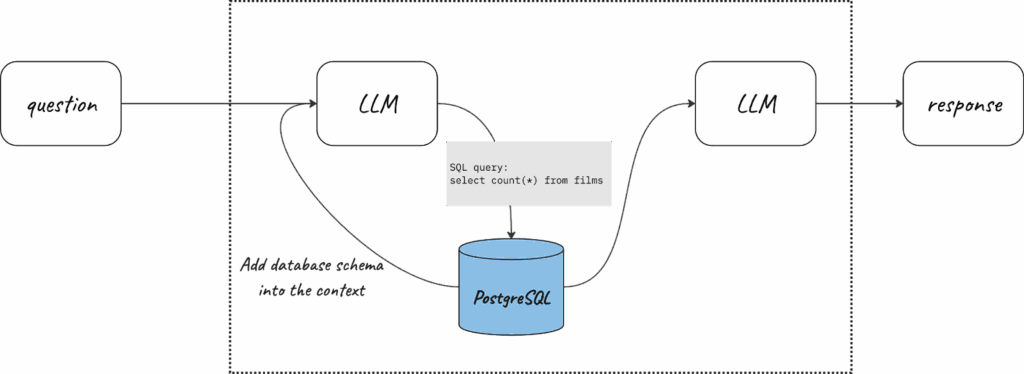
But this works only for simple questions, where it is quite straightforward. For more complex questions, multiple requests are required for the database and LLMs, so-called chains. It is also quite interesting, that chains help to fix some errors in the query on the fly. Below, you can see how the text-to-sql script worked for two more questions:
Sometimes, the Large Language Model can’t fix the error in the SQL query, and the agent gets stuck in the loop. It can happen for the same question that was successfully answered before. In the case of the loop, the agent will notify you about it:
|
1 2 3 4 5 6 7 8 9 10 11 12 13 14 15 16 17 18 19 20 21 22 23 24 25 26 27 28 29 30 31 |
... [SQL: ```sql SELECT actor_name, COUNT(*) AS num_films FROM film_actor GROUP BY actor_name ORDER BY num_films DESC LIMIT 5; ```] (Background on this error at: https://sqlalche.me/e/20/f405)The query is still not enclosed in triple backticks. Action: sql_db_query Action Input: ```sql SELECT actor_name, COUNT(*) AS num_films FROM film_actor GROUP BY actor_name ORDER BY num_films DESC LIMIT 5; ```Error: (psycopg2.errors.SyntaxError) syntax error at or near "```" LINE 1: ```sql ^ [SQL: ```sql SELECT actor_name, COUNT(*) AS num_films FROM film_actor GROUP BY actor_name ORDER BY num_films DESC LIMIT 5; ```] (Background on this error at: https://sqlalche.me/e/20/f405) > Finished chain. {'input': 'Which 5 actors have the most films they appeared in? Show names of actors and the corresponding number of films they appeared in.', 'output': 'Agent stopped due to iteration limit or time limit.'} |
Companies generate tons of data that they later use to make better business decisions. A perfectly structured BI system requires the skills of analysts and engineers. In this article, we saw how generative AI can help digest the data from rudimentary databases, but the expectation is that it will mature over time. There will be no need to learn SQL or understand how data is stored; AI will make sense of it automagically. This is going to impact how businesses store, manage, and process data.
In the second part of the blog post, we productize the script:
Check out Open Source AI Database Agent Part 2: OSADA!
Resources
RELATED POSTS




