

We have several PostgreSQL versions that support logical decoding to replicate data changes from a source database to a target database, which is a cool and very powerful tool that gives the option to replicate all the tables in a database, only one schema, a specific set of tables or even only some columns/rows, also is a helpful method for version upgrades since the target database can run on a different (minor or major) PostgreSQL version.
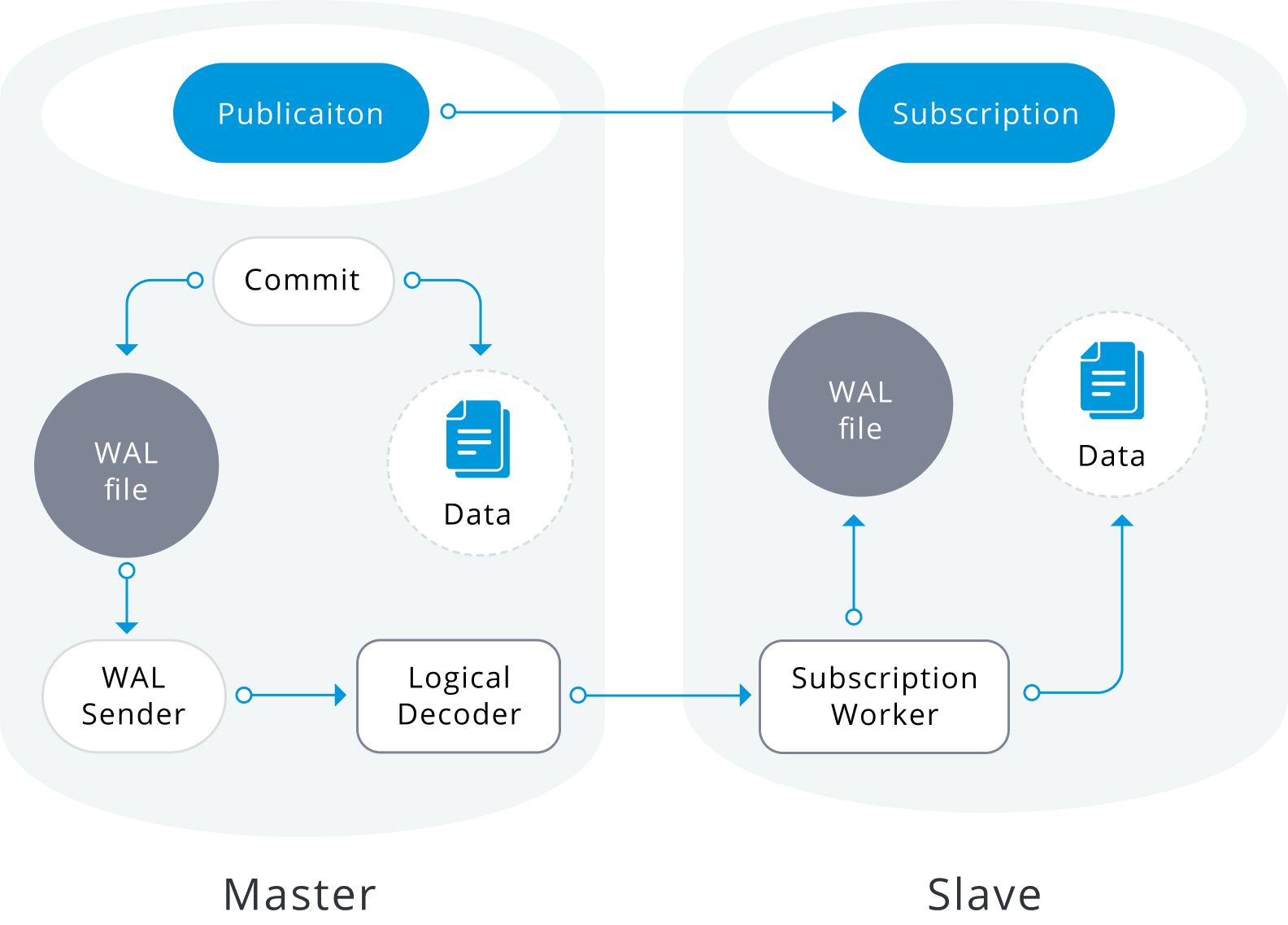
There are some cases when the databases have been hosted in the AWS Relational Database Service (RDS) which is the fully auto-managed solution offered by Amazon Web Services, there is no secret that choosing this option for our database backend comes with a level of vendor lock-in, and even when RDS offers some build-in replica solutions such as Multi-AZ or read-replicas sometimes we can take advantage of the benefits from logical replication.
In this post I will describe the simplest and basic steps I used to implement this replica solution avoiding the initial copy data from the source database to the target, creating the target instance from an RDS snapshot. Certainly, you can take advantage of this when you work with a big/huge data set and the initial copy could lead to high timeframes or network saturation.
NOTE: The next steps were tested and used for a specific scenario and they are not intended to be an any-size solution, rather give some insight into how this can be made and most importantly, to stimulate your own creative thinking.
In this exercise, I wanted to perform a version upgrade from PostgreSQL v11.9 to PostgreSQL v12.5, we can perform a direct upgrade using the build-in option RDS offers, but that requires a downtime window that can vary depending on some of the next:
During the direct upgrade process, RDS takes a couple of new snapshots of the source instance, firstly at the beginning of the upgrade and finally when all the modifications are done, depending on how old is the previous backup and how many changes have been made on the datafiles the pre backup could take some time. Also, if the instance is Multi-AZ the process should upgrade both instances, which adds more time for the upgrade, during most of these actions the database remains inaccessible.
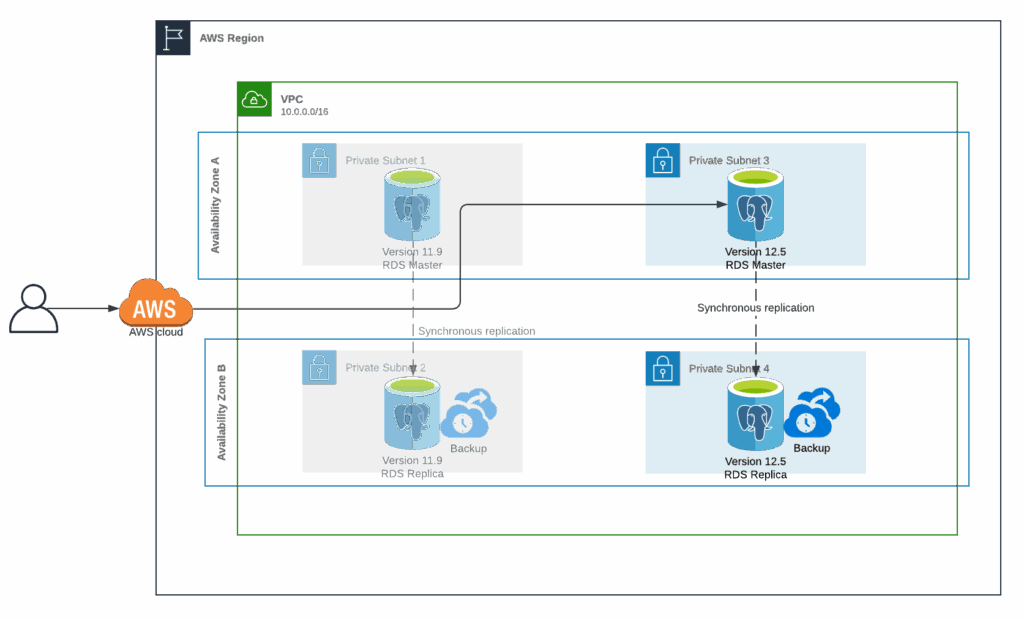
The next is a basic diagram of how an RDS Multi-AZ instance looks, all the client requests are sent to the master instance, while the replica is not accessible and some tasks like the backups are executed on it.
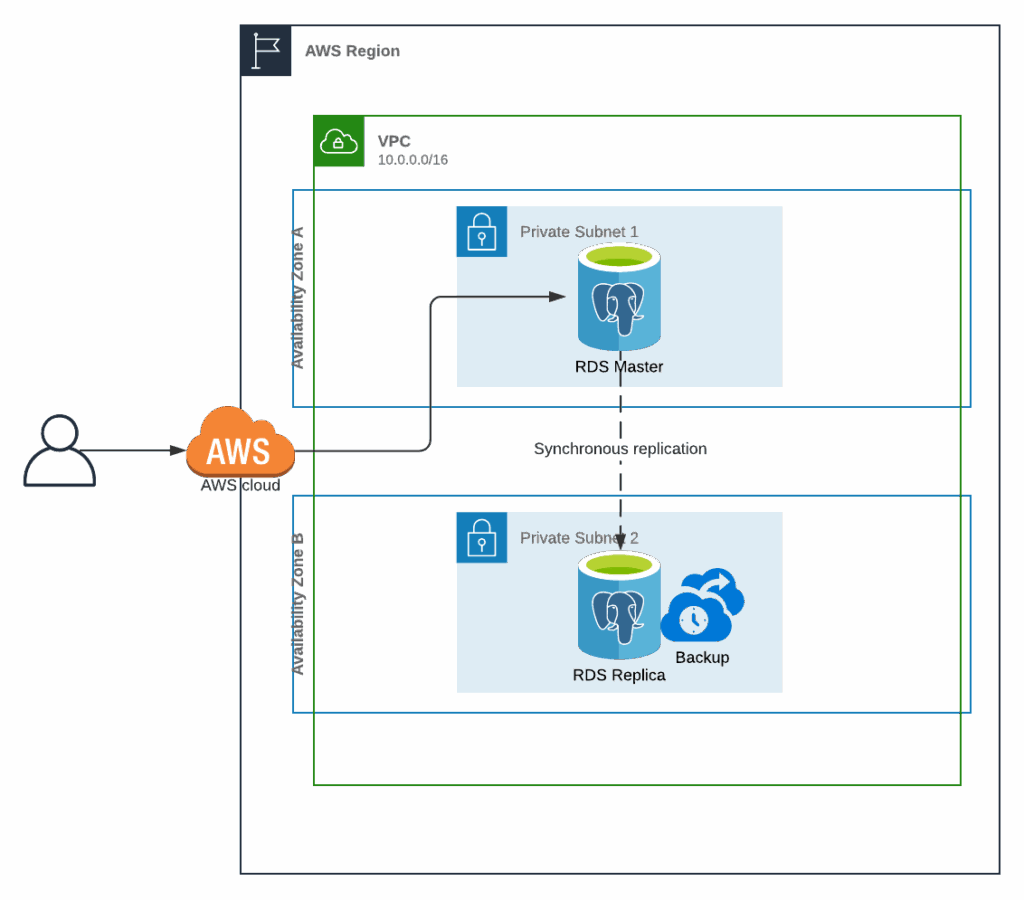
Therefore, I choose logical replication as the mechanism to achieve the objective, we can aim for a quicker switch-over if we create the new instance in the desired version and just replicate all the data changes, then we need a small downtime window just to move the traffic from the original instance to the upgraded new one.
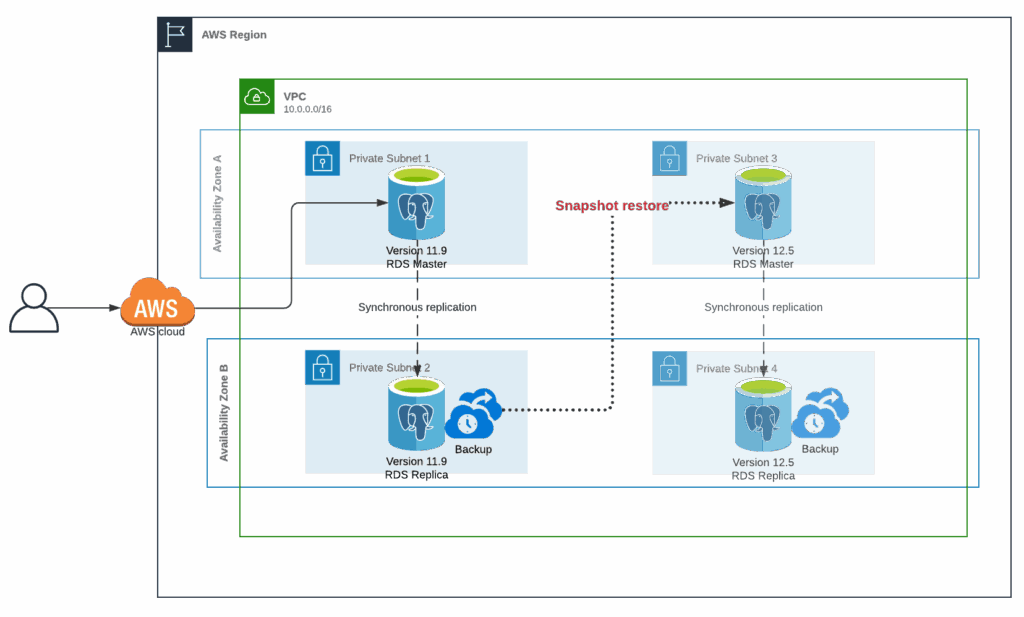
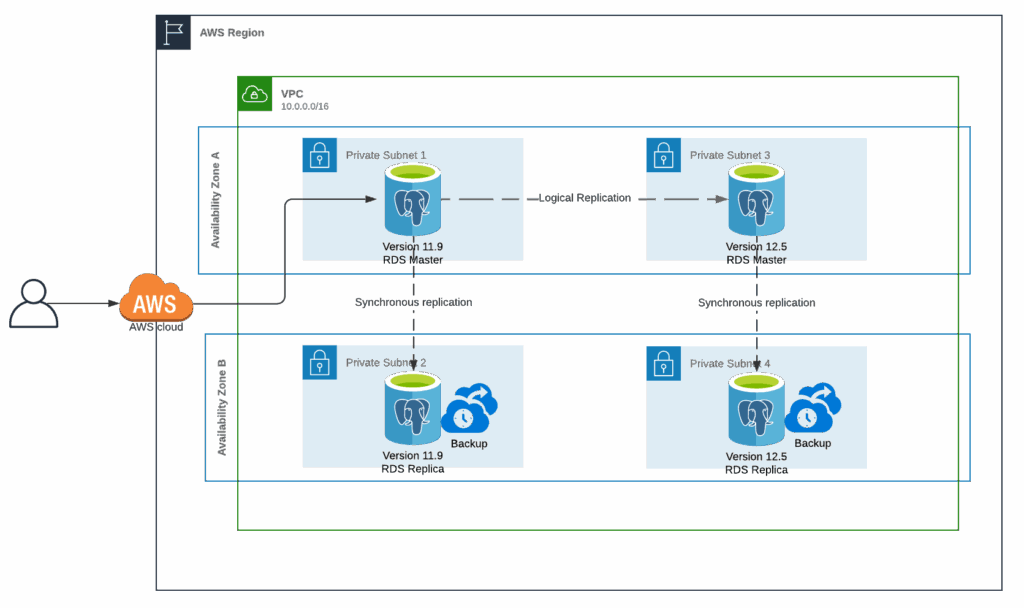
To be able to perform these actions we would need:
Per the title of this post, the next is the list of steps to set up a PostgreSQL logical replication between a PostgreSQL v11.9 and a v12.5 using an RDS snapshot to initialize the target database.
1. Verify the PostgreSQL parameters for logical replication
We require the next PostgreSQL parameters for this exercise
|
1 2 3 4 5 6 7 8 9 10 11 12 13 14 |
demodb=> select name,setting from pg_settings where name in ( 'wal_level', 'track_commit_timestamp', 'max_worker_processes', 'max_replication_slots', 'max_wal_senders') ; name | setting ------------------------+--------- max_replication_slots | 10 max_wal_senders | 10 max_worker_processes | 10 track_commit_timestamp | on wal_level | logical (5 rows) |
NOTE: The parameter track_commit_timestamp can be optional since in some environments is not advisable for the related overhead, but it would help to track and resolve any conflict that may occur when the subscriptions are started.
2. Create the replication user and grant all the required privileges
|
1 2 3 4 5 6 |
demodb=> CREATE USER pgrepuser WITH password 'SECRET'; CREATE ROLE demodb=> GRANT rds_replication TO pgrepuser; GRANT ROLE demodb=> GRANT SELECT ON ALL TABLES IN SCHEMA public TO pgrepuser; GRANT |
3. Create the PUBLICATION
|
1 2 |
demodb=> CREATE PUBLICATION pglogical_rep01 FOR ALL TABLES; CREATE PUBLICATION |
4. Create a REPLICATION SLOT
|
1 2 3 4 5 |
demodb=> SELECT pg_create_logical_replication_slot('pglogical_rep01', 'pgoutput'); pg_create_logical_replication_slot ------------------------------------ (pglogical_rep01,3C/74000060) (1 row) |
5. Create a new RDS snapshot
|
1 2 3 |
aws rds create-db-snapshot --db-instance-identifier demodb-postgres --db-snapshot-identifier demodb-postgres-to-125 |
6. Upgrade the RDS snapshot to the target version
|
1 2 3 |
aws rds modify-db-snapshot --db-snapshot-identifier demodb-postgres-to-125 --engine-version 12.5 |
7. Restore the upgraded RDS snapshot
Since we are moving from version 11.9 to 12.5 we may need to create a new DB parameter group if we are using some custom parameters.
From the instance describe we can verify the current parameter group
|
1 2 3 4 5 6 7 8 9 |
aws rds describe-db-instances --db-instance-identifier demodb-postgres | jq '.DBInstances | map({DBInstanceIdentifier: .DBInstanceIdentifier, DBParameterGroupName: .DBParameterGroups[0].DBParameterGroupName})' [ { "DBInstanceIdentifier": "demodb-postgres", "DBParameterGroupName": "postgres11-logicalrep" } ] |
Then we can validate the custom parameters
|
1 2 3 4 5 |
aws rds describe-db-parameters --db-parameter-group-name postgres11-logicalrep --query "Parameters[*].[ParameterName,ParameterValue]" --source user --output text track_commit_timestamp 1 |
We need to create a new parameter group in the target version
|
1 2 3 |
aws rds create-db-parameter-group --db-parameter-group-name postgres12-logicalrep --db-parameter-group-family postgres12 |
Finally, we need to modify the parameters we got before in the new parameter group
|
1 2 3 |
aws rds modify-db-parameter-group --db-parameter-group-name postgres12-logicalrep --parameters "ParameterName='track_commit_timestamp',ParameterValue=1,ApplyMethod=immediate" |
Now we can use the new parameter group to restore the upgraded snapshot
|
1 2 3 4 |
aws rds restore-db-instance-from-db-snapshot --db-instance-identifier demodb-postgres-125 --db-snapshot-identifier demodb-postgres-to-125 --db-parameter-group-name postgres12-logicalrep |
8. Get the LSN position from the target instance log
To list all the database logs for the new DB instance
|
1 2 |
aws rds describe-db-log-files --db-instance-identifier demodb-postgres-125 |
We should pick the latest database log
|
1 2 3 |
aws rds download-db-log-file-portion --db-instance-identifier demodb-postgres-125 --log-file-name "error/postgresql.log.2021-03-23-18" |
From the retrieved log portion we need to find the value after for the log entry redo done at:
|
1 2 3 |
... 2021-03-23 18:19:58 UTC::@:[5212]:LOG: redo done at 3E/50000D08 ... |
9. Create SUBSCRIPTION
|
1 2 3 4 5 6 7 8 9 |
demodb=> CREATE SUBSCRIPTION pglogical_sub01 CONNECTION 'host=demodb-postgres.xxxx.us-east-1.rds.amazonaws.com port=5432 dbname=demodb user=pgrepuser password=SECRET' PUBLICATION pglogical_rep01 WITH ( copy_data = false, create_slot = false, enabled = false, connect = true, slot_name = 'pglogical_rep01' ); CREATE SUBSCRIPTION |
10. Advance the SUBSCRIPTION
We need to get the subscription id
|
1 2 3 4 5 6 7 |
demodb=> SELECT 'pg_'||oid::text AS "external_id" FROM pg_subscription WHERE subname = 'pglogical_sub01'; external_id ------------- pg_73750 (2 rows) |
Now advance the subscription to the LSN we got in step 8
|
1 2 3 4 |
demodb=> SELECT pg_replication_origin_advance('pg_73750', '3E/50000D08') ; pg_replication_origin_advance ------------------------------- (1 row) |
11. Enable the SUBSCRIPTION
|
1 2 |
demodb=> ALTER SUBSCRIPTION pglogical_sub01 ENABLE; ALTER SUBSCRIPTION |
Once we are done with all the steps the data changes should flow from the source database to the target, we can check the status at the pg_stat_replication view.
Choosing DBaaS from cloud vendors bring some advantages and can speed up some implementations, but they come with some costs, and not all the available tools or solutions fits all the requirements, that is why always is advisable to try some different approaches and think out of the box, technology can go so far as our imagination.
Percona Distribution for PostgreSQL provides the best and most critical enterprise components from the open-source community, in a single distribution, designed and tested to work together.
Resources
RELATED POSTS





Worth to mention that this doesn’t work on PostgreSQL 9.6 since there’s no PUBLICATION on it. In that case you can use the pgLogical extension (available on RDS)
Ive tried this to migrate v10.16 to v13.5. I upgraded snapshot twice to reach at 13.5 before performing restore. Per document, after advancing LSN at subscriber RDS and enabling subscription, it never works.
In pg_replication_slots, it says active but data doesn’t get replicated.
Hi there, from the database logs in RDS are you able to get some message with details about what the subscription is doing? I wonder if could be something related with LSN position.
I’ve tried the instructions a few times. First I did a proof of concept taking a snapshot from production, creating a new database from it to use as source, then following the steps as described. Worked well.
Going from 11.8 to 14.1. Upgrading the RDS snapshot from 11.8 to 11.14 and then to 14.1.
However, I’ve now tried it twice with production as the source and it fails on logical replication streaming each time. It barely applies any changes, but I attribute that to AWS RDS lazy loading of blocks after the database is restored from snapshot. I had to increase the wal_sender_timeout and wal_receiver_timeout, both to 10min. But, it does apply changes is spurts. So something is getting through. But, after a couple of hours I get an error about a request WAL segment has already been removed. And oddly, it’s a WAL from before where it says it is at in recovery.
2022-03-05 03:08:44 UTC:10.0.1.15(37418):repluser@db:[938]:LOG: starting logical decoding for slot “pglogical_upgrade01”
2022-03-05 03:08:44 UTC:10.0.1.15(37418):repluser@db:[938]:DETAIL: Streaming transactions committing after 16DE6/CF902580, reading WAL from 16DE6/93F45A70.
2022-03-05 03:08:44 UTC:10.0.1.15(37418):repluser@db:[938]:ERROR: requested WAL segment 0000000100016DE600000024 has already been removed
That wal log is well before where the origin was advanced to, before enabling (step 8):
SELECT pg_replication_origin_advance(‘pg_4113386′, ’16DE6/6816C3B8’) ;
I’m not sure what is happening here. I’m wondering if it has to do with long running transactions. But, short of terminating any open transactions, I’m not sure what I could change to mitigate that. If I wait until all the transactions that were from before the publisher was created, then the pg_replication_origin_advance would be even farther in the future. Maybe I increase wal_keep_segments up to a substantial number so that it keeps hours of wal on disk. Any suggestions?
Hi Dan, the idea behind this blog post was to provide some insight how we can avoid the initial copy when using logical replication for an upgrade process, this is particularly beneficial when the dataset size is big so we might avoid the extra load in the source and save some network time. However, the logical replication is a very flexible approach we can adjust.
If you already have identified the tables related to those long running transaction, you might change the approach from a single publication for ALL TABLES, from step 3, to a multiple publications, so you can exclude the tables for the long transactions from the “main” publication, follow the approach for the rest of the tables and then just clean (truncate) the excluded tables in the target side and configure the logical replication as usual, adding the tables in the source to a different publication and create the corresponding subscription in the target (with the copy_data option enabled) and let the initial copy to run. Keep in mind for this approach you might need to address any foreign keys violations or unwanted trigger executions than may change the data. Hopefully you can overcome the issue :).
Hi David, could you tell me what’s the purpose of advancing the subscription to the LSN from the logs?
I tried your process on a small test database while skipping that step and it seemed to work fine.
Hi Gerret, the goal of that step is to ensure our subscription is going to start applying changes just at the point the recovery from the snapshot was done, in some highly transactional environments there might be a number of changes between the replication slot creation and the point in time the snapshot process kicks in, so the subscription might start applying duplicated changes.
I tried to setup logical replication using the above steps at least 3 times. It didn’t work ever. The issue is with LSN approach mentioned in the article, may be I didn’t understand correctly or I am doing something wrong here.
Fix for me was to use restart_lsn of publisher on subscriber. I ran “SELECT pg_replication_origin_advance(‘pg_57414’, restart_lsn_of_publisher) ;” query on subscriber. restart_lsn_of_publisher value was obtained from publisher by running “select restart_lsn from pg_replication_slots;” on publisher.
did you validate if there was any data loss ?
Instead of the restart or advance with lsn that was collected, you can use ‘invalid lsn’ ..
advance your subscription from invalid lsn and it should work.
Hi David,
What lsn I use if there are more than one
redo donein the logs?Hi David, This is very-well explained. I recently used this method to perform a major RDS version upgrade. I’ve one doubt though. How can we get the LSN in case we’ve multiple databases in a single RDS instance. Will they be same for all the databases(from step 8)? Thanks