

 What is Node Draining?
Anyone who ever worked with containers knows how ephemeral they are. In Kubernetes, not only can containers and pods be replaced, but the nodes as well. Nodes in Kubernetes are VMs, servers, and other entities with computational power where pods and containers run.
Node draining is the mechanism that allows users to gracefully move all containers from one node to the other ones. There are multiple use cases:
Kubernetes can automatically detect node failure and reschedule the pods to other nodes. The only problem here is the time between the node going down and the pod being rescheduled. Here’s how it goes without draining:
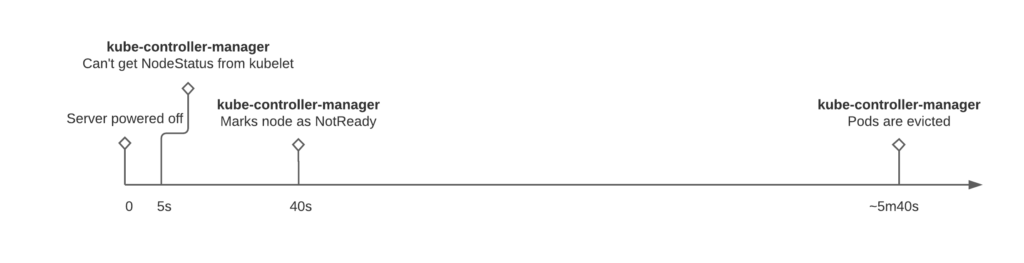
So if someone shuts down the server, then only after almost six minutes (with default settings), Kubernetes starts to reschedule the pods to other nodes. This timing is also valid for managed k8s clusters, like GKE.
These defaults might seem to be too high, but this is done to prevent frequent pods flapping, which might impact your application and infrastructure in a far more negative way.
As mentioned before – draining is the graceful method to move the pods to another node. Let’s see how draining works and what pitfalls are there.
kubectl drain {NODE_NAME} command most likely will not work. There are at least two flags that need to be set explicitly:
Once the drain command is executed the following happens:
Pods are evicted and now the server can be powered off. Wrong.
If for some reason your application or service uses a DaemonSet primitive, the pod was not drained from the node. It means that it still can perform its function and even receive the traffic from the load balancer or the service.
The best way to ensure that it is not happening – delete the node from the Kubernetes itself.
If kubelet is not stopped, the node will appear again after the deletion.
Pods are evicted, node is deleted, and now the server can be powered off. Wrong again.
Here is quite a standard setup:
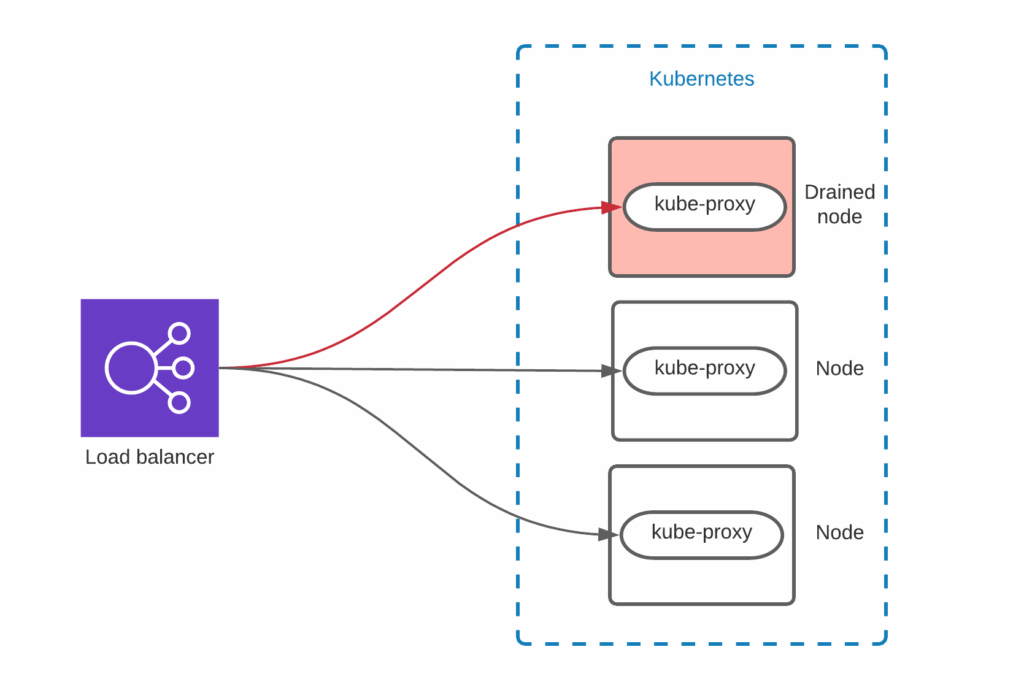
The external load balancer sends the traffic to all Kubernetes nodes. Kube-proxy and Container Network Interface internals are dealing with routing the traffic to the correct pod.
There are various ways to configure the load balancer, but as you see it might be still sending the traffic to the node. Make sure that the node is removed from the load balancer before powering it off. For example, AWS node termination handler does not remove the node from the Load Balancer, which causes a short packet loss in the event of node termination.
Microservices and Kubernetes shifted the paradigm of systems availability. SRE teams are focused on resilience more than on stability. Nodes, containers, and load balancers can fail, but they are ready for it. Kubernetes is an orchestration and automation tool that helps here a lot, but there are still pitfalls that must be taken care of to meet SLAs.
Resources
RELATED POSTS





Cool, I’ve seen the pitfalls, now can we have the answer for the question “Okay, Draining How?” ?