

 While there is no magic bullet for MySQL 5.7 database tuning, there are a few areas that can be focused on upfront that can dramatically improve the performance of your MySQL installation. While much information has been published on this topic over the years, I wanted to break down some of the more critical settings that anyone can implement – with no guesswork required.
Depending on the version of MySQL you are running, some of the default values used in this post may differ from your install, but the premise is still largely the same. We will focus on MySQL 5.7 for the purposes of this article.
Initial MySQL performance tuning can be broken down to the following categories:
Depending on the hardware you have installed MySQL on, some variables need to be set based on the machine (or VM) specifications. The following variables are largely dependent on your hardware:
innodb_flush_log_at_trx_commit
query_cache_type & query_cache_size
To tune further, more information will be required. The best way to gather this information is to install a MySQL monitoring/graphing tool like Percona Monitoring and Management (PMM). Once you have a tool installed, we can dive into the individual metrics and start customizing based on the data.
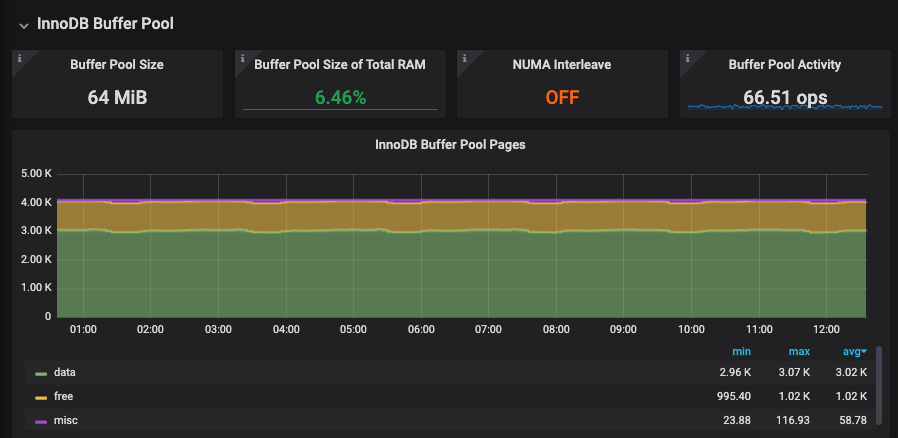
I would recommend starting with one of the most impactful variables – the innodb_buffer_pool_size. Compare the RAM and number of free pages on your instance to the total buffer pool size. Based on these metrics, you can determine if you need to increase or decrease your overall buffer pool size setting.
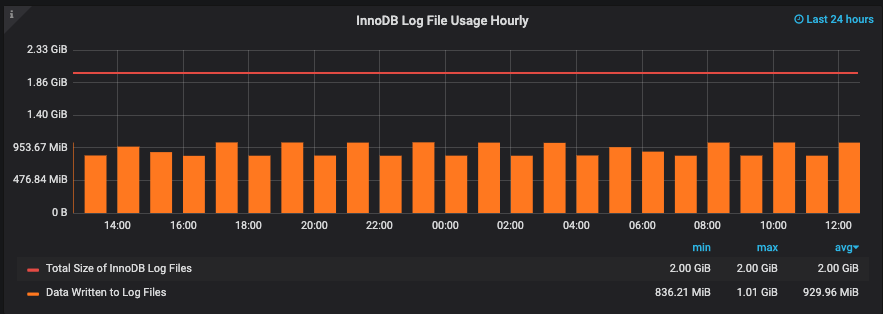
Next, take a look at your metrics for the InnoDB Log File usage. The rule of thumb is that your log files should hold approximately one hour of data. If you see that the data written to the log files hourly exceeds the total size of the log files, you would want to increase the innodb_log_file_size variable and restart MySQL. You could also verify with “SHOW ENGINE INNODB STATUS;” via the MySQL CLI to assist in calculating a good InnoDB log file size.
While this is by no means a comprehensive article on MySQL 5.7 database tuning, the suggestions above should clear some of the low hanging fruit and get your system closer to an ideal setup. As with all database tuning, your process should be an ongoing one based on current information.




