

The importance of having periodic backups is a given in Database life. There are different flavors: binary ones (Percona XtraBackup), binlog backups, disk snapshots (lvm, ebs, etc) and the classic ones: logical backups, the ones that you can take with tools like mysqldump, mydumper, or mysqlpump. Each of them with a specific purpose, MTTRs, retention policies, etc.
Another given is the fact that taking backups can be a very slow task as soon as your datadir grows: more data stored, more data to read and backup. But also, another fact is that not only does data grow but also the amount of MySQL instances available in your environment increases (usually). So, why not take advantage of more MySQL instances to take logical backups in an attempt to make this operation faster?
The idea is simple: instead of taking the whole backup from a single server, use all the servers available. This Proof of Concept is focused only on using the replicas on a Master/Slave(s) topology. One can use the Master too, but in this case, I’ve decided to leave it alone to avoid adding the backup overhead.
On a Master/3-Slaves topology:
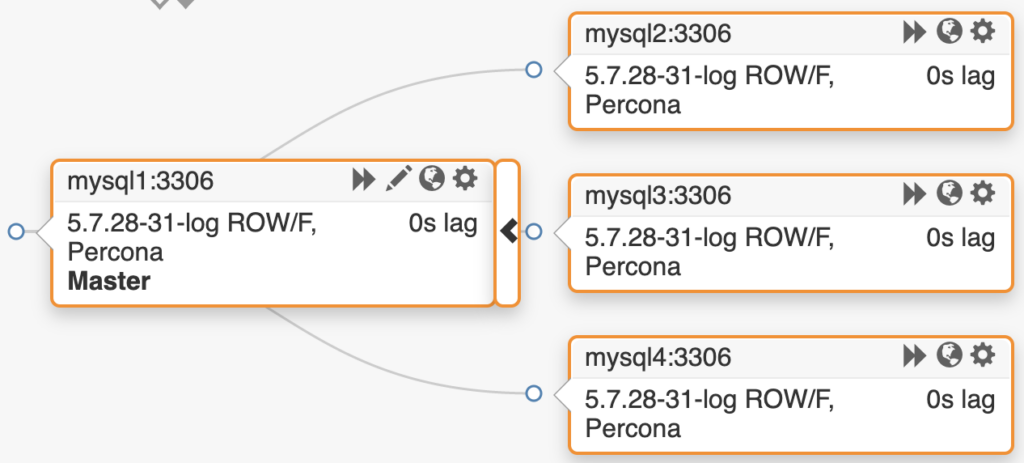
With a small datadir of around 64GB of data (without the index size) and 300 tables (schema “sb”):
|
1 2 3 4 5 6 7 8 |
+--------------+--------+--------+-----------+----------+-----------+----------+ | TABLE_SCHEMA | ENGINE | TABLES | ROWS | DATA (M) | INDEX (M) | TOTAL(M) | +--------------+--------+--------+-----------+----------+-----------+----------+ | meta | InnoDB | 1 | 0 | 0.01 | 0.00 | 0.01 | | percona | InnoDB | 1 | 2 | 0.01 | 0.01 | 0.03 | | sb | InnoDB | 300 | 295924962 | 63906.82 | 4654.68 | 68561.51 | | sys | InnoDB | 1 | 6 | 0.01 | 0.00 | 0.01 | +--------------+--------+--------+-----------+----------+-----------+----------+ |
Using the 3 replicas, the distributed logical backup with mysqldump took 6 minutes, 13 seconds:
|
1 2 3 4 5 6 7 8 9 10 11 12 13 14 15 |
[root@mysql1 ~]# ls -lh /data/backups/20200101/ total 56G -rw-r--r--. 1 root root 19G Jan 1 14:37 mysql2.sql -rw-r--r--. 1 root root 19G Jan 1 14:37 mysql3.sql -rw-r--r--. 1 root root 19G Jan 1 14:37 mysql4.sql [root@mysql1 ~]# stat /data/backups/20200101/mysql2.sql File: '/data/backups/20200101/mysql2.sql' Size: 19989576285 Blocks: 39042144 IO Block: 4096 regular file Device: 10300h/66304d Inode: 54096034 Links: 1 Access: (0644/-rw-r--r--) Uid: ( 0/ root) Gid: ( 0/ root) Context: unconfined_u:object_r:unlabeled_t:s0 Access: 2020-01-01 14:31:34.948124516 +0000 Modify: 2020-01-01 14:37:41.297640837 +0000 Change: 2020-01-01 14:37:41.297640837 +0000 Birth: - |
Same backup type on a single replica took 11 minutes, 59 seconds:
|
1 2 3 4 5 6 7 |
[root@mysql1 ~]# time mysqldump -hmysql2 --single-transaction --lock-for-backup sb > /data/backup.sql real 11m58.816s user 9m48.871s sys 2m6.492s [root@mysql1 ~]# ls -lh /data/backup.sql -rw-r--r--. 1 root root 56G Jan 1 14:52 /data/backup.sql |
In other words:
The distributed one was 48% faster!
And this is a fairly small dataset. Worth the shot. So, how does it work?
The logic is simple and can be divided into stages.
The full script can be found here:
https://github.com/nethalo/parallel-mysql-backup/blob/master/dist_backup.sh
Worth to note that the script has its own log that will describe every step, it looks like this:
|
1 2 3 4 5 6 7 8 9 10 11 12 13 14 15 16 17 18 19 20 21 22 23 24 25 26 27 28 29 30 31 32 33 34 |
[200101-16:01:19] [OK] Found 'mysql' bin [200101-16:01:19] [Info] SHOW SLAVE HOSTS executed [200101-16:01:19] [Info] Count tables OK [200101-16:01:19] [Info] table list gathered [200101-16:01:19] [Info] CREATE DATABASE IF NOT EXISTS percona [200101-16:01:19] [Info] CREATE TABLE IF NOT EXISTS percona.metabackups [200101-16:01:19] [Info] TRUNCATE TABLE percona.metabackups [200101-16:01:19] [Info] Executed INSERT INTO percona.metabackups (host,chunkstart) VALUES('mysql3',0) [200101-16:01:19] [Info] Executed INSERT INTO percona.metabackups (host,chunkstart) VALUES('mysql4',100) [200101-16:01:19] [Info] Executed INSERT INTO percona.metabackups (host,chunkstart) VALUES('mysql2',200) [200101-16:01:19] [Info] lock binlog for backup set [200101-16:01:19] [Info] slave status position on mysql3 [200101-16:01:19] [Info] slave status file on mysql3 [200101-16:01:19] [Info] slave status position on mysql4 [200101-16:01:19] [Info] slave status file on mysql4 [200101-16:01:19] [Info] slave status position on mysql2 [200101-16:01:19] [Info] slave status file on mysql2 [200101-16:01:19] [Info] set STOP SLAVE; START SLAVE UNTIL MASTER_LOG_FILE = 'mysql-bin.000358', MASTER_LOG_POS = 895419795 on mysql3 [200101-16:01:20] [Info] set STOP SLAVE; START SLAVE UNTIL MASTER_LOG_FILE = 'mysql-bin.000358', MASTER_LOG_POS = 895419795 on mysql4 [200101-16:01:20] [Info] set STOP SLAVE; START SLAVE UNTIL MASTER_LOG_FILE = 'mysql-bin.000358', MASTER_LOG_POS = 895419795 on mysql2 [200101-16:01:20] [Info] Created /data/backups/20200101/ directory [200101-16:01:20] [Info] Limit chunk OK [200101-16:01:20] [Info] Tables list for mysql3 OK [200101-16:01:20] [OK] Dumping mysql3 [200101-16:01:20] [Info] Limit chunk OK [200101-16:01:20] [Info] Tables list for mysql4 OK [200101-16:01:20] [OK] Dumping mysql4 [200101-16:01:20] [Info] Limit chunk OK [200101-16:01:20] [Info] Tables list for mysql2 OK [200101-16:01:20] [OK] Dumping mysql2 [200101-16:01:20] [Info] UNLOCK BINLOG executed [200101-16:01:20] [Info] set start slave on mysql3 [200101-16:01:20] [Info] set start slave on mysql4 [200101-16:01:20] [Info] set start slave on mysql2 |
Some basic requirements:
Interesting or not?
With this being a Proof of Concept, it lacks features that eventually (if this becomes a more mature tool) will arrive, like:
Let us know in the comments section!
Resources
RELATED POSTS





Outside the box thinking from our friends at Percona ??
I really like this idea, but why do you wait until the backup is complete to unlock the binlog on the master? Couldn’t that be done after issuing the “START SLAVE UNTIL” commands? This way it allows the master to commit again, but since the slaves are stopped their backups would still be consistent.
Hi Brad, it doesn’t. The backup command have an ampersand (&) at the end, which means that the execution of that command will continue in a async way. Unlock happens within the second.
Simple and great idea.
Just to add few things as a suggestion ..
events and routines
to dump events , procedures and functions
also it would be great to have a hostname as part of each backup.
and last it would be great if there is a check for replication filters before execution of backup.
Hi,
interesting as approach to split the load, operation impact of “logical” backup done over multiple instance.
My point-of-view:
interesting
– when you don’t have advance storage capabilities, want to limit operational task impact on your production
– by using standard tool, architecture
But:
– doesn’t it make more complex ?
– implementation ?
– if you need to restore our master (user issue –> delete data –> replicated to other slave), you will need to restore your master and rebuild your replicated (DR more complex, RTO impacted)
– what is the cost on running multiple ‘host” and additional storage for (in this scenario) 3 replicas ?
– as you mention there is disk/Storage solution, certainly on modern one, they have advance feature can provide a other magnitude of service and in this context:
– snapshot : for TB, it takes seconds (only delta)
– clone : for TB, it takes seconds to have a clone of the running (real-time) master MySQL instance
– time efficiency: very fast
– space efficiency : for the read –> access the original block of the Master databases (shared resource). With your database of e.g. 1 TB you could have a clone with some MB/GB. You consume the same storage resource (cpu, disk, …) and to limit this you could do the clone from a older snapshot/backup.
What you are really doing here is comparing a single serialized dump of all tables, to a parallel (n=3) dump of tables.
Could you test with mydumper ( https://github.com/maxbube/mydumper ), in order to differentiate between scaling via multiple connections dumping vs multiple servers?
Also, in my experience, parallelism in the dump part is less than half the problem, as restore from mysqldump typically scales much worse than creating the mysqldump.
Finally, the other problem that can occur is when, even though you have 100 tables, inevitably there will be one (or a few) table(s) that make up large percentage of the entire database size (e.g. an audit trail table or similar). mydumper seems to have features to help in this case, e.g. by chunking the tables into parts.