

Distributed systems are hard – I just want to echo that. In MySQL, we have quite a number of options to run highly available systems. However, real fault tolerant systems are difficult to achieve.
Take for example a common use case of multi-DC replication where Orchestrator is responsible for managing the topology, while ProxySQL takes care of the routing/proxying to the correct server, as illustrated below. A rare case you might encounter is that the primary MySQL node01 on DC1 might have a blip of a couple of seconds. Because Orchestrator uses an adaptive health check – not only the node itself but also consults its replicas – it can react really fast and promote the node in DC2.
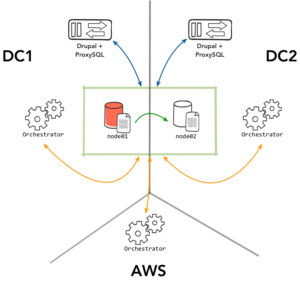
The problem occurs when node01 resolves its temporary issue. A race condition could occur within ProxySQL that could mark it back as read-write. You can increase an “offline” period within ProxySQL to make sure Orchestrator rediscovers the node first. Hopefully, it will set it to read-only immediately, but what we want is an extra layer of predictable behavior. This normally comes in the form of STONITH – by taking the other node out of action, we practically reduce the risk of conflict close to zero.
Orchestrator supports hooks to do this, but we can also do it easily with ProxySQL using its built in scheduler. In this case, we create a script where Orchestrator is consulted frequently for any nodes recently marked as downtimed, and we also mark them as such in ProxySQL. The script proxy-oc-tool.sh can be found on Github.
What does this script do? In the case of our topology above:
Adding the script to ProxySQL is simple. First you download and set permissions. I placed the script in /usr/bin/ – but you can put it anywhere accessible by the ProxySQL process.
|
1 2 3 |
wget https://gist.githubusercontent.com/dotmanila/1a78ef67da86473c70c7c55d3f6fda89/raw/b671fed06686803e626c1541b69a2a9d20e6bce5/proxy-oc-tool.sh chmod 0755 proxy-oc-tool.sh mv proxy-oc-tool.sh /usr/bin/ |
Note, you will need to edit some variables in the script i.e. ORCHESTRATOR_PATH .
Then load into the scheduler:
|
1 2 3 4 |
INSERT INTO scheduler (interval_ms, filename) VALUES (5000, '/usr/bin/proxy-oc-tool.sh'); LOAD SCHEDULER TO RUNTIME; SAVE SCHEDULER TO DISK; |
I’ve set the interval to five seconds since inside ProxySQL, a shunned node will need about 10 seconds before the next read-only check is done. This way, this script is still ahead of ProxySQL and is able to mark the dead node as OFFLINE_SOFT .
Because this is the simple version, there are obvious additional improvements to be made in the script like using scheduler args to specify and ORCHESTRATOR_PATH implement error checking.
Resources
RELATED POSTS





Continuent Tungsten Clustering automates management of the distributed MySQL systems. It is a complete solution with Tungsten Connector (more intelligent proxy than ProxySQL), Tungsten Manager (more complete cluster management solution than Orchestrator) and Tungsten Replicator (more advanced replication than mySQL native). Please check out recent webinar on Multi-site MySQL deployment by Riot Games (https://www.youtube.com/watch?v=MSxEYVCO8ek) and Multi-master MySQL deployment by NewVoiceMedia (https://www.youtube.com/watch?v=3NkVw97qIOY).
Are you offering this as Free and Open Source Software? Or are you just spamming?
They have even removed their previously open sourced Tungsten Replicator from github.