

MySQL replication isn’t perfect and sometimes our data gets out of sync, either by a failure in replication or human intervention. We are all familiar with Percona Toolkit’s pt-table-checksum and pt-table-sync to help us check and fix data inconsistencies – but imagine the following scenario where we mix regular replication with the Tungsten Replicator:
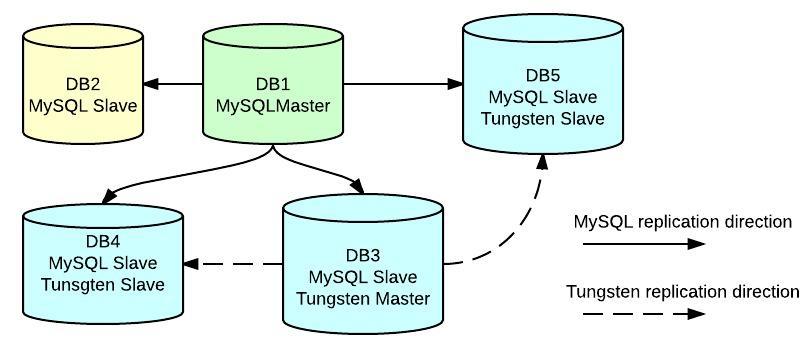
We have regular replication going from master (db1) to 4 slaves (db2, db3, db4 and db5), but also we find that db3 is also master of db4 and db5 using Tungsten replication for 1 database called test. This setup is currently working this way because it was deployed some time ago when multi-source replication was not possible using regular MySQL replication. This is now a working feature in MariaDB 10 and also a feature coming with the new MySQL 5.7 (not released yet)… in our case it is what it is 🙂
So how do we checksum and sync data when we have this scenario? Well we can still achieve it with these tools but we need to consider some extra actions:
First of all we need to understand that this tool was designed to checksum tables against a regular MySQL replication environment, so we need to take special care on how to avoid checksum errors by considering replication lag (yes Tungsten replication may still suffer replication lag). We also need to instruct the tool to discover slaves via dsn because the tool is designed to discover replicas using regular replication. This can be done by using the –plugin function.
My colleague Kenny already wrote an article about this some time ago but let’s revisit it to put some graphics around our case. In order to make pt-table-checksum work properly within Tungsten replicator environment we need to:
– Configure the –plugin flag using this plugin to check replication lag.
– Use –recursion-method=dsn to avoid auto-discover of slaves.
|
1 2 3 4 5 6 7 8 9 10 11 12 13 14 15 16 17 18 19 |
[root@db3]$ pt-table-checksum --replicate=percona.cksums --create-replicate-table --no-check-replication-filters --no-check-binlog-format --recursion-method=dsn=h=db1,D=percona,t=dsns --plugin=/home/mysql/bin/pt-plugin-tungsten_replicator.pl --check-interval=5 --max-lag=10 -d test Created plugin from /home/mysql/bin/pt-plugin-tungsten_replicator.pl. PLUGIN get_slave_lag: Using Tungsten Replicator to check replication lag Checksumming test.table1: 2% 18:14 remain Checksumming test.table1: 5% 16:25 remain Checksumming test.table1: 9% 15:06 remain Checksumming test.table1: 12% 14:25 remain Replica lag is 2823 seconds on db5 Waiting. Checksumming test.table1: 99% 14:25 remain TS ERRORS DIFFS ROWS CHUNKS SKIPPED TIME TABLE 04-28T14:17:19 0 13 279560873 4178 0 9604.892 test.table1 |
So far so good. We have implemented a good plugin that allows us to perform checksums considering replication lag, and we found differences that we need to take care of, let’s see how to do it.
pt-table-sync is the tool we need to fix data differences but in this case we 2 problems:
1- pt-table-sync doesn’t support –recursion-method=dsn, so we need to pass hostnames to be synced as parameter. A feature request to add this recursion method can be found here (hopefully it will be added soon). This means we will need to sync each slave separately.
2- Because of 1 we can’t use –replicate flags so pt-table-sync will need to re run checksums again to find and fix differences. If checksum found differences in more than 1 table I’d recommend running the sync in separate steps, pt-table-sync modifies data. We don’t want to blindly ask it to fix our servers, right?
That being said I’d recommend running pt-table-sync with –print flag first just to make sure the sync process is going to do what we want it to do, as follows:
|
1 2 3 4 5 6 7 8 9 10 11 12 13 14 |
[root@db3]$ pt-table-sync --print --verbose --databases test -t table1 --no-foreign-key-checks h=db3 h=db4 # Syncing h=db4 # DELETE REPLACE INSERT UPDATE ALGORITHM START END EXIT DATABASE.TABLE .... UPDATE `test`.`table1` SET `id`='2677', `status`='open', `created`='2015-04-27 02:22:33', `created_by`='8', `updated`='2015-04-27 02:22:33', WHERE `ix_id`='9585' LIMIT 1 /*percona-toolkit src_db:test src_tbl:table1 src_dsn_h=db3 dst_db:test dst_tbl:table1 dst_dsn_h=db4 lock:0 transaction:1 changing_src:0 replicate:0 bidirectional:0 pid:16135 user:mysql host:db3*/; UPDATE `test`.`table1` SET `id`='10528', `status`='open', `created`='2015-04-27 08:22:21', `created_by`='8', `updated`='2015-04-28 10:22:55', WHERE `ix_id`='9586' LIMIT 1 /*percona-toolkit src_db:test src_tbl:table1 src_dsn_h=db3 dst_db:test dst_tbl:table1 dst_dsn_h=db4 lock:0 transaction:1 changing_src:0 replicate:0 bidirectional:0 pid:16135 user:mysql host:db3*/; UPDATE `test`.`table1` SET `id`='8118', `status`='open', `created`='2015-04-27 18:22:20', `created_by`='8', `updated`='2015-04-28 10:22:55', WHERE `ix_id`='9587' LIMIT 1 /*percona-toolkit src_db:test src_tbl:table1 src_dsn_h=db3 dst_db:test dst_tbl:table1 dst_dsn_h=db4 lock:0 transaction:1 changing_src:0 replicate:0 bidirectional:0 pid:16135 user:mysql host:db3*/; UPDATE `test`.`table1` SET `id`='1279', `status`='open', `created`='2015-04-28 06:22:16', `created_by`='8', `updated`='2015-04-28 10:22:55', WHERE `ix_id`='9588' LIMIT 1 /*percona-toolkit src_db:test src_tbl:table1 src_dsn_h=db3 dst_db:test dst_tbl:table1 dst_dsn_h=db4 lock:0 transaction:1 changing_src:0 replicate:0 bidirectional:0 pid:16135 user:mysql host:db3*/; .... # 0 0 0 31195 Chunk 11:11:11 11:11:12 2 test.table1 |
Now that we are good to go, we will switch –print to –execute
|
1 2 3 4 5 6 7 8 |
[root@db3]$ pt-table-sync --execute --verbose --databases test -t table1 --no-foreign-key-checks h=db3 h=db4 # Syncing h=db4 # DELETE REPLACE INSERT UPDATE ALGORITHM START END EXIT DATABASE.TABLE # 0 0 0 31195 Nibble 13:26:19 14:48:54 2 test.table1 |
And voila: data is in sync now.
Tungsten Replicator is a useful tool to deploy these kind of scenarios, with no need to upgrade/change MySQL version – but it still has some tricks to avoid data inconsistencies. General recommendations on good replication practices still applies here, i.e. not allowing users to run write commands on slaves and so on.
Having this in mind we can still have issues with our data but now with an extra small effort we can keep things in good health without much pain.





Francisco, please could you help i have a question, im trying to find a solution to manage the automatic replication and failover with my sql, but the thing here i, only have 2 DB mysql servers 2 tomcat application servers the thing here if one servers fails the other should be able, im lookig MHA, tungsten, galera, pacemaker but im not sure what is better for my case could you recomend me oneof the solutions
Thanks!
Jorge, I should say here “it depends” because you need to evaluate what exactly you need for a HA solution. All tools you mentioned has pros and cons as they are highly dependant on the way you configure them and the apps.
If you don’t want to go too complex I’d start from testing MHA using VIPs so in case you have a failure you can automate failover to a secondary node by moving VIPs which should be transparent for your applications.
Hope this helps.
Best.
Francisco.
Francisco, is possible contact you by email or skype or something else and talk in spanish.
Jorge, generally speaking, I don’t give out my personal information on the blog, but I’m happy to respond here to any specifics you can provide about your situation. I will try and to help you at a high level as much as I can.
If you need more specific and detailed help, Percona offers contracts that should meet you and your company needs, additionally you can visit https://www.percona.com/forums/ to get extra help from any of our engineers.
Cheers.
Francisco,i have one dought,
which tool is best to synchronise data from SQL database to MYSQL data base?
Chenchu,
I don’t really know, there are some tools that can make the work but I’m not really sure if they can keep the data in sync. This post works for specific environments, like linux OS but I’m pretty sure they won’t work in Windows.