
Earlier this year, we introduced PSMDB Sandbox, a lightweight web UI that sits on top of our Terraform and Ansible automation for MongoDB. Since then, the project has changed a lot. It has a new name and repository, and it supports many more Percona products, MongoDB features and platforms.
In this post, I will go through the most important changes introduced over the last couple of months and what you can do with them.
The project started as mongo_terraform_ansible, with the UI as an add-on. Now the UI is the main way most people use it, so we renamed the whole thing to psmdb-sandbox.
There is a new helper script that installs the prerequisites for your intended deployment target platform(s), for example if you want to deploy in Docker:
|
1 2 3 |
./scripts/install-prerequisites.sh --docker --ui cd ui-go UI_REPO_DIR=.. go run . |
The script works on macOS, Debian and RHEL-based Linux. Use –aws, –gcp, –azure or –libvirt to add the prereqs for each target, and –dry-run if you want to see what it would do.
PSMDB Sandbox can now deploy Percona ClusterSync for MongoDB (PCSM). You get a source and a target cluster with PCSM between them, all in one environment. You can choose the PCSM version in the UI, and PCSM host show up in the Hosts & Connections panel.
PCSM is also monitored by Percona Monitoring & Management (PMM), so you can watch replication progress during a migration test.
PMM 3.10 can run PMM Extensions as a side-car to PMM Server to enable database management. The sandbox takes care of the details for you: it creates the shared token, enables the embedded Nomad server, and checks that the PMM Server version supports extensions.
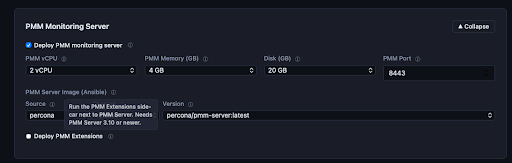
Alongside that, you can now deploy plain hosts or containers that run only pmm-client, so you can try using PMM Extensions to install and manage MongoDB on them.
PBM and PMM agents can now be turned on or off for each cluster or replica set. You can also skip PMM for the whole environment. That makes smaller, faster deployments possible when monitoring isn’t the point of the test.
MongoDB 9.0 is now an explicit choice for new deployments:
|
1 2 3 4 5 6 7 8 9 |
replsets = { rs01 = { mongodb_distribution = "community" mongo_release = "9.0" mongo_version = "9.0.2" enable_pmm = false enable_pbm = false } } |
PBM, mongot and PCSM are disabled for 9.x until they’re verified, and the sandbox rejects those combinations before it installs anything. The PSMDB 9.0 options will appear in the UI once packages are published.
On VM-based targets, you can now choose MongoDB Community or Enterprise packages as well as PSMDB. This is useful for comparing versions or reproducing an issue on upstream MongoDB. Some defaults now depend on the distribution. For example, PBM uses logical backups for Community and Enterprise, and keeps physical backups as the default for PSMDB.
You can add mongot to an environment to try full-text and vector search. This includes Percona Search for MongoDB builds of mongot and works on replica sets or sharded clusters.
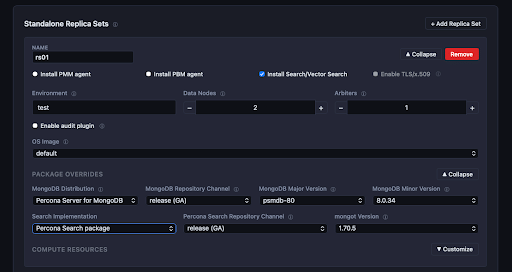
You can enable PSMDB data-at-rest encryption backed by HashiCorp Vault for the whole environment. The sandbox deploys a dedicated Vault instance, sets it up and unseals it, then configures every replica set and shard to use it:
LDAP authentication is now available, and we refactored the TLS setup to remove a lot of duplicated variables along the way. Together with the audit log support from the original release, you can test most security features in one place.
You can now change some topologies after deployment:
On cloud targets, Deploy runs terraform apply and then the matching Ansible playbook (add_shard.yml, add_replset_member.yml or main.yml). The UI blocks changes it can’t safely apply before Terraform runs, such as removing shards or changing the number of config servers.
Destroying an environment now keeps its definition and sets its status to Destroyed, so you can deploy it again with one click. If you want the definition gone too, tick the checkbox. A new Duplicate action creates a new environment from an existing one, which saves time when you want two similar setups side by side.
YCSB has been replaced by plgm, the Percona Load Generator for MongoDB. The UI has a new Load Generator section, and the AWS and GCP targets have a Compute & Storage section with settings for benchmarks:
Hardware Presets fill these fields with production-like profiles (Atlas-like M30–M80, IO-heavy, and latest generation).
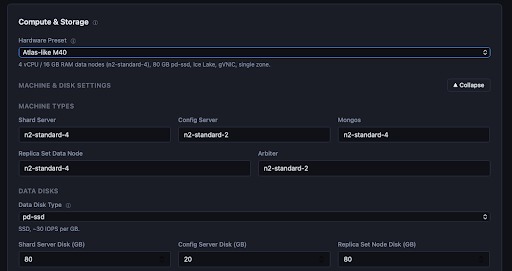
You can still edit every field, and the UI checks your values as you type.
Cloud configuration now runs the Ansible playbooks in parallel, one run per inventory, with the PMM server set up at the same time. This reduces deployment time significantly vs the previous behaviour. Each run has its own log tab with its status and elapsed time. Cancelling a job also stops all the parallel runs it started.
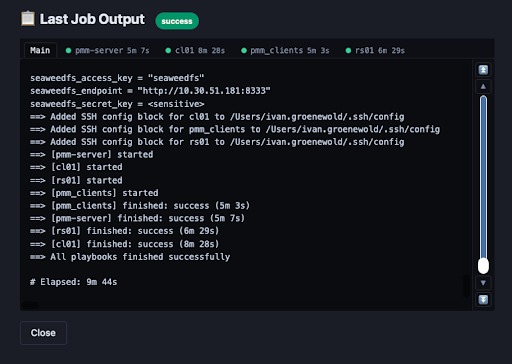
GCP metadata prefetching is faster, and the UI now checks for Docker port conflicts before it deploys.
What started as a convenience wrapper is now a fairly complete lab for the Percona software stack for MongoDB. It covers ClusterSync migrations, Vault encryption, Vector Search, MongoDB 9.0 and benchmarking with plgm. It runs from your browser, and you can tear things down just as easily when you’re done.
Try it out:
|
1 2 3 4 |
git clone https://github.com/percona/psmdb-sandbox.git cd psmdb-sandbox cd ui-go UI_REPO_DIR=.. go run . |
Then open http://127.0.0.1:5001.
As before, PSMDB Sandbox is a community project and is not covered by Percona support. If you run into issues or have ideas, please open an issue or pull request on GitHub.
Resources
RELATED POSTS