

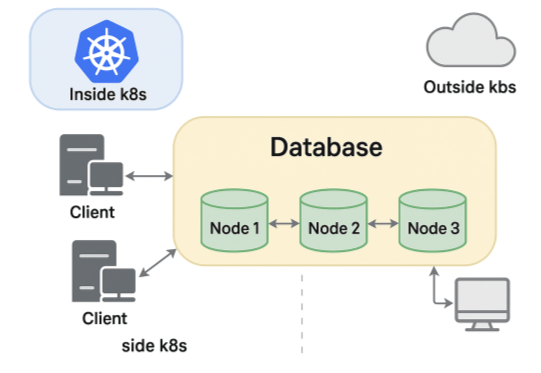
When running MongoDB replica sets in containerized environments like Docker or Kubernetes, making nodes reachable from inside the cluster as well as from external clients can be a challenge. To solve this problem, this post will explain the Horizons feature of Percona Server for MongoDB.
Let’s start by looking at what happens behind the scenes when you connect to a replicaset URI.
After connecting with a replset URI, the driver discovers the list of actual members by running the db.hello() command:
|
1 2 3 4 5 6 7 8 9 |
$ mongosh "mongodb://mongo1-internal:27017/?replicaSet=rs0" rs0 [direct: primary] test> db.hello() { topologyVersion: { processId: ObjectId('6877b5e18a13d54b752ff25c'), counter: Long('6') }, hosts: [ 'mongo1-internal:27017', 'mongo2-internal:27017', 'mongo3-internal:27017' ], ... |
The list of hosts returned contains each member’s name as you provided it to the rs.initialize() command.
The names are resolvable inside the same network, so all is well in this case. But what happens when connecting from outside?
Typically, you would use names like mongo1-external.mydomain.com that correctly point to the external IP addresses of the members. The problem is that after the initial connection is made, the driver will perform auto-discovery and try to connect to the names as reported by DB.hello(). These are not resolvable from outside.
What if we connect by IP address directly? Again, the driver will get the names from the list above, try to reach those, and fail after the initial connection is made:
|
1 2 3 4 |
Current Mongosh Log ID: 6849eb15ba228be45a69e327 Connecting to: mongodb://@10.30.50.155:32768/?replicaSet=rs0&appName=mongosh+2.5.2 MongoNetworkError: getaddrinfo ENOTFOUND mongo1-internal |
Even though mongo1-internal is not part of the connection string, the driver tries to reach it. So if the replica set members advertise their internal IPs or DNS names, clients outside can’t connect unless they can resolve that same name. We could work around that, but there’s another issue: the ports.
In the containerized world, it is likely that you set up your containers to use default port 27017. However they might be mapped to a different external port since you have to avoid port collisions (think about the case where containers are co-located in the same host).
We need a way for replica set members to identify themselves with different names and ports, depending on whether the client is in the same network or outside. A concept similar to split-brain DNS.
Horizons is a MongoDB feature that allows replica set members to advertise different identities depending on the client’s access context, such as internal versus external networks.
With this, you can make the same MongoDB replica set usable from:
MongoDB’s horizons rely on Server Name Indication (SNI) during the TLS handshake to determine which hostname and port to advertise. At connection time, clients present the hostname they used, and MongoDB uses that to return the proper set of endpoints. For that reason TLS is required in order for horizons to work.
Let’s walk through an example.
You can run the following steps on your local machine to test the feature.
Let’s start by creating the required CA and certificates using Cloudflare’s PKI and TLS toolkit.
1: Create ca-csr.json
|
1 2 3 4 |
$ mkdir certs $ cd certs $ tee ca-csr.json < |
Generate the CA:
|
1 |
$ cfssl gencert -initca ca-csr.json | cfssljson -bare ca |
This creates:
2: Create server-csr.json for each server, specifying both internal and external names in the “hosts” section so that our certificate is valid for everything.
|
1 2 3 |
$ for i in 1 2 3; do name="mongo$i" tee "${name}-csr.json" < |
3: Generate certificates using CFSSL
|
1 2 3 4 5 6 |
$ for i in 1 2 3; do name="mongo$i" cfssl gencert -ca=ca.pem -ca-key=ca-key.pem -config=<(cat <<'JSON' { "signing": { "default": { "expiry": "8760h", "usages": [ "signing", "key encipherment", "server auth", "client auth" ] } } } JSON ) "${name}-csr.json" | cfssljson -bare "${name}" cat "${name}.pem" "${name}-key.pem" > "${name}-combined.pem" done |
|
1 |
$ cd .. |
Resulting files:
Create a file with docker compose configuration:
|
1 2 3 4 5 6 7 8 9 10 11 12 13 14 15 16 17 18 19 20 21 22 23 24 25 26 27 28 29 30 31 32 33 |
$ tee test-horizons.yml < mongod --replSet rs0 --bind_ip_all --tlsMode requireTLS --tlsCertificateKeyFile /certs/mongo1-combined.pem --tlsCAFile /certs/ca.pem mongo2: container_name: mongo2 image: percona/percona-server-mongodb:latest volumes: - ./certs:/certs ports: - "27018:27017" command: > mongod --replSet rs0 --bind_ip_all --tlsMode requireTLS --tlsCertificateKeyFile /certs/mongo2-combined.pem --tlsCAFile /certs/ca.pem mongo3: container_name: mongo3 image: percona/percona-server-mongodb:latest volumes: - ./certs:/certs ports: - "27019:27017" command: > mongod --replSet rs0 --bind_ip_all --tlsMode requireTLS --tlsCertificateKeyFile /certs/mongo3-combined.pem --tlsCAFile /certs/ca.pem networks: default: driver: bridge EOF |
Here we are mapping our containers to ports 27017, 27018, and 27109 externally.
Now, start the services:
|
1 |
$ docker-compose -f test-horizons.yml up -d |
Now let’s initiate the replica set with different host names and ports for external access.
Launch a shell into one of the containers:
|
1 |
$ docker exec -it mongo1 /bin/bash |
Authenticate and initialize the replica set with this config:
|
1 2 3 4 5 6 7 8 9 10 11 12 13 14 15 16 17 18 19 20 21 |
$ mongosh --tls --tlsCertificateKeyFile /certs/mongo1-combined.pem --tlsAllowInvalidCertificates rs.initiate({ _id: "rs0", members: [ { _id: 0, host: "mongo1:27017", horizons: { external: "localhost:27017" } }, { _id: 1, host: "mongo2:27017", horizons: { external: "localhost:27018" } }, { _id: 2, host: "mongo3:27017", horizons: { external: "localhost:27019" } } ] }) |
Note: The “horizon” field here maps the external context to a different address than the internal one. Since we are going to test connecting from the local machine directly to the containers, set the horizons to localhost and the mapped ports.
Spin up a new containerized client, or use one of the existing MongoDB containers:
|
1 2 3 4 5 6 |
$ docker exec -it mongo1 mongosh --host rs0/mongo1:27017,mongo2:27017,mongo3:27017 --tls --tlsCertificateKeyFile /certs/mongo1-combined.pem --tlsCAFile /certs/ca.pem Current Mongosh Log ID: 6877deab6568339f46dfd9c4 Connecting to: mongodb://mongo1:27017,mongo2:27017,mongo3:27017/?replicaSet=rs0&tls=true&tlsCertificateKeyFile=%2Fcerts%2Fmongo1-combined.pem&tlsCAFile=%2Fcerts%2Fca.pem&appName=mongosh+2.5.0 Using MongoDB: 8.0.8-3 Using Mongosh: 2.5.0 rs0 [primary] test> |
It connects using internal Docker hostnames.
From your local machine:
|
1 2 3 4 5 6 |
$ mongosh "mongodb://localhost:27017,localhost:27018,localhost:27019/?replicaSet=rs0" --tls --tlsCertificateKeyFile /certs/mongo1-combined.pem --tlsCAFile /certs/ca.pem Current Mongosh Log ID: 6877defabc3f9a2d054a1296 Connecting to: mongodb://localhost:27017,localhost:27018,localhost:27019/?replicaSet=rs0&serverSelectionTimeoutMS=2000&tls=true&tlsCertificateKeyFile=certs%2Fmongo1-combined.pem&tlsCAFile=certs%2Fca.pem&appName=mongosh+2.3.1 Using MongoDB: 8.0.8-3 Using Mongosh: 2.3.1 rs0 [primary] test> |
As we have seen, MongoDB will resolve the external horizon names and connect successfully in both cases. You can verify the advertised hostnames and ports for the external connection:
|
1 2 3 4 5 6 7 8 9 10 11 12 13 14 |
rs0 [primary] test> db.hello() { topologyVersion: { processId: ObjectId('6877de4c632adf89fb590f38'), counter: Long('6') }, hosts: [ 'localhost:27017', 'localhost:27018', 'localhost:27019' ], setName: 'rs0', setVersion: 1, isWritablePrimary: true, secondary: false, primary: 'localhost:27017', me: 'localhost:27017', ... |
Versus the internal case:
|
1 2 3 4 5 6 7 8 9 10 11 12 13 14 |
rs0 [primary] test> db.hello() { topologyVersion: { processId: ObjectId('6877de4c632adf89fb590f38'), counter: Long('6') }, hosts: [ 'mongo1:27017', 'mongo2:27017', 'mongo3:27017' ], setName: 'rs0', setVersion: 1, isWritablePrimary: true, secondary: false, primary: 'mongo1:27017', me: 'mongo1:27017', ... |
The horizons feature in MongoDB is a powerful tool to bridge the gap between internal and external connectivity, especially in containerized or multi-network deployments.
Horizon also has the following limitations:
For some reason, this feature is not listed in the official MongoDB documentation; however, it is available in both Percona Server for MongoDB and MongoDB Community Edition. Also, Kubernetes users rejoice! Percona Operator for MongoDB supports Horizons since version 1.16.

Resources
RELATED POSTS




