

Percona Everest is a free and open source tool for running and managing databases like PostgreSQL, MySQL, and MongoDB inside Kubernetes. It simplifies things by providing three ways to work with your databases: a web interface (UI), a set of commands (API), and direct access through Kubernetes itself using built-in tools like kubectl.
Note: Before working with the CRDS shown in this blog, make sure you have Percona Everest installed in your Kubernetes cluster. You can follow the official Percona Everest installation guide.
The Percona Everest Operator is a core component of the Percona Everest platform. It defines a set of Custom Resource Definitions (CRDs) and provides Kubernetes-native abstractions to help you manage your databases declaratively. In this blog post, we’ll take a closer look at the key CRDs offered by Everest and how they fit into the overall architecture.
While we generally recommend interacting with Everest through its API or UI for ease of use and abstraction, there are several scenarios where working directly with CRDs can be advantageous:
Note: We published the Percona Everest Operator CRD Usage Guide earlier this year. This blog highlights some of the most practical and commonly used aspects of that guide.
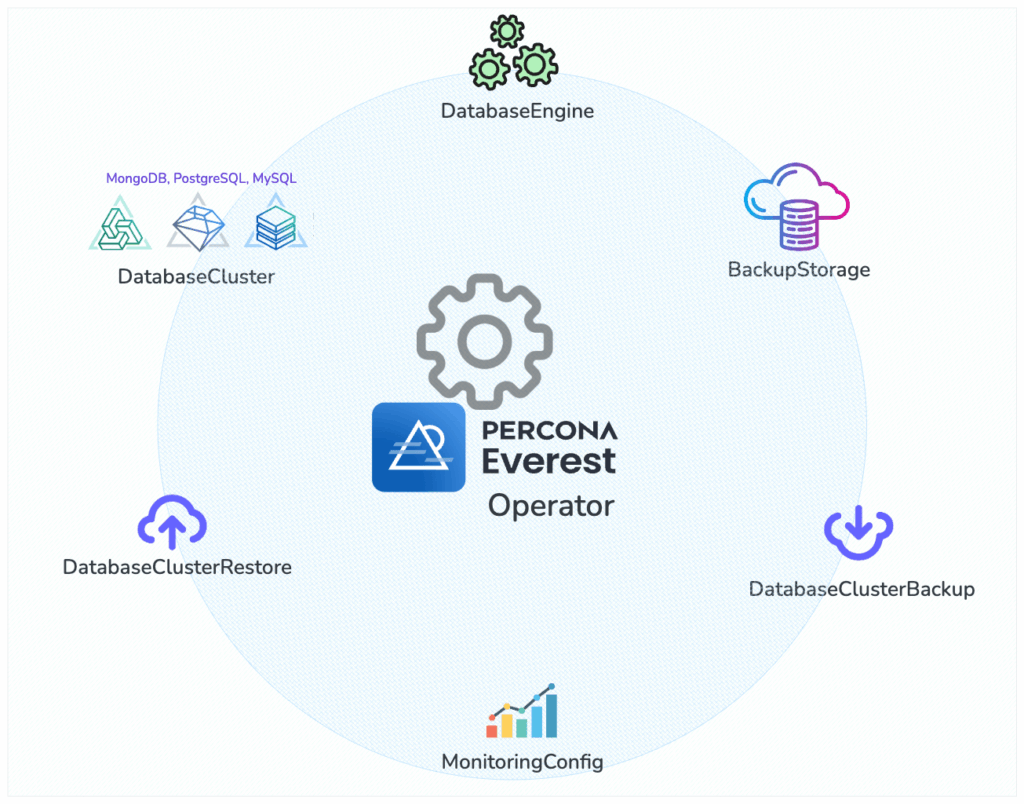
Image: Everest Operator: Key Components and CRDs
The main CRD you’ll work with is DatabaseCluster. It defines everything about your database: the engine type (like PostgreSQL, MongoDB, or MySQL), the number of replicas, storage size, resource limits, backup settings, and how the database is exposed inside or outside the cluster. You can manage your databases just like any other Kubernetes resource, declaratively and consistently.
Example for a simple PostgreSQL cluster:
|
1 2 3 4 5 6 7 8 9 10 11 12 13 14 15 16 17 18 19 20 21 22 23 24 25 26 27 28 29 30 31 |
apiVersion: everest.percona.com/v1alpha1 kind: DatabaseCluster metadata: labels: clusterName: my-database-cluster name: my-database-cluster spec: backup: pitr: enabled: false engine: replicas: 1 resources: cpu: "1" memory: 2G storage: class: standard-rwo size: 25Gi type: postgresql # Can be pxc, psmdb, postgresql userSecretsName: everest-secrets-my-database-cluster version: "17.4" monitoring: resources: {} proxy: expose: type: internal replicas: 1 resources: cpu: "1" memory: 30M type: pgbouncer |
Percona Everest currently supports the following database engines:
The DatabaseEngine CRD represents the installation of a Percona database operator, and it keeps track of:
|
1 2 3 4 5 6 |
apiVersion: everest.percona.com/v1alpha1 kind: DatabaseEngine metadata: name: percona-postgresql-operator spec: type: postgresql |
To check the available versions, use:
|
1 |
kubectl get dbengine percona-postgresql-operator -o jsonpath='{.status.availableVersions}' |
This is useful when you want to control which version you install or upgrade to.
Before configuring backups, you need to set up a backup storage location. First, create a Kubernetes secret with your cloud storage credentials:
|
1 2 3 4 5 6 7 8 |
apiVersion: v1 data: AWS_ACCESS_KEY_ID: YOUR_ACCESS_KEY_ID_BASE64_ENCODED AWS_SECRET_ACCESS_KEY: YOUR_SECRET_ACCESS_KEY_BASE64_ENCODED kind: Secret metadata: name: my-s3-backup-storage type: Opaque |
Then, create a BackupStorage custom resource that references this secret:
|
1 2 3 4 5 6 7 8 9 10 11 12 13 |
apiVersion: everest.percona.com/v1alpha1 kind: BackupStorage metadata: name: my-s3-backup-storage spec: bucket: my-s3-bucket credentialsSecretName: my-s3-backup-storage description: My S3 backup storage endpointURL: https://my-s3-endpoint.com forcePathStyle: false region: us-west-2 type: s3 verifyTLS: true |
Finally, configure backup schedules in your DatabaseCluster:
|
1 2 3 4 5 6 7 8 9 10 11 12 |
spec: backup: schedules: - name: "daily-backup" enabled: true schedule: "0 0 * * *" # Daily at midnight retentionCopies: 7 backupStorageName: "my-s3-backup-storage" pitr: # Point-in-Time Recovery enabled: true backupStorageName: "my-s3-backup-storage" uploadIntervalSec: 300 # 5 minutes |
You can also create on-demand backups using the DatabaseClusterBackup custom resource.
|
1 2 3 4 5 6 7 8 9 |
apiVersion: everest.percona.com/v1alpha1 kind: DatabaseClusterBackup metadata: labels: clusterName: my-database-cluster name: my-database-cluster-backup spec: backupStorageName: my-s3-backup-storage dbClusterName: my-database-cluster |
Backups may be restored to a DatabaseCluster using the DatabaseClusterRestore custom resource:
|
1 2 3 4 5 6 7 8 |
apiVersion: everest.percona.com/v1alpha1 kind: DatabaseClusterRestore metadata: name: restore-from-backup spec: dbClusterName: my-database-cluster dataSource: dbClusterBackupName: my-database-cluster-backup |
Point-in-time recovery lets you restore your database to an exact moment in time, for example, just before something went wrong.
To do this in Percona Everest, you create a DatabaseClusterRestore resource. You specify the name of the backup and the exact time (in UTC) you want to restore to.
|
1 2 3 4 5 6 7 8 9 10 11 |
apiVersion: everest.percona.com/v1alpha1 kind: DatabaseClusterRestore metadata: name: pitr-restore spec: dbClusterName: my-database dataSource: dbClusterBackupName: base-backup pitr: type: date date: "2024-04-11T15:30:00Z" # UTC timestamp |
You can also monitor the restore status:
|
1 |
kubectl get dbrestore restore-from-backup -o jsonpath='{.status}' |
Percona Everest supports Percona Monitoring and Management (PMM) as its monitoring solution. Before enabling monitoring for your database clusters, you need to create a MonitoringConfig that defines your setup.
First, create a secret with your PMM credentials:
|
1 2 3 4 5 6 7 8 |
apiVersion: v1 kind: Secret metadata: name: pmm-credentials type: Opaque data: username: <YOUR BASE64 ENCODED USERNAME> apiKey: <YOUR BASE64 ENCODED API KEY> |
Then create a MonitoringConfig:
|
1 2 3 4 5 6 7 8 9 10 11 |
apiVersion: everest.percona.com/v1alpha1 kind: MonitoringConfig metadata: name: my-monitoring-config spec: type: pmm credentialsSecretName: pmm-credentials pmm: url: "https://pmm.example.com" image: "percona/pmm-client:2.41.0" # Optional: specify PMM client version verifyTLS: true # Optional: verify TLS certificates |
Now you can enable monitoring for your database cluster:
|
1 2 3 4 5 6 7 8 9 10 |
spec: monitoring: monitoringConfigName: "my-monitoring-config" resources: limits: cpu: "200m" memory: "200Mi" requests: cpu: "100m" memory: "100Mi" |
Use the following command to quickly see the current state of your cluster (e.g., ready, creating, error, etc.):
|
1 |
kubectl get databasecluster my-database-cluster -o jsonpath='{.status}' |
To get more detailed information about the cluster, including its configuration, recent events, and any possible warnings or errors, use:
|
1 |
kubectl describe databasecluster my-database-cluster |
If your database cluster is stuck or shows an error, the first place to check is the operator logs. These logs can help you understand if there was a problem applying the CRD or managing the database resources.
|
1 |
kubectl logs deployment/everest-operator-controller-manager -n everest-system |
Using Percona Everest CRDs is a powerful way to manage your databases declaratively within Kubernetes. It’s especially useful for teams adopting GitOps, building automation pipelines, or working on platform engineering.
If you want to explore more examples, the official documentation includes CRD-based setups for PostgreSQL clusters, MySQL (Percona XtraDB Cluster), and MongoDB (Percona Server for MongoDB), including sharded clusters.
Resources
Feel free to share your experience in our Percona Community Forum.
Resources
RELATED POSTS




