

Remember when running databases in Kubernetes felt like a gamble? When unpredictable storage performance and complex state management made stability a constant battle? Thankfully, those days are largely behind us. With better tools, smarter operators, and field-tested strategies, you can now confidently deploy PostgreSQL on Kubernetes, especially when you need scale, automation, and platform consistency. Kubernetes has evolved beyond just hosting stateless services; it’s becoming the control plane for everything, including your critical databases.
In this post, you’ll discover why running PostgreSQL on Kubernetes isn’t just feasible but often the smart choice for teams handling growing infrastructure, consolidating environments, or planning for long-term scale. We’ll explore real business benefits, technical advantages, potential pitfalls to watch for, and which storage options perform best (with benchmark data to back it up). You’ll also learn how to get started using Percona Operator for PostgreSQL with our step-by-step implementation guide.
For teams managing PostgreSQL across multiple environments, Kubernetes offers a practical solution to bring consistency and automation to your database operations. It’s not about following a trend, though; it’s about solving real infrastructure challenges with tools that help you move faster, stay flexible, and reduce manual work.
Whether you’re running PostgreSQL in the cloud, on-premises, or in a hybrid infrastructure, Kubernetes provides tangible advantages for your technical and operational teams.
Your PostgreSQL deployment isn’t static anymore. You might be deploying clusters across regions, replicating data for failover, or integrating with microservices in dynamic environments. Kubernetes is built for exactly this kind of complexity. With the right setup, you can standardize how PostgreSQL is deployed, managed, and scaled across clouds, teams, and development stages.
You get:
Think of it as infrastructure-as-code for your database, removing the guesswork from scaling or recovering PostgreSQL.
PostgreSQL on Kubernetes can meet stringent high availability (HA) and disaster recovery (DR) requirements, often more efficiently than traditional VM setups or manual configurations. A well-architected Kubernetes deployment allows you to:
This flexibility is particularly valuable when you’re managing multiple instances, regions, or tenants.
Kubernetes helps teams right-size their resources. You can scale PostgreSQL vertically or horizontally based on usage, and adjust resources like memory, CPU, and storage dynamically. This opens up smarter infrastructure options:
Instead of overspending on oversized VMs or getting locked into inflexible managed services, you retain full control.
To be clear, running PostgreSQL on Kubernetes isn’t without challenges. There are valid concerns about storage reliability, state management, operator complexity, and disaster recovery. However, these are solvable problems, not roadblocks.
Here’s what typically holds teams back:
One question we often hear is, “Can Kubernetes storage really keep up with my PostgreSQL workloads?” For database work, performance and reliability aren’t optional features, so we decided to test it.
Percona’s study, Benchmarking PostgreSQL Storage Performance on Kubernetes, compared how different storage solutions handle PostgreSQL workloads when deployed using the Percona Operator for PostgreSQL. The goal was simple: identify how storage choices impact I/O performance and transaction throughput in real-world conditions.
The benchmarks ran on AWS EKS (v1.29.4) using i4i instances with local NVMe storage. We evaluated a mix of open source and commercial storage options:
To simulate actual PostgreSQL activity, we used two testing tools:
To reflect how you might run PostgreSQL in different environments, we tested under two memory scenarios:
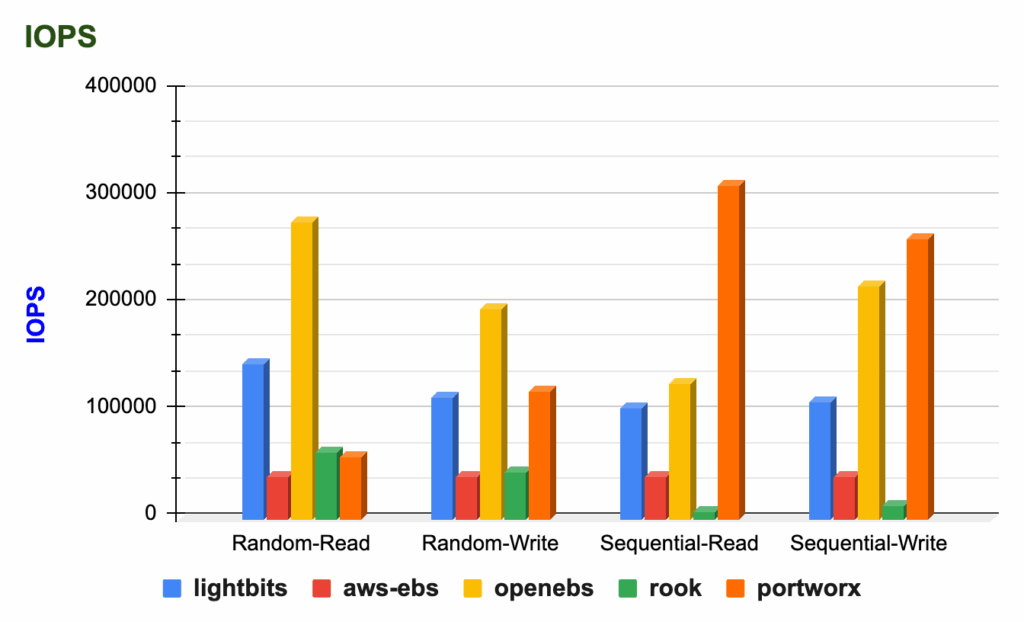
Each storage solution showed distinct strengths:
Perhaps most importantly, we found that the choice of storage backend significantly impacted performance, especially when PostgreSQL was memory-constrained and relied heavily on disk I/O. Throughput and latency varied considerably. With ample memory, the performance differences narrowed, highlighting the trade-offs between infrastructure cost and raw speed.
Get the full report with detailed test results and analysis
Storage is arguably the most critical factor influencing PostgreSQL performance on Kubernetes. Your choice directly impacts speed, stability, and cost under load.
This benchmark confirms that PostgreSQL can absolutely thrive on Kubernetes when paired with the right architecture and storage solution. And it reinforces the value of using a tested, production-ready operator like Percona Operator for PostgreSQL to manage the full stack.
Running PostgreSQL on Kubernetes becomes straightforward when you have the right tools. The process is repeatable, reliable, and production-ready with Percona Operator for PostgreSQL, which handles the heavy lifting of deploying, scaling, and managing your database.
This guide walks through a basic deployment using the Percona Operator for PostgreSQL. While simple, this foundation can be extended for staging and production use. Note: This example uses version 2.3.1. Check the Percona Operator documentation to use the latest stable version.
|
1 |
kubectl create namespace postgres-operator |
|
1 |
kubectl apply --server-side -f https://raw.githubusercontent.com/percona/percona-postgresql-operator/v2.3.1/deploy/bundle.yaml -n postgres-operator |
At this point, the Operator pod should be running. List the pods in your namespace to confirm that it’s in a running state.
|
1 2 3 4 |
kubectl get pods -n postgres-operator NAME READY STATUS RESTARTS AGE percona-postgresql-operator-55fff7dd8b-4pz54 1/1 Running 0 5m43s |
|
1 |
kubectl apply -f https://raw.githubusercontent.com/percona/percona-postgresql-operator/v2.3.1/deploy/cr.yaml -n postgres-operator |
Check the operator and replica set the Pods’ status.
|
1 |
kubectl get pg -n postgres-operator |
The Operator may take a few moments to finish initializing. The creation process is over when reporting the ready status:
|
1 2 |
NAME ENDPOINT STATUS POSTGRES PGBOUNCER AGE cluster1 cluster1-pgbouncer.postgres-operator.svc ready 3 3 143m |
The Operator is now installed and deployed. Next, you can connect to your PostgreSQL cluster and start using the database as you normally would.
|
1 |
kubectl get secrets -n postgres-operator |
The Secrets object we target is named cluster1-pguser-cluster1. We will retrieve the pgBouncer URI from your secret, decode it, and pass it as the PGBOUNCER_URI environment variable.
The following example shows how to pass the pgBouncer URI from the default Secret object cluster1-pguser-cluster1:
|
1 |
PGBOUNCER_URI=$(kubectl get secret cluster1-pguser-cluster1 --namespace postgres-operator -o jsonpath='{.data.pgbouncer-uri}' | base64 --decode) |
Now let’s create a Pod that runs a container with Percona Distribution for PostgreSQL and connects to the database. The following command does it, naming the Pod pg-client and connecting you to the cluster1 database:
|
1 |
kubectl run -i --rm --tty pg-client --image=perconalab/percona-distribution-postgresql:16 --restart=Never -- psql $PGBOUNCER_URI |
It might take a moment to create the Pod and establish the database connection. Once it’s ready, you’ll see output similar to this:
|
1 2 3 4 5 6 |
If you don't see a command prompt, try pressing enter. psql (16.2 - Percona Distribution, server 16.1 - Percona Distribution) SSL connection (protocol: TLSv1.3, cipher: TLS_AES_256_GCM_SHA384, compression: off) Type "help" for help. cluster1=> |
You’re now connected to your PostgreSQL cluster and ready to start creating tables and inserting data!

Running PostgreSQL on Kubernetes is one thing. Running it well, with security, scalability, observability, and expert support, is what sets Percona apart.
We don’t just package a few tools together. Our open source approach gives you a production-ready PostgreSQL stack with all the features you’d expect in an enterprise solution without hidden licensing costs, feature restrictions, or vendor lock-in.
With Percona Operator for PostgreSQL, you get everything you need right out of the box:
There’s no proprietary wrapper or enterprise-only tier. Everything we build is fully open source.
For organizations managing multiple database types (PostgreSQL, MySQL, MongoDB) on Kubernetes, Percona Everest provides a unified, self-service platform. It simplifies provisioning, scaling, backups, and monitoring across your diverse database fleet, offering an open source alternative to proprietary DBaaS platforms.
Sometimes you want to run everything yourself. Sometimes you want a partner. Percona gives you options without locking you into one path.
We offer:
And because we support MySQL, MongoDB, and PostgreSQL, we help you remain database-agnostic even as your infrastructure grows.
PostgreSQL and Kubernetes make a powerful combination, but only when you have the right architecture, storage, and operational support. When done well, this approach gives you a consistent, scalable way to run PostgreSQL anywhere, without relying on proprietary tools or sacrificing performance.
That’s exactly what we deliver.
With Percona for PostgreSQL, you get everything needed to run PostgreSQL in production, from high availability and security to backups, monitoring, and enterprise-grade extensions. Our Operator for PostgreSQL is included as part of the solution, giving you a fully open source, thoroughly tested deployment framework backed by PostgreSQL experts.
No lock-in. No compromise. Just a proven way to run PostgreSQL securely and reliably, wherever you need it.




