

 Hey Community! This is my first blog post so let me introduce myself. My name is Vasyl Yurkovych. I am a QA Automation Engineer at Percona and I have solid experience in software testing.
Software quality is one of the main focuses of Percona so we put a lot of energy into it (hopefully so you don’t have to!). Our biggest challenge in testing isn’t necessarily running the routines against the current version, but the fact that users can decide to upgrade at any time, from pretty much any supported version. So I’d like to share with you our upgrade testing approach for Percona Monitoring and Management (PMM) in hopes that this might be useful to others who create software that users install!
PMM is released every month and our users do not reinstall each new version – they just perform the upgrade operation when there’s a compelling feature or fix. Also, these PMM instances are not “empty”; they are full of various settings, monitored DBs, etc., all of which need to be preserved.
Taking into account all of that, we want to make sure that:
We decided to automate this process and select critical automation scenarios to execute. They were split into 3 stages: Pre Upgrade, Upgrade, and Post Upgrade.
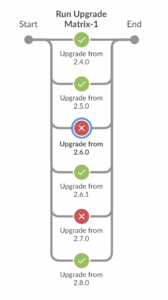
Also, we test upgrades from the older PMM versions, so we created a CI job that runs on the weekends and during the release testing phase. This gives us the ability to check the upgrade from any available version to the latest one. All we have to do is to specify the version we want to upgrade from. Check out this screenshot as an example of a failed upgrade.
Currently, we use this approach for testing Docker-based PMM Server upgrade, because PMM docker images are most commonly used. But we plan to implement the same upgrade job for OVF and AMI based PMM-Server soon.
This is the final piece of our upgrade testing approach which alerts us immediately if some version has a problem upgrading to the latest one and allows us to react at the same time.
While this may seem an obvious tactic to ensure software quality, it’s amazing how often we’ll discover something that only impacts a single version.
You are now safe to upgrade your Percona Monitoring and Management version, as PMM CI is watching your back!
Resources
RELATED POSTS




