

As we know, Orchestrator is a MySQL high availability and replication management tool that aids in managing farms of MySQL servers. In this blog post, we discuss how to make the Orchestrator (which manages MySQL) itself fault-tolerant and highly available.
When considering HA for the Orchestrator one of the popular choices will be using the Raft consensus.
Raft is a consensus protocol/ algorithm where multiple nodes composed of a (Leader) and (Followers) agree on the same state and value. The Leaders are decided by the quorum and voting, and it is the responsibility of the Leader Raft to do all the decision-making and changes. The other node just follows or syncs with the Leader without involving any direct changes.
When Raft is used with Orchestrator, it provides high availability, solves network partitioning, and ensures fencing on the Isolated node.
Next, we will see how we can deploy an Orchestrator/Raft based setup with the below topology.
For demo purposes, I am using the same server for both Orchestrator/Raft and MySQL.
|
1 2 3 |
172.31.20.60 Node1 172.31.16.8 Node2 172.31.23.135 Node3 |
So, we have the topology below, which we are going to deploy. Each Raft/Orchestrator node has its own separate SQLite database instance.
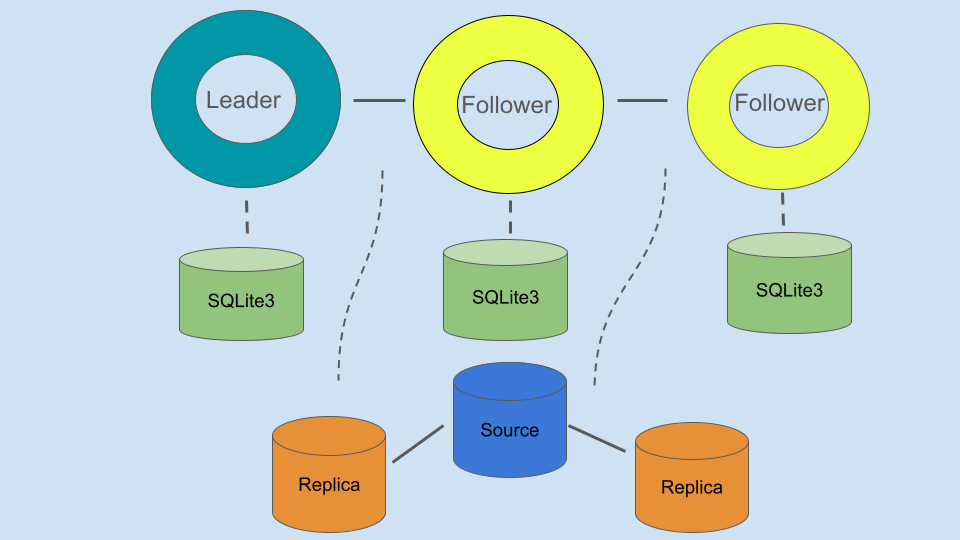
For this demo, I am installing the packages via Percona distribution. However we can also install the Orchestrator packages from Percona or Openark repositories directly.
|
1 2 3 4 |
shell> sudo yum install -y https://repo.percona.com/yum/percona-release-latest.noarch.rpm shell> sudo percona-release setup pdps-8.0 shell> sudo yum install -y percona-orchestrator percona-orchestrator-cli percona-orchestrator-client shell> sudo yum install -y percona-server-server |
Note – Openark is no longer active, and the last update was quite some time ago( “2021”). Therefore, we can rely on the Percona repositories, which have the latest release last pushed on (“2024”).
1) Create database-specific users/tables on the Source database node (Node1).
|
1 2 3 4 5 6 7 8 9 10 |
mysql> CREATE DATABASE meta; mysql> CREATE TABLE meta.cluster ( anchor TINYINT NOT NULL, cluster_name VARCHAR(128) CHARACTER SET ascii NOT NULL DEFAULT '', cluster_domain VARCHAR(128) CHARACTER SET ascii NOT NULL DEFAULT '', PRIMARY KEY (anchor) ) ENGINE=InnoDB DEFAULT CHARSET=utf8; mysql> INSERT INTO meta.cluster (anchor, cluster_name, cluster_domain) VALUES (1, 'testcluster', 'example.com'); |
Note – Orchestrator will fetch the cluster details from this table.
|
1 2 3 4 5 |
mysql> CREATE USER 'orchestrator'@'%' IDENTIFIED BY 'Orc@1234'; mysql> GRANT SUPER, PROCESS, REPLICATION SLAVE, RELOAD ON *.* TO 'orchestrator'@'%'; mysql> GRANT SELECT ON mysql.slave_master_info TO 'orchestrator'@'%'; mysql> GRANT DROP ON `_pseudo_gtid_`.* TO 'orchestrator'@'%'; mysql> GRANT SELECT ON meta.* TO 'orchestrator'@'%'; |
Note – These credentials will be used by the Orchestrator to connect to the MySQL backends.
2) Then, we need to copy the orchestrator template file to the /etc/orchestrator.conf.json and perform the necessary changes in the mentioned sections.
|
1 |
shell> sudo cp /usr/local/orchestrator/orchestrator-sample.conf.json /etc/orchestrator.conf.json |
|
1 2 |
"MySQLTopologyUser": "orchestrator", "MySQLTopologyPassword": "Orc@1234", |
|
1 2 3 4 5 |
"MySQLOrchestratorHost": "127.0.0.1", "MySQLOrchestratorPort": 3306, "MySQLOrchestratorDatabase": "orchestrator", "MySQLOrchestratorUser": "orc_server_user", "MySQLOrchestratorPassword": "orc_server_password", |
Create Orchestrator schema and related credentials.
You need to replace the details with Orchestrator managing database (MySQL) information.
|
1 |
DetectClusterAliasQuery": "SELECT ifnull(max(cluster_name), '''') as cluster_alias from meta.cluster where anchor=1;", |
|
1 2 |
"BackendDB": "sqlite", "SQLite3DataFile": "/var/lib/orchestrator/orchestrator.db", |
|
1 2 3 4 5 6 |
"RecoverMasterClusterFilters": [ "testcluster" ], "RecoverIntermediateMasterClusterFilters": [ "testcluster" ], |
RecoverMasterClusterFilters => It defines which cluster should be auto failover/recover.
RecoverIntermediateMasterClusterFilters => It resembles whether recovery/failure for intermediate masters allow. Intermediate masters are the replica hosts, which have their replicas as well.
|
1 2 3 4 5 6 7 8 9 10 |
"DefaultRaftPort": 10008, "RaftAdvertise": "172.31.20.60", "RaftBind": "172.31.20.60", "RaftDataDir": "/var/lib/orchestrator", "RaftEnabled": true, "RaftNodes": [ "172.31.20.60", "172.31.16.8", "172.31.23.135" ], |
|
1 2 3 4 5 6 7 8 9 10 |
"DefaultRaftPort": 10008, "RaftAdvertise": "172.31.16.8", "RaftBind": "172.31.16.8", "RaftDataDir": "/var/lib/orchestrator", "RaftEnabled": true, "RaftNodes": [ "172.31.20.60", "172.31.16.8", "172.31.23.135" ], |
|
1 2 3 4 5 6 7 8 9 10 |
"DefaultRaftPort": 10008, "RaftAdvertise": "172.31.23.135", "RaftBind": "172.31.23.135", "RaftDataDir": "/var/lib/orchestrator", "RaftEnabled": true, "RaftNodes": [ "172.31.20.60", "172.31.16.8", "172.31.23.135" ], |
Note – Here we mainly replace the RaftAdvertise/RaftBind configuration for each node. We need to also make sure the communication between the nodes is allowed on the given Raft port (10008).
3) Then, we can create the Raft data directory on each node.
|
1 |
shell> mkdir -p /var/lib/orchestrator |
4) Finally, we can start the Orchestrator service on each node.
|
1 |
shell> systemctl start orchestrator |
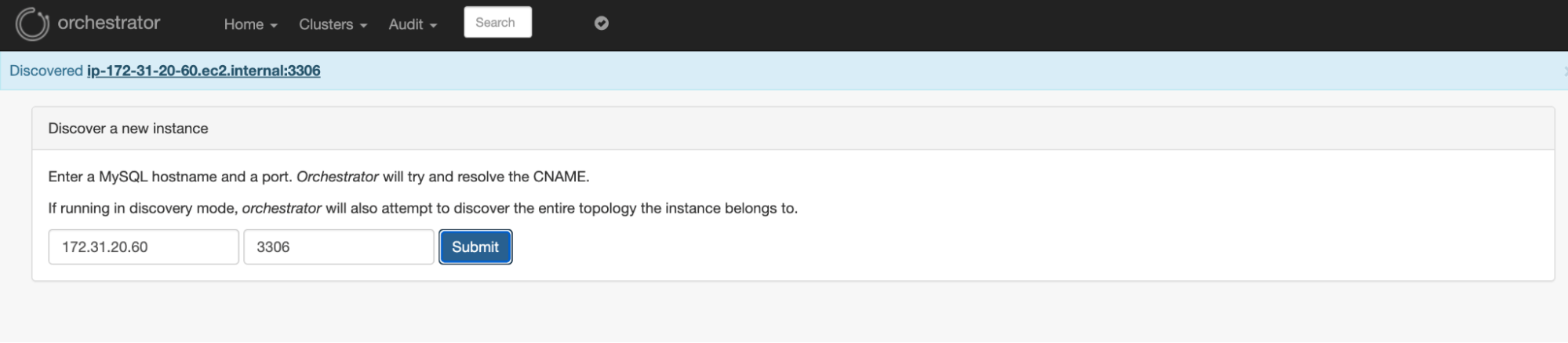
From the Orchestrator UI- http://ec2-54-147-20-38.compute-1.amazonaws.com:3000/web/status directly we can do the initial Node discovery process.
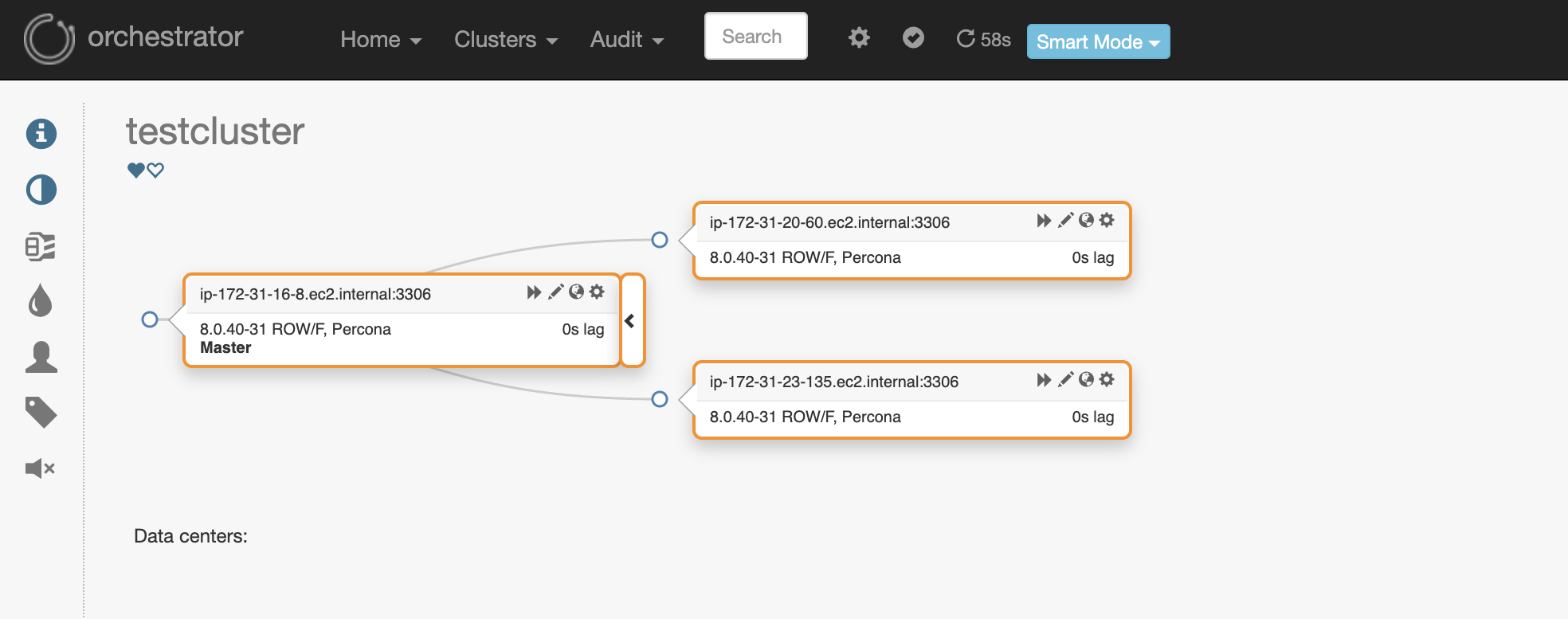
So here is our MySQL topology consisting of all 3 nodes.
As we are using SQLite3, we can use the below way to access the tables and information from the insight of the database.
|
1 2 3 4 5 |
shell> sqlite3 /var/lib/orchestrator/orchestrator.db SQLite version 3.34.1 2021-01-20 14:10:07 Enter ".help" for usage hints. sqlite> .tables |
|
1 2 3 4 5 6 7 8 9 10 11 12 13 14 15 16 17 18 19 20 |
access_token active_node agent_seed agent_seed_state async_request audit blocked_topology_recovery candidate_database_instance cluster_alias … node_health node_health_history orchestrator_db_deployments orchestrator_metadata raft_log raft_snapshot raft_store topology_failure_detection topology_recovery topology_recovery_steps |
Next, we can check the logs of each node to confirm the status.
|
1 |
shell> journalctl -u orchestrator |
We will see some voting and state changing in the below logs. So, Node2(172.31.16.8) becomes the leader while other nodes follow it.
|
1 2 3 4 5 6 7 8 9 10 11 12 13 14 15 |
Feb 02 15:09:38 ip-172-31-20-60.ec2.internal orchestrator[18395]: 2025-02-02 15:09:38 DEBUG raft leader is ; state: Candidate Feb 02 15:09:38 ip-172-31-20-60.ec2.internal orchestrator[18395]: 2025/02/02 15:09:38 [WARN] raft: Election timeout reached, restarting election Feb 02 15:09:38 ip-172-31-20-60.ec2.internal orchestrator[18395]: 2025/02/02 15:09:38 [INFO] raft: Node at 172.31.20.60:10008 [Candidate] entering Candidate state Feb 02 15:09:38 ip-172-31-20-60.ec2.internal orchestrator[18395]: 2025/02/02 15:09:38 [DEBUG] raft: Votes needed: 2 Feb 02 15:09:38 ip-172-31-20-60.ec2.internal orchestrator[18395]: 2025/02/02 15:09:38 [DEBUG] raft: Vote granted from 172.31.20.60:10008. Tally: 1 Feb 02 15:09:39 ip-172-31-20-60.ec2.internal orchestrator[18395]: 2025/02/02 15:09:39 [WARN] raft: Election timeout reached, restarting election Feb 02 15:09:39 ip-172-31-20-60.ec2.internal orchestrator[18395]: 2025/02/02 15:09:39 [INFO] raft: Node at 172.31.20.60:10008 [Candidate] entering Candidate state Feb 02 15:09:40 ip-172-31-20-60.ec2.internal orchestrator[18395]: 2025/02/02 15:09:40 [DEBUG] raft: Votes needed: 2 Feb 02 15:09:40 ip-172-31-20-60.ec2.internal orchestrator[18395]: 2025/02/02 15:09:40 [DEBUG] raft: Vote granted from 172.31.20.60:10008. Tally: 1 Feb 02 15:09:41 ip-172-31-20-60.ec2.internal orchestrator[18395]: 2025/02/02 15:09:41 [WARN] raft: Election timeout reached, restarting election Feb 02 15:09:41 ip-172-31-20-60.ec2.internal orchestrator[18395]: 2025/02/02 15:09:41 [INFO] raft: Node at 172.31.20.60:10008 [Candidate] entering Candidate state Feb 02 15:09:41 ip-172-31-20-60.ec2.internal orchestrator[18395]: 2025/02/02 15:09:41 [DEBUG] raft: Votes needed: 2 ... Feb 02 15:33:13 ip-172-31-20-60.ec2.internal orchestrator[18395]: 2025-02-02 15:33:13 DEBUG raft leader is 172.31.16.8:10008; state: Follower Feb 02 15:33:18 ip-172-31-20-60.ec2.internal orchestrator[18395]: 2025-02-02 15:33:18 DEBUG raft leader is 172.31.16.8:10008; state: Follower |
We can also use the below curl command to get the status.
|
1 |
shell> curl http://localhost:3000/api/status|jq . |
|
1 2 3 4 5 6 7 8 9 10 11 12 13 14 15 16 17 18 19 20 21 22 23 24 25 26 27 28 29 30 31 32 33 34 35 36 37 38 39 40 41 42 43 44 |
{ "Code": "OK", "Message": "Application node is healthy", "Details": { "Healthy": true, "Hostname": "ip-172-31-16-8.ec2.internal", "Token": "52c01a982d4169dc145b7693d0f86100a952949f6a83d7ef4db6ad5dafe45a8a", "IsActiveNode": true, "ActiveNode": { "Hostname": "172.31.16.8:10008", "Token": "", "AppVersion": "", "FirstSeenActive": "", "LastSeenActive": "", "ExtraInfo": "", "Command": "", "DBBackend": "", "LastReported": "0001-01-01T00:00:00Z" }, "Error": null, "AvailableNodes": [ { "Hostname": "ip-172-31-16-8.ec2.internal", "Token": "52c01a982d4169dc145b7693d0f86100a952949f6a83d7ef4db6ad5dafe45a8a", "AppVersion": "3.2.6-15", "FirstSeenActive": "2025-02-02T17:49:18Z", "LastSeenActive": "2025-02-04T18:01:12Z", "ExtraInfo": "", "Command": "", "DBBackend": "/var/lib/orchestrator/orchestrator.db", "LastReported": "0001-01-01T00:00:00Z" } ], "RaftLeader": "172.31.16.8:10008", "IsRaftLeader": true, "RaftLeaderURI": "http://172.31.16.8:3000", "RaftAdvertise": "172.31.16.8", "RaftHealthyMembers": [ "172.31.23.135", "172.31.20.60", "172.31.16.8" ] } } |
In the Orchestrator UI itself we can check the Raft details.
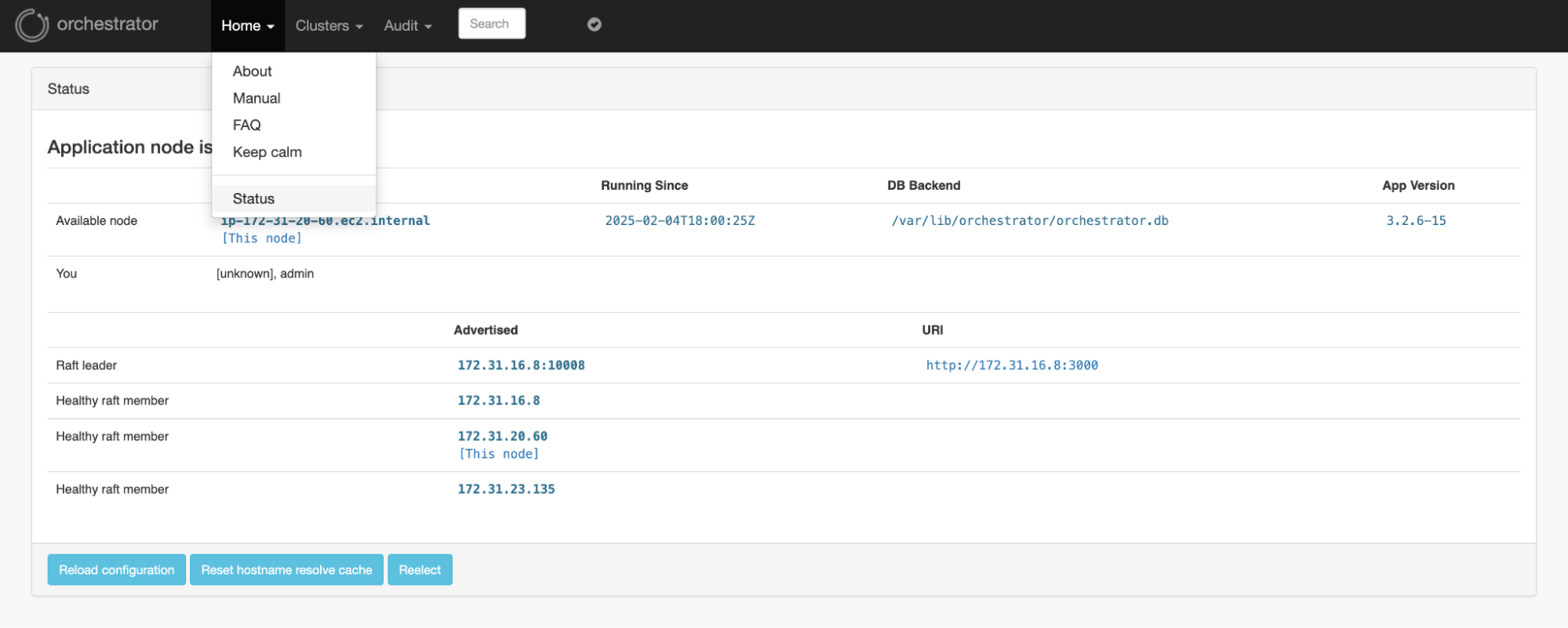
Now consider the current raft-leader Node1(172.31.20.60).
|
1 |
shell> orchestrator-client -c raft-leader |
|
1 |
172.31.20.60:10008 |
If we stop Node1 we can see that one of the follower nodes (Node2) becomes the new leader.
|
1 |
Shell > systemctl stop orchestrator |
|
1 2 |
Feb 02 18:04:11 ip-172-31-16-8.ec2.internal orchestrator[1854]: 2025/02/02 18:04:11 [DEBUG] raft: Failed to contact 172.31.20.60:10008 in 1m48.352338846s lines 3028-3073/3073 |
|
1 2 3 |
Feb 02 18:02:22 ip-172-31-23-135.ec2.internal orchestrator[1859]: 2025/02/02 18:02:22 [ERR] raft: Failed to make RequestVote RPC to 172.31.20.60:10008: dial tcp 172.> Feb 02 18:02:22 ip-172-31-23-135.ec2.internal orchestrator[1859]: 2025/02/02 18:02:22 [DEBUG] raft: Vote granted from 172.31.23.135:10008. Tally: 1 Feb 02 18:02:25 ip-172-31-23-135.ec2.internal orchestrator[1859]: 2025-02-02 18:02:25 DEBUG raft leader is 172.31.16.8:10008; state: Follower |
So, the new leader is Node2(172.31.16.8) now.
|
1 |
shell> orchestrator-client -c raft-leader |
|
1 |
172.31.16.8:10008 |
We can also manually trigger the switchover using the command raft-elect-leader from the current leader node.
|
1 |
shell> orchestrator-client -c raft-elect-leader -hostname ip-172-31-20-60.ec2.internal |
|
1 |
ip-172-31-20-60.ec2.internal |
Basically Raft leader node is responsible for making all topology related changes and recovery. Other nodes just sync/exchange information.
Once we stop the Source database Node3(172.31.23.135) the auto failover happens automatically. These are the logs from the Leader Raft node.
|
1 2 3 4 5 6 7 |
Feb 2 18:16:21 ip-172-31-16-8 orchestrator[1854]: 2025-02-02 18:16:21 INFO topology_recovery: Running PostFailoverProcesses hook 1 of 1: echo '(for all types) Recovered from DeadMaster on ip-172-31-23-135.ec2.internal:3306. Failed: ip-172-31-23-135.ec2.internal:3306; Successor: ip-172-31-16-8.ec2.internal:3306' >> /tmp/recovery.log Feb 2 18:16:21 ip-172-31-16-8 orchestrator[1854]: [martini] Started GET /api/audit-recovery-steps/1738518664101788458:8540cbf99f297864b4e719eb05aac13b2588e1be79ac8b56467e8758c13f1c08 for 103.164.24.70:17284 Feb 2 18:16:21 ip-172-31-16-8 orchestrator[1854]: [martini] Completed 200 OK in 782.708µs Feb 2 18:16:21 ip-172-31-16-8 orchestrator[1854]: [martini] Started GET /api/maintenance for 103.164.24.70:15464 Feb 2 18:16:21 ip-172-31-16-8 orchestrator[1854]: [martini] Completed 200 OK in 2.342996ms Feb 2 18:16:21 ip-172-31-16-8 orchestrator[1854]: 2025-02-02 18:16:21 DEBUG orchestrator/raft: applying command 650: write-recovery-step Feb 2 18:16:21 ip-172-31-16-8 orchestrator[1854]: 2025-02-02 18:16:21 INFO CommandRun(echo '(for all types) Recovered from DeadMaster on ip-172-31-23-135.ec2.internal:3306. Failed: ip-172-31-23-135.ec2.internal:3306; Successor: ip-172-31-16-8.ec2.internal:3306' >> /tmp/recovery.log,[]) |
In this blog post, we explored one of the ways of setting up high availability for the Orchestrator tool. The Raft mechanism has the advantage that it comes with automatic fencing and fault tolerance by voting/consensus mechanism. The leader will be elected and the sole responsible for all changes and recoveries. In a production environment, we should have at least three nodes (odd number) to have a quorum/voting. Also, there are some other ways that exist for configuring HA in an orchestrator using (Semi HA and HA by the shared backend) which we can explore in some other blog posts.

Resources
RELATED POSTS





Hi Anil,
This is really helpful. Just wondering if the setup can be done to handle multiple clusters. Suppose I have 3 different clusters in 3 nodes, can this setup be implemented for all the clusters?
Hi Hari,
Thanks for your feedback!
Orchestrator is built to manage multiple cluster/topology so this should work. All you need to repeat the configuration and create the necessary users on each different cluster.
All existing cluster details can be fetched based on the DetectClusterAliasQuery
Topology discovery can be done separately as below or from the UI itself.
First Cluster:
Second Cluster:
thank you for the blog – is percona-orchestrator maintained and will it work with mysql community version? The original orchestrator is not maintained anymore.
We are looking at orchestrator for PROD but the fact that it is not maintained anymore is high risk in production env in case the newer versions of mysql eventually cause issues/break orchestrator. also not sure mandatory OS patching if it will break orchestrator
Hi Renato,
Yes, Percona maintains the orchestrator separately at https://github.com/percona/orchestrator, and it keeps it updated there. This will be fully compatible with upstream MySQL also.